

REGEXEXTRACT returns the first match and ignores the rest of the cell
Updated
REGEXEXTRACT(text, regular_expression) returns the first match in the cell, or the capturing groups of that first match. A second email, a second id, a second date further along the same text is not a second result. The cell does not show #N/A when the first match succeeds. Later matches are simply unused.
What parentheses return from that first match is REGEXEXTRACT groups. A pattern that matches nothing is REGEX no match. Keep the Google Sheets UI in English. Patterns are RE2. Sheet Error is an independent formula-error library, not a Google product.
Recreate it on a blank sheet
Section titled “Recreate it on a blank sheet”- Open a blank spreadsheet. In A1 type
raw. In A2 type[email protected] and [email protected]. Two addresses, one cell.
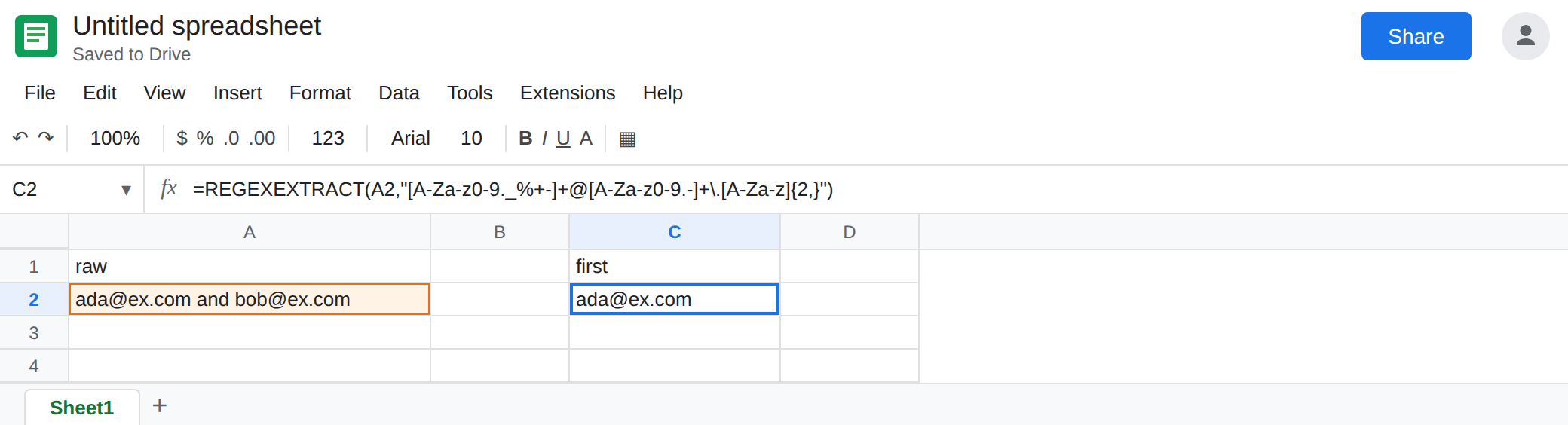
First match only. In C1 type first. In C2 enter =REGEXEXTRACT(A2,"[A-Za-z0-9._%+-]+@[A-Za-z0-9.-]+\.[A-Za-z]{2,}"). The cell shows [email protected]. [email protected] is still in A2. It is not in C2. There is no error triangle. Leave C2 as [email protected].
Groups do not mean “every match.” In C4 enter =REGEXEXTRACT(A2,"([A-Za-z0-9._%+-]+)@([A-Za-z0-9.-]+\.[A-Za-z]{2,})"). C4 is ada and D4 is ex.com. Two groups, two cells, still the first address. Bob is not column E. That spill shape is REGEXEXTRACT groups. Leave C4:D4 so you can see groups and “all matches” are different requests.
A miss is a different cell. In A3 type no address here. In C6 enter =REGEXEXTRACT(A3,"[A-Za-z0-9._%+-]+@[A-Za-z0-9.-]+\.[A-Za-z]{2,}"). C6 is #N/A. The tooltip is the usual no-match on REGEXEXTRACT. That is REGEX no match. It does not mean “second match missing.” A2’s second address never produces this tooltip. Leave C6 broken.
Every match. In E1 type all. In E2 enter:
=LET(src,A2,pat,"[A-Za-z0-9._%+-]+@[A-Za-z0-9.-]+\.[A-Za-z]{2,}",pieces,SPLIT(REGEXREPLACE(src,".*?("&pat&")","|$1"),"|"),FILTER(pieces,REGEXMATCH(pieces&"","^"&pat&"$")))
E2 spills [email protected] and [email protected]. The REGEXREPLACE walks the text, writing each match after a pipe. SPLIT breaks on that pipe. FILTER drops the empty piece and any leftover words that are not a full address. If you add thanks at the end of A2, E2 should still be the two addresses. C2 stays the first one only.
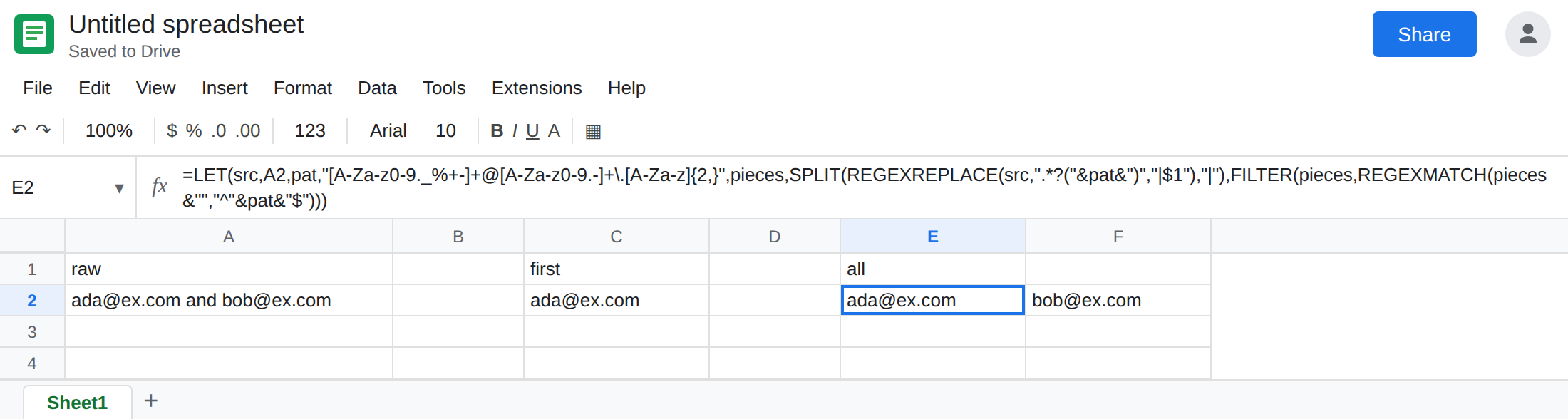
Leave C2 as the first address. Leave E2 as both.
What is actually wrong
Section titled “What is actually wrong”REGEXEXTRACTis defined to return one match: the leftmost one RE2 finds. It is notREGEXEXTRACTALL. C2 is the function working. The report is wrong only if you needed every address.- Capturing groups split that one match into columns. They do not repeat the search. C4:D4 is still Ada. Adding more parentheses will not reach Bob.
- The global flag people write in other engines does not turn this function into a list. A pattern of
(email)once is still one extraction. - The replace-and-split in E2 is a different function doing the repetition.
REGEXREPLACEreplaces every non-overlapping match. The.*?before the group consumes the text between addresses so the replacement can be just the address.FILTERis what keepsthanksout of the spill. Without it, the tail of the cell can sit in the last piece. SPLITof a cell that is already[email protected], [email protected]is the simpler path when a delimiter really is there.REGEXEXTRACTon each piece is then one match per piece, which is enough. A2 has the wordand, not a clean delimiter, so the replace is the one that fits.
This is not #REF! from a second group with a blocked neighbor. See REGEXEXTRACT groups. C2 is one cell and it has a value.
Leave C2 if the first address is all the column should store. Name the header first_email so nobody reads it as the full list.
Spill every match with E2. Point a validation list or a JOIN at that spill, not at C2.
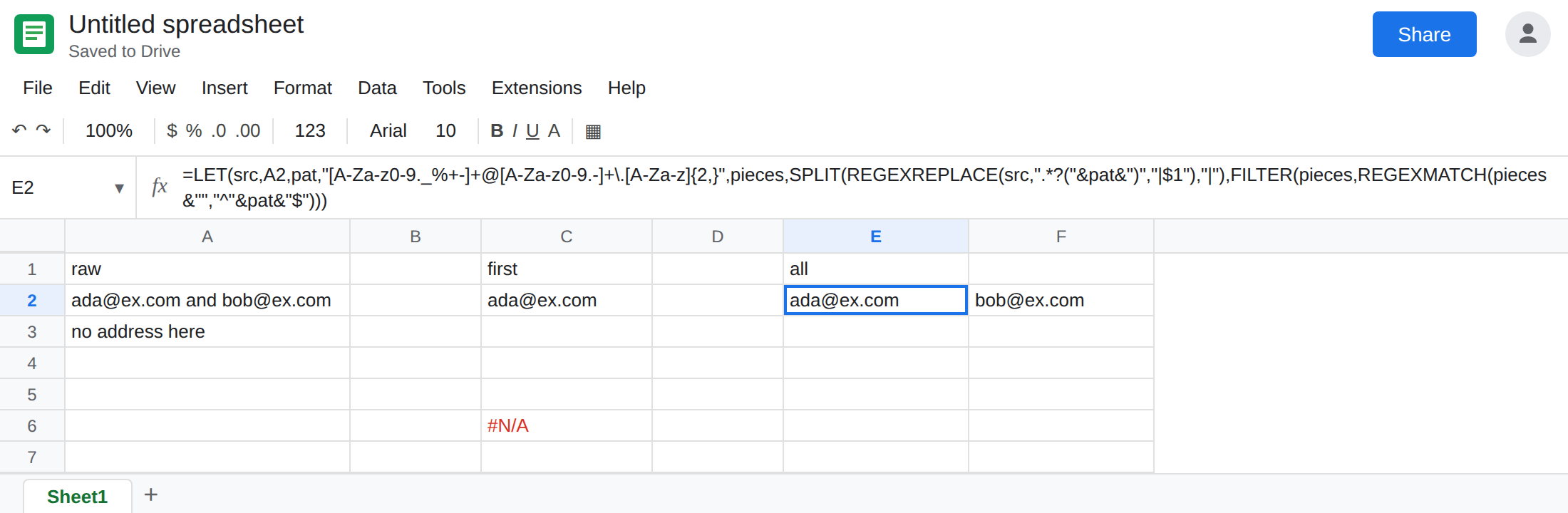
One pattern, many rows. If each row has several addresses, wrap the LET so src is the row’s cell, or use MAP only if each call returns one value. A MAP that returns the whole spill of addresses is a nested array. See MAP nested array. One row’s formula in E2 is the shape that matches this cell.
Do not wrap C2 in IFERROR. You would hide nothing useful and you might hide C6’s real #N/A if you copy the wrapper onto A3.
If REGEXEXTRACT shows one token and the cell still contains another, that is the first-match rule. If the cell is #N/A, the pattern missed entirely. If two cells appear and they are the local-part and the domain of the first address, those are groups, not the second address.