

SORTN display_ties_mode spills every tie, so n rows become a crowd
Updated
SORTN(range, n, display_ties_mode, sort_column, is_ascending) does not promise that the spill is n rows tall. Mode 0 does stop at n. Mode 1 keeps every additional row that ties the nth row on the sort column. Ask for 3 and, if six people share the fastest time, you get six rows. Mode 3 goes further: it keeps n distinct keys and then every physical row of those keys, including a duplicate you pasted twice. The spill is not #N/A. It is a longer list than the n you typed. A chart or a printed top-three built on that spill shows the whole tie pile.
The four modes, with a short sample, are SORTN ties mode. n of 0 or a mode of 5 is SORTN n / ties. A multi-column SORT whose primary key is the wrong pair is SORT column order. Keep the Google Sheets UI in English. Sheet Error is an independent formula-error library, not a Google product.
Recreate it on a blank sheet
Section titled “Recreate it on a blank sheet”- Open a blank spreadsheet. In A1 type
name, B1sec. Enter six rows at the same time, then two slower rows. A2Kim, B211.4. A3Omar, B311.4. A4Lee, B411.4. A5Priya, B511.4. A6Noah, B611.4. A7Ada, B711.4. A8Bo, B812.0. A9Cy, B912.2. Six winners, tied. You asked, in your head, for a top three.
Mode 0 caps the spill. In D1 type mode0. Leave D2:E5 empty. In D2 enter =SORTN(A2:B9,3,0,2,TRUE). Sort by seconds ascending. The spill is exactly three rows, all 11.4. Three of the six names are missing. Mode 0 does not go back for the rest of the tie. That block is the control for a hard cap. Which three names you see can follow Sheets’ stable order. The height is the point: three rows.
Mode 1 floods past n. In D8 type mode1. Leave D9:E16 empty so six rows can land. In D9 enter =SORTN(A2:B9,3,1,2,TRUE). You passed n of 3. Everyone tied with the third-place time comes too, and the third-place time is 11.4, which all six winners share. The spill is six rows, all 11.4. Bo and Cy stay out because 12.0 and 12.2 do not tie 11.4. There is no error triangle. Leave D9 as six rows.
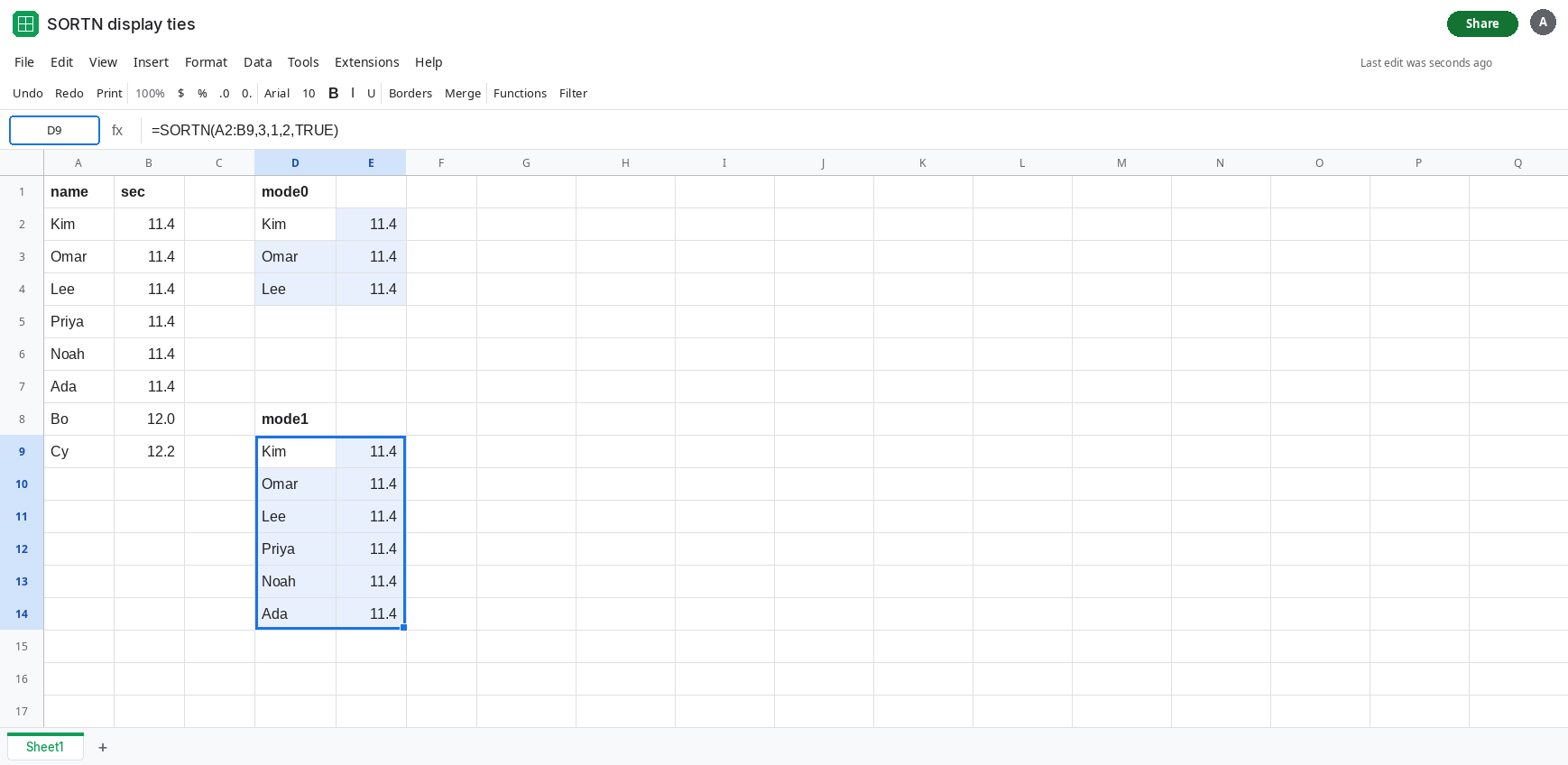
A duplicate row is another tie. Copy A2:B2 into A10:B10 so Kim / 11.4 exists twice, as two identical rows. Change D9 to =SORTN(A2:B10,3,1,2,TRUE). Mode 1 now has seven rows at 11.4 if the pasted Kim counts as its own row tied with the nth. The spill grows again. Identical data is not collapsed. Leave that taller spill.
Mode 3 keeps every copy of the winning keys. In G1 type mode3. In G2 enter =SORTN(A2:B10,1,3,2,TRUE). n is 1, so one distinct key: 11.4. Mode 3 then shows every row with that key, including both Kim rows. The spill is the whole tie pile plus the duplicate, and Bo and Cy are out. You asked for one key, not one row. The catalog of modes is SORTN ties mode. This page is the pile being larger than n.
Leave D9 taller than 3. Leave D2 at exactly three rows.
What is actually wrong
Section titled “What is actually wrong”- Mode
1defines the cutoff as “the value in the nth position,” then includes every row with that value. When the top of the list is one big tie, the nth position and the first position are the same value, sondoes not limit the height. - Duplicate rows are separate rows. Mode
1does not runUNIQUEfirst. A pasted copy of Kim is another11.4and it joins the flood. Mode2is the one that drops duplicate rows before the cap. It is not what you get by default. - Mode
3is a key cap, not a row cap.nof1plus a duplicated winning key is still every physical copy of that key. Counting the spill and expectingnis how a top-three report prints seven lines. - The sort column is the only column the tie looks at. Two people with the same
11.4and different names are tied. Putting the name in the range does not break the tie unless you also sort by the name column.SORTNaccepts further sort pairs the waySORTdoes. A second pair that is not a full tiebreak leaves the flood in place. - A blocked spill is
#REF!, not a long list. If the rows are visible and there is no triangle, the mode included them. See SORT / UNIQUE spill when the cell under the formula is already filled.
This is not an invalid n. n of 3 is legal. Mode 1 is legal. See SORTN n / ties when the tooltip is #N/A or #VALUE!.
Leave D9 as the flood and D2 as the three-row cap.
Stop at n, and accept that some tied names drop. In I1 type cap. In I2 enter =SORTN(A2:B10,3,0,2,TRUE). I2 is three rows. The other 11.4 rows are out, including a duplicate Kim. Use this when the printed table must be three lines and a photo finish can be arbitrary.
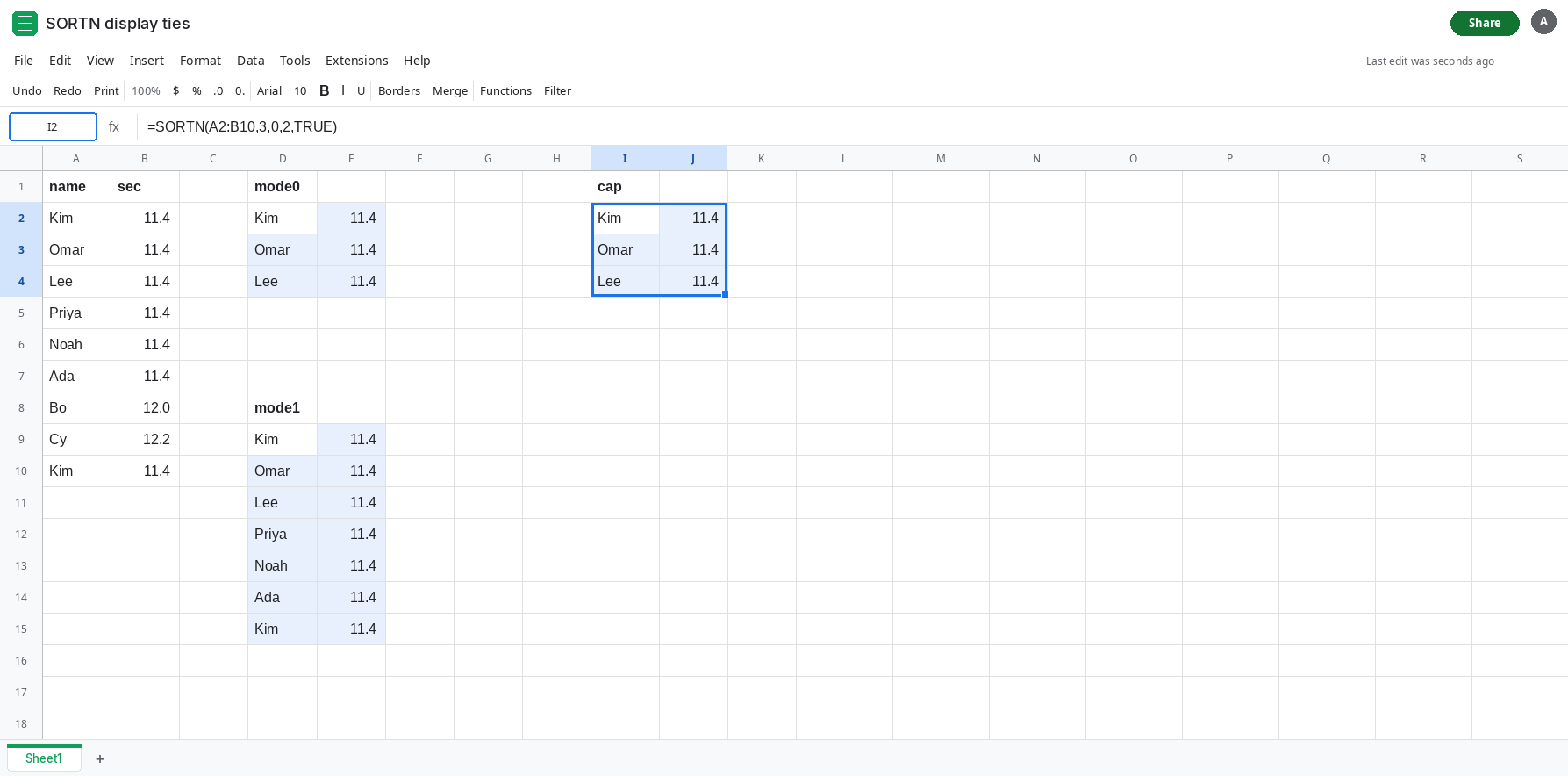
When the printed table must be three lines, mode 0 is the cap. A second sort pair can order names inside a time, and it does not change the contract of mode 1: rows that still tie the nth row on the sort join the spill. Do not raise n to 6 to make room for the pile and then treat a seventh duplicate as a new bug. The height follows the mode.
Drop identical copies before the cut with mode 2 when the only extra rows are paste duplicates: =SORTN(A2:B10,3,2,2,TRUE). Identical Kim rows collapse. Distinct people who share 11.4 can still fill the three slots. Read the height after you change the mode. The mode list, including mode 2 versus mode 3, is SORTN ties mode.
If n is 3 and the spill is six rows of the same time, display_ties_mode is 1 or 3 and the tie is real. If the spill is three rows, the mode is 0 or the fourth row was not actually tied. If the cell is #N/A, n or the mode is invalid and you want the other SORTN page.