

Fix TOCOL / TOROW #REF! or wrong shape in Google Sheets (ignore blanks vs errors)
Updated
TOCOL flattens a block into one column. TOROW flattens it into one row. ignore: 0 keep everything, 1 drop blanks, 2 drop errors, 3 drop both. #REF! is a blocked spill. A wrong shape is TOROW when you needed a column, or ignore 1 leaving #N/A because blanks are not errors.
This page is flatten + ignore. It is not SORT / UNIQUE spill or UNIQUE overwrite (same overwrite tooltip, different function). It is not HSTACK / VSTACK pad. English Google Sheets UI.
Recreate it on a blank sheet
Section titled “Recreate it on a blank sheet”- Open a blank spreadsheet. In A1 type
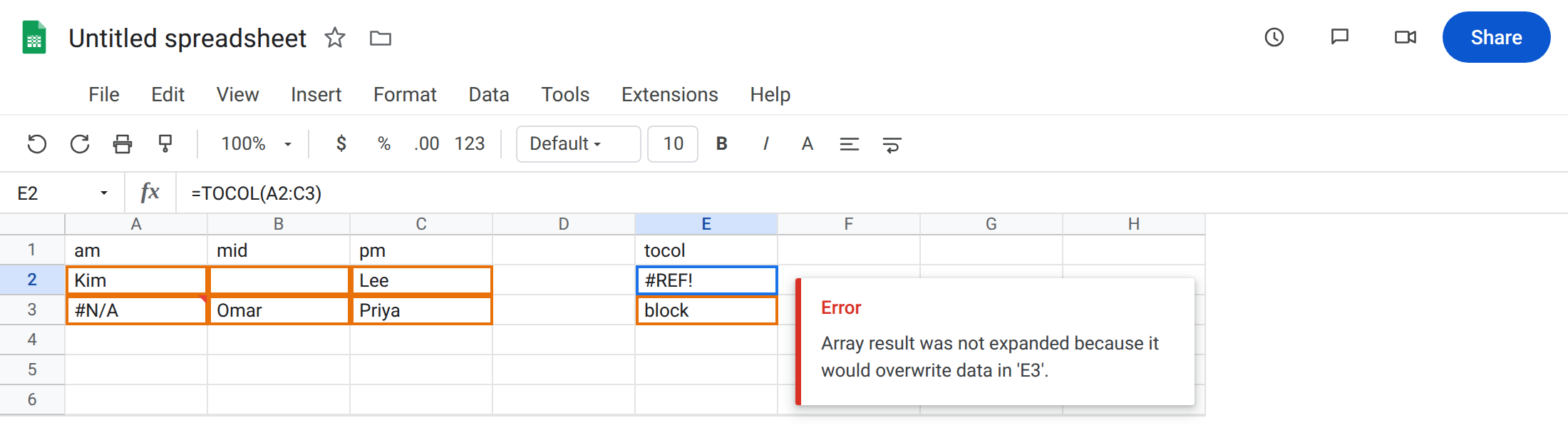
am, B1mid, C1pm. A2Kim. Leave B2 empty. C2Lee. A3 enter=NA(). B3Omar. C3Priya. A two-row dock board with one blank and one#N/A.
Blocked TOCOL spill. In E1 type tocol. In E3 type block. Leave E2 empty. In E2 enter =TOCOL(A2:C3). The cell shows #REF!. The tooltip is Array result was not expanded because it would overwrite data in ‘E3’. Default TOCOL keeps blanks and errors, so it needs six cells down from E2. E3 is occupied. Leave E2 broken.
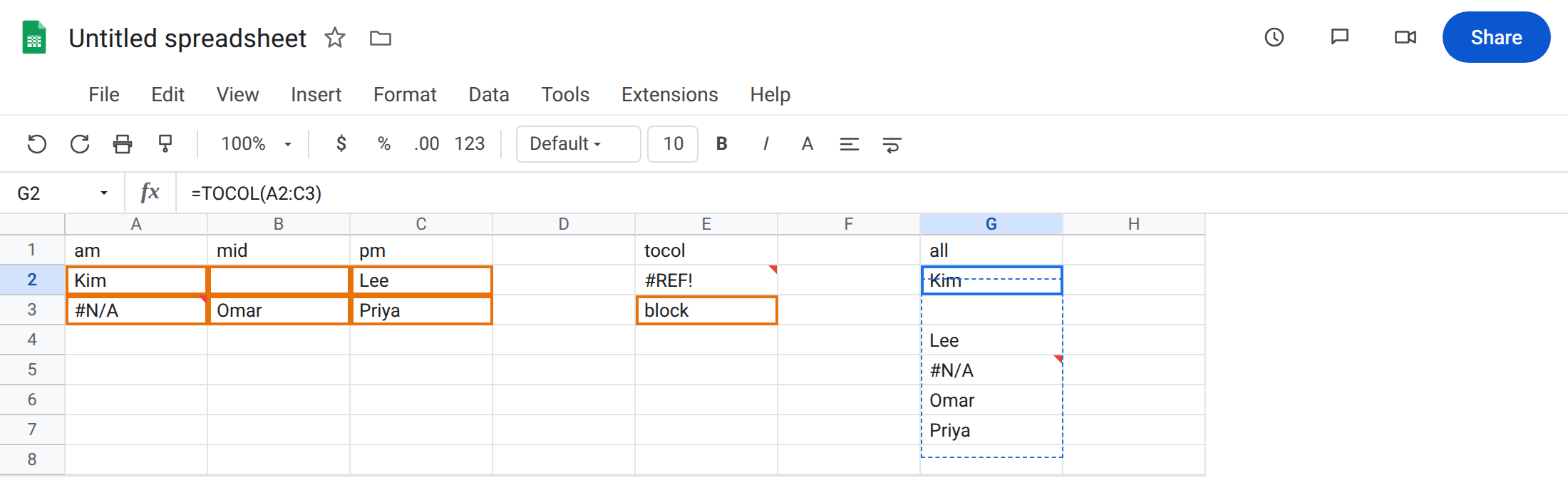
A working flatten on a clear column. In G1 type all. Leave G2:G7 empty. In G2 enter =TOCOL(A2:C3). The formula spills six cells, row-wise: Kim, blank, Lee, #N/A, Omar, Priya. That block is the control: same range, empty path.
Ignore blanks still keeps errors. In I1 type ignore_blanks. Leave I2:I6 empty. In I2 enter =TOCOL(A2:C3,1). The spill is Kim, Lee, #N/A, Omar, Priya. The blank in B2 is gone. The #N/A in A3 stays. 1 is blanks only.
Ignore errors still keeps blanks. In K1 type ignore_errors. Leave K2:K6 empty. In K2 enter =TOCOL(A2:C3,2). The spill is Kim, blank, Lee, Omar, Priya. A3’s #N/A is gone. B2’s blank stays.
TOROW is a row, not a column. In M1 type torow. In N2 type keep. Leave M2 empty. In M2 enter =TOROW(A2:C3). #REF! — the row needs six columns and N2 is occupied. On a clear row it spills across. Leave M2 broken.
Confirm scan order. In G10 enter =TOCOL(A2:C3,0,TRUE). TRUE scans by column: Kim, #N/A, blank, Omar, Lee, Priya. Same six values, different order. Leave E2 as the blocked #REF!.
What is actually wrong
Section titled “What is actually wrong”TOCOLandTOROWreturn arrays. One occupied cell in the path blocks the entire spill. The formula bar still namesA2:C3. There is no#REF!inside the formula text.- Default
ignoreis0: keep blanks and errors. A “short” stack you expected from dropping empties never happens until you pass1or3. 1is not “clean the board.” It drops blanks and keeps#N/A.2drops errors and keeps blanks.3drops both. Mixing them up looks like a broken flatten.- Scan defaults to by row.
scan_by_columnTRUEwalks down each column first. Kim then#N/Ais that flag, not a sort. TOROWwrites sideways. Putting it where you wanted a dropdown column is the wrong function, even when it spills.
This is not SORT / UNIQUE as the overwrite primer. Same tooltip, different function. See SORT / UNIQUE spill. This page is flatten + ignore.
This is not HSTACK padding a short afternoon column with #N/A. See HSTACK / VSTACK pad. A3’s #N/A was already in the source. TOCOL copied it.
This is not a deleted reference. See after you delete. E2 still says TOCOL(A2:C3).
Leave E2 (and M2 if it is #REF!) broken so the overwrite stays visible. Leave G2 as the full six-cell control.
Clear the path, or move the formula. G2 already spills on empty cells. Delete block in E3 only if the formula must stay in E2. Do not wrap E2 in IFERROR. That prints a blank and never flattens. See IFERROR vs IFNA.
Pick ignore on purpose. Roster without blanks: =TOCOL(A2:C3,1). Roster without #N/A: =TOCOL(A2:C3,2). Names only: =TOCOL(A2:C3,3) — Kim, Lee, Omar, Priya.
Need a column? Use TOCOL. Need a header row of codes? Use TOROW. Do not TRANSPOSE(TOCOL(...)) unless you already flattened and then want the other axis.
Need a wrap after flatten? That is WRAPROWS / WRAPCOLS, not a second ignore flag.
If TOCOL is #REF! and the formula still says TOCOL, look at the cells below. If a blank or #N/A remained, change ignore. If Kim / #N/A came first, you scanned by column.
Ignore blanks is not ignore errors
Section titled “Ignore blanks is not ignore errors”1 drops blanks and keeps #N/A (I2). 2 drops errors and keeps blanks (K2). 3 drops both. Empty and =NA() are not one kind of “missing.” Padding #N/A from HSTACK is the other page.