

TO_TEXT keeps the cell’s format, and TEXT follows the pattern you pass
Updated
TO_TEXT(value) turns a number into text and keeps the cell’s existing format. A percent-formatted 0.2 that displays 20% becomes the text 20%. A currency-formatted cell keeps the currency symbol. A date keeps the date display, not the raw serial. TEXT(value, format) ignores that menu and prints only the pattern in the second argument. The two functions can sit on the same cell and disagree. Both results are text.
Google’s help states that rule: currencies stay currencies, percentages stay percentages, dates stay dates. An illegal TEXT pattern is TEXT format code. Stripping a format back to a pure number is TO_PURE_NUMBER. Keep the Google Sheets UI in English.
Recreate it on a blank sheet
Section titled “Recreate it on a blank sheet”- Open a blank spreadsheet. File → Settings → Locale → United States so the currency symbol and separators in this recreate match the words below. In A1 type
kind, B1raw.
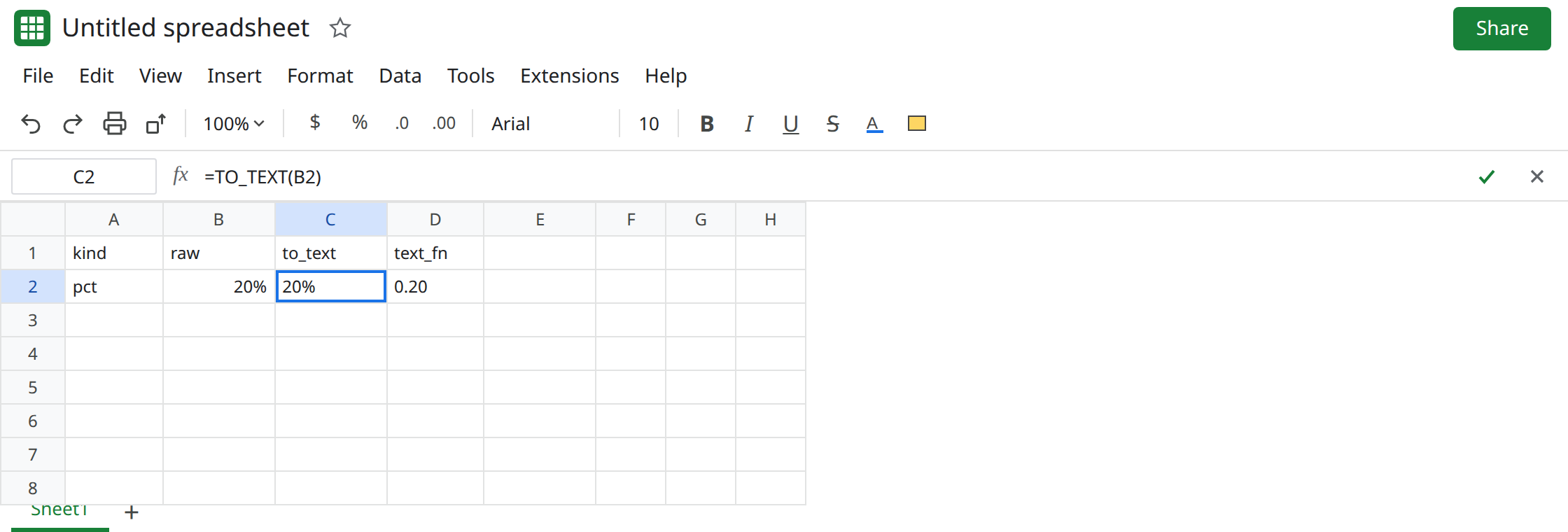
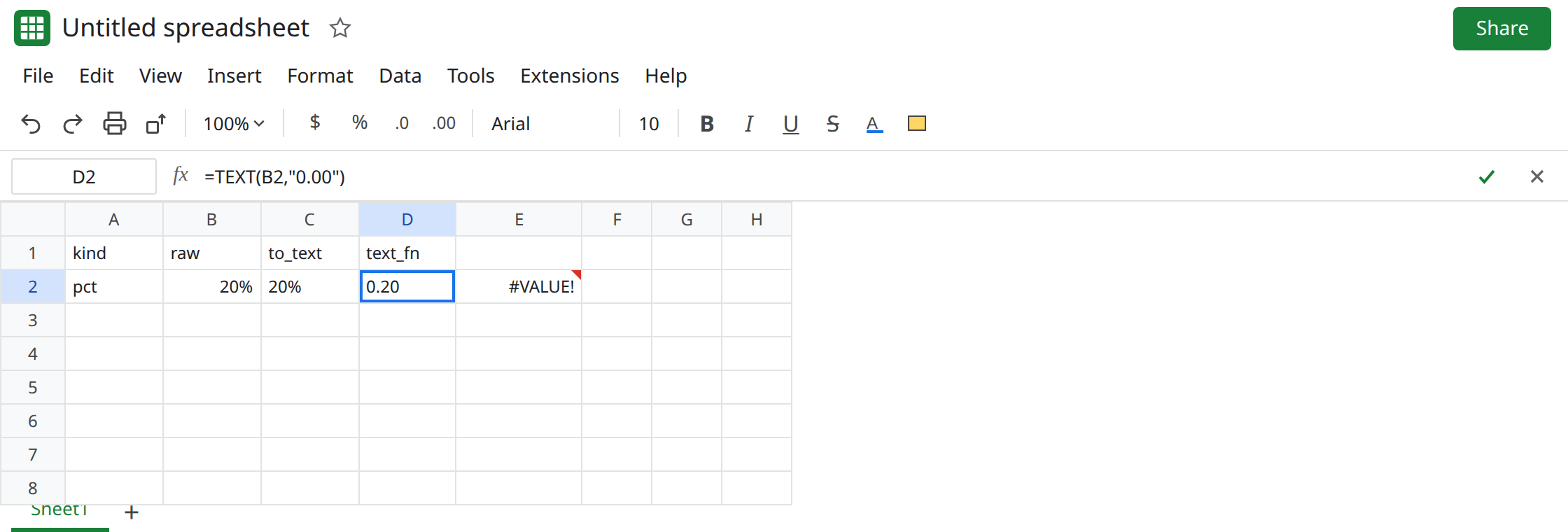
Percent. In A2 type pct. In B2 type 0.2. Format → Number → Percent. B2 displays 20%. ISNUMBER(B2) is TRUE. The stored value is still 0.2. In C1 type to_text. In C2 enter =TO_TEXT(B2). C2 is the text 20%. ISTEXT(C2) is TRUE. In D1 type text_fn. In D2 enter =TEXT(B2,"0.00"). D2 is 0.20. Same cell, two strings. Leave both.
Currency. In A4 type cur. In B4 type 1234.5. Format → Number → Currency. B4 displays $1,234.50. In C4 enter =TO_TEXT(B4). C4 is text that includes $ and the separators, matching the display. In D4 enter =TEXT(B4,"0.00"). D4 is 1234.50. TEXT did not copy the currency format. The $ pattern, and why it is not the locale’s currency, is TEXT currency format.
Date. In A6 type day. In B6 enter =DATE(2024,5,6). Format B6 as a date if it shows a serial. In C6 enter =TO_TEXT(B6). C6 is a date string in the locale’s display, not 45418 and not necessarily 2024-05-06. In D6 enter =TEXT(B6,"yyyy-mm-dd"). D6 is 2024-05-06. When you need a stable order, D6 is the one to join. See ambiguous date display if the painted date and the serial disagree.
Math on the formatted text. In E2 enter =C2+1. E2 is #VALUE!. 20% is not a number. =VALUE(C2) is #VALUE! too, because of the percent sign. Leave E2 broken. See VALUE() locale when the failure is a decimal comma, not a symbol.
A plain number, so format is not in play. In B8 type 24 with no custom format. In C8 enter =TO_TEXT(B8). C8 is 24. There was no percent or currency paint to keep. TO_TEXT is not “always add a symbol.” It keeps the format the cell already has.
What is actually wrong
Section titled “What is actually wrong”TO_TEXThas no format argument. Changing C2’s formula cannot request ISO dates or two plain decimals. The source cell’s Format → Number menu is the pattern. Change that menu and C2 changes with it.TEXThas a format argument and does not read the menu. D2 stays0.20if you switch B2 from percent to currency. C2 does not stay20%.- Both are text.
ISTEXTis TRUE.SUMof C2 is0. The#VALUE!shows up when you add. See wrong type. TO_PURE_NUMBER(B2)returns0.2and is still a number. It is the opposite direction. See TO_PURE_NUMBER.TO_DATEturns a serial into a date value, not into text. See TO_DATE serial.
This is not a CSV apostrophe sitting in front of digits. See CSV leading apostrophe. C2’s extra characters are the percent sign from the format.
Leave C2 as 20% text and E2 as #VALUE!.
Choose the string on purpose. Keep D2 when you want the raw decimals: =TEXT(B2,"0.00"). For a percent sign you control, =TEXT(B2,"0%") is 20%. For the date, keep D6. Use TO_TEXT when the cell is already formatted the way the label should read and you only need ISTEXT to be TRUE.
If the next step is math, use B2 or TO_PURE_NUMBER(B2), not C2. Do not VALUE a string that contains % or $ until you strip the symbol.
Do not wrap E2 in IFERROR. The addend is text because TO_TEXT kept the format. See IFERROR vs IFNA.
If TO_TEXT shows 20% or $1,234.50 and TEXT of the same cell with "0.00" shows digits, both are working. The format menu fed TO_TEXT. The pattern fed TEXT. If you needed one of those shapes, call that function. If you needed a number, call neither.