

Fix LET name clashes in Google Sheets (duplicate names, SUM, named ranges)
Updated
LET binds names left to right, then evaluates the last argument. Each name in that list has to be a new identifier. Repeating shift is an error: the name is already used in this LET. A legal name can still be the wrong word. sum is a legal identifier and it shadows the SUM function inside that formula, so SUM(A2:A4) no longer means the built-in. A local rate shadows a named range rate. The formula returns the local number. There is no triangle. You think you read the range.
This page is duplicates and shadowing. Misspellings, names used before they exist, and a name spelled A1 are LET #NAME?. A named range that won over a named function is named functions. Keep the Google Sheets UI in English.
Recreate it on a blank sheet
Section titled “Recreate it on a blank sheet”- Open a blank spreadsheet. In A1 type
hours. A28. A34. A42. In B1 typeextra. B22.
A clean LET. In D1 type ok. In D2 enter =LET(shift,A2,ot,B2,shift+ot). The cell shows 10. Two different names. That cell is the control.
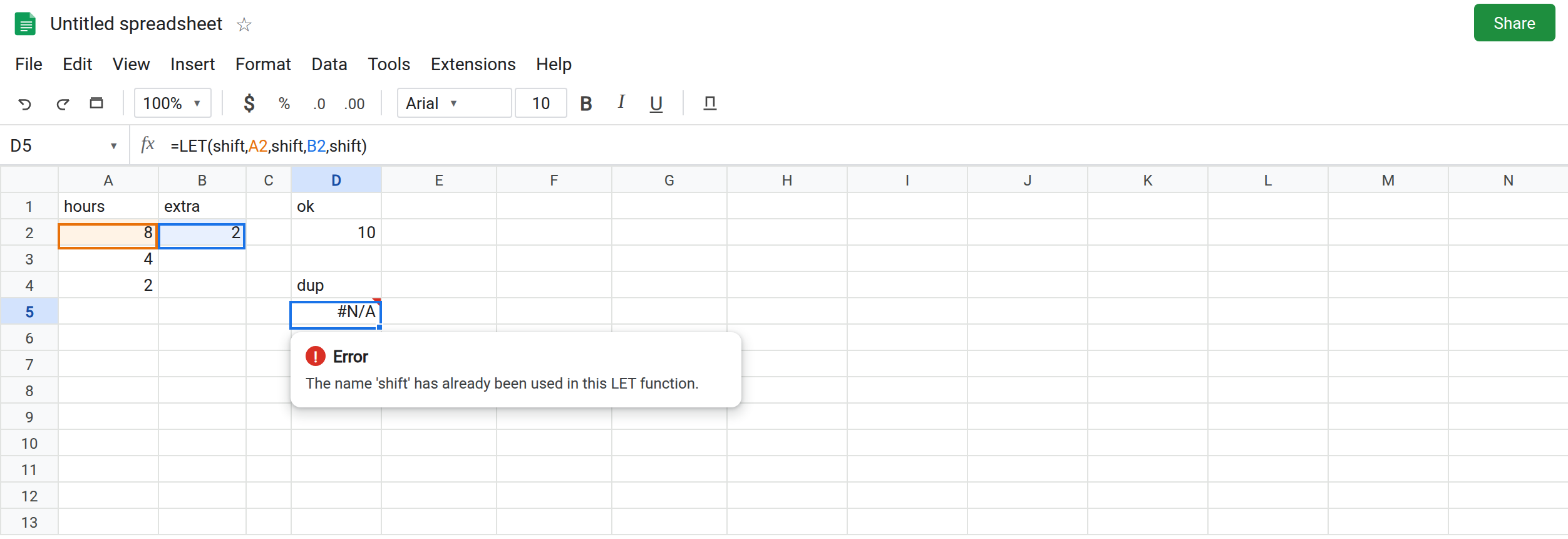
The same name twice. In D4 type dup. In D5 enter =LET(shift,A2,shift,B2,shift). The second shift repeats a name already bound in this LET. The cell shows #N/A or #ERROR!. The tooltip says the name was already used, or that LET’s names must be unique. It does not quietly keep the first 8 or the second 2. Leave D5 broken.
sum hides SUM. In D7 type shadow. In D8 enter =LET(sum,A2,sum(A2:A4)). The local name sum is 8. The last argument tries to call that name as a function. The cell shows #NAME? or #ERROR!. SUM the built-in is not visible inside this formula. Outside LET, =SUM(A2:A4) is 14. Leave D8 broken. In D9 enter =SUM(A2:A4) so the real total stays on the sheet as 14.
A named range loses to the local name. Data → Named ranges. Name rate, range B2. Done. B2 is 2, so the name rate is 2 anywhere on the sheet. In D11 enter =LET(rate,12,rate). The cell shows 12. No error triangle. The named range is still 2. The local binding won for this formula only. In D12 enter =rate. D12 shows 2, the range. Leave D11 as 12. The clash is the disagreement between D11 and D12, not a red corner.
A typo is the other page. In F2 enter =LET(shift,A2,ot,B2,shiftt+ot). #NAME? because shiftt was never bound. That is LET #NAME?. Leave F2 as the contrast. D5’s names are both spelled shift. F2’s problem is a third spelling.
Leave D5 and D8 broken. Leave D11 as 12 and D12 as 2. Leave D2 as 10.
What is actually wrong
Section titled “What is actually wrong”- Uniqueness is per
LET. You cannot rebindshifttoB2halfway down the same call. Use a new name (ot,total) or a nestedLETif you need a second binding. D5 is not “the second one wins.” - Shadowing is silent when the local name is used as a value. D11 returns
12because that is what you bound. The named range is unchanged for every formula that does not hide it. D12 proves the range is still there. - Shadowing a function is loud.
sum(...)looks up the local value and tries to call it. Built-ins in scope for that formula include any name you did not steal. Picktotalorhours_sum, notsum,average,if, orlet. - Names are not case-sensitive.
SUMandsumare the same binding. Capital letters do not point at the function. - A nested
LETmay reuse a name from the outer one on purpose. The inner binding is a different scope. D5 is one scope with two bindings of the same word. Do not “fix” D5 by adding an innerLETunless you actually want two scopes.
This is not A1 as a name. =LET(A1,A2,A1+1) is #ERROR! because A1 is a cell address, which LET will not bind. See LET #NAME?. D5 uses shift, which is a legal identifier used twice.
This is not a deleted named range. See named range #REF! / #NAME?. D12 still returns 2. If D12 were #NAME?, the range had been removed. That is not why D11 shows 12.
Leave D5, D8, and D11 as they are.
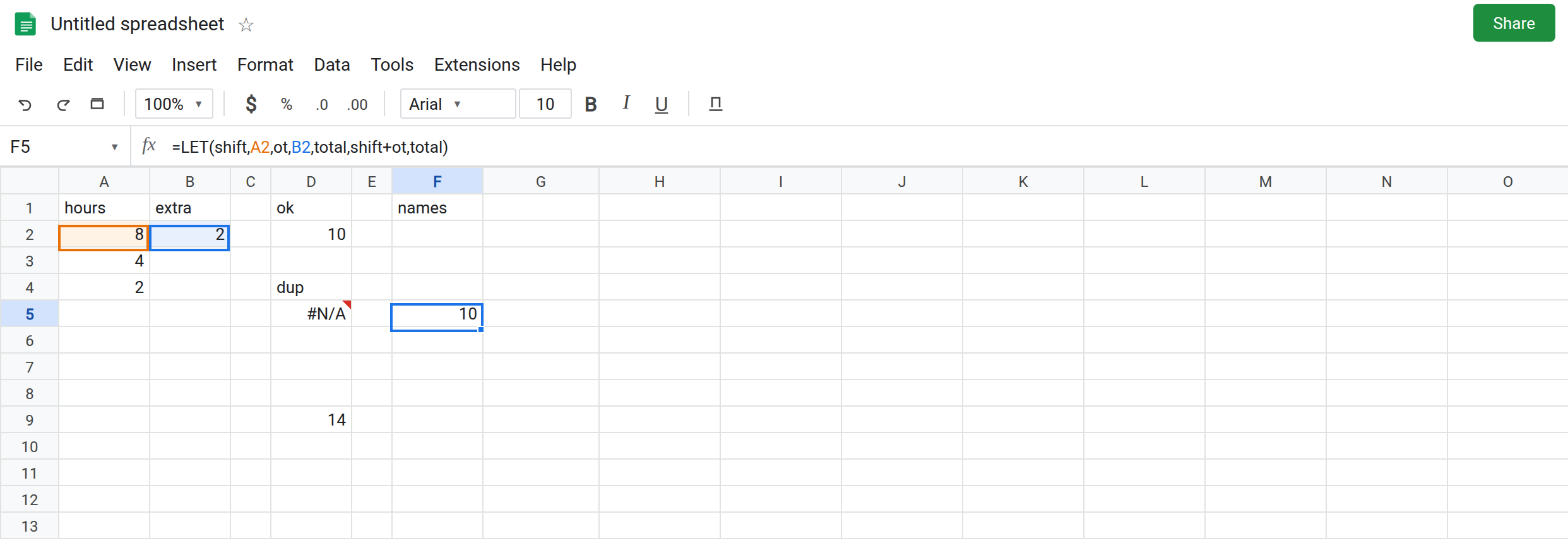
One binding per name. Keep D2. If the second number is a new idea, give it a new name: =LET(shift,A2,ot,B2,total,shift+ot,total) in F5. F5 shows 10.
Do not name a local after a function you still call. In F8 enter =LET(hours0,A2,SUM(A2:A4)+hours0). The cell shows 22 (14+8). SUM is the built-in. hours0 is the local. D8 stays broken.
Read a named range under a different local name, or do not reuse the word. =LET(markup,rate,markup+1) uses the named range rate (2) and binds markup. The result is 3. =LET(rate,12,rate) will always be 12 and will not consult B2. Rename the local or the named range if both need to appear in one formula. They cannot share a spelling there.
Do not wrap D5 in IFERROR. The duplicate is still in the formula. See IFERROR vs IFNA.
If the tooltip says the name is already used, delete the second binding. If SUM suddenly fails only inside one LET, a local is named sum. If a formula returns a constant while a named range of the same spelling holds a different cell, the local name is winning. Check D12 beside it.