

CEILING and CEILING.MATH round negative numbers in different directions
Updated
CEILING(value, [factor]) and CEILING.MATH(number, [significance], [mode]) both round away from zero on a positive number, and they agree there. On a negative number they do not have to agree. CEILING uses the sign of the factor: a negative factor rounds a negative value away from zero, and a positive factor rounds it the other way, toward zero. CEILING.MATH ignores the sign of significance. With mode omitted or 0, a negative number rounds toward zero. With a nonzero mode, it rounds away from zero. Swapping the function name without swapping that rule changes -8.8 from -8 to -9. A positive value with a negative factor is #NUM! on CEILING and a normal round on CEILING.MATH.
The opposite-sign #NUM! on FLOOR is FLOOR sign. Keep the Google Sheets UI in English. Sheet Error is an independent formula-error library, not a Google product.
Recreate it on a blank sheet
Section titled “Recreate it on a blank sheet”- Open a blank spreadsheet. In A1 type
n. A2 type-8.8. A3 type11.2.
Positive numbers agree. In C1 type ceiling. In D1 type math. In C3 enter =CEILING(A3,1). C3 is 12. In D3 enter =CEILING.MATH(A3). D3 is 12. Same direction, away from zero, to the next integer. That pair is the control.
Negative, toward zero, both ways that mean toward zero. In C2 enter =CEILING(A2,1). The factor is positive. On a negative value that positive factor rounds toward zero. C2 is -8. In D2 enter =CEILING.MATH(A2). Mode is omitted, so a negative number rounds toward zero. D2 is -8. They match. This is the case that convinces people the two functions are the same.
Negative factor on CEILING goes the other way. In C4 enter =CEILING(A2,-1). Value and factor are both negative. CEILING rounds away from zero. C4 is -9. D2 is still -8. Same input -8.8, two results, no error triangle. Leave C4 as -9.
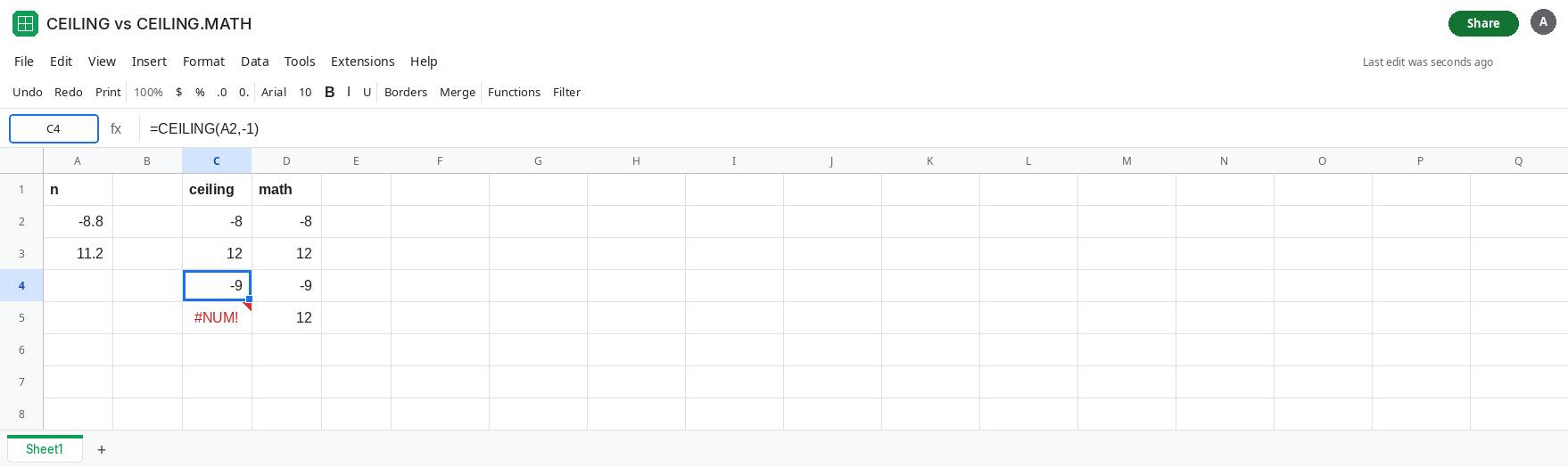
Mode sends CEILING.MATH away from zero. In D4 enter =CEILING.MATH(A2,1,1). Significance is positive. Mode is 1, which is not zero, so the negative number rounds away from zero. D4 is -9. It matches C4. The sign of 1 did not do that. The mode did. =CEILING.MATH(A2,-1,1) is also -9, because the sign of significance is ignored.
Positive value, negative factor, #NUM! only on CEILING. In C5 enter =CEILING(A3,-1). A3 is 11.2, positive. The factor is negative. C5 is #NUM!. A positive value requires a positive factor. In D5 enter =CEILING.MATH(A3,-1). D5 is 12. CEILING.MATH ignores the minus on the significance and still rounds the positive number up. Leave C5 as #NUM!.
Leave C4 as -9 and D2 as -8. Leave C5 broken.
What is actually wrong
Section titled “What is actually wrong”- “Round up” is not one direction once the number is negative. Toward zero makes
-8.8into-8(the result is larger algebraically). Away from zero makes it-9(the result is smaller). Both get described as up in different docs. The cells are the definition. CEILINGencodes the choice in the sign of the factor, and only when the value is negative. A negative factor on a positive value is#NUM!, not a direction.CEILING.MATHencodes the choice in mode. Blank or0means toward zero for negatives. Any other mode means away from zero. The sign you pass as significance does not pick the direction. CopyingCEILING(A2,-1)intoCEILING.MATH(A2,-1)drops the away-from-zero instruction and returns-8.- Positive inputs hide the split. C3 and D3 are both
12. A price sheet of positive amounts will not show this. A variance, a temperature, or a signed balance will. - An exact multiple does not move.
CEILING(-8,-1)stays-8. The split only appears when there is a fractional part to place.
This is not ROUND binary. ROUND picks the nearest place. CEILING always moves away from an exact multiple, in the direction its rule names. Neither cell is a residue.
Leave C4 as -9, D2 as -8, and C5 as #NUM!.
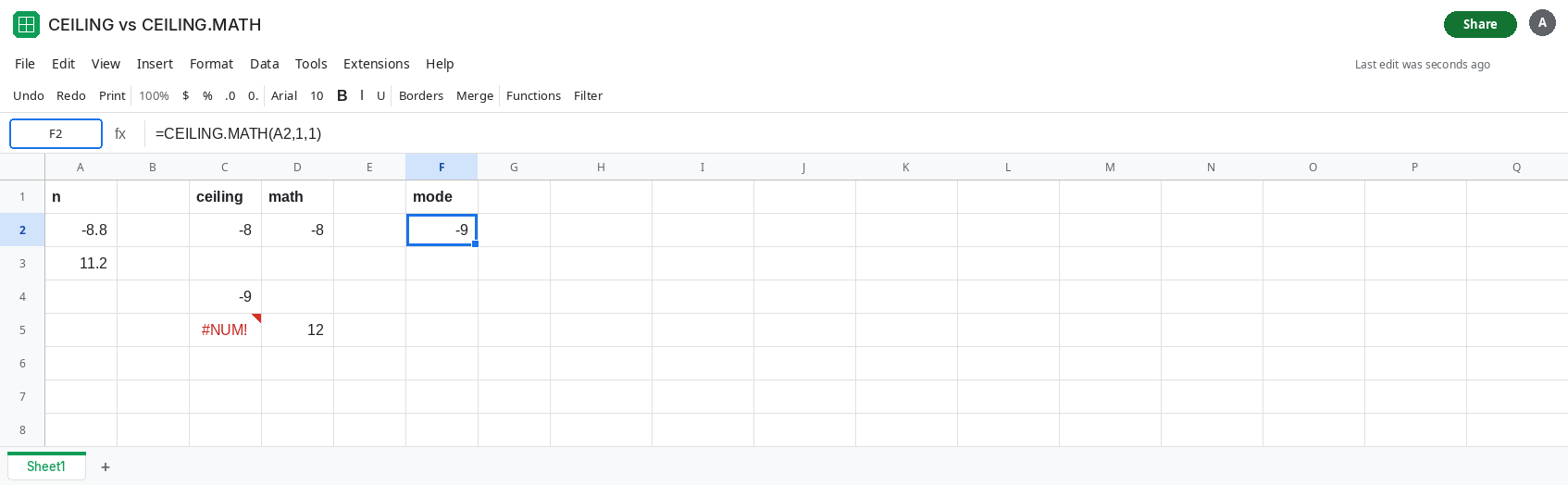
Pick the function whose switch you meant. For “negative balances go away from zero, same as a negative factor used to,” use CEILING with a negative factor, or CEILING.MATH with a nonzero mode. In F2 enter =CEILING.MATH(A2,1,1). F2 is -9, matching C4. For “negative balances go toward zero,” use CEILING(A2,1) or CEILING.MATH(A2). Both are -8.
Keep the factor positive on CEILING unless the value is negative and you want away from zero. =CEILING(ABS(A3),1) is 12 for the positive row and does not throw. Applying that ABS to the negative row would erase the sign. Only do it when the column is a magnitude.
Do not wrap C5 in IFERROR. The #NUM! is the sign rule. See IFERROR vs IFNA. CEILING.MATH is the function that accepts a negative significance. Replacing the name is the fix, not hiding the error.
If both functions return -8 for -8.8, you used a positive factor and a blank mode, and they are supposed to match. If one cell is -9, that cell used a negative CEILING factor or a nonzero CEILING.MATH mode. If the positive row is #NUM!, the factor on CEILING is negative.