

FLOOR returns #NUM! when the factor's sign does not match the number
Updated
FLOOR(value, [factor]) rounds down to a multiple of the factor, and the factor has to share the value’s sign. FLOOR(2.5, -1) is #NUM!. FLOOR(-8.8, 1) is #NUM! for the same reason: the signs differ. FLOOR(-8.8, -1) is legal and rounds toward zero, to -8. FLOOR.MATH ignores the sign of significance. On a negative number with mode omitted it rounds away from zero, so FLOOR.MATH(-8.8) is -9. The #NUM! is the sign rule. The -8 versus -9 split is the same family of direction rules as ceiling, on the floor side.
CEILING’s negative directions are CEILING vs CEILING.MATH. A generic domain error such as SQRT(-1) is out of domain. Keep the Google Sheets UI in English. Sheet Error is an independent formula-error library, not a Google product.
Recreate it on a blank sheet
Section titled “Recreate it on a blank sheet”- Open a blank spreadsheet. In A1 type
n. A2 type2.5. A3 type-8.8.
Same sign, positive, is the control. In C1 type floor. In C2 enter =FLOOR(A2,1). C2 is 2. Positive value, positive factor, rounded down to the multiple of 1. No error.
Opposite sign on a positive number. In C3 enter =FLOOR(A2,-1). C3 is #NUM!. The tooltip is about the factor and the value. 2.5 and -1 do not share a sign. Leave C3 broken.
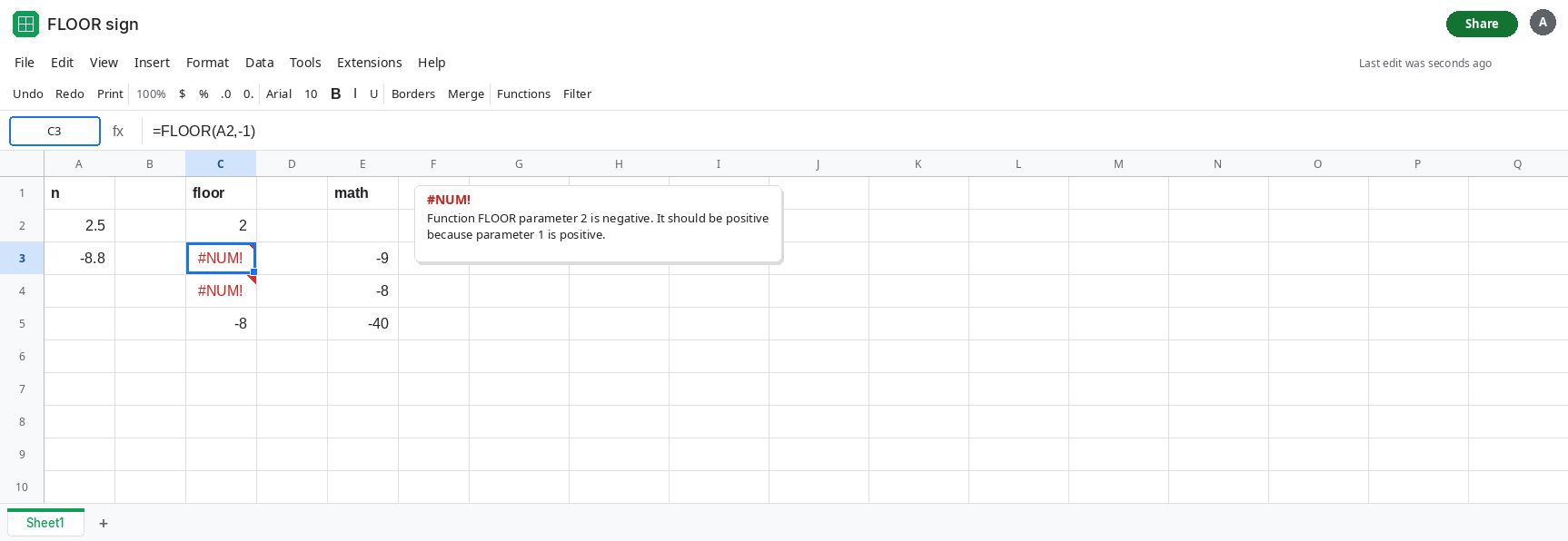
Opposite sign on a negative number. In C4 enter =FLOOR(A3,1). A3 is -8.8. The factor is positive. C4 is #NUM!. Leave C4 broken. Both opposite-sign calls fail. The sign that is “wrong” is whichever one does not match the value.
Matching negative signs. In C5 enter =FLOOR(A3,-1). Both arguments are negative. C5 is -8. Negative value and negative factor round toward zero. That cell is the control for a signed input. It is not #NUM!.
FLOOR.MATH accepts the positive significance. In E1 type math. In E3 enter =FLOOR.MATH(A3). E3 is -9. Mode is omitted, so a negative number rounds away from zero. The default significance is 1, positive, and that plus sign is ignored. In E4 enter =FLOOR.MATH(A3,1,1). Mode is nonzero, so the negative number rounds toward zero. E4 is -8. In E5 enter =FLOOR.MATH(-42,10,-1). E5 is -40, the documented toward-zero case for a nonzero mode. Significance’s minus sign is ignored. The mode is what moved it.
Leave C3 and C4 as #NUM!. Leave C5 as -8 and E3 as -9.
What is actually wrong
Section titled “What is actually wrong”FLOORrefuses mixed signs instead of guessing a direction. The error is#NUM!, which means the arguments are numbers the function will not use. See out of domain for the same token on other functions. Here the domain rule is the sign pair.- A negative factor is legal only next to a negative value, and then the round is toward zero. People carry a negative factor over from
CEILING, where a negative factor on a negative value means away from zero. OnFLOORthat copied minus sign either#NUM!s (if the value is positive) or rounds the other way (if the value is negative). FLOOR.MATHwill not#NUM!just because significance is positive and the number is negative. It always has a direction: away from zero when mode is blank, toward zero when mode is nonzero.FLOOR.MATH(-8.8)is-9.FLOOR(-8.8,-1)is-8. Replacing the name changes the result even after you remove the#NUM!.- Factor
0is also#NUM!. A zero step has no multiple to land on. That is a different broken input from a minus sign. Read the formula bar before you flip the sign. - A positive sheet never hits this.
FLOOR(2.5,1)is2. The error shows up when a significance cell is a signed tick size, or when a column of variances goes negative and the factor stays1while another formula path negates the factor.
This is not #VALUE!. Text in either argument would be #VALUE!. Both arguments here are numbers. See wrong type if the tooltip names text.
Leave C3 and C4 broken.
Give FLOOR a factor with the same sign as the value. In G2 enter =FLOOR(A2,ABS(1)). G2 is 2. In G3 enter =FLOOR(A3,-ABS(1)). G3 is -8. The ABS keeps the step size at 1 and the minus is applied only when the value is negative. In G4 enter =IF(A3>=0,FLOOR(A3,1),FLOOR(A3,-1)). G4 is -8. Fill that pattern down a mixed column. Opposite signs never reach FLOOR.
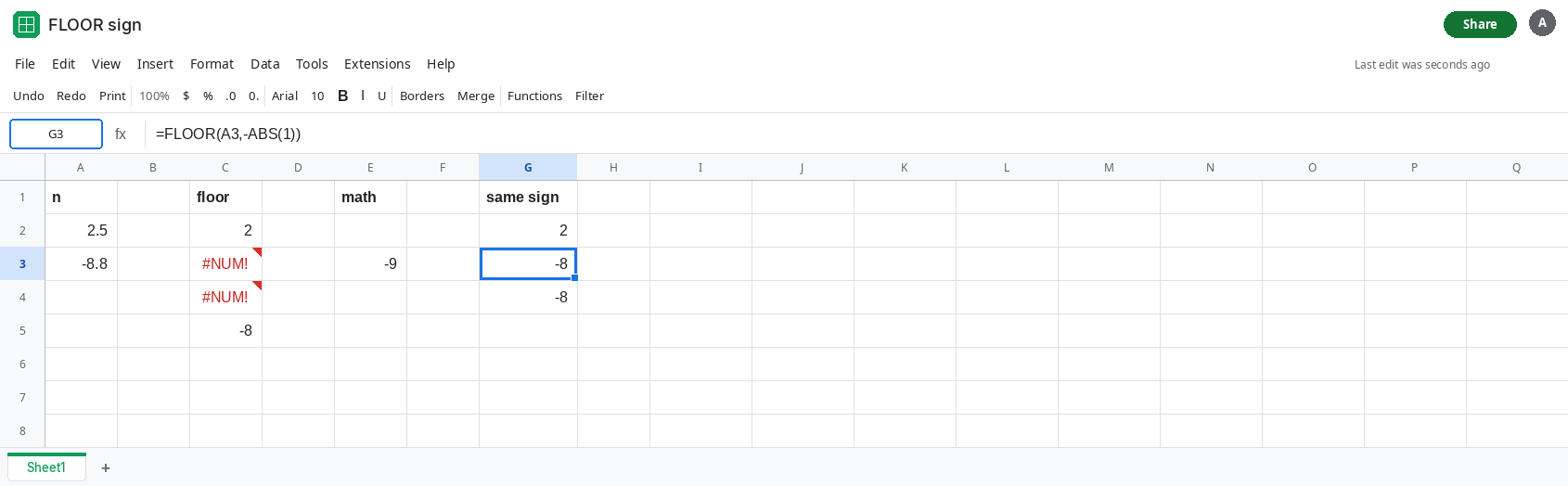
Or use FLOOR.MATH and set mode on purpose. =FLOOR.MATH(A3) is -9 (away from zero). =FLOOR.MATH(A3,1,1) is -8 (toward zero). Pick one and use it for the whole column. Do not mix FLOOR on the positive rows and FLOOR.MATH on the negative rows unless you have compared one known value, because the default directions differ.
Do not wrap C3 in IFERROR. You would turn a sign bug into a blank and still round the next row the wrong way. See IFERROR vs IFNA.
If the tooltip is #NUM! and one argument is negative while the other is positive, the signs do not match. If both are negative and the result is -8 for -8.8, FLOOR rounded toward zero. If the result is -9 and the function is FLOOR.MATH with no mode, that is away from zero, and it is not the #NUM!.