

JOIN keeps blanks and TEXTJOIN can skip them, and JOIN rejects a two-dimensional range
Updated
JOIN(delimiter, value1, …) concatenates one-dimensional arrays and always keeps blanks, so a blank cell becomes a doubled delimiter. TEXTJOIN(delimiter, ignore_empty, text1, …) takes the same kind of list and, when ignore_empty is TRUE, drops cells that are empty. FALSE keeps them, which matches JOIN. JOIN also refuses a block that has more than one row and more than one column. TEXTJOIN accepts that block. A zero is not empty for either function. The doubled hyphen is the bug people file as “TEXTJOIN is broken” when the formula is actually JOIN.
Empty-delimiter concatenation and a blocked BYROW spill are TEXTJOIN spill / delimiter. Keep the Google Sheets UI in English. Sheet Error is an independent formula-error library, not a Google product.
Recreate it on a blank sheet
Section titled “Recreate it on a blank sheet”- Open a blank spreadsheet. In A1 type
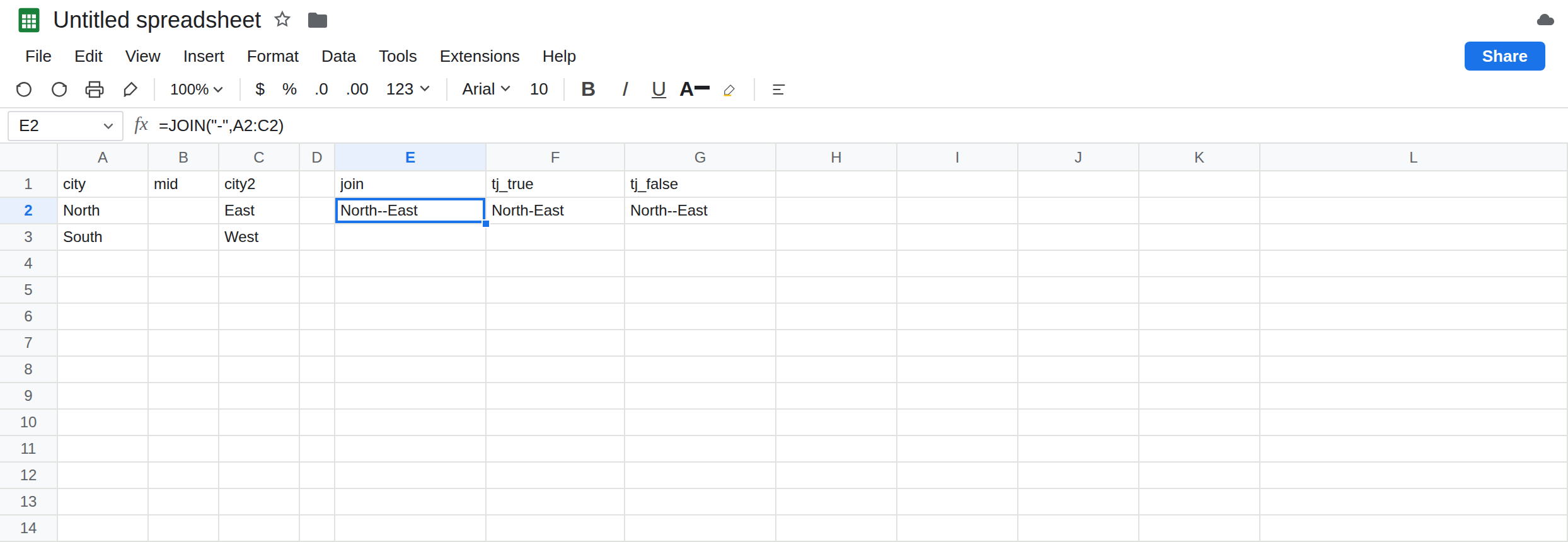
city, B1mid, C1city2. In A2 typeNorth. Leave B2 empty. Do not type a space. In C2 typeEast. In A3 typeSouth. Leave B3 empty. In C3 typeWest.
JOIN keeps the gap. In E1 type join. In E2 enter =JOIN("-",A2:C2). E2 is North--East. Two hyphens, because B2 contributed an empty piece and the delimiter was still written around it. There is no argument on JOIN that means “skip blanks.” Leave E2 as that string.
TEXTJOIN can drop it. In F1 type tj_true. In F2 enter =TEXTJOIN("-",TRUE,A2:C2). F2 is North-East. One hyphen. In G1 type tj_false. In G2 enter =TEXTJOIN("-",FALSE,A2:C2). G2 is North--East, the same characters as E2. FALSE is “keep empty cells,” not “something went wrong.” Leave F2 as the one-hyphen control and G2 as the pair of hyphens.
A formula that returns an empty string. In B4 enter ="". The cell looks blank. ISBLANK(B4) is FALSE, because a formula is there. In E4 enter =JOIN("-",A2,B4,C2). E4 is North--East. In F4 enter =TEXTJOIN("-",TRUE,A2,B4,C2). F4 is North-East. ignore_empty TRUE treats "" as empty. JOIN does not. Leave both. The visual blank in B2 and the formula blank in B4 fail the same way inside JOIN.
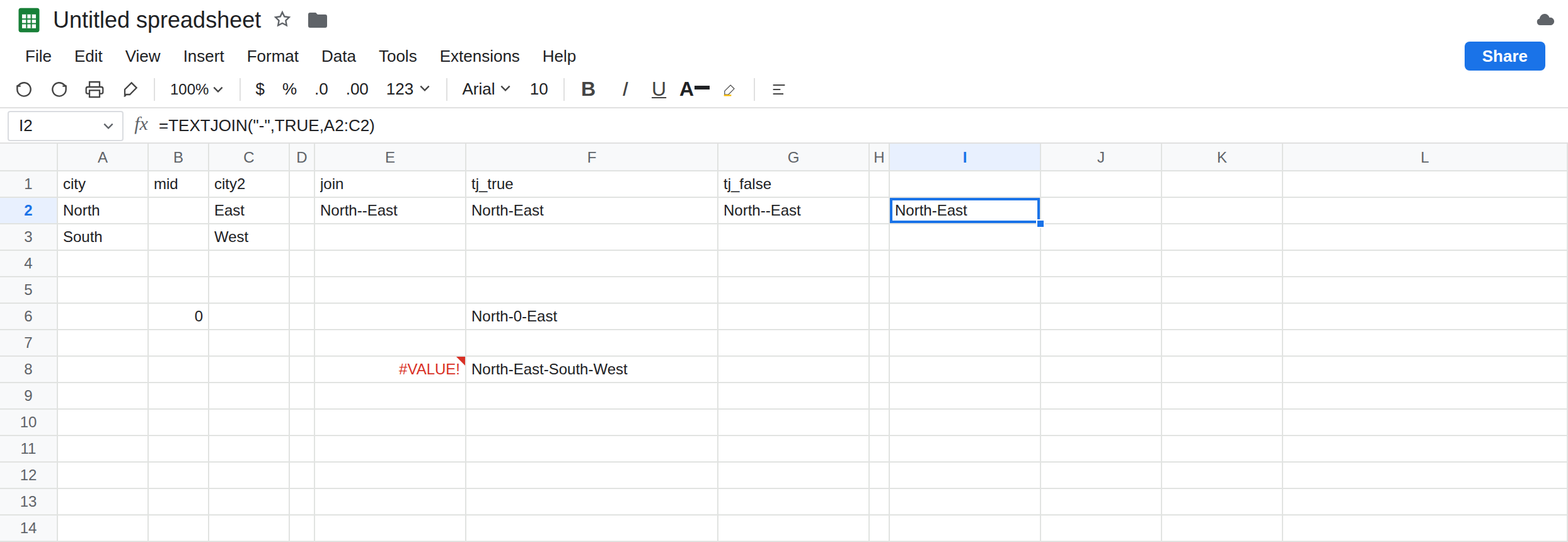
Zero is kept. In B6 type 0. In F6 enter =TEXTJOIN("-",TRUE,A2,B6,C2). F6 is North-0-East. TRUE did not drop the zero. Empty means blank or "", not “a value I consider missing.” A space in B6 would also remain: it is a character. Leave F6 so the zero stays in the string.
Two dimensions. In E8 enter =JOIN("-",A2:C3). A2:C3 is two rows by three columns. E8 is #VALUE!. The tooltip says the range has to be a single row or a single column. JOIN will accept A2:C2 (one row) or A2:A3 (one column). It will not accept the block. In F8 enter =TEXTJOIN("-",TRUE,A2:C3). F8 is North-East-South-West. Blanks in B2 and B3 are skipped. The four cities are one string. That is a real result, and it is also easy to publish when you meant one join per row. Leave E8 broken. Leave F8 as the whole-block join.
Leave E2 as North--East. Leave F2 as North-East. Leave E8 as #VALUE!.
What is actually wrong
Section titled “What is actually wrong”JOINhas two jobs in the argument list: the delimiter, then the values. There is no ignore flag. A blank is a value with length zero, so the delimiters on either side sit against each other.North--Eastis that, not a double hyphen you typed in A2.TEXTJOIN’s second argument is required.TRUEdrops empties.FALSEkeeps them and then looks likeJOIN. People copyTEXTJOIN("-", A2:C2)and omit the flag; that is a#VALUE!or a shifted argument, not a quietJOIN. Pass the boolean.ISBLANKis the wrong test for “will TEXTJOIN drop this?” A formula=""is not blank and is still dropped whenignore_emptyisTRUE. See ISBLANK vs empty. Zero,FALSE, and a single space are not dropped.- A rectangle is legal in
TEXTJOINand illegal inJOIN. E8’s#VALUE!is the shape. F8’s long string is the shape succeeding. If you wantedNorth-Easton row 2 andSouth-Weston row 3, neither formula is a per-row spill.BYROWis the per-row tool, and a blocked spill under it is TEXTJOIN spill / delimiter. - An empty delimiter is allowed.
JOIN("",A2:C2)andTEXTJOIN("",TRUE,A2:C2)concatenate with nothing between the pieces. That is a different surprise (no separator at all) from the doubled hyphen. Do not “fix”North--Eastby deleting the delimiter until you have decided the blank should stay.
This is not SPLIT. SPLIT cuts. These functions glue. A doubled delimiter you later SPLIT will invent an empty field. See SPLIT by each character only if the cut is the bug you are looking at now.
This is not wrong type in the 10 + pcs sense. E8 is #VALUE! because the array is two-dimensional, not because North is text. JOIN is happy to join text.
Leave E2, G2, and E8 broken or doubled so the comparison stays on the sheet.
Skip blanks. In I2 enter =TEXTJOIN("-",TRUE,A2:C2). I2 is North-East. Copy the idea down for row 3 if you need South-West in I3 with the same formula pointed at A3:C3. Do not point TEXTJOIN at A2:C3 unless one cell for the whole block is what you want. F8 is that whole block.
Keep a visible gap for a missing city. Use TEXTJOIN with FALSE, or use JOIN, on purpose. G2 is that choice. Do not mix the two in one column.
One row or one column if you are staying on JOIN. =JOIN("-",A2:C2) is legal and will keep showing North--East while B2 is empty. Fill B2 with Central and E2 becomes North-Central-East. The doubled hyphen was the empty cell, not a stuck delimiter.
Per row of a block. =BYROW(A2:C3,LAMBDA(r,TEXTJOIN("-",TRUE,r))) spills North-East and South-West. If the cell under that formula is occupied, the spill is #REF!. See TEXTJOIN spill / delimiter.
Do not wrap E8 in IFERROR. The #VALUE! is the rectangle. See IFERROR vs IFNA. Changing locale does not add an ignore flag to JOIN.
If the string has North--East, an empty cell is inside the range and the function is JOIN or TEXTJOIN with FALSE. If the cell is #VALUE! and the range is a block, switch to TEXTJOIN or pass one row. If a 0 survived TRUE, that is expected. Empty and zero are different.
JOIN vs TEXTJOIN TRUE vs a rectangle
Section titled “JOIN vs TEXTJOIN TRUE vs a rectangle”JOIN of North, blank, East is North--East. TEXTJOIN with TRUE is North-East. TEXTJOIN with FALSE matches JOIN. A formula ="" is empty for TEXTJOIN TRUE and not empty for JOIN. Zero stays in the string. JOIN of A2:C3 is #VALUE!. TEXTJOIN of that block is one string of every non-empty city.