

Fix IMPORTFEED errors in Google Sheets (fetch or parse, not CSV or XPath)
Updated
IMPORTFEED(url, [query], [headers], [num_items]) pulls an RSS or Atom feed. query is "items" (default), "feed", or "items title" / "items url" / "items summary" / "items created". If Sheets cannot fetch the URL, you get Could not fetch url (usually #N/A). If the URL is an HTML homepage, the function does not suddenly become IMPORTHTML — it still expects a feed. IMPORTDATA wants CSV. IMPORTXML wants XPath.
This page is IMPORTFEED. It is not IMPORTDATA fetch. It is not IMPORTXML / IMPORTHTML. It is not IMPORTRANGE access. Keep the Google Sheets UI in English.
Recreate it on a blank sheet
Section titled “Recreate it on a blank sheet”- Open a blank spreadsheet. In A1 type
kind, B1url, C1feed. Click Allow access if the external-data banner appears (same banner asIMPORTXML/IMPORTDATA/IMAGE).
A URL that cannot be fetched. In A2 type dead. In B2 type https://example.invalid/rss.xml. In C2 enter =IMPORTFEED(B2). The cell does not spill items. Could not fetch url, usually #N/A. Leave C2 broken.
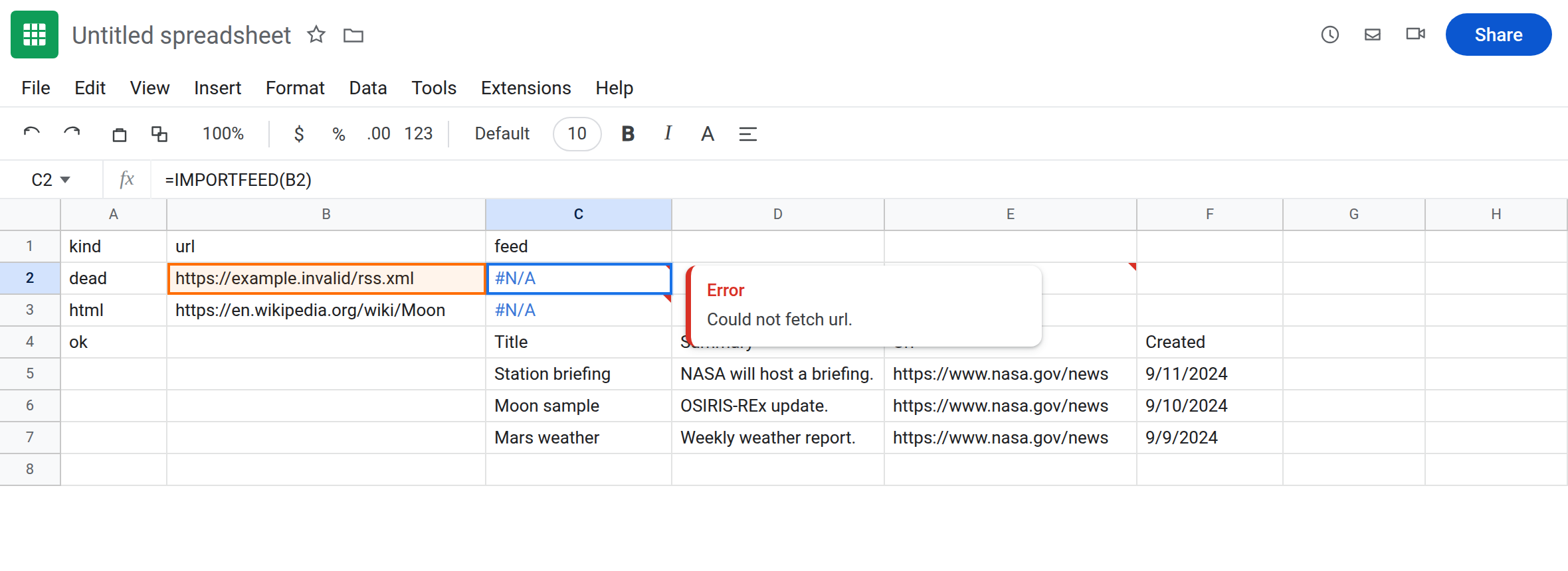
A web page, not a feed. In A3 type html. In B3 type https://en.wikipedia.org/wiki/Moon. In C3 enter =IMPORTFEED(B3). After Allow access, this is not a clean items table. You get a fetch/parse error, empty, or garbage — still IMPORTFEED, not IMPORTHTML. Leave C3 as that failed-as-feed result.
A working feed control. In A4 type ok. In C4 enter:
=IMPORTFEED("https://www.nasa.gov/rss/dyn/breaking_news.rss","items",TRUE,3)
Wait. C4 should spill a small items table (title / summary / url / created — headers TRUE, three items). If that NASA URL is blocked on your network, use any public RSS or Atom URL you are allowed to fetch (a feed you host, or a site’s documented /feed). C4 is the control: the function works when the URL returns a feed. Replace the sample if you do not have rights to that file.
Bad query string. In C6 enter =IMPORTFEED("https://www.nasa.gov/rss/dyn/breaking_news.rss","items xpath",TRUE,3) (or "table"). An unknown query errors. Leave C6 broken if you pointed it at a feed that loaded in C4. Legal queries are feed, items, and items plus title/summary/url/created.
IMPORTDATA contrast. In E2 enter =IMPORTDATA("https://example.invalid/data.csv"). Also Could not fetch url. Different function. See IMPORTDATA fetch. Leave E2 as contrast.
Leave C2 as the dead host. Leave C3 as the HTML miss. Leave C4 as the working spill if it loaded.
What is actually wrong
Section titled “What is actually wrong”IMPORTFEEDGETs a feed document.example.invaliddoes not resolve. A 404 on a real host is the same fetch family.- A wiki HTML page is not RSS.
IMPORTHTML(...,"table",1)is the HTML-table function.IMPORTXMLis XPath. Do not add an XPath asIMPORTFEED’s second argument. - The URL must include
http://orhttps://. A Google Sheet id belongs inIMPORTRANGE. A Drive file link is not a feed. num_itemstrims items queries. It does not fix a dead host.headersTRUE only adds a header row when items actually return.- Result too large / Loading… are the same traffic family as
IMPORTXML. Usenum_items3 as in C4. See IMPORTXML / IMPORTHTML.
This is not #N/A from a lookup. See what #N/A means. This is not GOOGLETRANSLATE. See GOOGLETRANSLATE.
Leave C2, C3, E2, and C6 broken.
Confirm the function works. C4 already did, after Allow access, if the feed loaded. If C4 spills and C2 does not, IMPORTFEED is not dead. The URL in B2 is.
Use a reachable RSS or Atom URL. Paste it in a browser. You should see XML with <rss or <feed, not a rendered article. In G2 enter the same formula as C4 (or your feed). The spill should match C4.
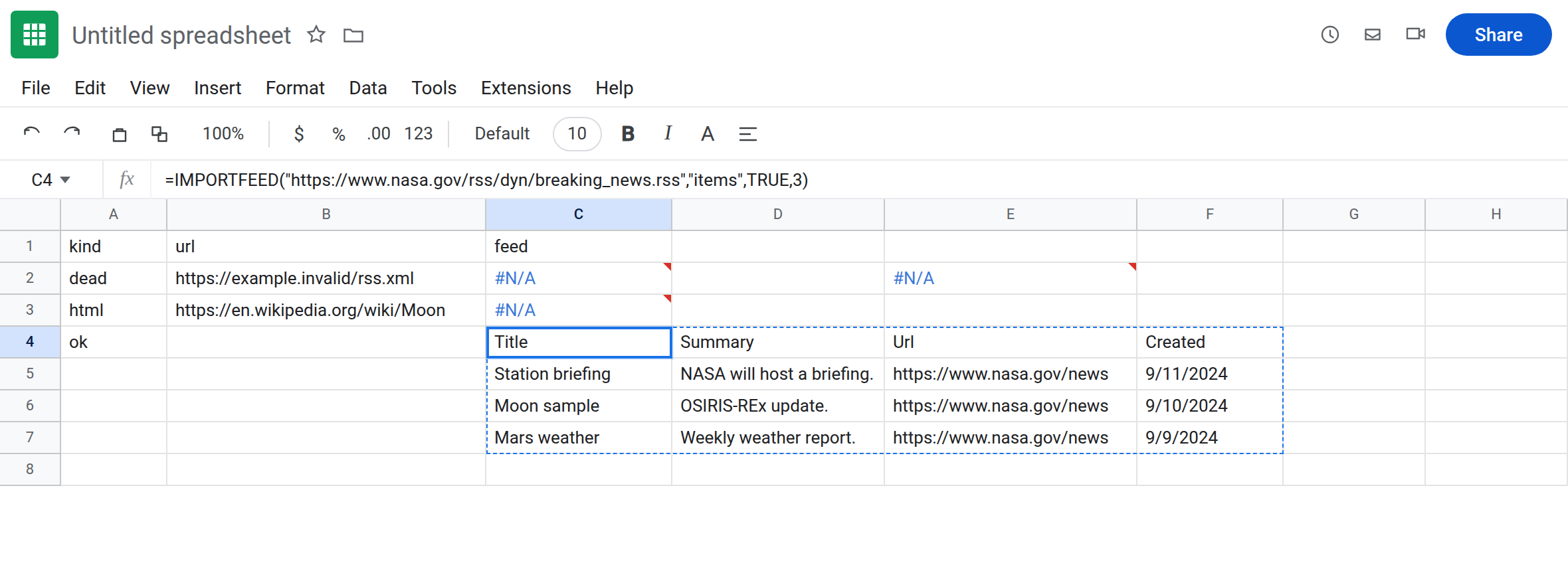
Pick query from the list. "items title" for one column of titles. "feed" for one row of feed metadata. Not "table", not an XPath.
Do not wrap C2 in IFNA until the host exists. See IFERROR vs IFNA. IFERROR will also hide a #REF! spill block if items later load into a crowded range.
If Could not fetch url, fix the host. If the URL is a homepage, switch function (IMPORTHTML / IMPORTXML) or find the site’s actual /rss / /feed. If C4 is Loading…, wait and cut duplicate imports. If the tooltip is You need to connect these sheets, you typed IMPORTRANGE.
IMPORTFEED vs IMPORTDATA vs IMPORTXML vs IMPORTRANGE
Section titled “IMPORTFEED vs IMPORTDATA vs IMPORTXML vs IMPORTRANGE”IMPORTFEED → RSS/Atom. This page.
IMPORTDATA → CSV/TSV. IMPORTDATA fetch.
IMPORTXML / IMPORTHTML → XPath / table index. IMPORTXML / IMPORTHTML.
IMPORTRANGE → another spreadsheet, Allow access on #REF!. IMPORTRANGE access. Same English word “import,” four different contracts.