

COUNTA counts a formula blank and a zero as present
Updated
COUNTA(range) counts cells that are not truly empty. A formula that returns "" looks blank and is still counted. The number 0 looks like “nothing” on a dashboard and is still counted. A single space is counted. An untouched empty cell is not. People read COUNTA as “how many answers did we get” and then wonder why a column of blanks totals 40. The blanks are formulas.
COUNT counts numbers only, and it does count 0. COUNTBLANK counts untouched cells and, in Google Sheets, formulas that return "". That pair is COUNTBLANK vs COUNTIF. ISBLANK is FALSE on the formula blank. That split is ISBLANK vs empty. Keep the Google Sheets UI in English. Sheet Error is an independent formula-error library, not a Google product.
Recreate it on a blank sheet
Section titled “Recreate it on a blank sheet”- Open a blank spreadsheet. In A1 type
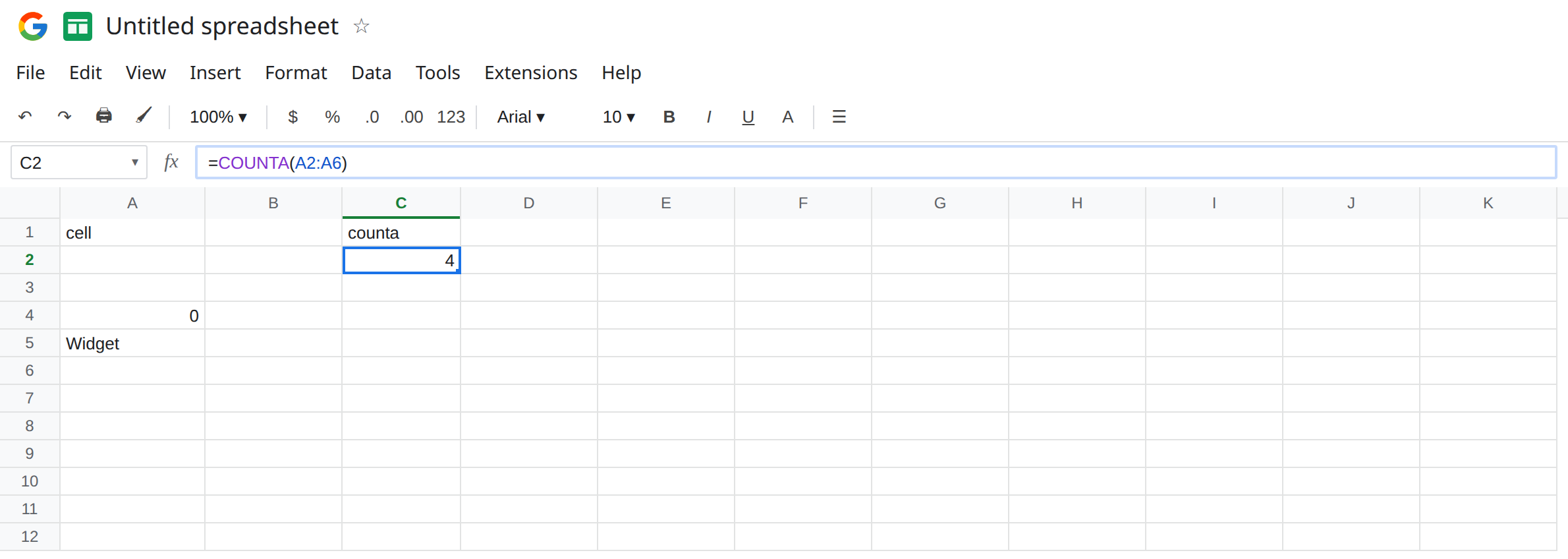
cell. Leave A2 untouched. Do not type a space there. In A3 enter="". The cell looks empty. The formula bar shows="". In A4 type0. In A5 typeWidget. In A6 type a single space, then Enter. A6 looks empty until you click it and see the space in the formula bar.
COUNTA. In C1 type counta. In C2 enter =COUNTA(A2:A6). C2 is 4. The four are the formula blank, the zero, Widget, and the space. A2, the cell you never touched, is the one that dropped out. If you expected 1 because only Widget is “filled in,” the other three are the hidden presence.
COUNT, for the zero. In C4 enter =COUNT(A2:A6). C4 is 1. Only A4 is a number. COUNT skips text, skips the space, skips "", and still counts the zero. A “count of responses” built with COUNT misses Widget. A “count of responses” built with COUNTA includes the zero and the formula blank. Neither function is “non-blank labels only.”
COUNTBLANK. In C6 enter =COUNTBLANK(A2:A6). C6 is 2: the untouched A2 and the formula "" in A3. The space is not blank. The zero is not blank. COUNTA and COUNTBLANK both include A3. Adding them does not recover the row count. 4 + 2 is 6, and the range only has five cells, because A3 was in both.
A zero that arrived from math. In A8 enter =1-1. The cell shows 0. In C8 enter =COUNTA(A8). C8 is 1. In D8 enter =ISBLANK(A8). D8 is FALSE. A calculated zero is present. It is not the formula blank in A3.
Leave C2 as 4. Leave A3 as ="".
What is actually wrong
Section titled “What is actually wrong”COUNTAmeans “cells with a value,” and""is a value whose length is 0. The grid paints it the same color as a never-typed cell. The formula bar does not.- Zero is a number. Inventory that is actually zero should stay in
COUNTAand inCOUNT. The bug is calling that zero “blank” and then also calling a formula blank “zero.” They are different cells. A3 is text (empty text). A4 is numeric 0.=ISTEXT(A3)is TRUE.=ISNUMBER(A4)is TRUE. - A space fails every “blank” test that looks at length.
=LEN(A6)is1.TRIMof a space becomes"", butCOUNTAof the untrimmed cell still counts it. See CHAR(160) blanks ifLENstays above 0 afterTRIM. COUNTAof a whole column (A:A) includes the header and every formula blank down the sheet. AnARRAYFORMULAthat fills a thousand rows with""makesCOUNTA(A:A)huge. That is the same rule as A3, applied to a spill.COUNTIF(A2:A6,"<>")treats""as empty, so it does not matchCOUNTA. The “not empty” criterion andCOUNTAdisagree on formula blanks. That disagreement is the point of COUNTBLANK vs COUNTIF. Do not swap the functions and expect the same4.
This is not COUNTIFS range size. A size mismatch is #VALUE!. See COUNTIFS range size. C2 is a number, and the number is the problem.
This is not IF(A4) treating zero as off. That truthiness page is IF blank vs 0. Here the zero is being counted, not used as a condition.
Leave C2, A3, and A6 as they are.
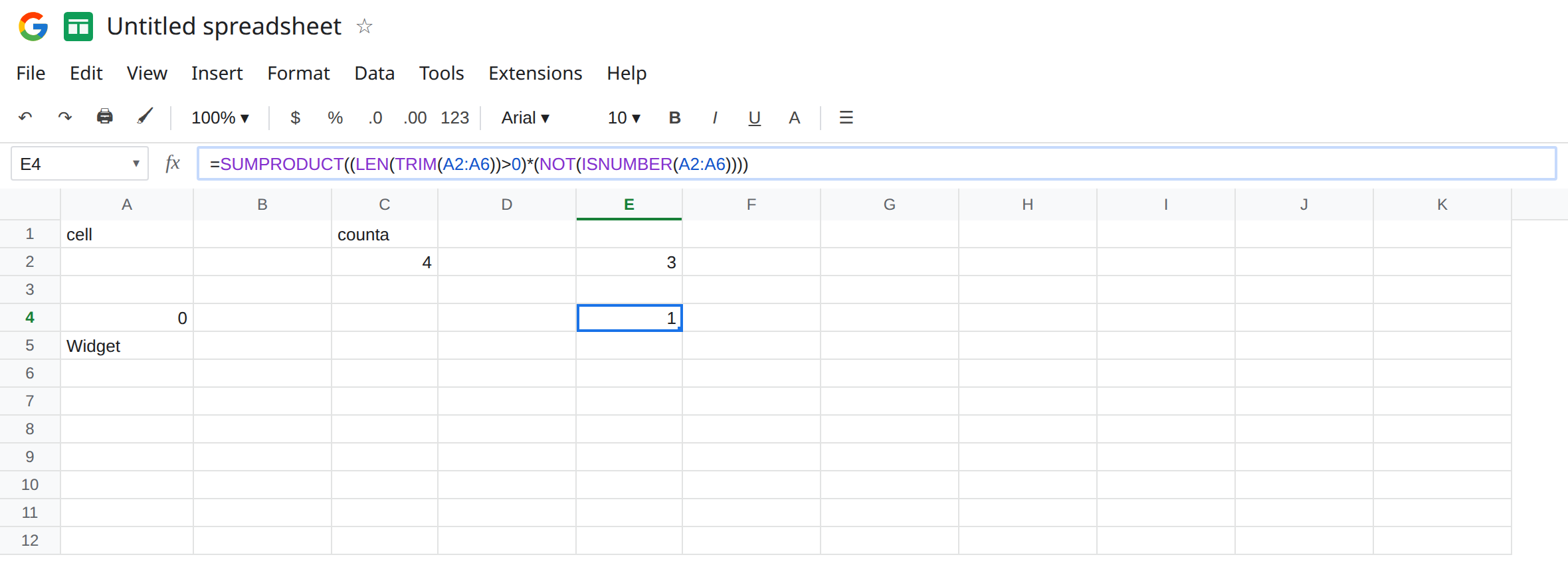
Count labels, not formula blanks. In E2 enter =SUMPRODUCT(--(LEN(A2:A6)>0)). E2 is 3: the zero (digits have length 1), Widget, and the space. "" and the untouched cell drop out. In E4 enter =SUMPRODUCT((LEN(TRIM(A2:A6))>0)*(NOT(ISNUMBER(A2:A6)))). E4 is 1. Only Widget. The zero is numeric, so it is excluded, and the space trims away. =COUNTIF(A2:A6,"<>") is 3 (zero, Widget, and the space). It skips A2 and A3. That 3 is not COUNTA’s 4.
Stop writing ="" into rows you want COUNTA to ignore. Return a truly empty result by not filling the row. If the formula must stay, count with LEN(TRIM(...))>0 or with COUNTIF(...,"<>"), and label the header with the definition you picked.
Do not subtract COUNTBLANK from the row count and call it COUNTA. On this sheet, five rows minus COUNTBLANK 2 is 3, and COUNTA is 4. The formula blank is why.
Do not wrap C2 in IFERROR. Nothing errored. The count is honestly 4.
If COUNTA is larger than the labels you see, click the blank-looking cells. A formula bar of ="" or a space, or a cell that shows 0, is present. If you need “typed answers only,” measure length after TRIM, and keep the zero in COUNT when zero is a real quantity.
What each function includes
Section titled “What each function includes”| Cell | COUNTA | COUNT | COUNTBLANK |
|---|---|---|---|
| Untouched A2 | no | no | yes |
="" in A3 | yes | no | yes |
0 in A4 | yes | yes | no |
Widget | yes | no | no |
| One space | yes | no | no |
A3 is in both COUNTA and COUNTBLANK. That overlap is the hidden blank. A4 is the hidden zero: present for both COUNTA and COUNT.