

QUERY year(Col1) fails on a mixed array, and month(Col1) is 0 for January
Updated
year() and month() in the query language need a Date or DateTime column. An array {A1:B} that mixes real dates with a formula that returns "" is not that column. year(Col1) is #VALUE!. The tooltip is Unable to parse query string for Function QUERY parameter 2: Can’t perform the function year on a column that is not a Date or a DateTime column. month(Col1) fails the same way on that mix.
Once the column is only dates, month() is zero-based. January is 0. February is 1. Google’s query language documents that. A 0 is not the #VALUE! coming back. year() is not zero-based. 2024 is 2024.
year(A) on a sheet range that contains the text TBD is QUERY mixed dates. This page is Col1 on an array, a “blank” that is actually ="", and the January 0. Keep the Google Sheets UI in English. Locale United States.
Recreate it on a blank sheet
Section titled “Recreate it on a blank sheet”- Open a blank spreadsheet. In A1 type
date, B1item. In A2 enter=DATE(2024,1,15). B2Widget. In A3 enter="". B3Skip. In A4 enter=DATE(2024,2,1). B4Gadget. Format A2 and A4 as dates. A3 looks empty. It is not a blank cell.
The formula blank is text. In D1 type blank. In D2 enter =ISBLANK(A3). D2 is FALSE. In D3 enter =ISNUMBER(A2). D3 is TRUE. In D4 enter =ISNUMBER(A3). D4 is FALSE. A3 is a formula result of "". That is enough to keep the column from being a Date column. Leave D2 as FALSE.
year(Col1) on the array. In F1 type year_col. In F2 enter =QUERY({A1:B4},"select year(Col1), Col2",1). F2 is #VALUE!. Tooltip: Can’t perform the function year on a column that is not a Date or a DateTime column, inside Unable to parse query string. The braces make the ids Col1 and Col2. Leave F2 broken.
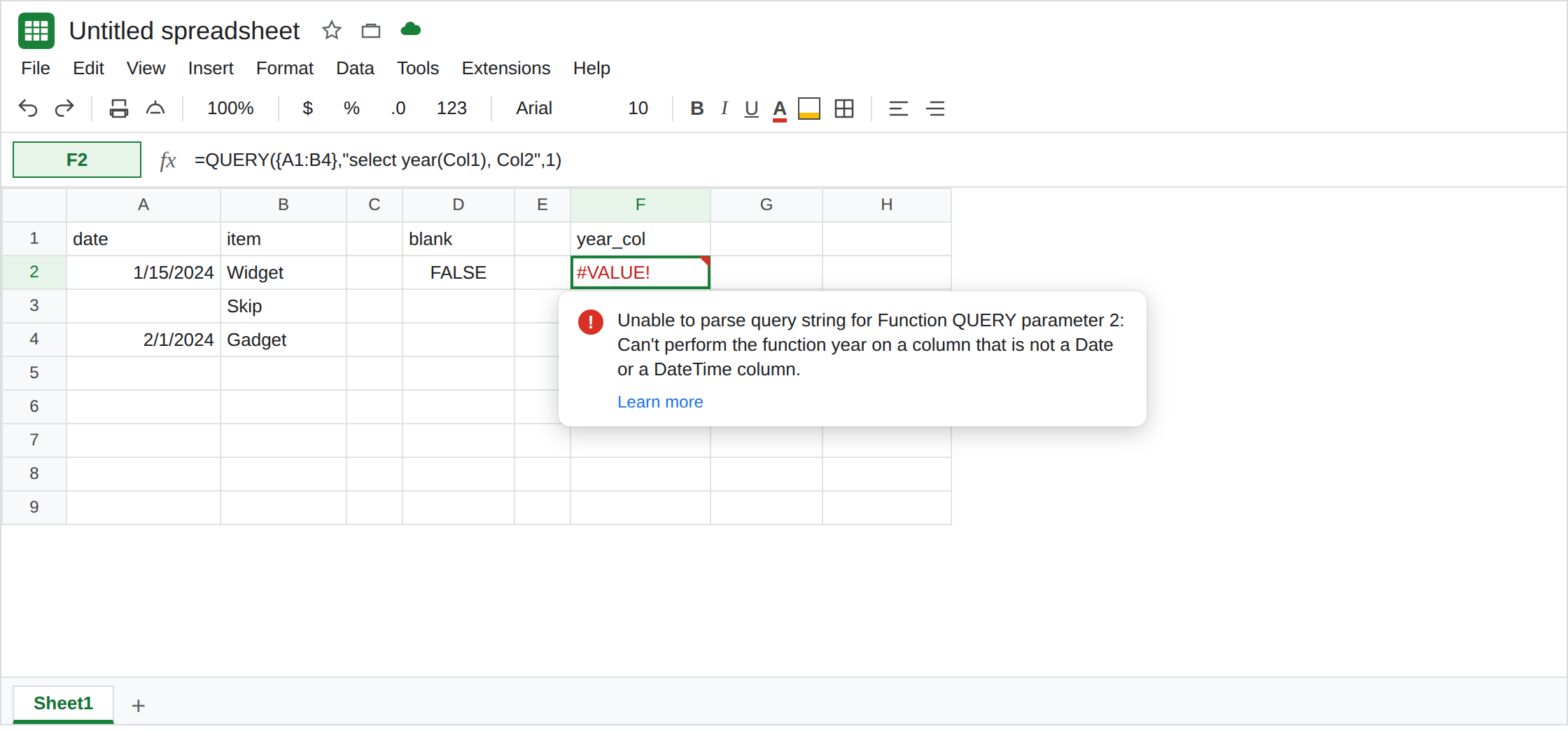
month(Col1) on the same mix. In F4 enter =QUERY({A1:B4},"select month(Col1), Col2",1). #VALUE!. Same tooltip family, naming month. Leave F4 broken. Do not add 1 to “fix” a query that never ran.
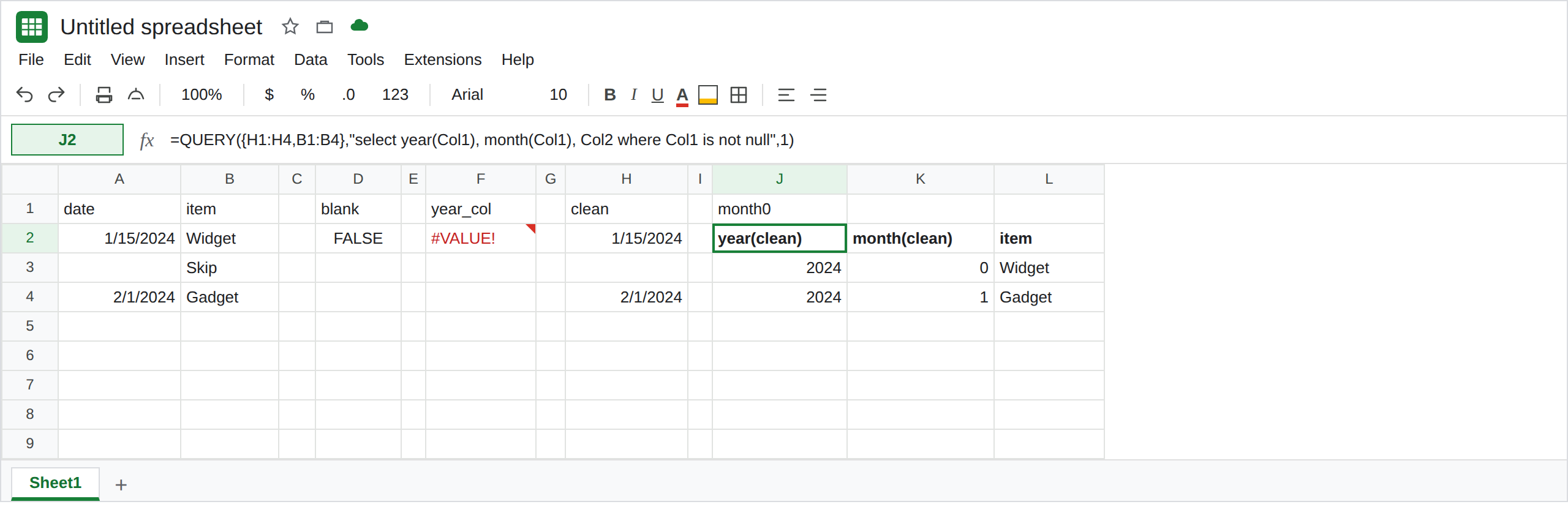
Clean dates, then month is 0. In H1 type clean. In H2 enter =IF(ISNUMBER(A2),A2,). Fill H2:H4. H3 is a real blank. In J1 type month0. In J2 enter =QUERY({H1:H4,B1:B4},"select year(Col1), month(Col1), Col2 where Col1 is not null",1). The data rows are Widget with year 2024 and month 0, and Gadget with year 2024 and month 1. January is 0. That block is the control. 0 is the documented month index, not a leftover error.
where Col1 is not null drops the blank helper row. It does not turn text into a date. F2 has no helper. F2 stays #VALUE!.
What is actually wrong
Section titled “What is actually wrong”QUERYtypes the whole column. One text value makes it not a Date column, andyear/monthrefuse it. A3’s=""is text.ISBLANKis FALSE. The dates you can see in A2 and A4 do not change the column type.- On an array, the id is
Col1, notA.year(A)against{A1:B4}isNO_COLUMNand never reaches the date check. F2 usesCol1. The tooltip namesyearand Date / DateTime. See Col1 vs A when the token isNO_COLUMN: A. - The letter-column version of the same date mix, with
TBDtyped by hand, is QUERY mixed dates. Use that page when the formula saysyear(A)and the text is a word in the cell. Use this page when the id isCol1and the “empty” cell has a formula. month()counts January as0and December as11.quarter()is 1-based. Adding 1 belongs onmonthonly, and only after J2 has already returned numbers.month(Col1)+1on the cleaned array is1for Widget and2for Gadget.IFERRORaround F2 hides the type mix and also hides a real January0if you wrap J2 by habit. See IFERROR vs IFNA.
Leave F2 and F4 broken. Leave D2 as FALSE.
Make the column dates, then read month as 0-based. Keep the helper in H and the query in J2. For a 1-based month, in J6 enter =QUERY({H1:H4,B1:B4},"select year(Col1), month(Col1)+1, Col2 where Col1 is not null",1). Widget’s month is 1. Gadget’s month is 2. The year stays 2024.
Do not QUERY the open column. A2:A includes every blank row on the tab. A long tail of empty cells plus one text formula is still a mixed column. Bound the range to the rows you filled, after the helper.
If year(Col1) says the column is not a Date, find the cell where ISNUMBER is FALSE, including ="". If month returns 0 for a January date, add 1 in the select. If the tooltip says NO_COLUMN: A, the array needs Col1. That is not a month index.