

QUERY IS NULL misses a formula that returns an empty string
Updated
is null in QUERY means no value. A cell you have never typed in is that case. A formula ="" looks just as blank and is a zero-length string. ISBLANK on it is FALSE. where B is null keeps the untouched cell and leaves the formula row out. The row is still in the source. The filter asked for null, and the formula did not return null.
ISBLANK versus "" on the sheet is ISBLANK vs empty. The same split inside FILTER is FILTER blank vs empty. Keep the Google Sheets UI in English. Sheet Error is an independent formula-error library, not a Google product. Locale United States.
Recreate it on a blank sheet
Section titled “Recreate it on a blank sheet”- Open a blank spreadsheet. In A1 type
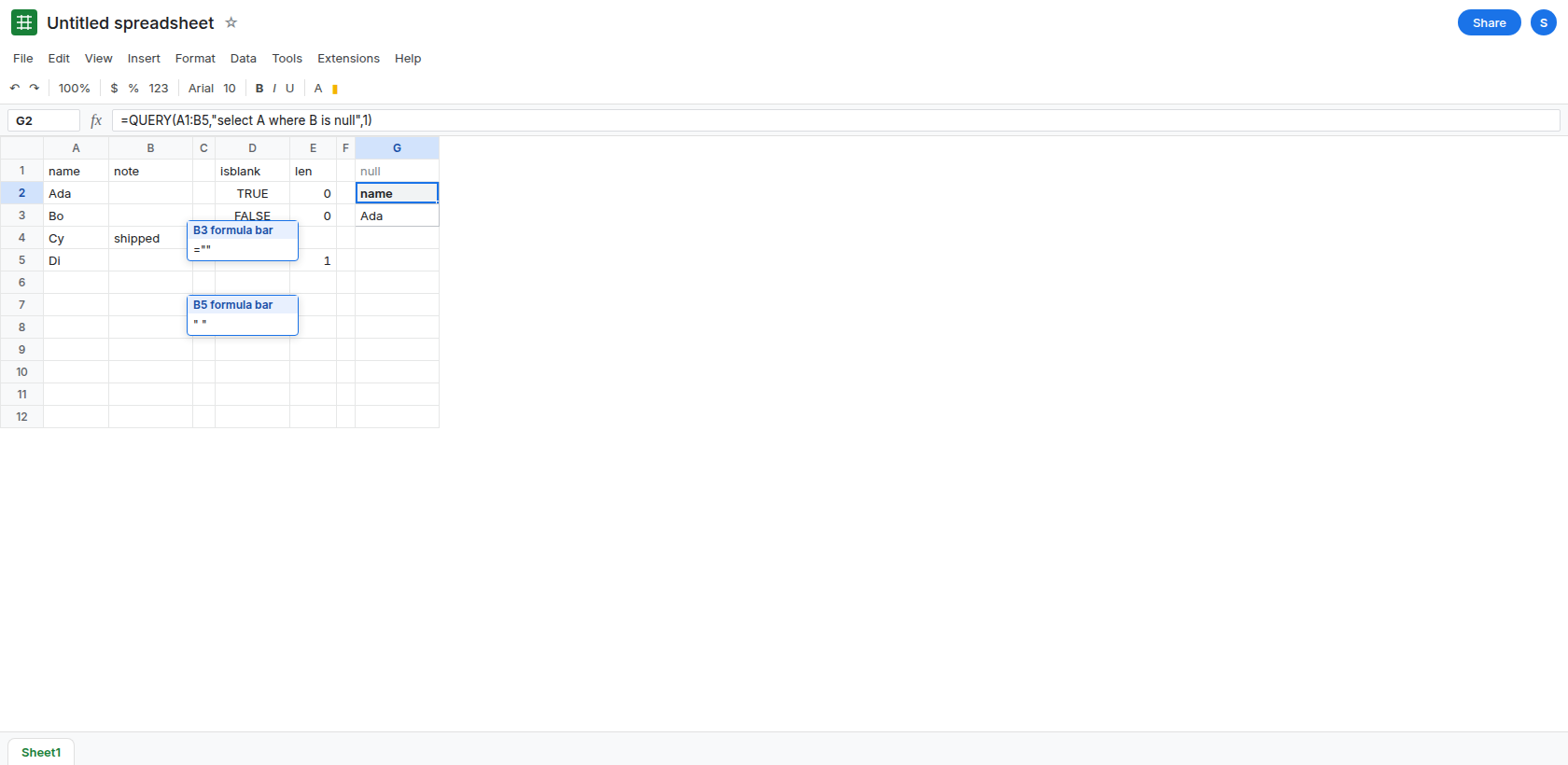
name, B1note. A2Ada. Leave B2 completely empty. Do not type a space. A3Bo. In B3 enter="". A4Cy. B4shipped. A5Di. In B5 type a single space. The grid shows Ada and Bo as blank notes. Cy has a word. Di looks blank and is not.
Confirm the four cells. In D1 type isblank, E1 len. In D2 enter =ISBLANK(B2). D2 is TRUE. In D3 enter =ISBLANK(B3). D3 is FALSE. In E2 enter =LEN(B2). E2 is 0. In E3 enter =LEN(B3). E3 is 0. In E5 enter =LEN(B5). E5 is 1. Same length on Ada and Bo, different ISBLANK. Leave D3 as FALSE.
is null. In G1 type null. In G2 enter =QUERY(A1:B5,"select A where B is null",1). The spill is the header name and Ada. Bo is absent. Cy is absent. Di is absent. The formula blank did not count as null. Leave G2 as Ada only.
The empty-string test. In G6 type empty. In G7 enter =QUERY(A1:B5,"select A where B = ''",1). The spill includes Bo. It may also include Ada, because a text column sometimes presents a true blank as '' once QUERY types the column. It does not include Cy. It does not include Di: a space is not ''. Leave G7 as the rows that matched ''. If Ada appears here and also in G2, you have both tests matching one blank. Bo is the row that distinguishes them: Bo is in G7’s family and not in G2.
is not null keeps the formula blank. In G11 enter =QUERY(A1:B5,"select A where B is not null",1). Cy is there. Bo is there, because ="" is not null. Di is there, because a space is not null. Ada is not, unless this column’s typing folded the true blank into a string. Read the names against G2 before you delete anyone. The surprise people report is Bo still listed after they asked to drop blanks.
A space and a non-breaking space are text. CHAR(160) is CHAR(160) blanks. TRIM does not remove that character.
What is actually wrong
Section titled “What is actually wrong”is nulland=""are different values on the sheet.QUERYdoes not collapse them just because the grid looks empty. G2 asked for null and got Ada. B3’s formula is a string of length 0. D3 is the proof.where B = ''is two single quotes inside the query string, an empty string literal. It is notwhere B = ""with double quotes, which is a parse problem. See QUERY string quotes.- Column type can fold some blanks together. If G2 on your file also lists Bo,
QUERYcoerced that string while typing the column. CheckLENandISBLANKanyway. The coercion is not a promise, and a space still will not match. Do not skip the helper in the fix because one file happened to fold Bo. - An open range such as
A1:Bwithis nullalso matches the untouched rows under the table. Bound the range, or require the name:where A is not null and B is null. A huge spill of empty names is that open range, not a second kind of null.
This is not QUERY no rows unless the tooltip says the query completed with an empty output. G2 returned Ada.
Leave G2 as the is null spill. Leave B3 as ="".
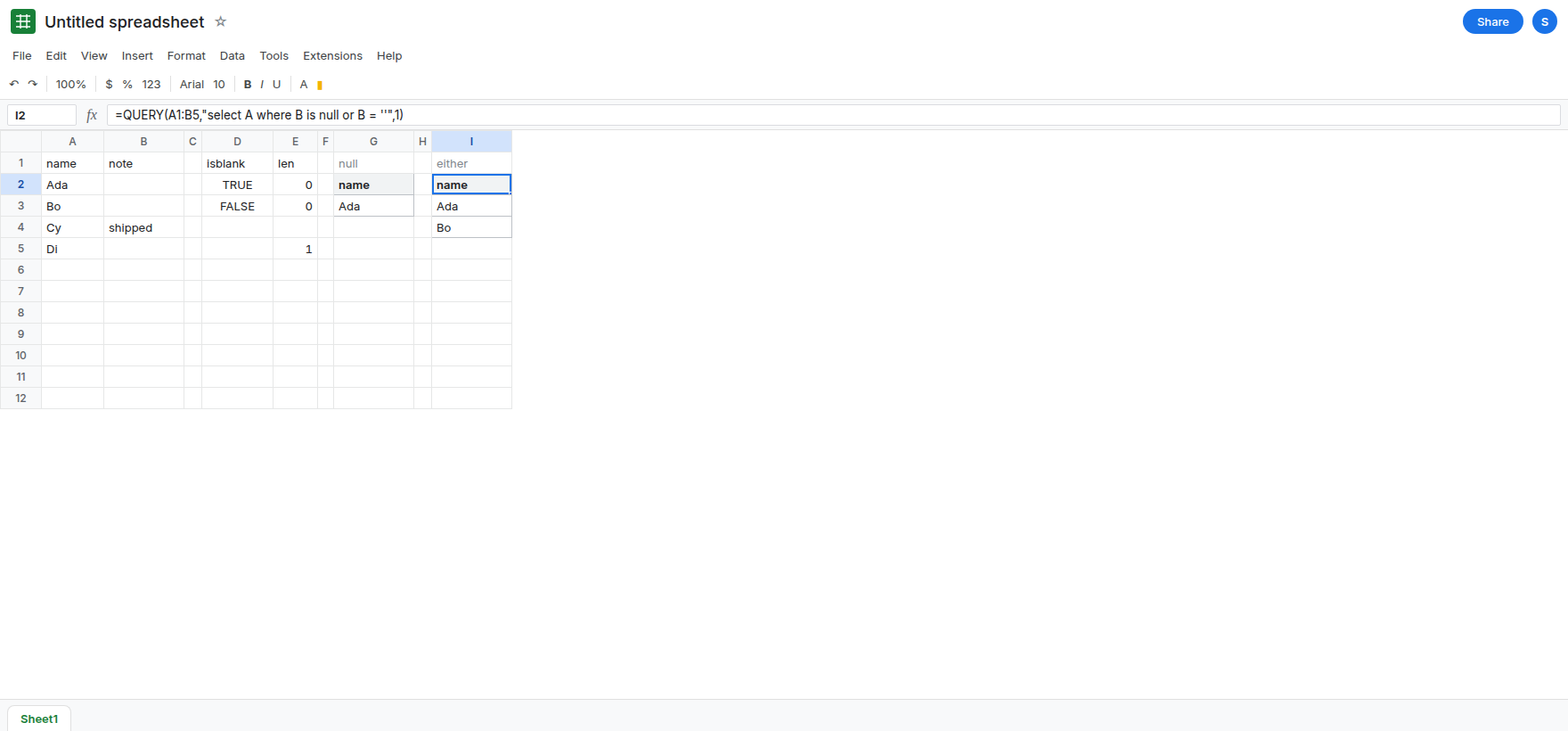
Ask for both kinds of blank. In I1 type either. In I2 enter =QUERY(A1:B5,"select A where B is null or B = ''",1). Ada and Bo. Cy stays out. Di stays out, because of the space. Parentheses matter if you add more and terms. See QUERY AND / OR.
Normalize, then use is null. In K1 type note_n. In K2 enter =IF(LEN(TRIM(B2))=0,,TRIM(B2)) and fill K2:K5. K2 and K3 are truly empty. K5 is empty because the space was trimmed. K4 is shipped. In K7 enter =QUERY({A1:A5,K1:K5},"select Col1 where Col2 is null",1). Ada, Bo, and Di. The array uses Col2. See Col1 vs A. Use this helper when a space should count as blank. Use I2 when a space should stay.
Do not wrap G2 in IFERROR. G2 succeeded. Bo is missing because the test was wrong, not because the query failed. See IFERROR vs IFNA.
If is null drops a row whose formula is ="", add or B = '', or turn those formulas into real blanks and query the helper. If a space still appears, LEN is greater than 0. is null will not remove it.