

TO_PURE_NUMBER of a 50% cell is 0.5, and a later *100 counts the percent twice
Updated
A cell that displays 50% usually stores 0.5. The percent format multiplies the display by 100 and adds the sign. TO_PURE_NUMBER returns the stored number and paints it as an ordinary number, so the result is 0.5, not 50. That is the function working. The double count happens in the next step. Someone multiplies by 100 to “turn it back into a percent,” gets 50, and then formats that 50 as percent. The grid shows 5000%. Or a formula downstream already assumes percents are stored as 50 and multiplies by the pure 0.5, and the rate collapses. TO_PURE_NUMBER did not divide by 100. The format never changed the stored value. The extra *100 did.
Sheet Error is an independent formula-error library, not a Google product. Currency text that TO_PURE_NUMBER cannot parse is TO_PURE_NUMBER. TO_PERCENT on a whole number 20 displaying 2000% is TO_PERCENT double scale. VALUE of the text 50% is VALUE % text. Keep the Google Sheets UI in English.
Recreate it on a blank sheet
Section titled “Recreate it on a blank sheet”- Open a blank spreadsheet. In A1 type
kind, B1stored, C1pure, D1times.
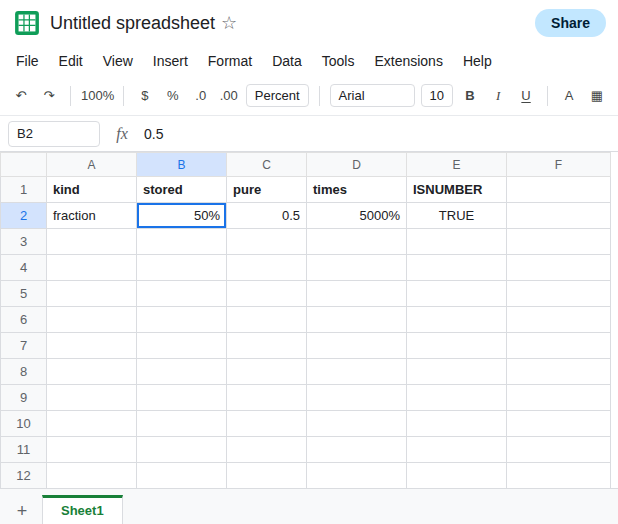
A real percent, the control. In A2 type fraction. In B2 type 0.5. Format → Number → Percent. B2 displays 50%. The formula bar still carries 0.5. ISNUMBER(B2) is TRUE. In C2 enter =TO_PURE_NUMBER(B2). C2 is 0.5. Format C2 as a plain number if it inherited a percent format from somewhere else. C2 is not 50. That row is the function doing what it defines. Leave C2 as 0.5.
The extra times 100. In D2 enter =C2*100. D2 is 50. Format D2 as Format → Number → Percent. D2 displays 5000%. You scaled a number that was already the fraction, then the format scaled the display again. Leave D2 as that percent format so the 5000% stays visible. In D3 enter =B2*100 formatted as percent. D3 also displays 5000%. TO_PURE_NUMBER was not required for the damage. The multiply was.
Typing 50 and then formatting is a different stored number. In B5 type 50. Format B5 as percent. B5 displays 5000% immediately. In C5 enter =TO_PURE_NUMBER(B5). C5 is 50, not 0.5. The menu did not divide by 100. People who wanted fifty percent needed to type 50% or 0.5, not 50 plus the format. C5 is TO_PERCENT double scale from the other direction. Leave C5 as 50.
Text is unchanged. In B7 type an apostrophe, then 50%. In C7 enter =TO_PURE_NUMBER(B7). C7 stays the text 50%. In D7 enter =C7*100. D7 is #VALUE!. The pure-number function did not parse the sign. See VALUE % text. Leave D7 broken.
What is actually wrong
Section titled “What is actually wrong”- Percent means
1 = 100%in the format.TO_PURE_NUMBERstrips the format and keeps the stored value. Of a true50%, that value is0.5. Expecting50is expecting the display, not the number. - A second
*100stores fifty. Percent format on that result displays five thousand percent. Two scales. The function contributed the visible0.5that made the multiply look necessary. It did not apply a scale of its own. - Typing
50and choosing Percent stores50.TO_PURE_NUMBERthen returns50. Multiplying that by100is a third, different mistake. Check a plain-number copy before you multiply. - Downstream math that does
rate * pricewants0.5, not50. If you “fixed” C2 by multiplying, the price math is a hundred times too large. If you needed the digits50for a label, useTEXT, not a number that will be formatted again. - Text
50%is not a candidate forTO_PURE_NUMBER.VALUEon a locale that understands the percent sign returns0.5. See VALUE % text.
Leave D2 displaying 5000% and C2 as 0.5.
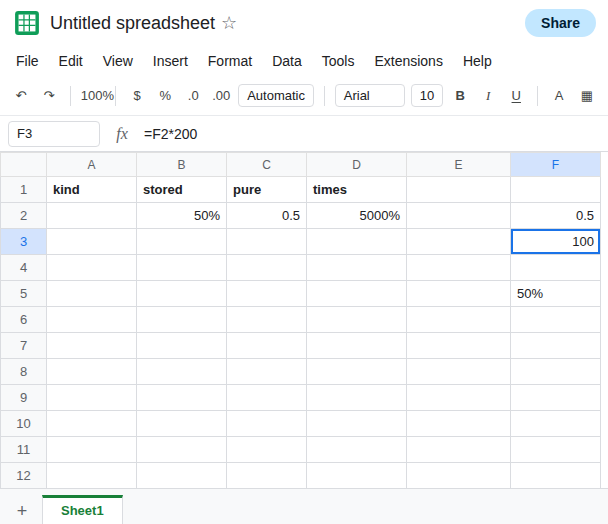
Use the pure fraction in math. In F2 enter =C2. F2 is 0.5. In F3 enter =F2*200. F3 is 100, half of 200, which is the fifty percent you displayed in B2. Do not multiply F2 by 100 first.
If a label must show the digits 50, In F5 enter =TEXT(B2,"0%"). F5 is the text 50%. ISNUMBER(F5) is FALSE. It will not enter a product formula cleanly. That is the point. A label and a rate are different cells.
If you typed 50 meaning fifty percent, divide once: =TO_PURE_NUMBER(B5)/100 is 0.5. Format that result as percent if you want 50% on screen. Do not also multiply by 100 in the next column.
Do not wrap D2 in IFERROR. There is no error. The rate is a hundred times too large. See IFERROR hides cause.
If TO_PURE_NUMBER of a cell that displays 50% is 0.5, the cell stored a fraction and the function stripped the paint. Drop the extra *100. If the pure number is 50, the cell stored fifty and the percent format was only a display. Divide once if you meant a rate.