

QUERY LIMIT and OFFSET skip the wrong block or drop the header
Updated
QUERY applies offset and then limit to data rows. With the headers argument 1, the label row is peeled off first and put back on the result. offset 10 skips ten products, not ten sheet rows and not “start at item 10.” limit 10 offset 10 is data rows 11 through 20. People who wanted rows 10 through 19 are one row late. Set headers to 0 and the label row is data, so the same offset skips it and the spill has no names.
offset past the end of the table, and limit 0, are empty #N/A on QUERY LIMIT / OFFSET. A WHERE that matches nothing is QUERY no rows. Keep the Google Sheets UI in English. Sheet Error is an independent formula-error library, not a Google product.
Recreate it on a blank sheet
Section titled “Recreate it on a blank sheet”- Open a blank spreadsheet. In A1 type
n, B1name. In A2 enter=SEQUENCE(12). In B2 enter=ARRAYFORMULA("row "&A2:A13). Twelve products,row 1throughrow 12. The header is sheet row 1. The first product is sheet row 2.
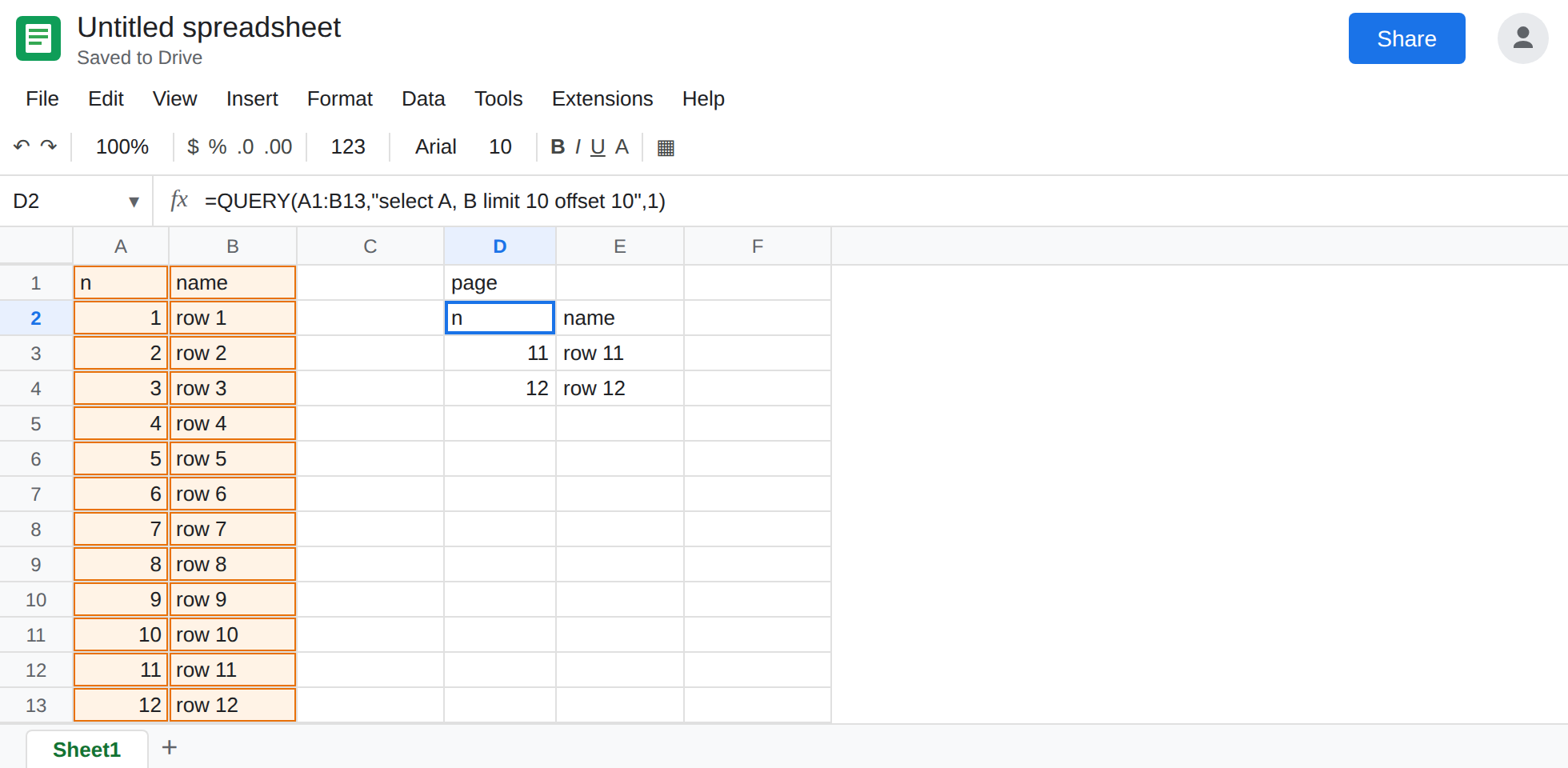
Page as written. In D1 type page. In D2 enter =QUERY(A1:B13,"select A, B limit 10 offset 10",1). The spill’s header is still n / name. The data rows are 11 / row 11 and 12 / row 12. Only two rows remain, because only two products sit after a skip of ten. They are not row 10. Leave D2 as that short page.
The block that starts at the 10th product. In D8 enter =QUERY(A1:B13,"select A, B limit 10 offset 9",1). Skip nine data rows. The first data row of the spill is 10 / row 10, then 11, then 12. offset is “how many to skip,” so the first row you keep is skip + 1. D8 is the control for “start at item 10.”
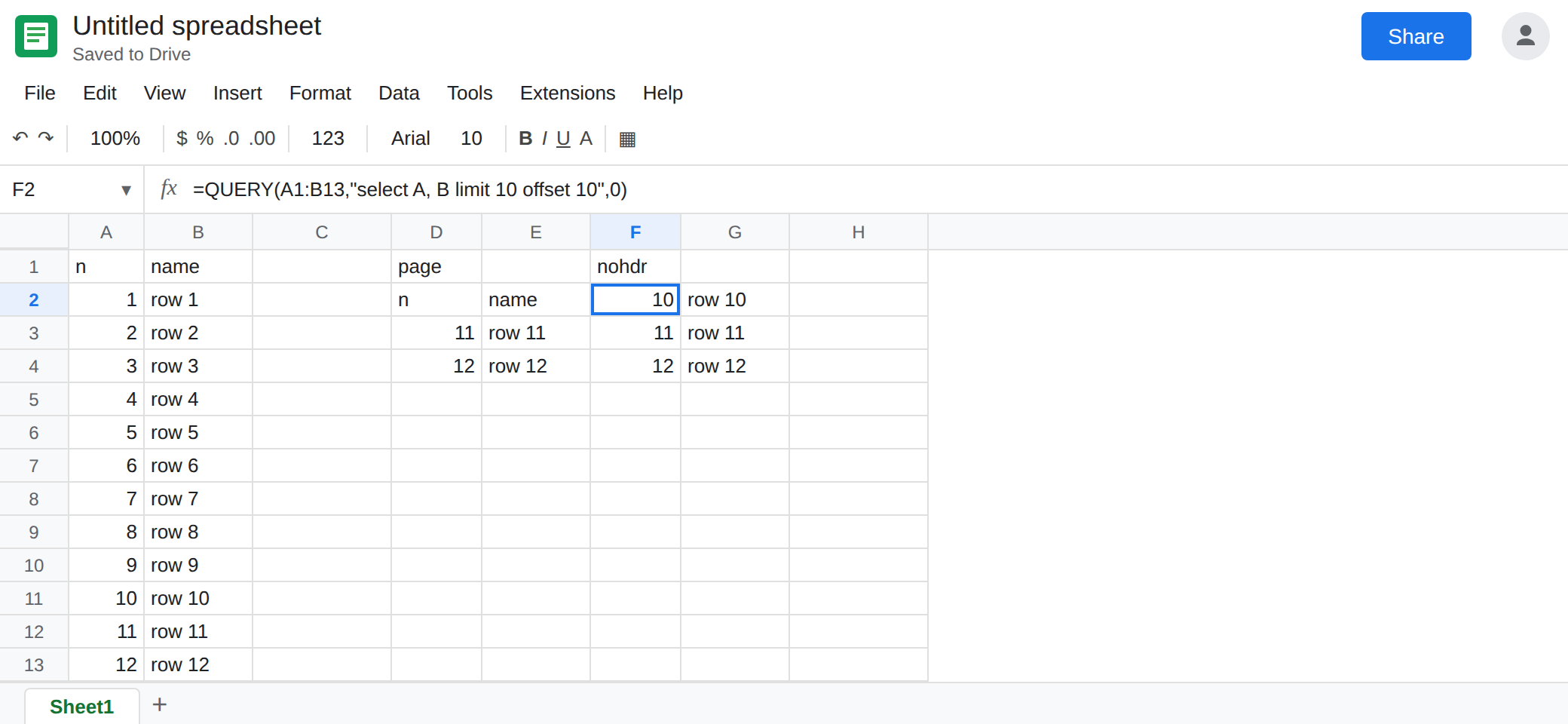
Headers 0 drops the labels into the skip. In F1 type nohdr. In F2 enter =QUERY(A1:B13,"select A, B limit 10 offset 10",0). The third argument 0 means row 1 is data, so the query sees thirteen rows: the labels, then products 1 through 12. offset 10 skips the label row and products 1 through 9. The spill starts at product 10 (10 / row 10) and has no n / name header. D2, with headers 1, skipped ten products and starts at 11, and it kept the header. Same clause, different slice. Leave F2 as that unlabeled block.
Empty is the other page. In F8 enter =QUERY(A1:B13,"select A, B offset 40",1). #N/A, Query completed with an empty output. Nothing is wrong with the column names. The skip is past twelve products. See QUERY LIMIT / OFFSET. Leave F8 broken.
Leave D2 as rows 11 and 12. Leave F2 unlabeled. Leave D8 as the page that starts at 10.
What is actually wrong
Section titled “What is actually wrong”offsetcounts data rows after headers are removed, when the third argument is1or greater. It does not count the header as one of the skipped rows. D2 skips products 1–10 and keeps 11 and 12. Item 10 is one less skip:offset 9.limitis applied afteroffset.limit 10 offset 10is not “rows 10 through 20.” It is “skip 10, then take 10,” which is rows 11–20 on a longer list. Clause order in the string can belimitthenoffset. The engine still skips first.headers0puts the label row in the data. The same numbers then skip a different block, and the spill has no labels to hang a chart on. F2. Guessed headers (-1or omitted) can go either way. Pass1when row 1 is labels.order byruns before the skip. An offset withoutorder byskips the range’s current order, not the smallestn. Sort in the query if page 2 should be “the next ten after sort.”- A blank page with the empty-output tooltip is an offset past the end, or
limit 0. Shrink the offset. Do not debug it as a fencepost until the skip is smaller than the row count.
This is not a WHERE miss. See QUERY no rows. D2 returned rows. The rows are the wrong slice.
Leave D2 and F2 as the wrong slices.
Skip one less than the first item you want. Keep D8 for “start at the 10th product, up to ten rows.” On a longer table, page 2 of ten rows is offset 10 limit 10 (items 11–20). Page 1 is limit 10 with no offset. Write the page number down next to the formula so the skip is (page-1)*10.
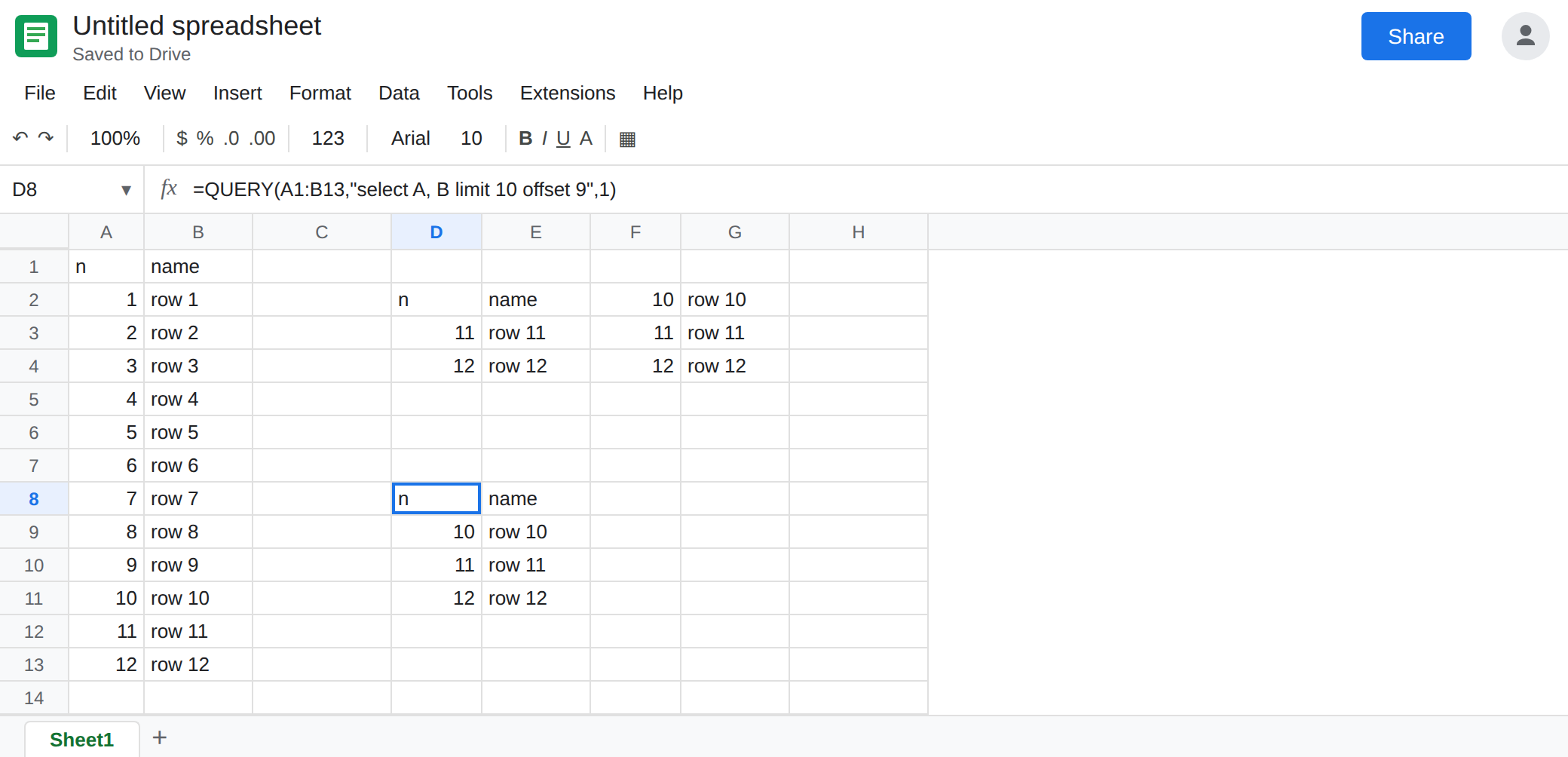
Keep the header by passing 1. Use D8’s third argument when the first row is labels. Use 0 only when the range has no label row and you are willing to let offset consume the first lines.
Do not IFNA D2. It returned a page. IFNA is for F8, and only after you know the skip is allowed to be empty. See IFERROR vs IFNA.
If the first id on the page is one higher than you wanted, subtract one from offset. If the labels vanished, the headers argument is 0 and offset ate them. If the cell is empty #N/A, the skip is past the data and you are on the LIMIT / OFFSET page.