

Fix REDUCE in Google Sheets when the LAMBDA or the accumulator is wrong
Updated
REDUCE(initial_value, array, LAMBDA(acc, value, …)) walks the array and returns one final accumulator. The lambda receives the running value and the current element, in that order, and must return the next running value. One name is #N/A (wrong number of arguments). Returning {acc, value} is #N/A (nested array). Two quieter bugs have no red triangle: a product that starts at 0 stays 0, and a lambda that returns value instead of acc leaves only the last element. SCAN spills every step. This page is the final value only.
This page is REDUCE mistakes. Running totals are SCAN / REDUCE LAMBDA. A walk that hits Calculation limit was reached is calculation limit. Keep the Google Sheets UI in English. Helper names stay English: LAMBDA, REDUCE.
Recreate it on a blank sheet
Section titled “Recreate it on a blank sheet”- Open a blank spreadsheet. In A1 type
hours. A22. A33. A41. Three shifts. The total is 6. The product of the three numbers is 6 as well, if you start from 1. Starting from 0, the product is 0.
A correct total. In C1 type sum. In C2 enter =REDUCE(0,A2:A4,LAMBDA(acc,v,acc+v)). The cell shows 6. Initial value 0, then add each hours cell. That cell is the control.
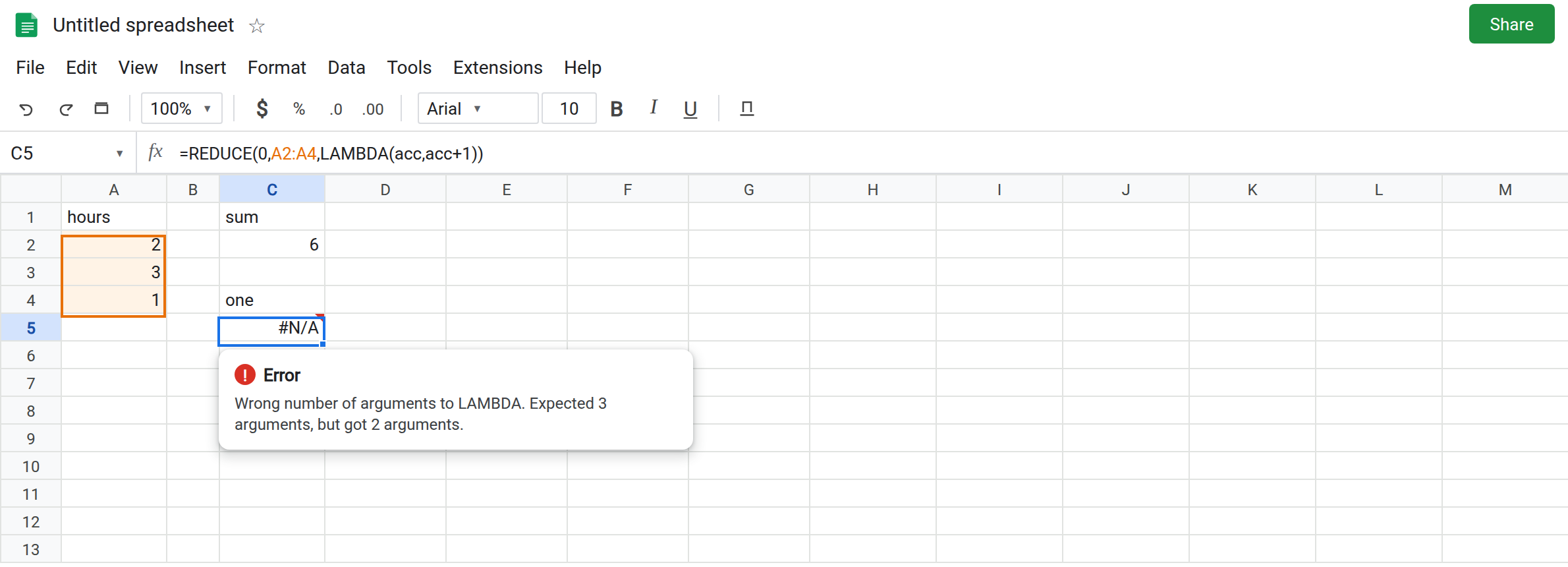
One name. In C4 type one. In C5 enter =REDUCE(0,A2:A4,LAMBDA(acc,acc+1)). The cell shows #N/A. The tooltip is Wrong number of arguments to LAMBDA. Expected 3 arguments, but got 2 arguments. Sheets counts the names plus the expression. REDUCE passes two inputs, so the lambda needs two names and a body. You supplied one name and a body. Leave C5 broken. You can ignore v in the math. You cannot omit the name.
A row returned. In C7 enter =REDUCE(0,A2:A4,LAMBDA(acc,v,{acc,v})). #N/A or #VALUE!. Tooltip: Single value expected. Nested array results are not supported. Leave C7 broken.
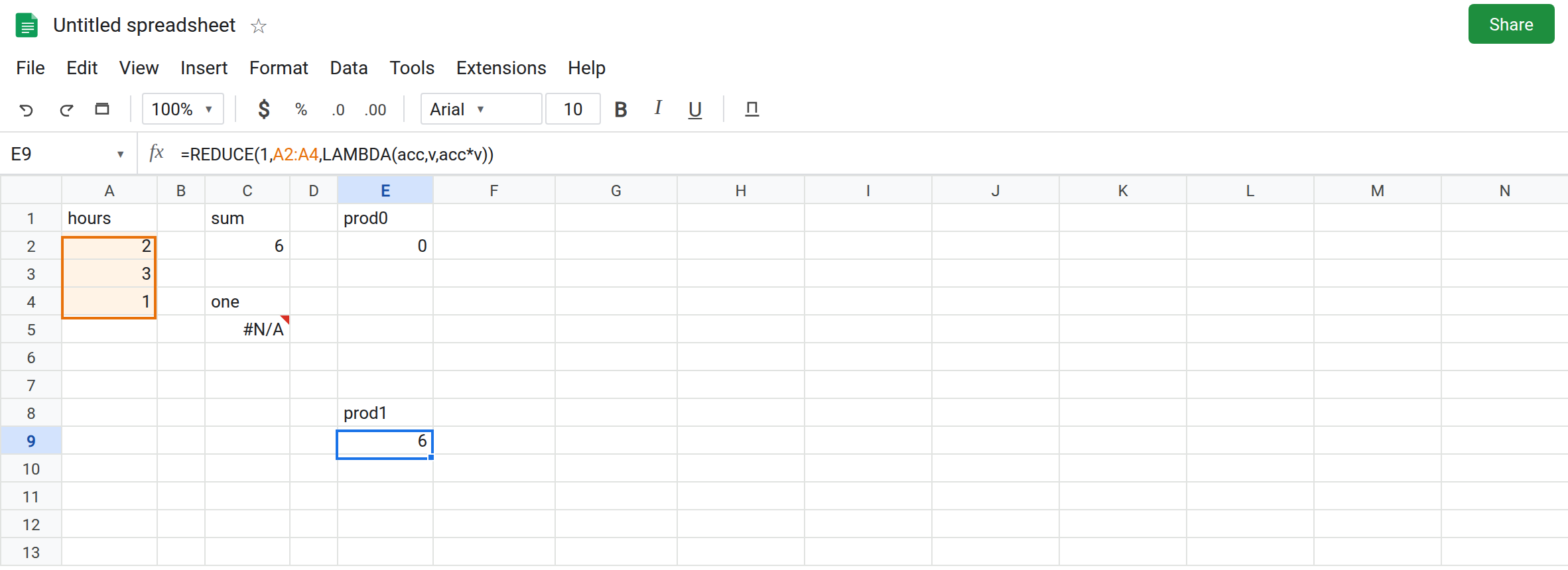
Product seeded with 0. In E1 type prod0. In E2 enter =REDUCE(0,A2:A4,LAMBDA(acc,v,acc*v)). The cell shows 0. No error triangle. The first step is 0*2. Every later step multiplies by zero. The hours are fine. The initial value is the wrong identity for multiplication. Leave E2 as 0.
Returning the element. In E4 type last. In E5 enter =REDUCE(0,A2:A4,LAMBDA(acc,v,v)). The cell shows 1, the last hours value. acc is never used. Each step throws away the running total and keeps the current element. People read 1 as a total. It is A4. Leave E5 as 1.
Text initial value plus a number. In E7 enter =REDUCE("",A2:A4,LAMBDA(acc,v,acc+v)). The first addition is ""+2. The cell shows #VALUE!. Addition does not concatenate unless you use &. Leave E7 broken.
SCAN contrast. In G2 enter =SCAN(0,A2:A4,LAMBDA(acc,v,acc+v)). The spill is 2, 5, 6. Same lambda, every step. If you needed that column and only built REDUCE, C2’s 6 is complete and the path is missing. That is SCAN / REDUCE LAMBDA.
Leave C5, C7, and E7 broken. Leave E2 as 0 and E5 as 1. Leave C2 as 6.
What is actually wrong
Section titled “What is actually wrong”- The initial value is the accumulator before the first element. It is not “the first hours cell, so skip A2.” Seeding a sum with
0is correct. Seeding a product with0is E2. Seeding a product with1is the identity that leaves the hours intact. - The lambda’s return replaces
accfor the next call. Returnvand the history collapses to the last element. E5. Returnacc+vand the history is the total. C2. - Arity is two names. The error text talks about
LAMBDA’s argument count, not aboutREDUCEneeding another range. C5. - A two-cell return is a nested array.
REDUCEwill not spill a pair. C7. Two results means twoREDUCEcalls, orHSTACKof two final numbers. ""is not a numeric zero. E7 is#VALUE!. See wrong type for the same addition outsideREDUCE.- An empty range returns the initial value and never calls the lambda.
=REDUCE(0,A8:A9,LAMBDA(acc,v,acc+v))on blank A8:A9 may still visit blanks and add0, depending how you wrote the range. A truly empty array returns0without adding. If the total equals the initial value, check that the range actually contains the hours.
This is not BYROW of each shift. BYROW would spill 2, 3, 1 with one lambda name. See BYROW / MAP LAMBDA.
Leave C5, E2, and E5 in place.
Two names, return the next acc, seed the right identity. Keep C2 for a sum. In E9 enter =REDUCE(1,A2:A4,LAMBDA(acc,v,acc*v)). The cell shows 6 (1*2*3*1). The only change from E2 is the initial 1.
Last element on purpose. E5 is correct when you want the last value and the initial value does not matter. Name the header last so it is not read as a total. For a total, the body must mention acc.
Text. Concatenate with &: =REDUCE("",A2:A4,LAMBDA(acc,v,acc&v)) produces 231, which is rarely what hours need. Sums stay numeric. Do not start a sum from "".
Do not wrap C5 in IFERROR. You would turn an arity bug into a blank total and it would match neither C2 nor E5. See IFERROR vs IFNA.
If REDUCE is #N/A and the tooltip names LAMBDA, count names (exactly two) and check that the body is one value. If the result is 0 on a product, the seed is 0. If the result equals the last cell, the body ignored acc. If you needed every step, use SCAN.