

WEEKNUM and ISOWEEKNUM disagree by a week when the systems differ
Updated
WEEKNUM(date, [type]) and ISOWEEKNUM(date) both return a week number. They do not use the same rules. Default WEEKNUM is system 1: the week that contains 1 January is week 1, and type 1 starts that week on Sunday. ISOWEEKNUM is ISO 8601: weeks start on Monday, and week 1 is the week that contains the year’s first Thursday. On 1 January 2023 those two calls return 1 and 52. Neither cell is an error. A report that mixes them is off by a week, or off by a whole year boundary, with no red triangle.
WEEKDAY numbering is WEEKDAY type. That function returns a day-of-week, not a week-of-year. Keep the Google Sheets UI in English. Sheet Error is an independent formula-error library, not a Google product.
Recreate it on a blank sheet
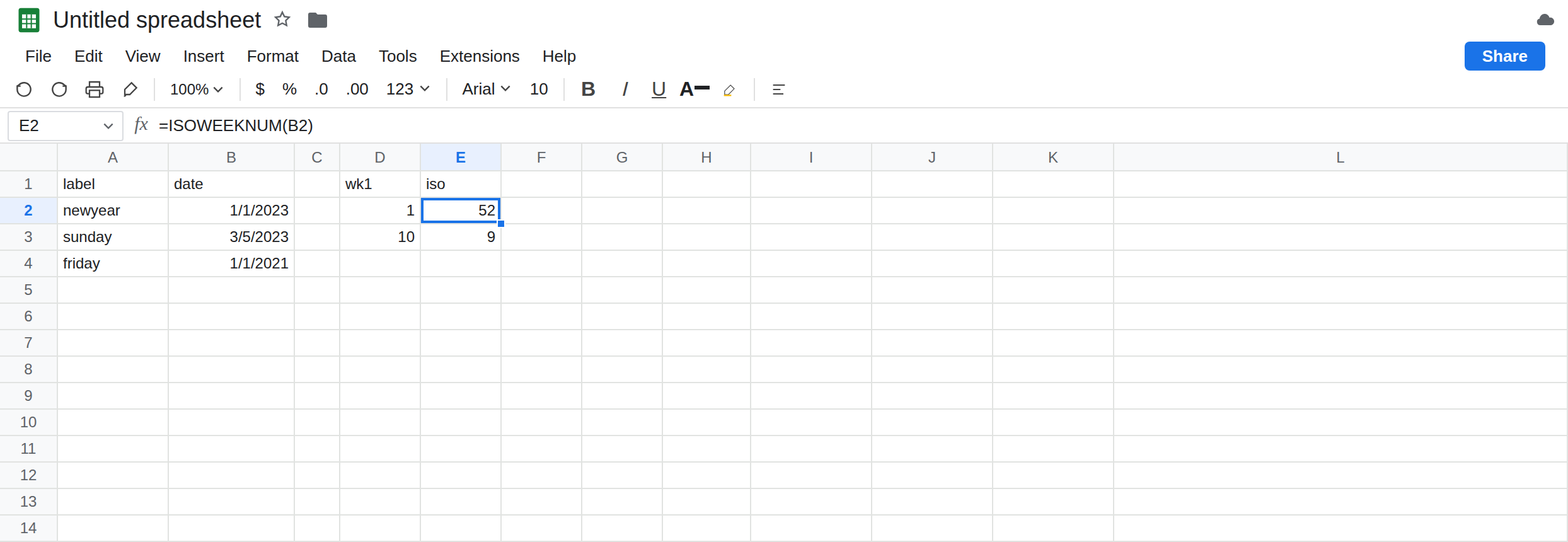
Section titled “Recreate it on a blank sheet”- Open a blank spreadsheet. In A1 type
label, B1date. In A2 typenewyear. In B2 enter=DATE(2023,1,1). Format B2 as Date. 1 January 2023 is a Sunday. In A3 typesunday. In B3 enter=DATE(2023,3,5). Format B3 as Date. 5 March 2023 is also a Sunday. In A4 typefriday. In B4 enter=DATE(2021,1,1). Format B4 as Date. 1 January 2021 is a Friday. Build the dates withDATE. A typed1/1/2023follows the spreadsheet locale and can land on a different day. See DATEVALUE locale only if a text date is#VALUE!.
System 1, Sunday. In D1 type wk1. In D2 enter =WEEKNUM(B2,1). D2 is 1. Omitting the type, =WEEKNUM(B2), matches D2. Type 1 starts the week on Sunday and uses system 1, so the week that contains 1 January is week 1. In D3 enter =WEEKNUM(B3,1). D3 is 10. Count it if you want a check: 1 January is the Sunday that opens week 1, and 5 March is nine weeks later, still a Sunday, so it opens week 10.
ISO. In E1 type iso. In E2 enter =ISOWEEKNUM(B2). E2 is 52. Same Sunday, different system. The ISO week that contains 1 January 2023 starts on Monday 26 December 2022. Its Thursday is 29 December 2022, so the week belongs to the previous ISO year and the number is 52, not 1. In E3 enter =ISOWEEKNUM(B3). E3 is 9. Sunday 5 March is the last day of the ISO week that started Monday 27 February, which is week 9. Default WEEKNUM said 10. That is the off-by-one you see on Sundays all year, not only in January.
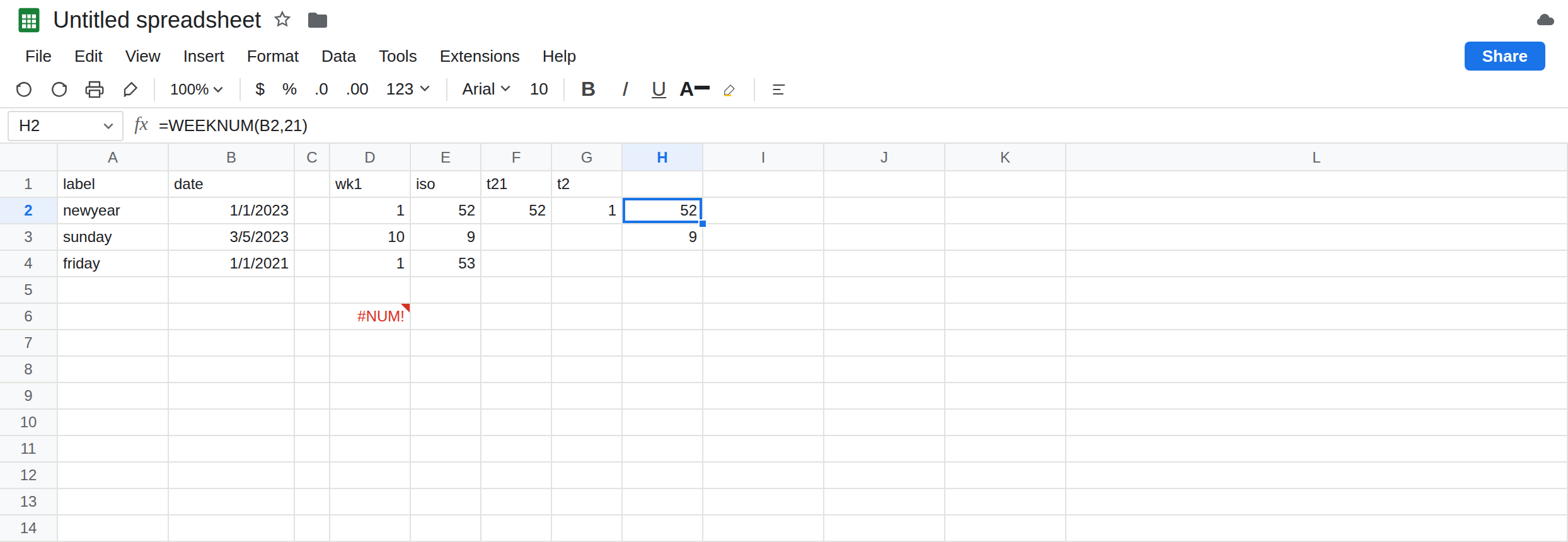
Type 21 matches ISO. Type 2 does not. In F1 type t21. In F2 enter =WEEKNUM(B2,21). F2 is 52, the same as E2. Type 21 is system 2: Monday start, week 1 contains the first Thursday. In G1 type t2. In G2 enter =WEEKNUM(B2,2). G2 is 1, not 52. Type 2 starts the week on Monday, but it is still system 1: the week that contains 1 January is week 1. Monday-start is not the ISO rule. Leave G2 next to F2 so that pair stays visible.
A January Friday in the previous ISO week. In E4 enter =ISOWEEKNUM(B4). E4 is 53. In D4 enter =WEEKNUM(B4,1). D4 is 1. 1 January 2021 falls in the ISO week that started Monday 28 December 2020. That Thursday is still in 2020, so the ISO number is 53 while system 1 still calls it week 1. YEAR(B4) is 2021 on both formulas. The week function does not return an ISO week-year. Gluing YEAR to ISOWEEKNUM prints 2021-W53 for a week that ISO treats as the end of 2020.
An illegal type. In D6 enter =WEEKNUM(B2,99). D6 is #NUM!. Type 99 is not in the table (1, 2, 11 through 17, 21). Leave D6 broken. The 1 versus 52 on D2 and E2 is not #NUM!. See WEEKDAY type for the same token on WEEKDAY.
Leave D2 as 1 and E2 as 52. Leave G2 as 1. Leave D6 as #NUM!.
What is actually wrong
Section titled “What is actually wrong”- System 1 numbers the week that contains 1 January as week 1. Types
1and17start on Sunday. Types2and11start on Monday. Types12through16start on Tuesday through Saturday. Only type21is system 2. - System 2 and
ISOWEEKNUMuse Monday through Sunday, and week 1 contains the year’s first Thursday.WEEKNUM(date,21)matchesISOWEEKNUM.WEEKNUM(date,2)does not, even though both start on Monday. - A Sunday opens a type-
1week and closes an ISO week. 5 March 2023 is10versus9. At New Year the numbers are not adjacent:1versus52, or1versus53. YEARis the calendar year. ISO week 52 on 1 January can belong to the previous ISO year. GluingYEARto the week number does not recover that year. Type99is#NUM!and never picks a system.
This is not WORKDAY weekend code 99. See WORKDAY #NUM!. The dates here are built with DATE, not parsed from 1/3/2023. See DATEVALUE day order only for text dates.
Leave D2, E2, G2, and D6 on the sheet.
Pick one system and write it down. If the report is ISO, use ISOWEEKNUM or WEEKNUM(date,21) everywhere, including the header. In H2 enter =WEEKNUM(B2,21). H2 is 52, matching E2. In H3 enter =WEEKNUM(B3,21). H3 is 9, matching E3. Do not leave one column on type 1 and the next on ISOWEEKNUM.
If the business week starts on Sunday, keep type 1 and do not call the column ISO. D2’s 1 is correct for that rule. The bug is comparing it to E2.
Do not prefix the ISO week with YEAR alone. E4 is week 53 while YEAR(B4) is 2021. A January chart that jumps from week 1 to week 52 is this mismatch, not a missing row.
Do not wrap E2 in IFERROR. There is no error. See IFERROR vs IFNA. Changing File → Settings → Locale does not switch system 1 to ISO.
If two week columns differ by one on a Sunday, check type 1 against ISOWEEKNUM. If they differ in the first week of January (1 against 52 or 53), you are on system 1 versus system 2. If the cell is #NUM!, the type is not in the list. If the date itself is #VALUE!, stop and fix the date before you touch the type.
System 1 vs type 21 vs an illegal type
Section titled “System 1 vs type 21 vs an illegal type”WEEKNUM type 1 on 1 January 2023 is 1. ISOWEEKNUM and type 21 are 52. Type 2 is still 1. On 5 March 2023, type 1 is 10 and ISO is 9. On 1 January 2021, ISO is 53. Type 99 is #NUM!.