

Fix SCAN / REDUCE LAMBDA shape errors in Google Sheets
Updated
SCAN(initial, array, LAMBDA(acc, value, …)) walks a list, feeding each result into the next call, and spills every intermediate accumulator. REDUCE uses the same lambda shape but returns one final value. The lambda must return a scalar (or a consistent accumulator Sheets accepts). Returning {acc, value}, a SPLIT, or a row is nested-array refusal (#N/A / #VALUE!, Single value expected). Two names are required (acc and the item). One name is Wrong number of arguments to LAMBDA.
This page is SCAN / REDUCE accumulator shape. It is not BYROW / MAP LAMBDA (BYROW is one scalar per row, no running total). It is not ARRAYFORMULA empty 0. Keep the Google Sheets UI in English. Helper names stay English: LAMBDA, SCAN, REDUCE.
Recreate it on a blank sheet
Section titled “Recreate it on a blank sheet”- Open a blank spreadsheet. In A1 type
hours. A22. A33. A41. Three shifts.
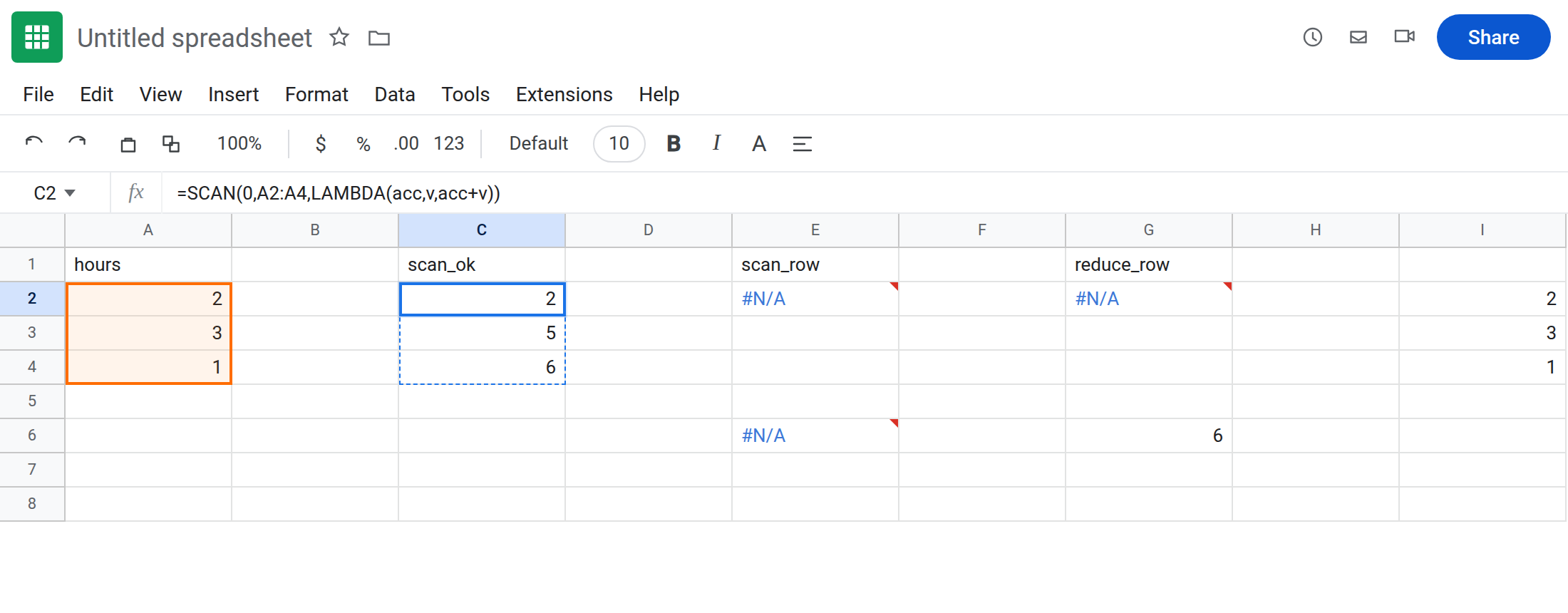
Working SCAN (running total). In C1 type scan_ok. Leave C2:C4 empty. In C2 enter =SCAN(0,A2:A4,LAMBDA(acc,v,acc+v)). The formula spills 2, 5, 6. That block is the control: one number per step.
SCAN lambda returning a row. In E1 type scan_row. In E2 enter =SCAN(0,A2:A4,LAMBDA(acc,v,{acc,v})). The cell errors (#N/A / #VALUE!). Tooltip: Single value expected. Nested array results are not supported. {acc,v} is two cells. Leave E2 broken.
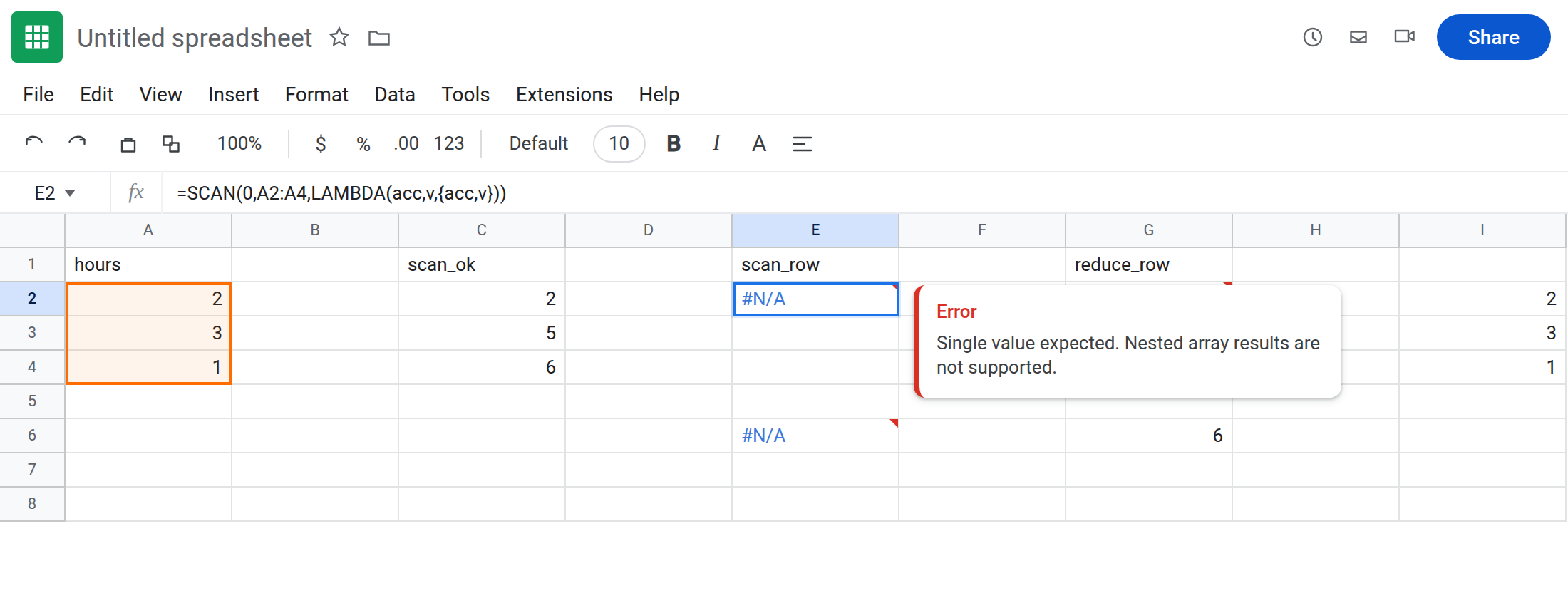
Wrong number of LAMBDA names. In E6 enter =SCAN(0,A2:A4,LAMBDA(acc,acc+1)). One name, two inputs (acc and each v). Tooltip: Wrong number of arguments to LAMBDA. Leave E6 broken.
REDUCE returning an array. In G1 type reduce_row. In G2 enter =REDUCE(0,A2:A4,LAMBDA(acc,v,{acc,v})). Same nested-array error as E2, but REDUCE would have been a single cell even when legal. Leave G2 broken.
Working REDUCE. In G6 enter =REDUCE(0,A2:A4,LAMBDA(acc,v,acc+v)). The cell shows 6 (total hours). One value. Not a spill of running totals.
BYROW contrast. In I2 enter =BYROW(A2:A4,LAMBDA(row,SUM(row))). Spills 2, 3, 1 — per row, not a running sum. That page is BYROW / MAP LAMBDA. Leave I2 as contrast. Do not return row from BYROW here either.
Leave E2, E6, and G2 broken. Leave C2 as running totals. Leave G6 as 6.
What is actually wrong
Section titled “What is actually wrong”SCAN/REDUCElambdas are(accumulator, this_element) → next_accumulator. The return is one value.{acc,v}is two.SPLITis N. Nested arrays are not supported — same sentence asBYROWreturning a row, different function.LAMBDAneeds one name per input.SCANalways has two (unless you wrap extra closed-over names inside the body, not as extraLAMBDAparameters for the array walk). Droppingvis E6.SCANspills n results for n inputs. Occupied cells under C2:C4 would be#REF!overwrite, not Single value expected. See SORT / UNIQUE spill for occupancy. E2 failed before it could spill.REDUCEdoes not spill intermediates. If you needed the running column, that isSCAN, notREDUCEwrapped inIFERROR.MAP/BYROWdo not take an initial0. PassingSCAN-styleaccintoBYROWis the wrong helper.
This is not MAKEARRAY / MAP size mismatch. See BYROW / MAP LAMBDA.
This is not TEXTJOIN per row. See TEXTJOIN spill / delim.
Leave E2, E6, and G2 broken.
Return one accumulator. Keep C2: =SCAN(0,A2:A4,LAMBDA(acc,v,acc+v)). Keep G6 for the total only.
Need two outputs per step? Do not return {total, v} from SCAN. Use two SCANs, or HSTACK of SCAN and the source column: =HSTACK(A2:A4,SCAN(0,A2:A4,LAMBDA(acc,v,acc+v))) on empty cells. Pad #N/A on uneven stacks is HSTACK / VSTACK pad.
Two LAMBDA names. E6 becomes LAMBDA(acc,v,acc+v) — you can ignore v in the body (acc+1) but the name must still be there if SCAN passes it.
Do not wrap E2 in IFERROR. You still have no running total. See IFERROR vs IFNA.
If the tooltip is Single value expected, the lambda spilled. If it is Wrong number of arguments to LAMBDA, add the v name. If you got 2,3,1 instead of 2,5,6, you used BYROW, not SCAN.
SCAN vs REDUCE vs BYROW
Section titled “SCAN vs REDUCE vs BYROW”SCAN → running accumulator, n cells (C2).
REDUCE → final accumulator, one cell (G6).
BYROW → one scalar per row, no acc (I2). Nested row return on BYROW is BYROW / MAP LAMBDA. Nested {acc,v} on SCAN is this page. Same tooltip family. Read the function name, then count lambda names (acc,v vs row).