

MATCH exact mode still treats * as a wildcard unless you escape it with ~
Updated
MATCH(key, range, 0) is the exact search type, and it still reads * as “any characters,” ? as “one character,” and ~ as the escape. A key you type as ~* does not mean the two characters tilde and star. The tilde escapes the star, so the pattern is “a literal star.” It finds a cell whose text is *. It misses a cell whose text is ~*. The pattern people write next, ~~*, escapes the tilde and then leaves * as a wildcard, so it matches any key that starts with a tilde. The pattern for the two literal characters tilde and star is ~~~*: an escaped tilde, then an escaped star.
The same three characters in COUNTIF are COUNTIF literal * ?. XMATCH only wildcards when match_mode is 2. See XMATCH wildcards. VLOOKUP wildcards are VLOOKUP wildcards. Keep the Google Sheets UI in English. Sheet Error is an independent formula-error library, not a Google product.
Recreate it on a blank sheet
Section titled “Recreate it on a blank sheet”- Open a blank spreadsheet. In A1 type
sku. In A2 type a single*. In A3 type~A(tilde, then A). In A4 type~*(tilde, then star). Three keys. A2 is a star. A4 is a tilde and a star. They are not the same text.=A2=A4is FALSE.
A star with nothing in front of it. In C1 type star. In C2 enter =MATCH("~*",A2:A4,0). C2 is 1. The pattern ~* is “literal star.” Row 1 of the range is A2. A4 was not considered as the two-character key. There is no #N/A. Leave C2 as 1.
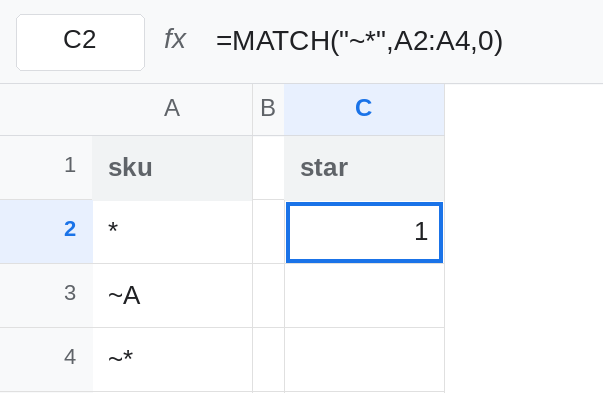
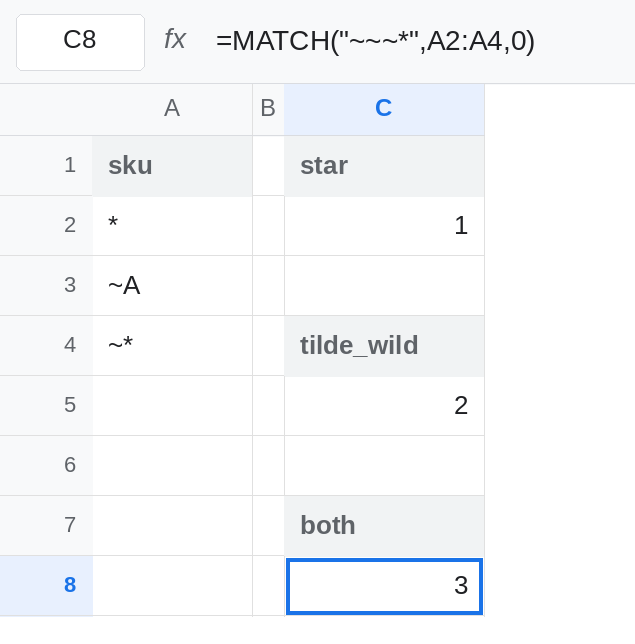
One tilde in front of a star is not “both characters literal.” In C4 type tilde_wild. In C5 enter =MATCH("~~*",A2:A4,0). C5 is 2, not 3. ~~ is one literal tilde. The * after it is still “any characters,” and it may be the single character A. A3 (~A) matches and sits above A4. MATCH returns the first hit. A4 would also match ~~*, and it never gets a turn. Leave C5 as 2. This is the easy miss: the pattern looks escaped, and it found the wrong tilde row.
Both characters literal. In C7 type both. In C8 enter =MATCH("~~~*",A2:A4,0). C8 is 3. ~~ is a literal tilde. ~* is a literal star. Together they are the text in A4 and not the text in A3. Leave C8 as 3.
search_type 1 does not use this escape the same way. In C10 enter =MATCH("~*",A2:A4,1). Search type 1 is approximate, on a range it assumes is sorted ascending. Wildcard escaping is a search-type 0 rule. C10 is not the position C8 found, and it may be #N/A. Do not use it to test tildes. Approximate MATCH on unsorted keys is MATCH approx unsorted. Leave C10 as whatever it returned and do not treat it as the sku position.
The key lives in a cell. In E1 type wanted. In E2 type ~*. In E4 enter =MATCH(E2,A2:A4,0). E4 is 1, the same as C2. The cell does not turn the star into a literal. You still have to build the escapes. Leave E4 as 1.
Leave C2 as 1, C5 as 2, and C8 as 3.
What is actually wrong
Section titled “What is actually wrong”- Exact
MATCHis not “the characters I typed.”*and?are patterns unless a tilde escapes them. C2 finds A2. - A tilde consumes the next character only. In
~~*, the first tilde escapes the second tilde, and the star is free. The pattern means “starts with ~.” A3 wins because it is first. C5. - A literal tilde and a literal star is three tildes in the pattern plus the star:
~~~*. C8. Counting tildes in the formula bar is the whole debug. - Putting the unescaped text in a cell changes nothing. E4. Escape when you build the criterion:
=MATCH(SUBSTITUTE(SUBSTITUTE(E2,"~","~~"),"*","~*"),A2:A4,0)doubles tildes first, then escapes stars, and that call returns3for the text~*sitting in E2. Do the tilde substitution first. If you escape stars first, the tilde you just inserted gets doubled on the next pass. - Search type
0is required for this pattern. Search type1is a different function behavior. C10.
This is not XMATCH in the default mode. Default XMATCH is exact and does not treat * as a wildcard. A literal star there needs match_mode 2 before the tilde rules apply. See XMATCH wildcards. MATCH with 0 is already in wildcard mode.
Leave C2 and C5 in place. They are the two wrong patterns.
Literal two-character key. Keep C8: =MATCH("~~~*",A2:A4,0). The position is 3, which is A4.
Literal star only. C2 is already that search. Use it when the sku is * and not ~*. The pattern is ~*, one tilde.
From a cell, escape in order. In E6 enter =MATCH(SUBSTITUTE(SUBSTITUTE(E2,"~","~~"),"*","~*"),A2:A4,0). E2 holds ~*. E6 is 3. The inner SUBSTITUTE doubles the tilde. The outer one escapes the star. Reversing those two SUBSTITUTE calls escapes the star, then doubles the tilde you added, and the pattern is wrong again.
Do not switch to search type 1 to avoid learning the tilde. You lose exactness. See MATCH type -1 for the descending cousin of approximate MATCH. If C5 returns a row whose text merely starts with ~, the last * in the pattern is still a wildcard. Add one more tilde in front of that star.