

IMPORTRANGE returns #REF! after the source tab is renamed
Updated
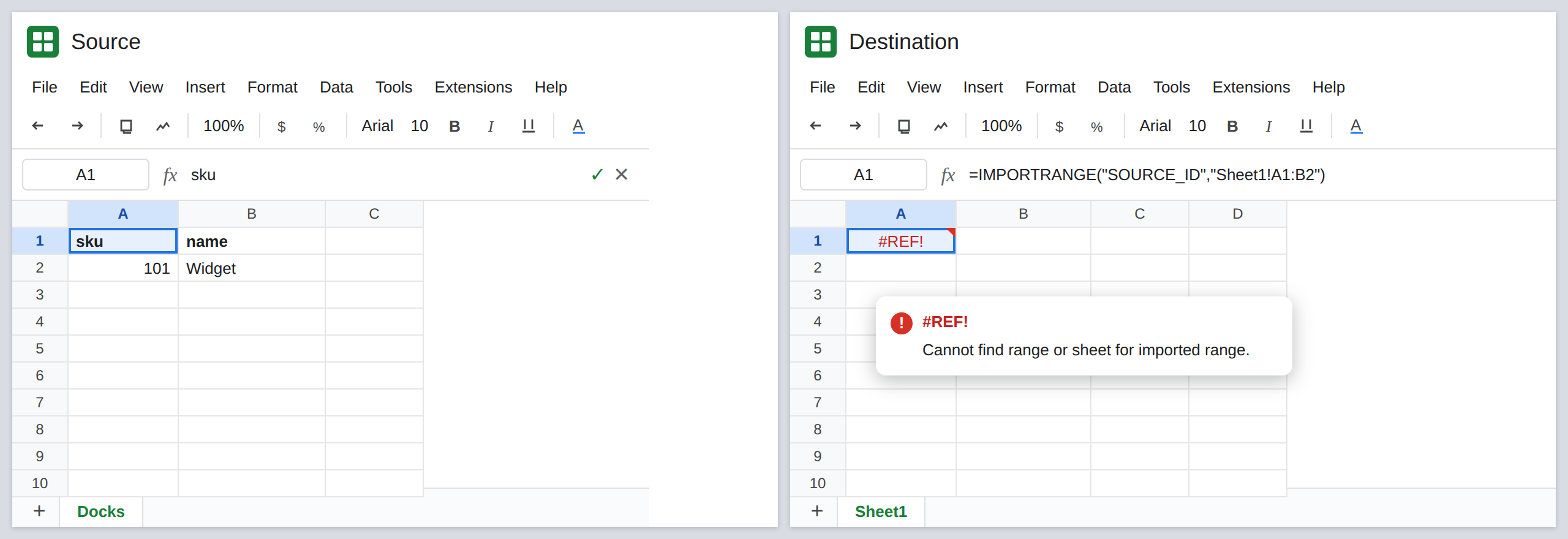
IMPORTRANGE looks up the second argument as text. "Sheet1!A1:B2" means a tab that is still named Sheet1. Rename that tab on the source and the destination cell is #REF!. The formula bar still shows the old name. The values did not move. The tab label did. Sheets does not rewrite the string inside the quotes.
This page is that A1 string. A named range that broke because the name changed is IMPORTRANGE named range. Access removed later is IMPORTRANGE permission revoked. The first Allow access click is IMPORTRANGE access. Keep the Google Sheets UI in English.
Recreate it on a blank sheet
Section titled “Recreate it on a blank sheet”- You need two spreadsheets. On the source, A1
sku, B1name, A2101, B2Widget. Leave the tab namedSheet1. Copy the id from the URL (between/d/and/edit).
A pull that already works. On the destination, A1 enter =IMPORTRANGE("SOURCE_ID","Sheet1!A1:B2") with that id. If the tooltip says You need to connect these sheets, click Allow access once and wait until sku / 101 spill. That spill is the control. If you have never connected these files, finish IMPORTRANGE access first. This page starts after the spill is real.
Rename the tab, not the cells. On the source, double-click the Sheet1 tab and name it Docks. Do not edit A1:B2. Return to the destination and reload if it does not update. A1 is #REF!. The tooltip says the range or sheet cannot be found (Cannot find range or sheet for imported range). The formula bar still shows "Sheet1!A1:B2". There is no second Allow access button. Leave A1 broken.
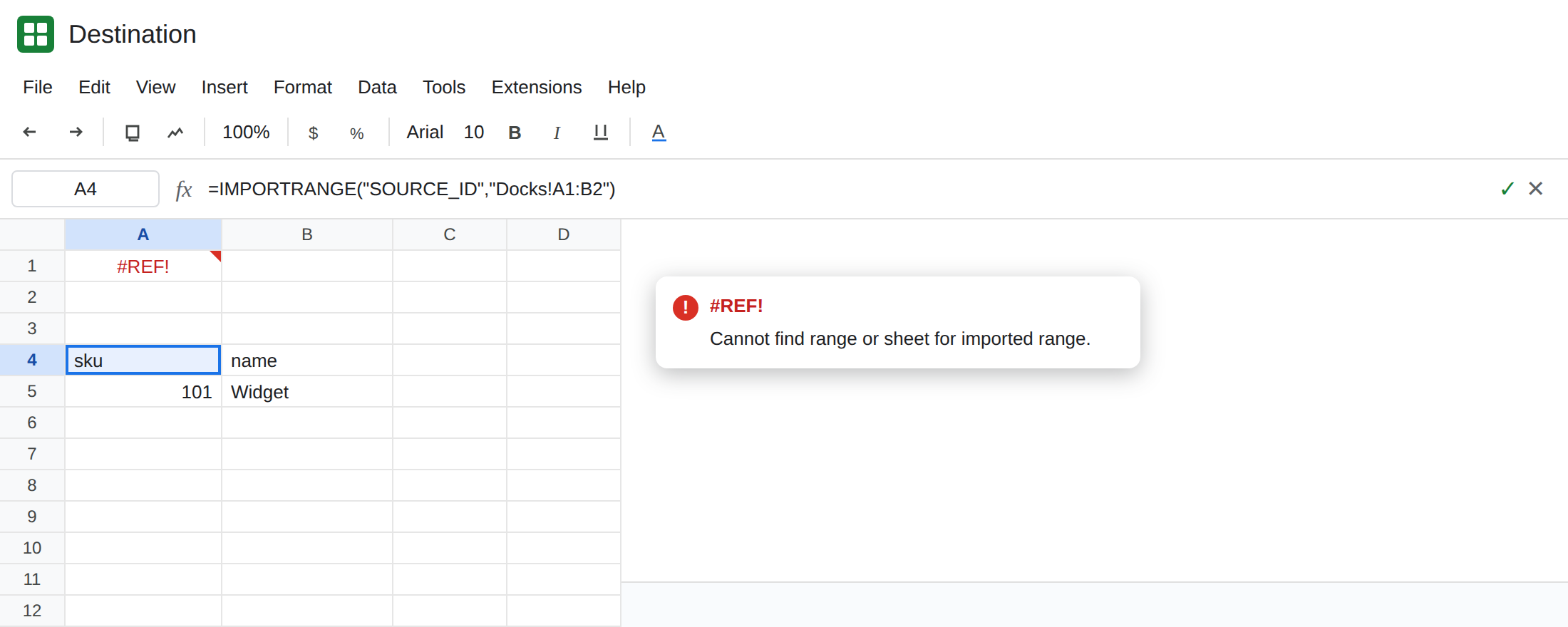
The new tab name works. In A4 enter =IMPORTRANGE("SOURCE_ID","Docks!A1:B2"). The pair is already connected, so there is no second prompt. A4 spills sku / 101. That cell is the repaired control. Leave A1 on the old name.
A space in the new name. If you rename the tab to Dock List, the string is "'Dock List'!A1:B2". The single quotes sit inside the double-quoted argument, around the tab name only. Dock List!A1:B2 without those inner quotes is also #REF!. The space is part of the name.
A named range does not fail this edit. On the source, select A1:B2, Data → Named ranges, name DockPrices. In C1 enter =IMPORTRANGE("SOURCE_ID","DockPrices"). C1 spills even though the tab is Docks, not Sheet1. The name follows the cells. Renaming the name is the other page. Leave C1 as that contrast if you created it.
Permission is a different sentence. If the tooltip says you do not have permission, or You need to connect these sheets, stop. Renaming a tab does not remove Share. That is IMPORTRANGE permission revoked or the first connect.
Leave A1 broken on Sheet1. Leave A4 spilling from Docks.
What is actually wrong
Section titled “What is actually wrong”- The second argument is text. Sheets does not treat it as a live reference, so a tab rename on the source does not flow into the destination formula.
"Sheet1!A1:B2"and"Docks!A1:B2"are different lookups. - The id can still be perfect. Opening the source URL in this browser still shows Widget. The failure is the tab token, not the file.
- A typo (
Sheet1versussheet1, or a trailing space in the tab name) is the same#REF!as a rename. Tab names are matched as text. - A named range survives the tab rename because the name stores the range.
"DockPrices"never containedSheet1. See IMPORTRANGE named range. - Deleting the tab is the same missing-sheet tooltip. Renaming it back, or pointing the string at the tab that exists, is the repair. Restoring a deleted tab from version history is a different edit.
This is not Result too large. A1:B2 is small. See IMPORTRANGE too large.
Leave A1 as the stale tab name so the #REF! stays visible.
Put the current tab name in the string. Keep A4: =IMPORTRANGE("SOURCE_ID","Docks!A1:B2"). Or edit A1 after you have seen the error. On the source, read the tab label at the bottom. Copy it. If the label contains a space or an apostrophe, wrap the tab portion in single quotes inside the range string.
Prefer a named range when editors rename tabs. If the rectangle stays A1:B2 and the tab label moves, "DockPrices" is the stable string. If editors rename the named range and never rename the tab, the A1 string is the stable one. Pick the token your editors do not change.
Do not wrap A1 in IFERROR. A rename and a permission failure would both look blank. See IFERROR vs IFNA. IFNA does not catch #REF!.
If A1 is #REF! and the second argument contains !, open the source and read the tab name. Update the string. If the second argument is a single word, you are on the named-range page, not this one.