

WORKDAY.INTL weekend strings start on Monday, and holidays skip workdays
Updated
WORKDAY.INTL(start, num_days, weekend, holidays) returns a date, not a count. The weekend is a code or a seven-character string. The string is Monday first: 1 means weekend, 0 means work. "0000011" is Saturday and Sunday, the same as code 1. A string written Sunday-first ("1100000") marks Monday and Tuesday off and returns a different date with no error. Holidays that fall on a workday move the result. Holidays that fall on a day the weekend already removed do not. Code 99 and other illegal codes are #NUM! on WORKDAY #NUM!. The matching count, not a date, is NETWORKDAYS.INTL weekend.
Keep the Google Sheets UI in English. Format the result as Date. Sheet Error is an independent formula-error library, not a Google product.
Recreate it on a blank sheet
Section titled “Recreate it on a blank sheet”- Open a blank spreadsheet. In A1 type
start. In A2 enter=DATE(2024,6,3)(a Monday). B1days. B210. C1holiday.
Code 1, the default weekend. In E1 type code1. In E2 enter =WORKDAY.INTL(A2,B2,1). Ten working days after Monday 3 June 2024, Saturday and Sunday off, no holidays. E2 is 6/17/2024. Format E2 as Date. =WORKDAY(A2,B2) is the same date. Code 1 is Sat+Sun. That cell is the control.
The string that matches code 1. In E4 type string. In E5 enter =WORKDAY.INTL(A2,B2,"0000011"). Seven characters, Monday through Sunday. The two 1s are Saturday and Sunday. E5 is 6/17/2024, the same as E2.
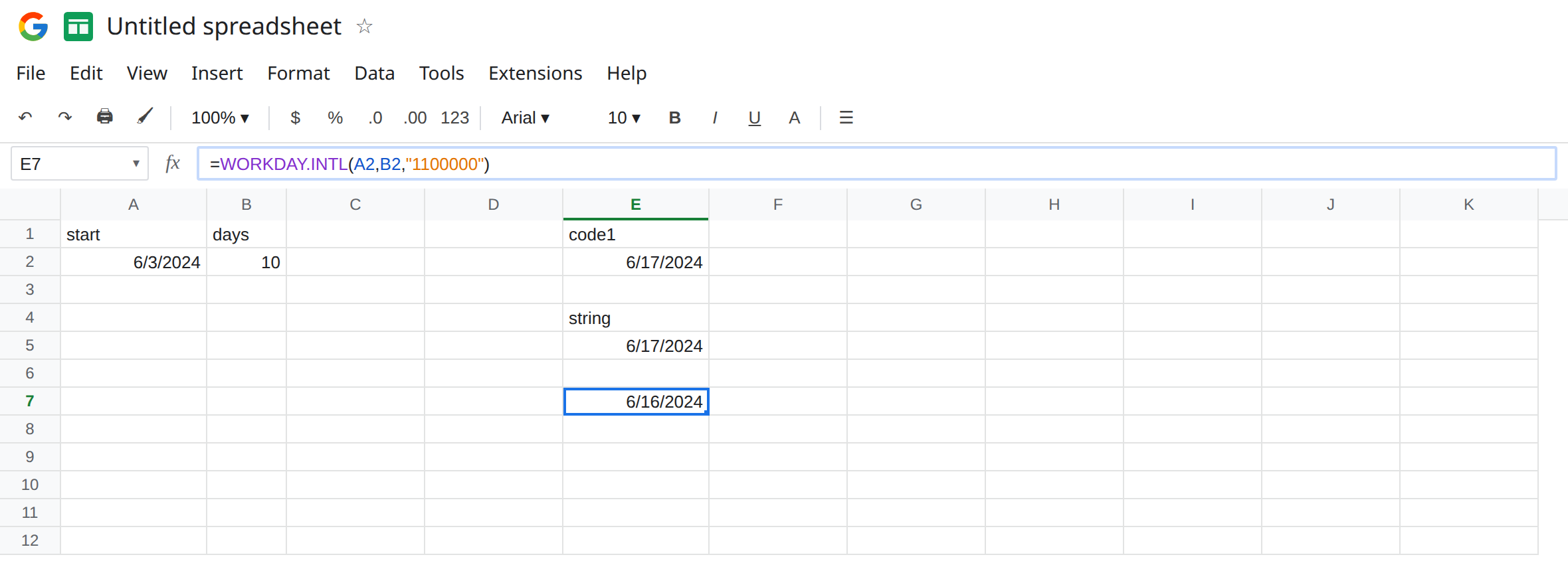
A Sunday-first string. In E7 enter =WORKDAY.INTL(A2,B2,"1100000"). If you listed the week as Sunday, Monday, Tuesday… and typed 11 at the front, you did not mark Saturday and Sunday. You marked Monday and Tuesday, because the first character is Monday. E7 is 6/16/2024. No triangle. The date is simply one day earlier than E2, and the days off are the wrong days. Leave E7 as that date.
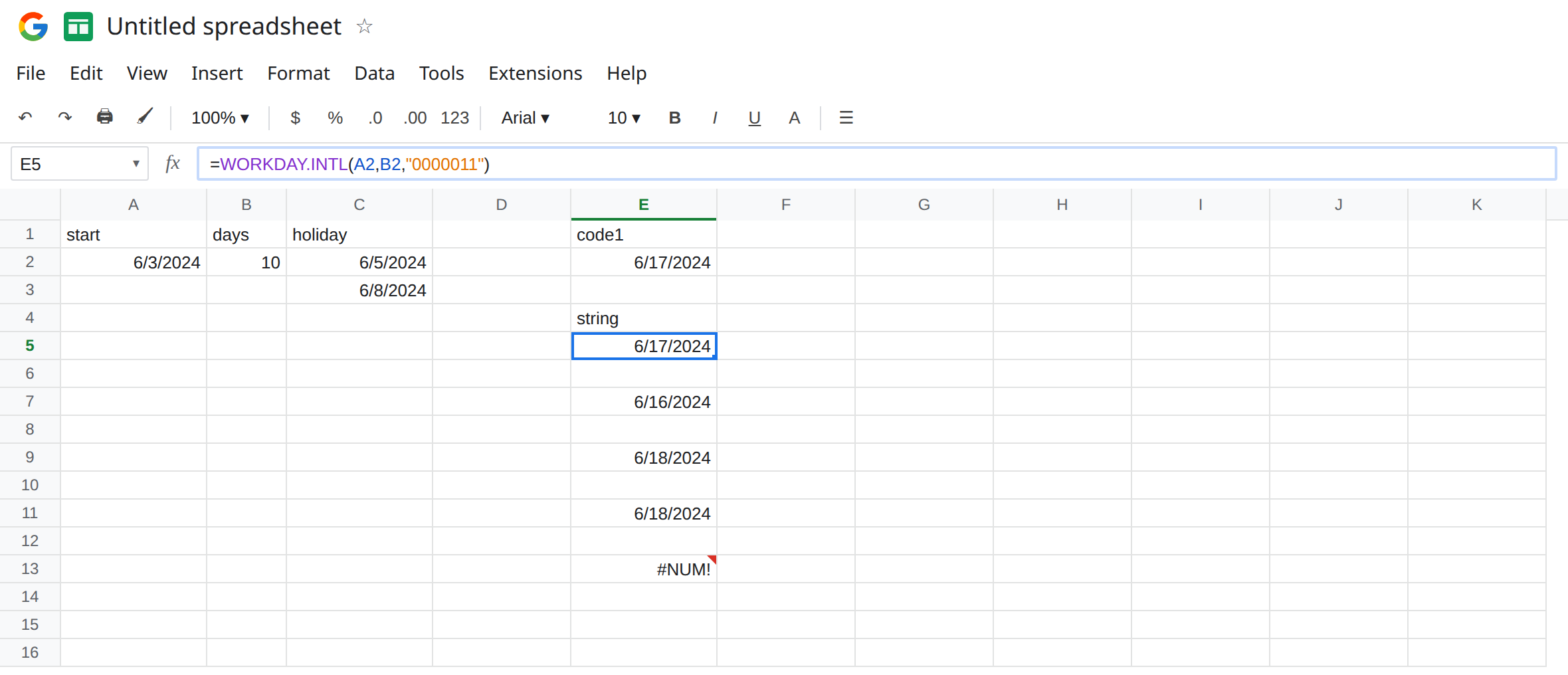
A workday holiday moves the date. In C2 enter =DATE(2024,6,5) (Wednesday). In E9 enter =WORKDAY.INTL(A2,B2,"0000011",C2). Wednesday is a workday under Sat+Sun, so the ten workdays take one extra calendar step. E9 is 6/18/2024. One holiday, one day later than E5.
A weekend holiday does not. In C3 enter =DATE(2024,6,8) (Saturday). In E11 enter =WORKDAY.INTL(A2,B2,"0000011",C2:C3). Saturday is already off. Adding it to the holiday list does not skip another day. E11 is 6/18/2024, the same as E9, not 6/19/2024. People who “add Saturday just in case” and then debug a one-day miss are often looking at a workday holiday and a weekend holiday as if both counted.
Illegal string, so the quiet miss has a neighbor that errors. In E13 enter =WORKDAY.INTL(A2,B2,"000001"). Six characters. #NUM!. In E14 enter =WORKDAY.INTL(A2,B2,"0000000"). No weekend bit. #NUM!. Code 99 is the other page. Leave E13 and E14 broken. E7 is not #NUM!. It is the wrong week.
Leave E7 as 6/16/2024. Leave E13 as #NUM!. Leave E2 and E5 as 6/17/2024.
What is actually wrong
Section titled “What is actually wrong”- Codes:
1Sat+Sun,2Sun+Mon,3Mon+Tue,4Tue+Wed,5Wed+Thu,6Thu+Fri,7Fri+Sat, then11Sunday only through17Saturday only."0000011"equals code1."0000001"equals Sunday only (code11). The string does not rotate when the spreadsheet locale displays weeks starting on Sunday. "1100000"is a legal string, so there is no tooltip. Compare it to E2 before you ship a schedule. The count of working days between two dates with that same string is NETWORKDAYS.INTL weekend. This function returns the end date.- Holidays are extra days off, unioned with the weekend, not added on top of a day that is already off. A holiday list that includes Saturdays will not move E5 until one of those dates is a workday under the weekend you chose.
- Holiday text is
#VALUE!. A serial that cannot be a date is#NUM!, covered on WORKDAY #NUM!. C2 and C3 areDATEresults.ISNUMBERis TRUE. num_dayscounts workdays after the start. It does not count the start unless the start is not itself a workday you still need to include. Changing the weekend changes which dates get counted. E7 and E2 use the same10and land on different days.
This is not WEEKDAY type 1 versus 2. See WEEKDAY type. That function numbers a single date. It does not skip ahead 10 workdays.
This is not DATEDIF. See DATEDIF MD / YM / YD.
Leave E7, E13, and E14 on the sheet.
Use code 1 or the Monday-first string. Keep E2 and E5. For Friday and Saturday off, the string is "0000110" or the code 7. Write the seven bits in a cell comment or a header: Mon Tue Wed Thu Fri Sat Sun, so the next edit does not start the string on Sunday.
List holidays that are real days off. Keep C2 if 5 June is a holiday. Drop C3 if Saturday is already a weekend under "0000011". Pass C2 or C2:C3 as the last argument only after the weekend string is the one you meant. A correct holiday list will not repair "1100000".
Do not wrap E13 in IFERROR and fall back to WORKDAY, which always uses Sat+Sun. You would hide a bad string and also ignore a weekend you still need. See IFERROR vs IFNA.
If the date moved and the string starts with 1, you marked Monday off. If a holiday did not move the date, that holiday is already outside the workweek. If the cell is #NUM!, the string is not seven 0/1 characters with at least one 1, or the code is outside 1–7 and 11–17.
Codes, strings, holidays
Section titled “Codes, strings, holidays”Start Monday 3 June 2024 plus 10 workdays. Code 1 and "0000011" → 17 June. "1100000" → 16 June, no error. Holiday Wednesday 5 June → 18 June. Adding Saturday 8 June does not move 18 June again. Six-character strings and "0000000" are #NUM!. Code 99 is WORKDAY #NUM!. The day count between two dates is NETWORKDAYS.INTL, not this function.