

XMATCH match_mode 2 treats * and ? as wildcards
Updated
XMATCH(key, range, match_mode, search_mode) uses the third argument as match_mode. 0 is exact, and it is the default. 2 is wildcard: * is any run of characters, ? is one character. A sku that really contains a star, looked up in mode 2, hits an earlier prefix or returns #N/A instead of the literal row. The fourth argument is search_mode. A 2 in that slot is binary search, not wildcards.
Binary search on an unsorted list is XMATCH #N/A. The same wildcard codes on XLOOKUP are XLOOKUP match_mode. COUNTIF uses the same * ? ~ rules on a criterion. See COUNTIF literal * ?. Keep the Google Sheets UI in English. Sheet Error is an independent formula-error library, not a Google product.
Recreate it on a blank sheet
Section titled “Recreate it on a blank sheet”- Open a blank spreadsheet. In A1 type
sku. A2N12. A3N120. A4N12*. The fourth sku is the characters N, 1, 2, and a star. In D1 typekey. D2N12*. D3N12?.
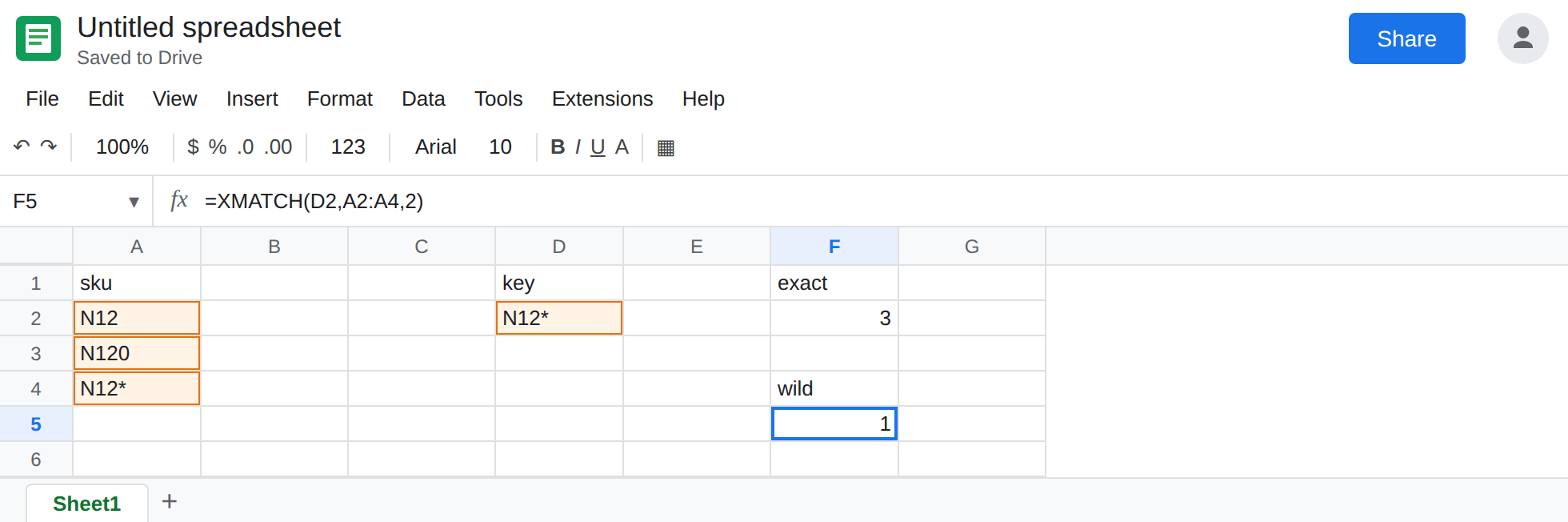
Exact, the default. In F1 type exact. In F2 enter =XMATCH(D2,A2:A4). The cell shows 3. Mode 0 looks for the sku whose text is exactly N12*. The star is a character. A2 is not that sku. F2 is the control.
Wildcard mode. In F4 type wild. In F5 enter =XMATCH(D2,A2:A4,2). The third argument is 2. The cell shows 1, not 3. The pattern N12* means “N12, then anything,” and * may be empty, so A2 matches and is first. The literal star in A4 never gets a turn. Leave F5 as 1.
A question mark. In A5 type N12?. In F7 enter =XMATCH(D3,A2:A5). Exact mode returns 4 (A5 is the fourth cell of A2:A5). In F8 enter =XMATCH(D3,A2:A5,2). Mode 2 treats ? as one character. N12? matches N120 (the 0 fills the question mark) before it matches a literal ?. F8 is 2, the position of N120, not 4. Leave F8 as 2.
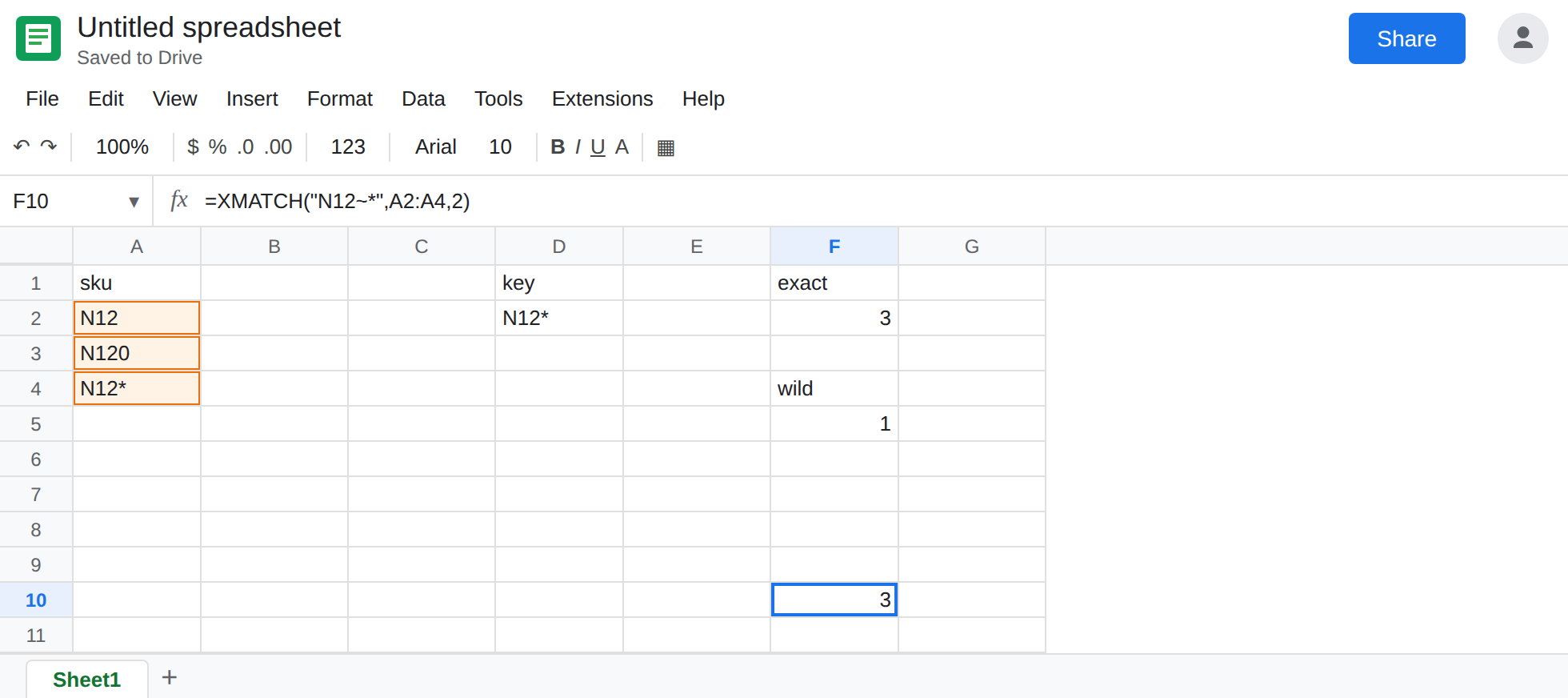
Escape. In F10 enter =XMATCH("N12~*",A2:A4,2). The tilde escapes the star. The cell shows 3, the literal sku, even though mode is 2. "N12~?" is the escape for a literal question mark.
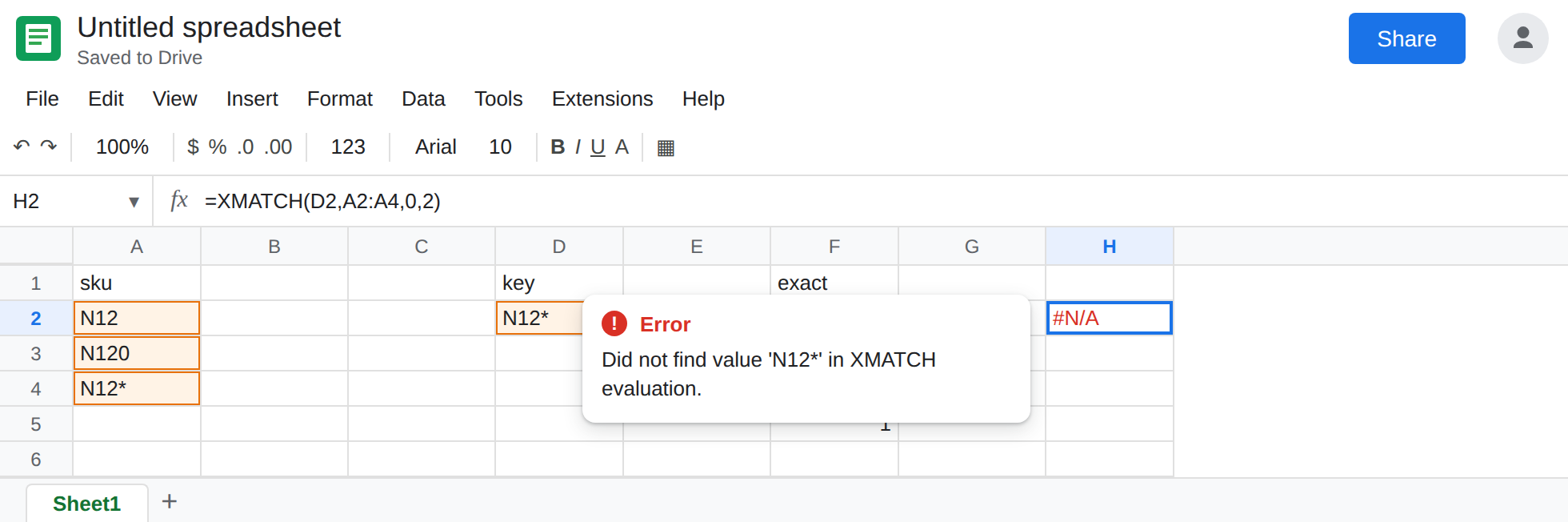
Not the fourth argument. In H2 enter =XMATCH(D2,A2:A4,0,2). The 2 is search_mode, binary search, with exact match_mode. A2:A4 is not a sorted list of plain text in the way binary search requires. H2 is #N/A or a position that is not the exact 3 you have in F2. That failure is XMATCH #N/A. Leave H2 as the contrast. Do not “fix” F5 by moving the 2 one comma to the right.
Leave F5 as 1 and F8 as 2. Leave F2 as 3.
What is actually wrong
Section titled “What is actually wrong”- Argument order is the whole bug. Third slot: how to compare. Fourth slot: where to start and whether the search is binary. F5 and H2 both contain a
2. They are not the same setting. - In mode
2,*and?are not data. A catalog that uses them as punctuation will silently hit a shorter sku. F5 returns a position, soINDEXon that position returns the wrong row with no#N/A. - Mode
2can also be#N/Awhen nothing matches the pattern. That tooltip looks like a missing key. F2 already proved the literal sku is present. If mode2is#N/Aand mode0is a number, the pattern is the problem. ~escapes the next wildcard character.~*is a star.~?is a question mark.~~is a tilde. The escape is part of the key you pass, not a fourth argument.- Mode
1and-1are next-larger and next-smaller, and they want a sorted range. They are not wildcards. ApproximateMATCHon unsorted keys is MATCH approx unsorted. This page stays on mode2.
This is not XLOOKUP returning a price. XLOOKUP with match_mode 2 uses the same wildcard rules and returns a value from another column. See XLOOKUP match_mode. XMATCH returns a position only.
Leave F5 and F8 as the wildcard hits.
Literal punctuation uses mode 0, or a tilde. Keep F2 for a star you mean as a star. Use F10 when you must stay in mode 2 because other keys in the same formula are real patterns.
Real patterns stay in mode 2. =XMATCH("N12*",A2:A4,2) is correct when you want the first sku that starts with N12. Read F5 as “first prefix,” not as a broken exact match. Put the star in the key on purpose, and keep the literal sku out of that search or accept that N12 wins.
Do not wrap F5 in IFNA. The position 1 is a successful match of a pattern. IFNA only helps when the cell is actually #N/A. See IFERROR vs IFNA.
If XMATCH finds a shorter sku and the key contains * or ?, look at the third argument. 2 there is wildcards. A 2 after another comma is binary search. Exact text, including a literal star, is the default third argument 0, or ~ in front of the punctuation.