

Fix SEQUENCE #REF! in Google Sheets (spill cannot expand)
Updated
SEQUENCE builds an array of numbers and spills it from the formula cell. #REF! here means a cell in that path already has a value (or the grid cannot grow). The formula is fine. The spill cannot land. Nothing in SEQUENCE was deleted.
This page is a blocked SEQUENCE spill. It is not SORT / UNIQUE spill (SORT / UNIQUE of an existing list). It is not UNIQUE overwrite (the one-column UNIQUE / SORT overwrite primer). It is not after you delete (#REF! inside the formula text). Keep the Google Sheets UI in English.
Recreate it on a blank sheet
Section titled “Recreate it on a blank sheet”- Open a blank spreadsheet. In A1 type
bay. In A4 type the wordnote. Leave A2, A3, A5, and A6 empty. You are about to number six dock bays withSEQUENCE. A4 is a leftover comment in the way.
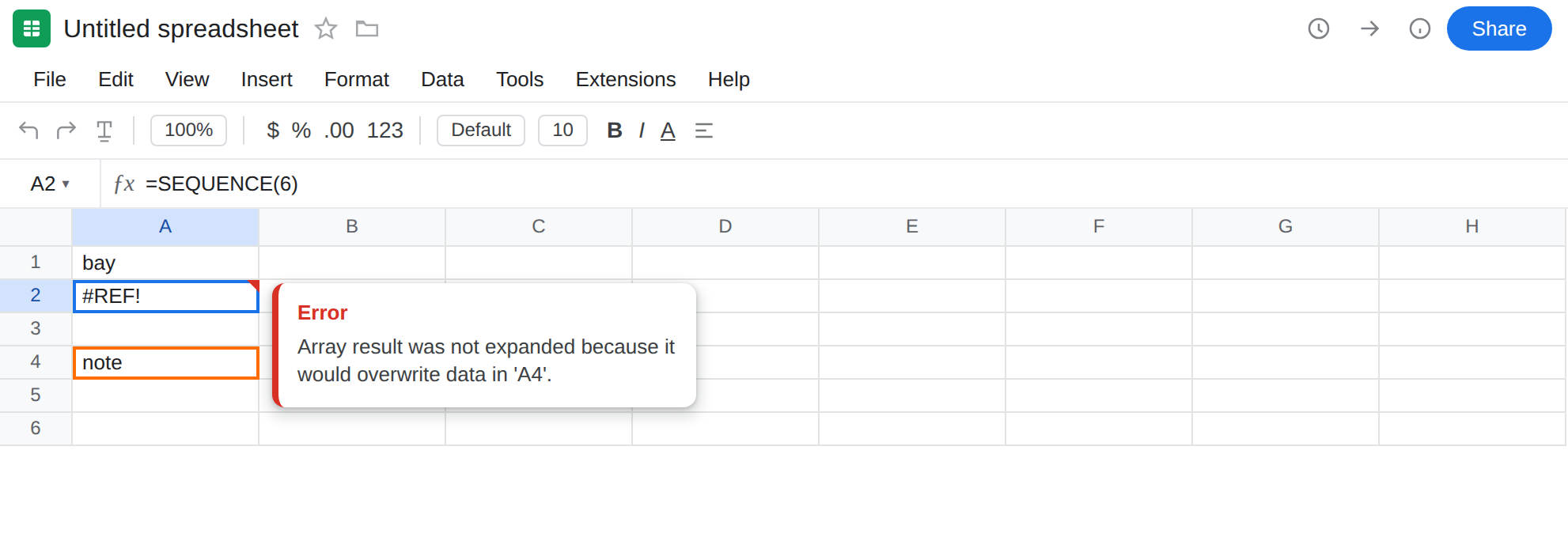
Blocked down. In A2 enter =SEQUENCE(6). The cell shows #REF!. The tooltip is Array result was not expanded because it would overwrite data in ‘A4’. SEQUENCE(6) needs A2:A7. A4 already holds note. Leave A2 broken.
A control on empty cells. In C1 type seq_ok. Leave C2:C5 empty. In C2 enter =SEQUENCE(4). The column spills 1, 2, 3, 4. Same function, clear path. That block is the control: SEQUENCE works when nothing sits in the spill.
Blocked to the right. In E1 type grid. In F3 type block. Leave E2, E3, E4, F2, and F4 empty. In E2 enter =SEQUENCE(3,2). The cell shows #REF!. A 3×2 sequence needs E2:F4. F3 already holds block. Leave E2 broken.
Leave A2 and E2 as the broken formulas. Leave C2 as the working 1–4.
Select A2 and read the formula bar. It is still =SEQUENCE(6). There is no #REF! token inside the formula. That is the tell versus a delete.
What is actually wrong
Section titled “What is actually wrong”SEQUENCE(rows, [columns], [start], [step])returns an array. Sheets writes every cell of that array starting at the formula. One occupied cell in the rectangle blocks the whole result. A2 stays#REF!.noteis not overwritten. There is no partial spill of1,2above the note.- A space, a note, or another formula counts as occupied. The cell has to be empty.
SEQUENCEdoes not care that A4’s text is unrelated to bay numbers. SEQUENCE(3,2)is two columns. A value in the second column of the spill (F3) is the same error on a different axis as A4 under a one-column fill.- The tooltip is Array result was not expanded because it would overwrite data in ’…’. It is not Circular dependency detected, not an out-of-range
INDEX, not You need to connect these sheets.
This is not SORT or UNIQUE of a fruit list. Those functions spill from data you already typed. See SORT / UNIQUE spill. A2 has no source column. It generates integers. Clearing A4 (or moving SEQUENCE) is the same kind of fix as that page, and a different formula.
This is not the UNIQUE overwrite primer. That recreate is UNIQUE blocked from below and SORT blocked to the right on sku/name. See UNIQUE overwrite. Do not change A2 to UNIQUE to “match the screenshot” on that page.
This is not a deleted cell. After a delete, the formula bar contains #REF! (=A1+#REF!). See after you delete. A2 still names SEQUENCE(6).
This is not INDEX past a range and not CHOOSE #VALUE!. SEQUENCE is not picking a position from a list. See INDEX past range.
Leave A2 and E2 broken so #REF! stays on the sheet. Leave C2 spilling 1–4.
Place SEQUENCE where it can spill. In K1 type bays. Leave K2:K7 empty. In K2 enter =SEQUENCE(6). The column spills 1 through 6. Do not put a label in K3.
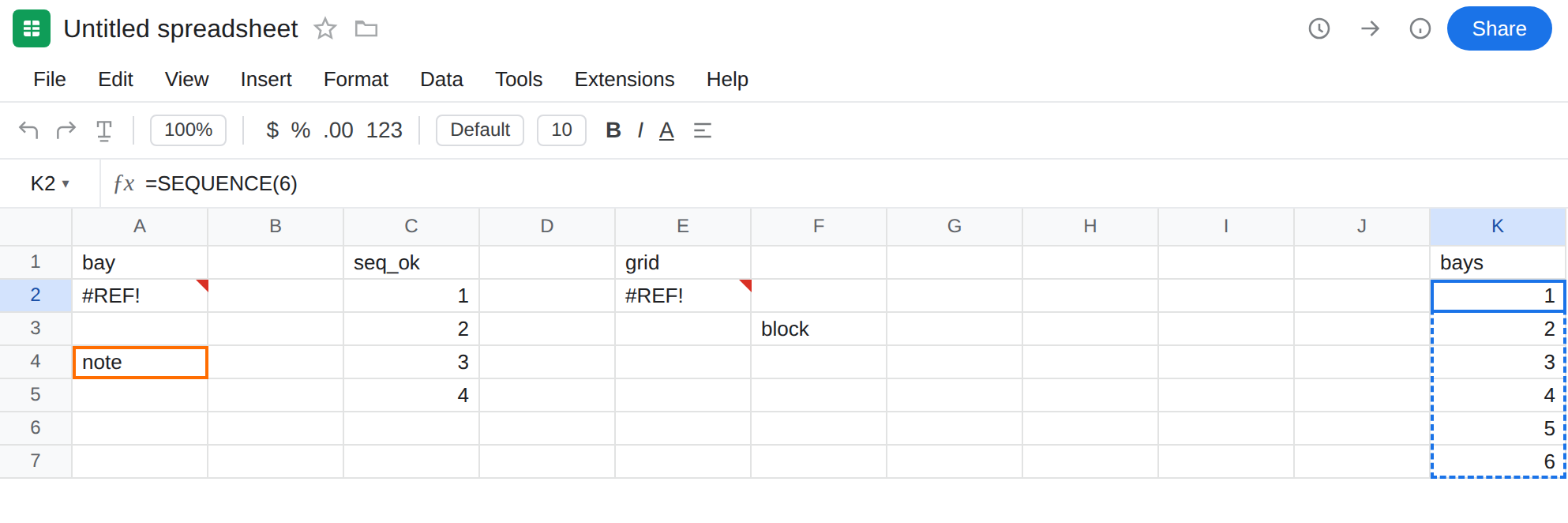
Clear the blockers if the formula must stay in A2. Delete the value in A4 — do not delete row 4 if other formulas depend on that row. A2 spills. Undo or retype note if you want the #REF! back. On this sheet, leave A4 filled so A2 stays #REF! next to K2.
Widen only the empty rectangle. For the 3×2 grid, leave F3 as block and put a working copy in M2: =SEQUENCE(3,2) with M2:N4 empty.
Do not wrap A2 in IFERROR. That prints a blank and never numbers the bays. See IFERROR vs IFNA. IFNA will not catch #REF!.
Do not replace SEQUENCE with SORT(A2:A7) or UNIQUE of a helper column to dodge the spill. Those functions still need an empty path, and they need source values SEQUENCE does not.
If SEQUENCE is #REF! and the formula still reads SEQUENCE with a real size, a cell in the spill is occupied (or you hit the edge of the sheet). Clear the path or move the formula. The generator is not the bug.
SEQUENCE is not SORT / UNIQUE
Section titled “SEQUENCE is not SORT / UNIQUE”SORT and UNIQUE rearrange values that already exist. Their #REF! is still a blocked spill — and that is why those primers exist — but the recreate starts with a list. See SORT / UNIQUE spill and UNIQUE overwrite.
SEQUENCE starts from a count. Dock 1–6 does not live in a source column until the spill succeeds. If you only needed 1, 2, 3, … n, keep SEQUENCE and give it empty cells. If the formula bar still shows SEQUENCE, this is the page. If it shows SORT or UNIQUE, use those pages. If #REF! is inside the formula text, you deleted a reference.