

PERCENTILE.EXC returns #NUM! at 0, at 1, and when it cannot interpolate
Updated
PERCENTILE.EXC(data, k) returns the value at percentile k, and k has to sit strictly between 0 and 1. 0 and 1 are #NUM!. On a short list, a k that looks ordinary can still be #NUM! because exclusive percentiles only interpolate inside a tighter window: for n numbers, k must lie between 1/(n+1) and n/(n+1). Five numbers cannot answer 0.15 or 0.9. PERCENTILE.INC and PERCENTILE include the ends. k of 0 is the minimum. k of 1 is the maximum. They are different functions. A sheet that swaps the suffix and keeps k will either throw #NUM! or quietly change the number.
#NUM! from a negative square root is out of domain. Keep the Google Sheets UI in English. Sheet Error is an independent formula-error library, not a Google product.
Recreate it on a blank sheet
Section titled “Recreate it on a blank sheet”- Open a blank spreadsheet. In A1 type
v. A215. A320. A435. A540. A650. Five numbers. The minimum is15. The maximum is50.
Ends that INC allows. In C1 type inc0. In C2 enter =PERCENTILE.INC(A2:A6,0). C2 is 15. In C3 enter =PERCENTILE.INC(A2:A6,1). C3 is 50. In C4 enter =PERCENTILE(A2:A6,0). C4 is 15. PERCENTILE matches INC. Those three cells are the control.
EXC at the same ends. In E1 type exc0. In E2 enter =PERCENTILE.EXC(A2:A6,0). E2 is #NUM!. In E3 enter =PERCENTILE.EXC(A2:A6,1). E3 is #NUM!. The tooltip is that the percentile must be greater than 0 and less than 1. Leave E2 and E3 broken. The data did not change. The function did.
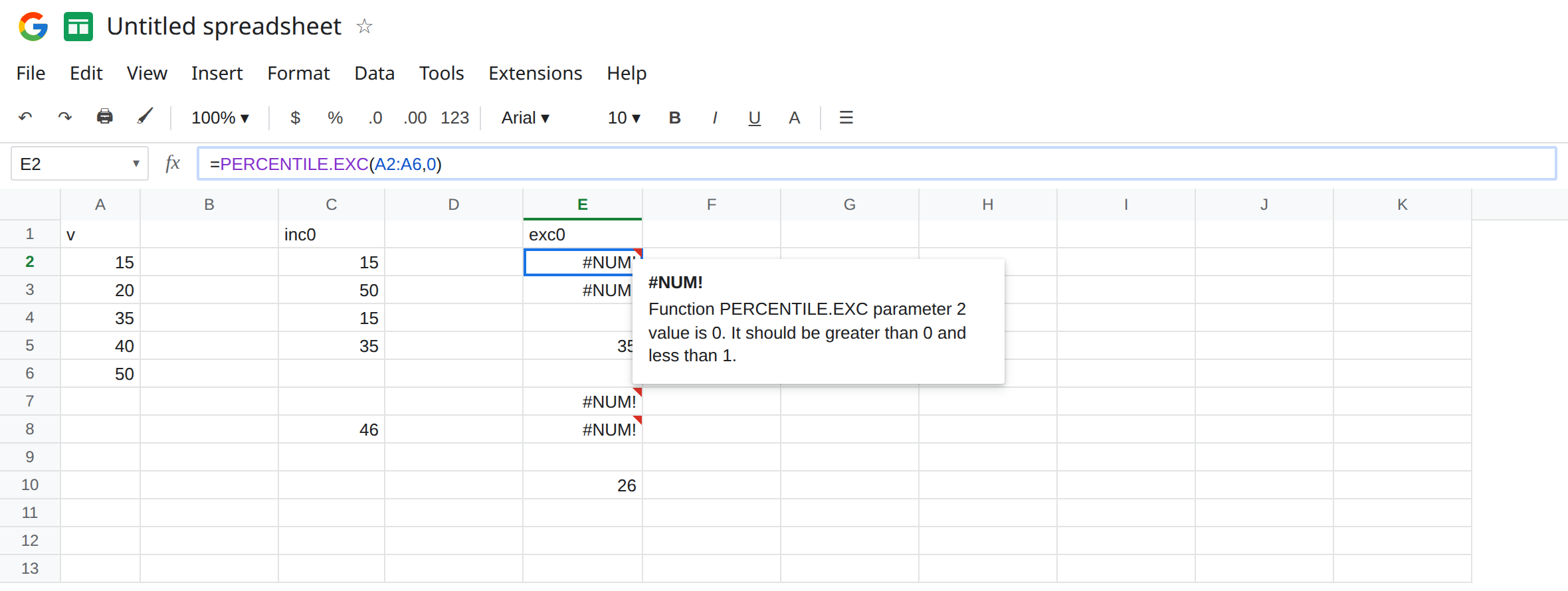
A middle k that both can answer. In E5 enter =PERCENTILE.EXC(A2:A6,0.5). E5 is 35. In C5 enter =PERCENTILE.INC(A2:A6,0.5). C5 is 35. The median of this particular list agrees. Agreement at 0.5 does not mean the functions agree at the tails.
k that cannot be interpolated. In E7 enter =PERCENTILE.EXC(A2:A6,0.15). Five points: 1/(5+1) is about 0.1667. 0.15 is below that window. E7 is #NUM!. In E8 enter =PERCENTILE.EXC(A2:A6,0.9). 5/6 is about 0.833. 0.9 is above it. E8 is #NUM!. In C8 enter =PERCENTILE.INC(A2:A6,0.9). C8 is a number, not an error. The same 0.9 is legal for INC and illegal for EXC on this list. Leave E7 and E8 broken.
A k EXC can interpolate. In E10 enter =PERCENTILE.EXC(A2:A6,0.4). E10 is 26. The result is not one of the input cells. Exclusive percentiles interpolate. Seeing 26 when the column only holds 15, 20, 35, 40, 50 is not a bug.
k outside 0 to 1. In E12 enter =PERCENTILE.EXC(A2:A6,90). People type 90 when they mean the 90th percentile. k is a fraction. 90 is not between 0 and 1. #NUM!. =PERCENTILE.INC(A2:A6,90) is #NUM! too. 0.9 is the 90th percentile. A percent-formatted cell that contains 0.9 and displays 90% is fine as k. A cell that contains the number 90 is not.
Leave E2, E3, E7, and E8 as #NUM!. Leave C2 as 15 and E5 as 35.
What is actually wrong
Section titled “What is actually wrong”EXCnever returns the 0th or 100th percentile. Asking for the minimum throughPERCENTILE.EXC(...,0)is#NUM!by design. UseMIN, or usePERCENTILE.INCwith0.- The tighter window depends on
n. Adding rows can make0.9start working, and deleting rows can make akthat worked yesterday return#NUM!. The tooltip is still “cannot interpolate” or the 0/1 bound. The data range got shorter. It did not become non-numeric. - Text in the range is ignored. A header included by mistake (
A1:A6instead ofA2:A6) changesnand can push a borderlinekout of the window. Count numeric cells if0.9suddenly fails. INCandEXCcan both return a number and still disagree near the tails. If a spec names “exclusive percentile,”INC’s friendlier0.9is the wrong function even though it has no triangle.QUARTILE.EXCof quart0or4is the same family of#NUM!. This page stays onPERCENTILE.EXC.
This is not LARGE with n past the list. See LARGE / SMALL n. E2’s k is 0, which LARGE would also reject, but the function on the formula bar is PERCENTILE.EXC.
This is not a blank range. An empty numeric list is #NUM! as well. A2:A6 is full. The k is the problem.
Leave E2, E7, and E8 broken.
Use INC when the ends are in the spec. Keep C2: =PERCENTILE.INC(A2:A6,0) is 15. Keep C3 for the maximum. =MIN(A2:A6) is the same 15 if all you wanted was the bottom of the list.
Keep EXC and pick a k inside the window. For these five numbers the window is about 0.1667 to 0.8333. E5 (0.5) and E10 (0.4) sit inside it. In G2 enter =PERCENTILE.EXC(A2:A6,0.5). G2 is 35.
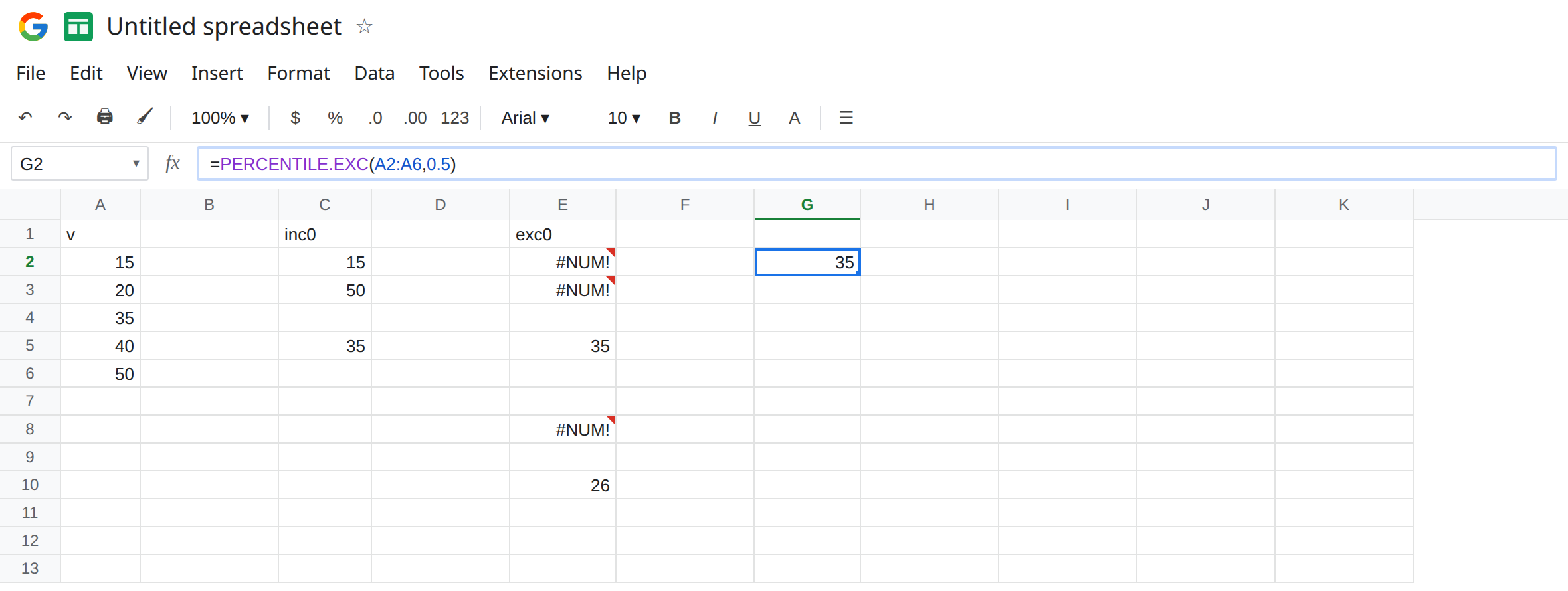
If the list is short and the spec insists on the 90th exclusive percentile, add more numeric rows until 0.9 is below n/(n+1), or switch to PERCENTILE.INC and say so in the header. Do not pass 90.
Do not wrap E2 in IFERROR and show the minimum. You would publish an inclusive result under an exclusive function. See IFERROR vs IFNA. IFNA does not catch #NUM!.
If PERCENTILE.EXC is #NUM! and k is 0 or 1, use INC or MIN/MAX. If k is 0.9 on a handful of rows, check n/(n+1) before you change the data. If k is 90, divide by 100. PERCENTILE without a suffix follows INC.
EXC vs INC on this list
Section titled “EXC vs INC on this list”INC of 0 is 15. EXC of 0 is #NUM!. INC of 1 is 50. EXC of 1 is #NUM!. Both return 35 at 0.5. EXC of 0.4 is 26. EXC of 0.15 and of 0.9 is #NUM! at n = 5, while INC of 0.9 is a number. The suffix is the whole bug.