

MAXIFS AND-combines criteria, so East or West comes back as 0
Updated
MAXIFS(max_range, criteria_range1, criterion1, ...) keeps a row only when every criterion matches. A second pair does not mean “or.” MAXIFS of qty where region is East and region is West asks one cell to be both words. No row qualifies. The function then returns 0, the same number it returns when nothing matches at all. There is no #N/A and no #VALUE! from the logic. The East maximum and the West maximum are both on the sheet. The combined call never looked at them as alternatives.
MAXIFS returning 0 because the category is absent is MINIFS / MAXIFS no match. A #VALUE! because the ranges differ in size is MAXIFS / MINIFS size. OR logic in FILTER is FILTER OR vs AND. Keep the Google Sheets UI in English. Sheet Error is an independent formula-error library, not a Google product.
Recreate it on a blank sheet
Section titled “Recreate it on a blank sheet”- Open a blank spreadsheet. In A1 type
region, B1qty. A2East, B210. A3West, B34. A4East, B46. A5West, B59. A6North, B61. East’s larger qty is10. West’s larger qty is9. The larger of those two regions is10. North is1and should stay out.
Each region alone. In D1 type east. In D2 enter =MAXIFS(B2:B6,A2:A6,"East"). D2 is 10. In D4 type west. In D5 enter =MAXIFS(B2:B6,A2:A6,"West"). D5 is 9. Those two are the controls. Each criterion is possible. Each max is a real row.
Both criteria on the same column. In F1 type both. In F2 enter =MAXIFS(B2:B6,A2:A6,"East",A2:A6,"West"). F2 is 0. Sheets required region to equal East and equal West on the same row. The criteria ranges are the same size, so this is not the #VALUE! on MAXIFS size. Leave F2 as 0.
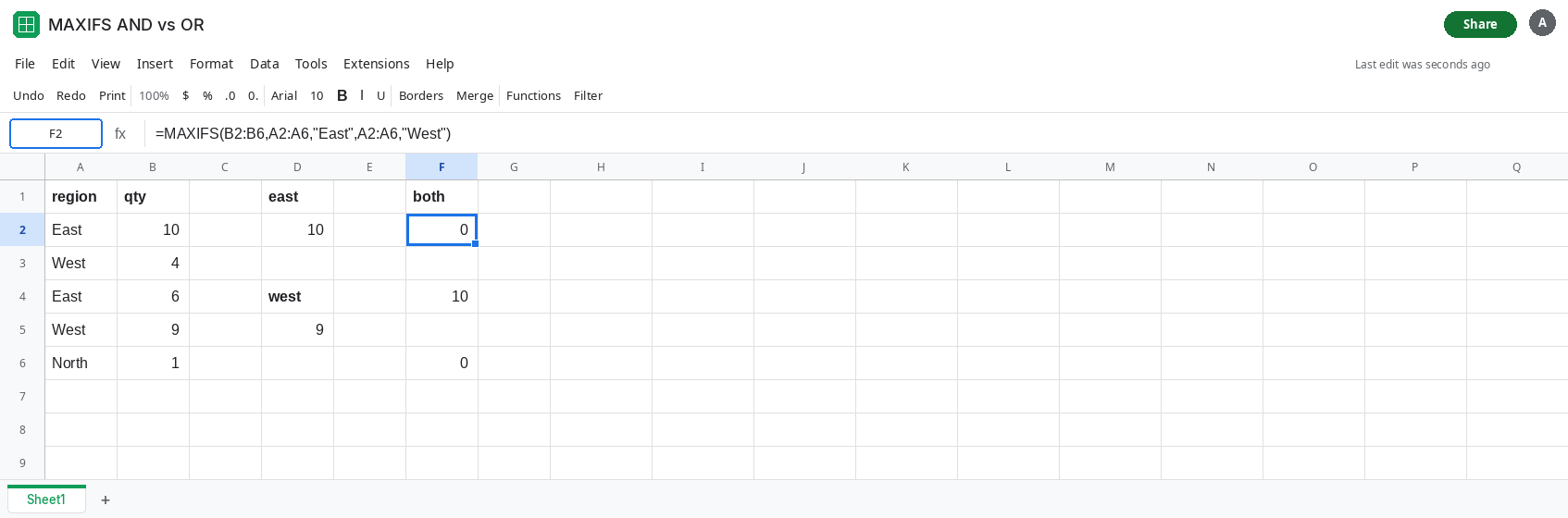
A real AND still works. In F4 enter =MAXIFS(B2:B6,A2:A6,"East",B2:B6,">5"). F4 is 10. East and qty greater than 5 can be true together. A4 is East 6, A2 is East 10. The larger is 10. AND is the right reading when the pairs talk about different tests. It is the wrong reading when both pairs name the same column and the words exclude each other.
No match looks identical. In F6 enter =MAXIFS(B2:B6,A2:A6,"South"). F6 is 0. South is absent. F2 is 0 because East-and-West is impossible. The results match. The reasons do not. See MINIFS / MAXIFS no match for the absent-category case. Leave F2 as the impossible AND.
Leave F2 as 0. Leave D2 as 10 and D5 as 9.
What is actually wrong
Section titled “What is actually wrong”- Every extra criteria pair in
MAXIFSnarrows the rows. It never widens them. Two values for one column narrow the set to empty, and the empty max is0. 0is also the “nothing matched” result. You cannot tell F2 from F6 by the number alone. The formula bar has to show two criteria that cannot be true together, or a category that is not in the column.- OR of two
MAXIFSresults is a different shape: compute each max, then takeMAXof those numbers. That picks the larger peak. It does not return the row, only the qty. FILTERwith+between conditions is OR on the rows, andMAXof that spill is the same peak, with the rows still available if you need the region name beside it. Multiplication between conditions is AND. See FILTER OR vs AND.- A zero qty that really is the maximum of a matched region is a successful
0. Check that a one-criterionMAXIFSfor that region is also0before you call it the AND bug.
This is not a range-size error. If F2 is #VALUE!, the ranges differ. See MAXIFS / MINIFS size.
Leave F2 as 0. That cell is the impossible AND.
Max of the separate maxima. In H2 enter =MAX(MAXIFS(B2:B6,A2:A6,"East"),MAXIFS(B2:B6,A2:A6,"West")). H2 is 10. Each MAXIFS is a legal one-criterion call. MAX chooses between 10 and 9. Add another region as another argument. A region that matches nothing contributes 0, which can become the reported max if every region misses. When that matters, test each piece the way D2 and D5 do.
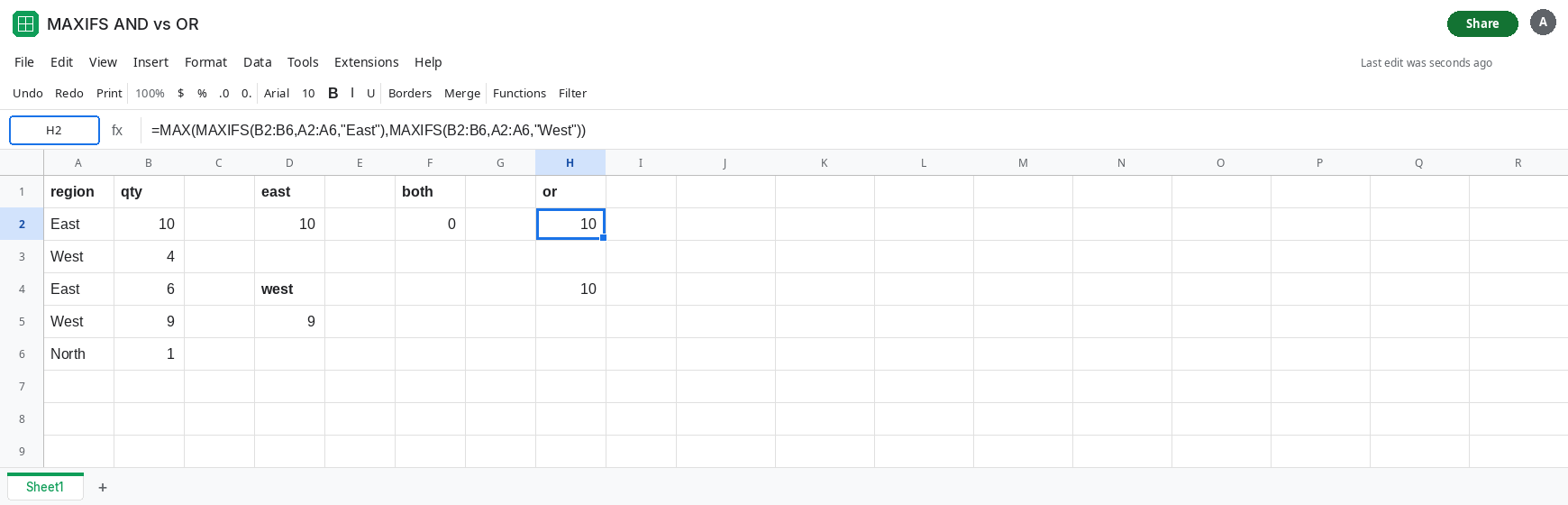
Or FILTER the OR, then MAX. In H4 enter =MAX(FILTER(B2:B6,(A2:A6="East")+(A2:A6="West"))). H4 is 10. The + is OR. MAXIFS cannot take that array as a criterion. If neither label exists, FILTER returns #N/A and MAX of that is #N/A, which is louder than the quiet 0. See FILTER no match.
Keep AND when the tests are different columns. F4 is already the pattern: region East and qty above 5. Do not split that into MAX of two MAXIFS calls. That would return the larger of “any East” and “any qty above 5,” which is a different question.
If one MAXIFS with two criteria on the same range is 0, and each criterion alone returns a number, the pairs were AND-ed. If a single criterion is already 0, nothing matched that word. If the cell is #VALUE!, the ranges are different sizes.