

Fix SORTN #N/A or #VALUE! in Google Sheets (n too small, n invalid, or ties mode)
Updated
SORTN sorts a block and returns the first n rows. #VALUE! means n is 0/negative or display_ties_mode is not 0–3. #N/A means nothing to return (empty range). Ties mode 1 is not an error: n=1 can spill two rows when the first place tied.
This page is SORTN counts and ties. It is not SORT / UNIQUE spill (#REF! overwrite). It is not UNIQUE by_col. Keep the Google Sheets UI in English.
Recreate it on a blank sheet
Section titled “Recreate it on a blank sheet”- Open a blank spreadsheet. In A1 type
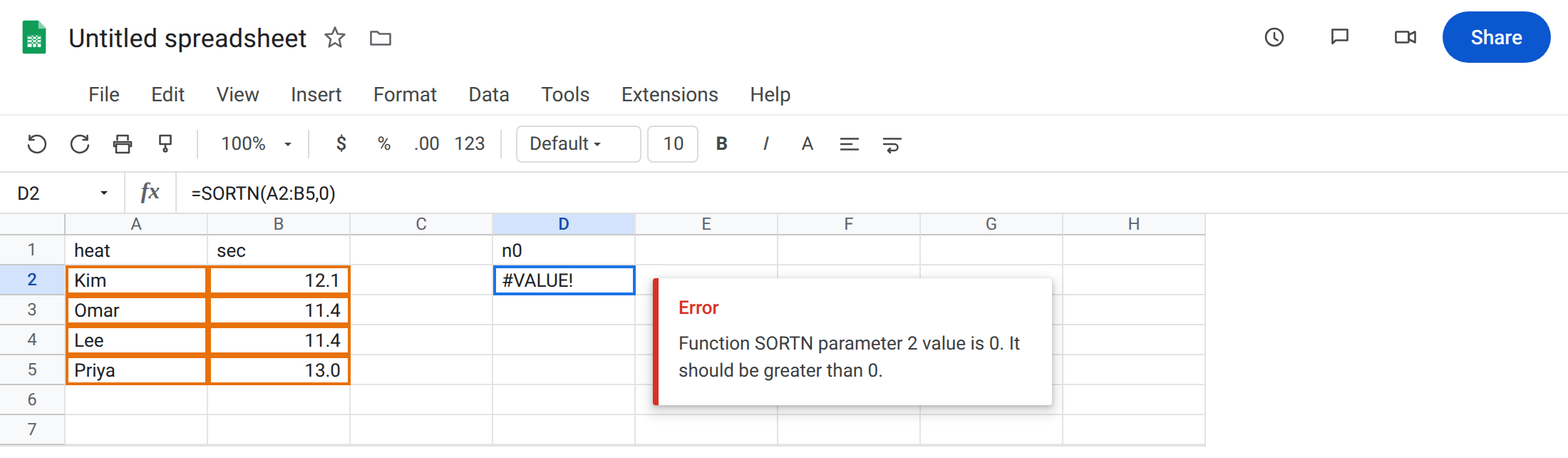
heat, B1sec. A2Kim. B212.1. A3Omar. B311.4. A4Lee. B411.4. A5Priya. B513.0. Two people share11.4.
n = 0. In D1 type n0. In D2 enter =SORTN(A2:B5,0). The cell shows #VALUE! (or #N/A on some builds). n must be greater than 0. Default n is 1 if you omit it. 0 is not “all rows.” Leave D2 broken.
Illegal ties mode. In D5 type mode5. In D6 enter =SORTN(A2:B5,2,5,2,TRUE). display_ties_mode only accepts 0, 1, 2, 3. 5 is #VALUE!. Leave D6 broken.
A legal top-2 (mode 0). In F1 type top2. Leave F2:G3 empty. In F2 enter =SORTN(A2:B5,2,0,2,TRUE). Sort by seconds ascending. The spill is two rows: Omar 11.4 and Lee 11.4 (or Lee then Omar — same time, mode 0 does not add a third row). That block is the control.
Ties mode 1 returns extra rows. In F6 type ties. Leave F7:G9 empty. In F7 enter =SORTN(A2:B5,1,1,2,TRUE). You asked for 1 row. Mode 1 also keeps every row tied with the nth. Both 11.4 heats spill. Two rows from n=1. Not #N/A. Leave F7 as that spill so you can see the extra row.
Empty SORTN. In I1 type empty. In I2 enter =SORTN(A2:A1,2). The range has no data rows. The cell shows #N/A. Leave I2 broken.
n larger than the table. In I5 enter =SORTN(A2:B5,99,0,2,TRUE). Four rows in, four rows out. n too big is not an error. No red triangle.
Leave D2, D6, and I2 broken. Leave F2 and F7 as the two working spills.
What is actually wrong
Section titled “What is actually wrong”nmust be> 0.0is not “unlimited.” For “all rows, but sorted with a ties mode,” people pass9^9as a stand-in for “big n,” not0.display_ties_mode0= at most n rows.1= n plus ties at the boundary.2= at most n after dropping duplicate rows.3= n unique keys, but every duplicate of those keys.5is none of those.- When you set a ties mode you should also set
sort_columnandis_ascending. Mode without a sort column is easy to misread: the default sort is the first column (heatnames), notsec. #N/Aon I2 is an empty source, not “n too big.”n=99still spills four.
This is not UNIQUE exactly_once. See UNIQUE by_col. SORTN mode 2 drops duplicate rows after sort, not “appears once.”
This is not FILTER no match. See FILTER no match. I2 never filtered.
Leave D2, D6, and I2 broken.
Pass a positive n. Keep F2: =SORTN(A2:B5,2,0,2,TRUE) for two fastest heats. For every row sorted by time, =SORTN(A2:B5,9^9,0,2,TRUE) or =SORT(A2:B5,2,TRUE).
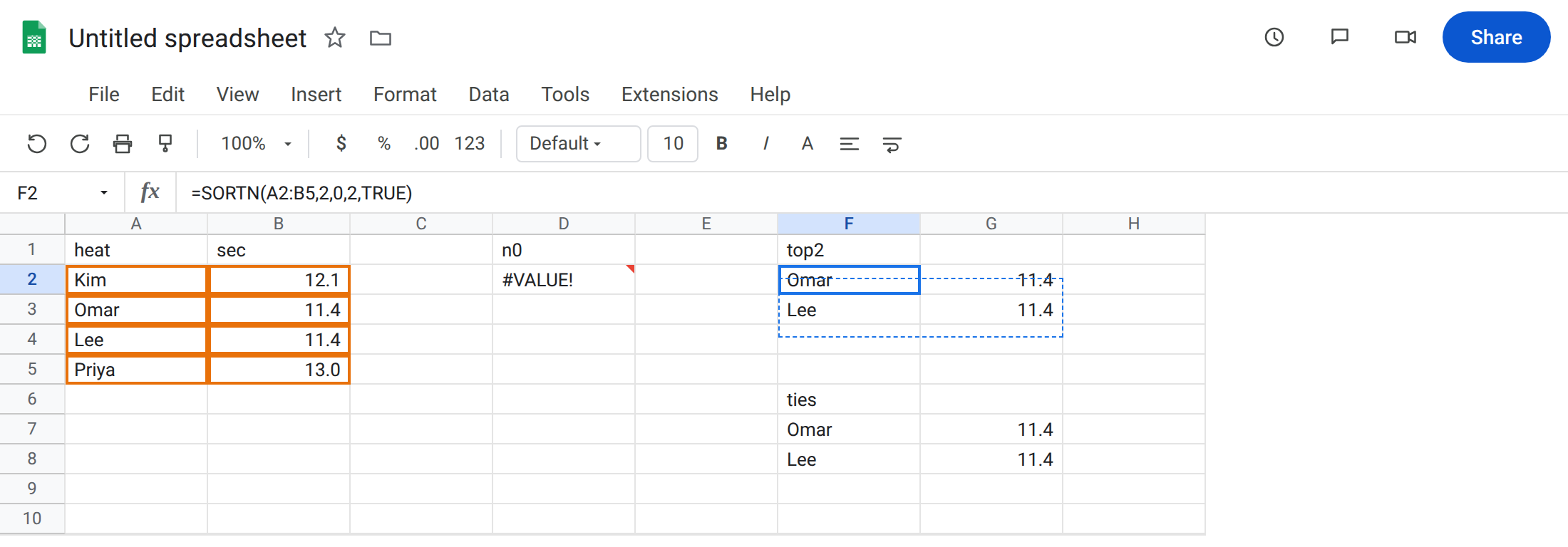
Pick the ties mode you mean. Fastest unique time: mode 2. Fastest heat plus anyone who tied that time: mode 1 (F7). Strictly n rows even if the next person tied: mode 0 (F2).
Fix empty input before you wrap. I2 needs a range with rows. IFNA(SORTN(...),"none") is for a genuine empty result, not for n=0. See IFERROR vs IFNA.
Do not “fix” F7 by wrapping. The extra row is the mode working.
If #VALUE!, check n and the ties mode number. If #N/A, check that the range has rows. If you got more rows than n, you are in mode 1 or 3. If n is huge and you got the whole table, that is success, not a miss.
n=0 vs ties vs empty
Section titled “n=0 vs ties vs empty”n=0 refuses to run. That is D2.
Mode 1 runs and adds rows. That is F7. Count the spill before you assume SORTN ignored n.
Empty range is #N/A with nothing to sort. That is I2. n=99 on a four-row table is silent and complete. “Too big” is not an error on this function. Occupied cells under a successful SORTN are the spill page, not this one.