

A sheet full of INDIRECT recalculates on every edit
Updated
INDIRECT turns text into a reference. It is volatile: Sheets recalculates it when the workbook calculates, not only when that text changes. One INDIRECT("A2") is cheap and pointless. A column of them, or a dashboard that builds addresses on every row, reruns that work on every keystroke. The cells can all show the right values. The file is still slow. There is no triangle to mark the cost.
This page is that cost. INDIRECT of a string that is not an address is INDIRECT #REF!. Notation and the A1 flag are ADDRESS / R1C1. Keep the Google Sheets UI in English.
Recreate it on a blank sheet
Section titled “Recreate it on a blank sheet”- Open a blank spreadsheet. In A1 type
n. In A2 type10. In A3 type20. In A4 type30.
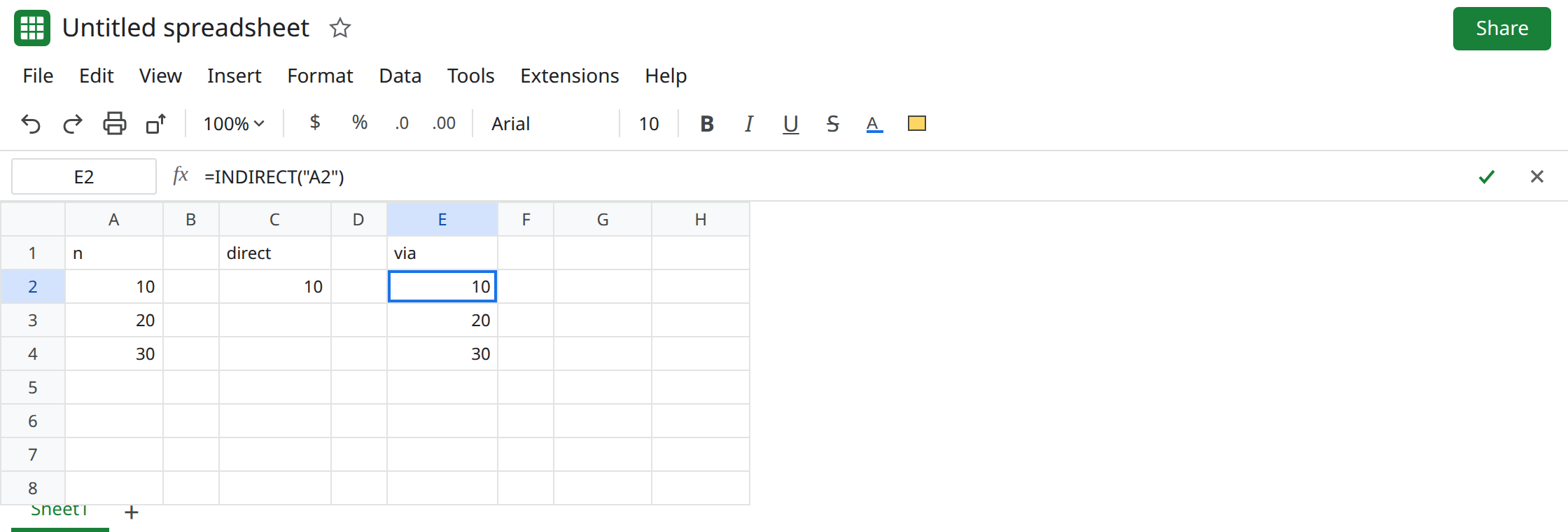
A direct reference, the control. In C1 type direct. In C2 enter =A2. C2 is 10. Fill C2 down through C4 if you want three normal formulas. Edit an empty cell, D1 (type x, delete it). C2 stays 10. Sheets did not need to re-read a text address.
The same hop through text. In E1 type via. In E2 enter =INDIRECT("A2"). E2 is 10. Same number as C2. In E3 enter =INDIRECT("A3"). In E4 enter =INDIRECT("A4"). The values match. Fill the pattern down only if you are willing to feel the lag: fifty copies are enough to notice on a small file, a few hundred are the storm people paste onto a template. Edit D1 again. The values do not change, and the formulas still run. Leave E2:E4 as INDIRECT.
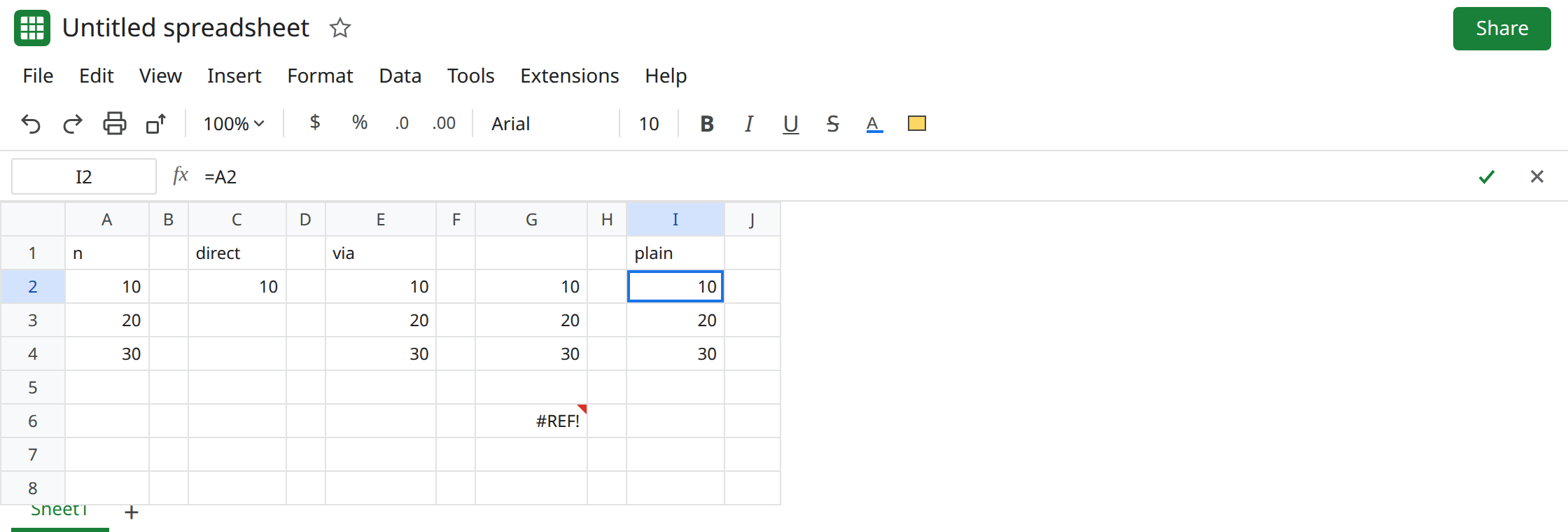
Built from ROW, which is how the column usually appears. In G2 enter =INDIRECT("A"&ROW()). In G2 that text is A2, so G2 is 10. Fill G2 down through G4. G3 reads A3. The concatenation builds a new string every time the sheet calculates, and INDIRECT looks it up every time. Correct answers, volatile work. Leave G2:G4 filled.
A bad string is not the slowdown. In G6 enter =INDIRECT("nope"). G6 is #REF!. That one cell is INDIRECT #REF!. Fixing the string does not make a thousand good INDIRECT calls cheap. Leave G6 broken so the error page stays distinct.
What is actually wrong
Section titled “What is actually wrong”- A normal reference is a precedent. Sheets recalculates C2 when A2 changes.
INDIRECThides the precedent inside a string, so Sheets treats the formula as volatile and recalculates it on edits that do not touch A2:A4. - The cost scales with how many volatile formulas depend on each other.
INDIRECTinsideSUM,FILTER, or a chart range pulls those dependents along. The wait shows up as the tab spinner, not as#REF!. ROW()and string joins are not free either, but they are not why a short sheet crawls. The volatile lookup is. Replacing G2 with=A2removes both the join and the lookup.- A calculation-limit tooltip means the formula ran out of steps or memory, often a
LAMBDAover a huge grid. See calculation limit. A pause on every edit with no tooltip is this page.
This is not a sheet-name apostrophe. See INDIRECT sheet name. E2’s string is A2 on the same tab. It works. It is just expensive in bulk.
OFFSET has the same volatility habit. A moving window built with OFFSET is OFFSET volatility.
Leave E2 and G6 in place: one live INDIRECT, one #REF!.
Point at the cell. In I1 type plain. In I2 enter =A2. Fill I2:I4 with =A3 and =A4, or one formula =ARRAYFORMULA(A2:A4) if you truly want a spill. Edit D1. I2 stays 10. You did not lose a capability. "A2" was never dynamic.
When the address really is text a person typed, keep a single INDIRECT of that cell, not a filled column of reconstructed A&row strings. Prefer INDEX for “row n of this range”: =INDEX(A:A,2) returns A2 and is not a substitute for a thousand volatile calls. See INDEX past range if the index is outside the range. That error is #REF! with a different tooltip.
Do not wrap the slow column in IFERROR. The values may already be right. See IFERROR hides cause.
If the formulas say INDIRECT and the sheet waits on every edit, replace the ones whose text never changes with normal references. If one cell is #REF! because the text is not an address, that cell is the INDIRECT #REF! page.