

Fix IMPORTXML and IMPORTHTML in Google Sheets (Allow access, Result too large, still loading)
Updated
IMPORTXML and IMPORTHTML pull a public URL into the grid. Three failures look similar and are not the same: a first-use Allow access banner, Result too large, and a cell that stays on Loading…. None of these is IMPORTRANGE.
Recreate it on a blank sheet
Section titled “Recreate it on a blank sheet”- Open a blank spreadsheet. In A1 type
xml_ok. In A2 enter:
=IMPORTXML("https://en.wikipedia.org/wiki/Moon","//h1")
- Allow access. The first time this spreadsheet uses
IMPORTXML,IMPORTHTML,IMPORTDATA,IMPORTFEED, orIMAGE, Sheets shows a warning banner: this file can send and receive data from external parties. Click Allow access. Until an editor clicks it, every import on this sheet stays blocked. That banner is not the in-cellIMPORTRANGEprompt. See IMPORTRANGE access only if the tooltip is You need to connect these sheets.
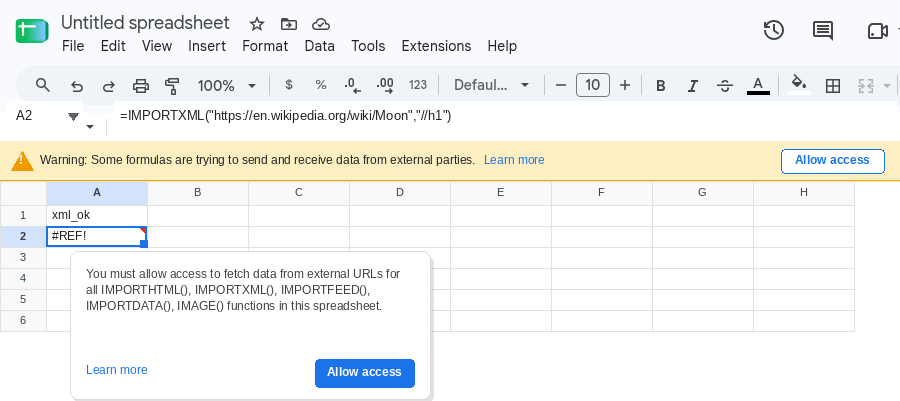
-
After the click, wait until A2 spills the page heading (
Moon). That row is the control: URL and XPath are fine, permission is granted. -
Result too large. In C1 type
xml_big. In C2 enter:
=IMPORTXML("https://en.wikipedia.org/wiki/Moon","//*")
When the XPath returns more than one request will hold, C2 is an error and the tooltip is Result too large. Leave C2 broken.
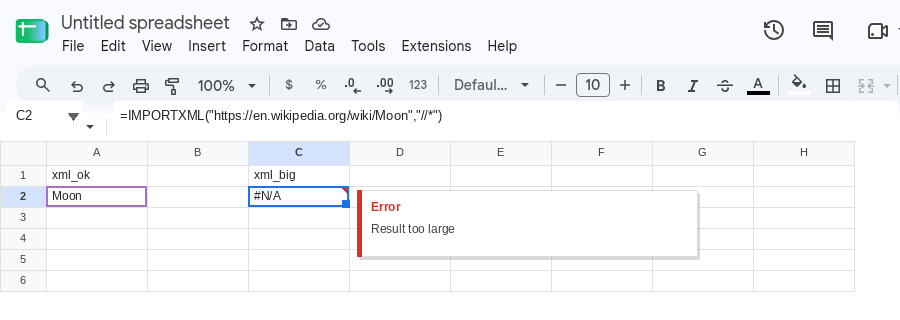
- IMPORTHTML. In E1 type
html. In E2 enter:
=IMPORTHTML("https://en.wikipedia.org/wiki/Moon","table",1)
Same banner as step 2 (already clicked). If that table is huge, you get the same Result too large tooltip. If it spills, you have a working table pull to compare.
- Still loading. A2 shows
Loading…while Sheets fetches. That is normal for a few seconds. If it never finishes, or the tooltip is Loading data may take a while because of the large number of requests. Try to reduce the amount of IMPORTHTML, IMPORTDATA, IMPORTFEED, or IMPORTXML functions across spreadsheets you’ve created., that is traffic or a URL the function cannot finish — not a missing Allow access click.
Leave A2 as the working control. Leave C2 as the oversized XPath.
What is actually wrong
Section titled “What is actually wrong”- Allow access is a per-spreadsheet banner for external URLs. Editors click once. Viewers cannot. After the click, later
IMPORTXML/IMPORTHTMLformulas on this file do not ask again. This is notIMPORTRANGEconnecting two Google files. - Result too large is the payload.
IMPORTXMLdownloads whatever the XPath matches.//*on a full HTML page is a common way to blow the cap.IMPORTHTMLdownloads the whole table or list at that index — you cannot “select three columns” inside the fetch the way you narrow anIMPORTRANGErange string. This is not theIMPORTRANGE10 MB grid cap. See IMPORTRANGE too large only when the formula isIMPORTRANGE. - Still loading is a fetch that has not returned. Too many import formulas (counted across files you created, not only this tab), a page that never settles, or a JavaScript-rendered URL with no static HTML for the XPath to read. Recalc and re-paste make more requests. They do not raise the quota.
#N/Awith Imported content is empty is a different miss: bad XPath, wrong table index, or a page with nothing to parse. That is not this page.- Admin has not allowed imports from… is a Workspace block. Clicking Allow access will not override it.
This is not #N/A from a lookup. See what #N/A means. This is not a Formula parse error from commas vs semicolons. See locale parse error.
Leave C2 as //* so Result too large stays on the sheet. Put each fix in a neighboring cell. Use a URL you are allowed to fetch.
Allow access. Click Allow access on the banner. Do not change A2. If you are on a phone and the banner says to use a desktop browser, open the sheet on desktop (or request the desktop site) and click there. Editors only.
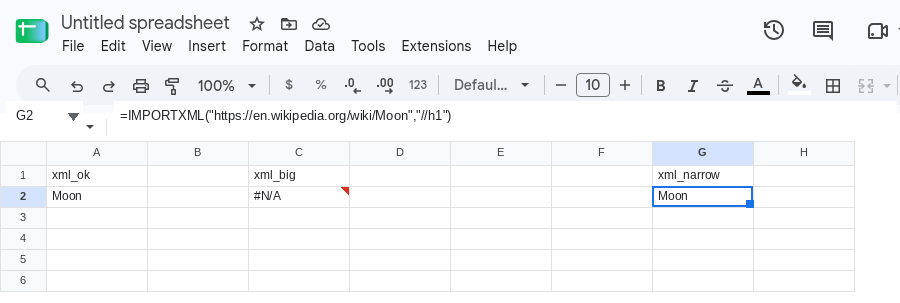
Narrow the XPath. Import the nodes you need, not the document. In G1 type xml_narrow. In G2 enter:
=IMPORTXML("https://en.wikipedia.org/wiki/Moon","//h1")
The cell should match A2. Prefer a specific path (//h1, //table[1]//tr[position()<=10]//td, //a/@href only if you truly need every link) over //*, //div, or //p on a long article.
Narrow IMPORTHTML. You choose "table" or "list" and a 1-based index. You do not pass a column list. If table 1 is the oversized dump, try the next index that is actually the table you wanted ("table",2). If every table on the page is too big, switch to IMPORTXML with an XPath that keeps a few rows, or copy the table once and paste values.
Cut the number of import formulas. One fetch, then local formulas. In I1 type once. Keep A2 as the only IMPORTXML on the sheet. In I2 enter =A2. The cell shows the same heading. Do not put a second IMPORTXML to the same URL “to be safe.” Do not wrap NOW() or RAND() into the URL — import functions refuse those references.
If Loading… never ends. Confirm the banner was accepted. Confirm the URL returns HTML or XML in a browser with JavaScript off. A single-page app that paints the table in the browser will not give IMPORTXML that table. Reduce duplicate IMPORTXML / IMPORTHTML / IMPORTDATA / IMPORTFEED formulas on this file and on other files you own. Wait for an in-flight fetch; deleting and re-entering the same formula starts another request.
Do not wrap Result too large or a stuck load in IFERROR and call it fixed. Do not click Allow access on an IMPORTRANGE cell expecting it to unstick IMPORTXML. Name a smaller XPath, a smaller table, or fewer import formulas until the tooltip is gone and the spill is the nodes you actually needed.