

Fix VLOOKUP after you insert a column in Google Sheets (index now points at the wrong field)
Updated
VLOOKUP returns a column by number: index 2 means “second column of the range you passed,” not “the column titled role.” Insert a column inside that range and every index shifts. The formula still runs. There is often no #REF! and no #N/A. Index 2 now points at the new empty field (or at title, or at whatever you inserted). The name you wanted moved to index 3.
This page is a silent wrong column after Insert → Column. It is not VLOOKUP bad index (index bigger than the range; tooltip out of bounds; cell #REF!). It is not XLOOKUP vs VLOOKUP as a full migration, though the extra below is why XLOOKUP and INDEX/MATCH survive this insert. It is not VLOOKUP wrong row (approximate TRUE).
Recreate it on a blank sheet
Section titled “Recreate it on a blank sheet”- Open a blank spreadsheet. In A1 type
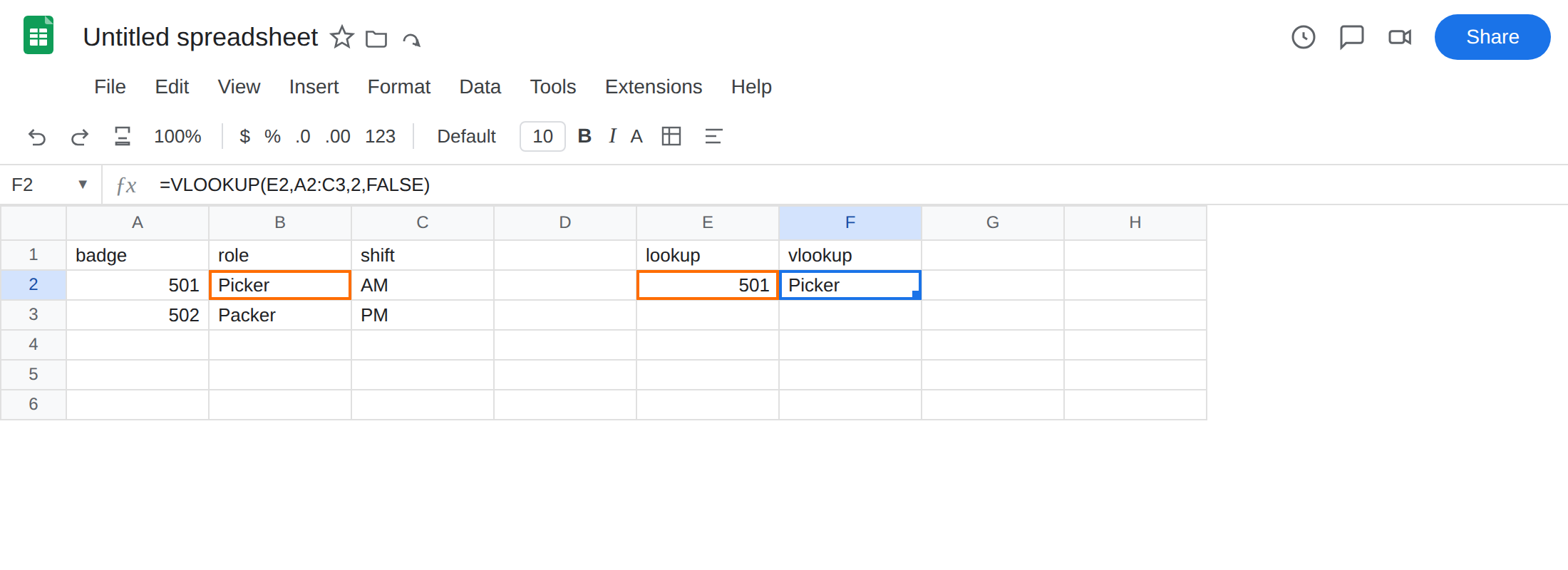
badge, B1role, C1shift. A2501. B2Picker. C2AM. A3502. B3Packer. C3PM. E1lookup. E2501. - Index 2 is role, before the insert. In F1 type
vlookup. In F2 enter=VLOOKUP(E2,A2:C3,2,FALSE). The cell showsPicker. That is the control. Do not change this formula in the next step.
-
Insert a column inside the range. Click column B (role). Insert → Columns → Insert 1 column left. Sheets shifts role to C and shift to D. The new B is empty. Put
titlein B1. In B2 typeL1. In B3 typeL2. -
Same formula, wrong field. F2 is still
=VLOOKUP(E2,A2:C3,2,FALSE)— or Sheets widenedA2:C3toA2:D3when the insert landed inside the range. Index2now means the new title column. F2 showsL1, notPicker. There is no error triangle. Leave F2 as the broken result.
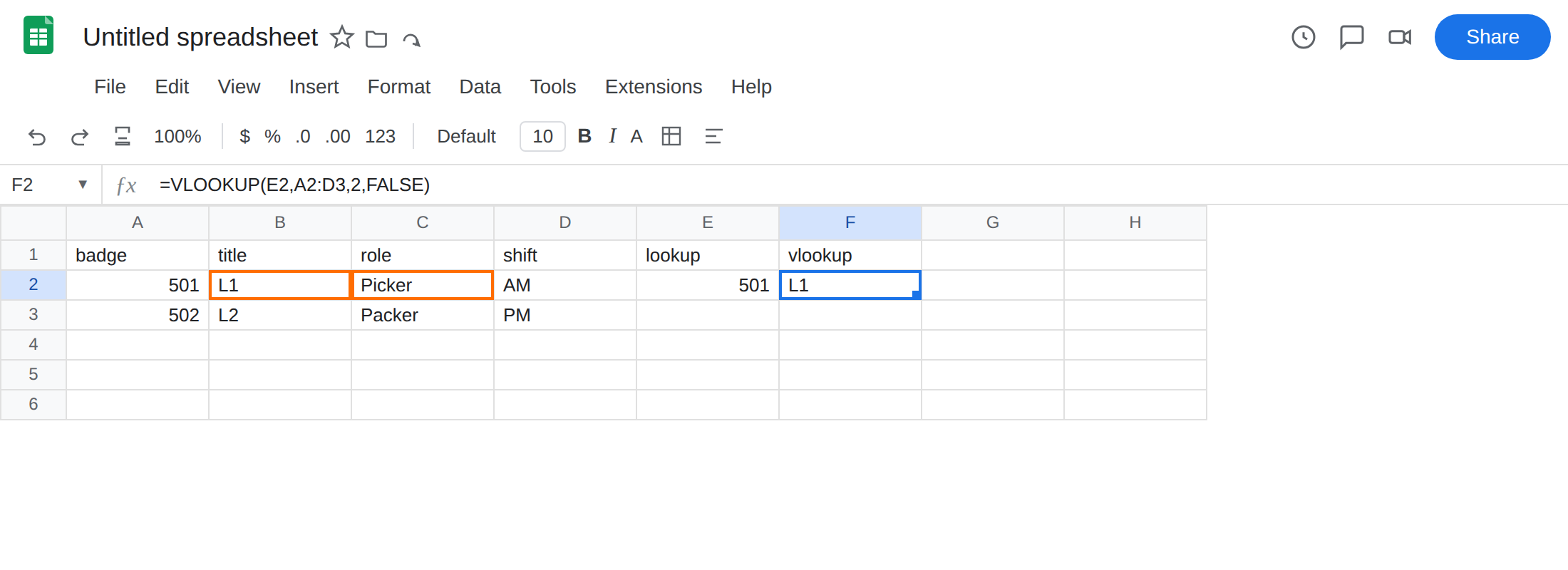
If the insert did not widen the range, put =VLOOKUP(E2,A2:D3,2,FALSE) so you still see L1 vs Picker. Role is column C. Index 2 is not role.
Index past the width is the other primer. =VLOOKUP(E2,A2:B3,4,FALSE) is #REF! — VLOOKUP bad index. This page does not error.
Leave F2 showing L1.
What is actually wrong
Section titled “What is actually wrong”VLOOKUP’s third argument is a count, not a header name. Index1is badge (left of the range). Index2is whatever now sits one column to the right of badge. After Insert → Column left of role, that is title.- Sheets may auto-expand
A2:C3toA2:D3when you insert inside the range. That keeps the formula from#REF!and still leaves index2pointed at the new column. Auto-expand is not “the formula followed role.” - The lookup key still matches. Badge
501is in A2.#N/Awould mean a miss.#REF!would mean the index is larger than the range.L1means the index is legal and wrong. This is not VLOOKUP bad index. Do not “fix” F2 by widening the range and keeping2. Widening is what made2mean title. Approximate match is unrelated — you passedFALSE. See VLOOKUP wrong row only if the fourth argument isTRUEor omitted.
This is not number vs text on the badge. See VLOOKUP no match. E2 and A2 are both numeric 501. The name moved.
This is not lookup left of the key. Badge is still the leftmost column of the range.
Leave F2 as the silent L1.
Bump the index only as a patch. In G1 type index_3. In G2 enter =VLOOKUP(E2,A2:D3,3,FALSE). The cell shows Picker. Every later insert will demand another bump. Do not stop here on a sheet that still grows.
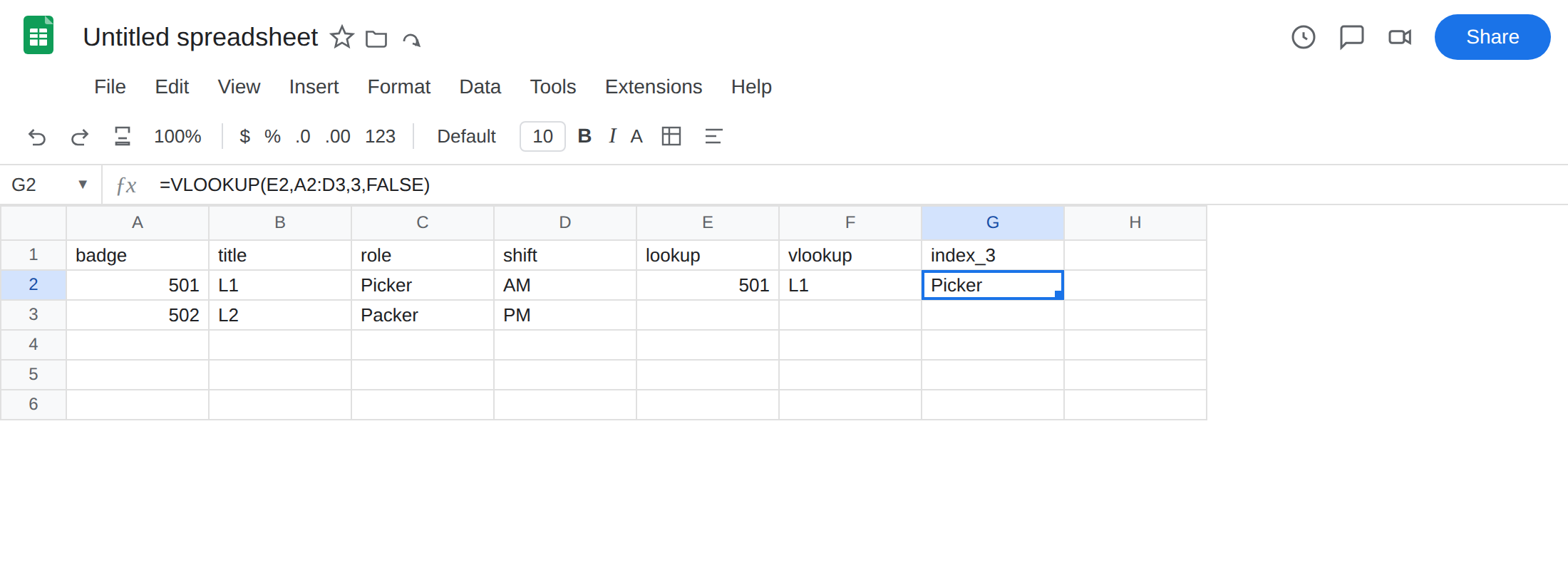
Name the return column — XLOOKUP. In G4 enter =XLOOKUP(E2,A2:A3,C2:C3). The cell shows Picker. Inserting a column updates C2:C3 with role. The index does not.
Name the return column — INDEX / MATCH. In G6 enter =INDEX(C2:C3,MATCH(E2,A2:A3,0)). Same idea. Pass 0 on MATCH. See MATCH #N/A.
Do not wrap F2 in IFERROR. There is no error. The formula is proudly returning title. See IFERROR vs IFNA.
If VLOOKUP still “works” after an insert but the field looks like the new column, count index 2 from the left of the range again. Then replace the index with a named return range.
Why XLOOKUP and INDEX/MATCH survive inserts
Section titled “Why XLOOKUP and INDEX/MATCH survive inserts”VLOOKUP(range, index) encodes the return field as an integer. Integers do not move when you insert. Columns do. That is the whole failure.
XLOOKUP(key, lookup_range, result_range) encodes the return field as a range. Insert → Column updates C2:C3 to the new address of role, the same way =C2 follows Picker. The formula text changes; the meaning does not. XLOOKUP vs VLOOKUP is the broader migration (left lookup, default exact, if_not_found). The insert is the practical reason to migrate even when the key is already in column A.
INDEX(role, MATCH(key, badge, 0)) is the same contract with two functions. Use it when XLOOKUP is unavailable, or when you already think in positions. Do not keep VLOOKUP(...,2,FALSE) on a table that still gets new fields in the middle. The next insert will look like this page again, still without #REF!.