

MMULT returns #VALUE! when a cell is blank or text, even if the shapes match
Updated
MMULT(matrix1, matrix2) multiplies two matrices. The inner sizes have to match: columns of the first equal rows of the second. When they do match and a cell is blank or text, the error is still #VALUE!. The tooltip says the parameter expects number values and that the blank cannot be coerced to a number. The shape is fine. The contents are not. N() turns blanks into 0 so the product runs, and it also turns the word pcs into 0, which hides a bad cell inside a quiet zero.
A 2×3 times a 2×2, where the inner sizes differ, is MMULT dimensions. SUMPRODUCT of the same shapes treats text as 0 instead of erroring. See SUMPRODUCT size. Keep the Google Sheets UI in English. Sheet Error is an independent formula-error library, not a Google product.
Recreate it on a blank sheet
Section titled “Recreate it on a blank sheet”- Open a blank spreadsheet. You need three 2×2 blocks and one identity.
Numbers that work. In A1 type ok. A2 1, B2 2, A3 3, B3 4. In D1 type I. D2 1, E2 0, D3 0, E3 1. In G1 type prod. Leave H2 empty. In G2 enter =MMULT(A2:B3,D2:E3). A 2×2 times a 2×2 identity is the original matrix. G2 is 1, H2 is 2, G3 is 3, H3 is 4. That spill is the control.
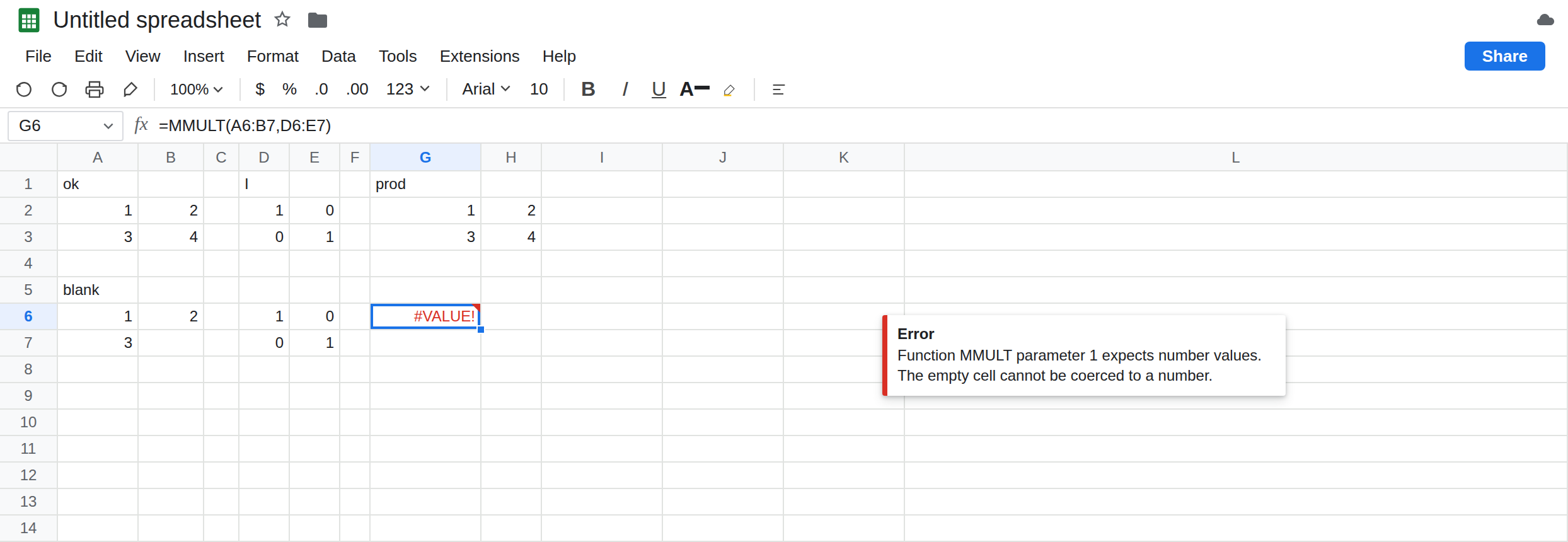
A blank in a legal shape. In A5 type blank. A6 1, B6 2, A7 3. Leave B7 empty. Do not type 0. In D6:E7 copy the same identity (1, 0, 0, 1). In G6 enter =MMULT(A6:B7,D6:E7). G6 is #VALUE!. The tooltip says function MMULT parameter 1 expects number values, and that the empty cell cannot be coerced to a number. Two rows, two columns, on both sides. Inner size 2 equals inner size 2. Leave G6 broken.
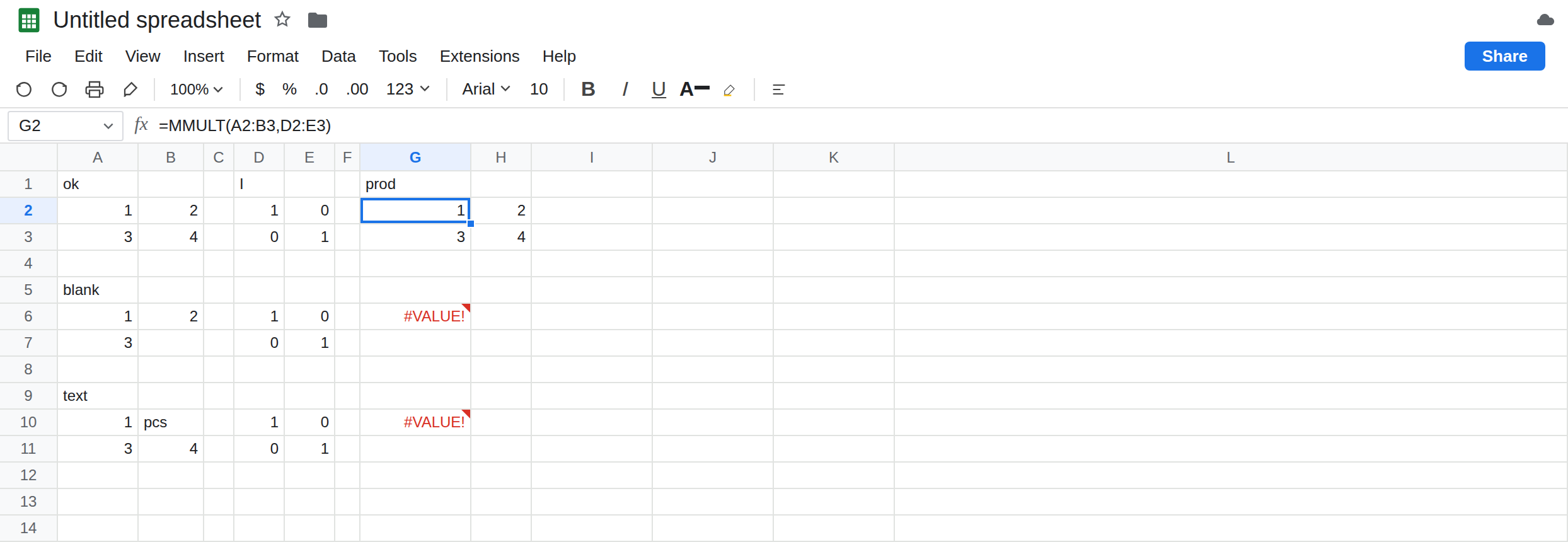
Text in a legal shape. In A9 type text. A10 1, B10 pcs, A11 3, B11 4. Identity again in D10:E11. In G10 enter =MMULT(A10:B11,D10:E11). G10 is #VALUE!. The tooltip names pcs as text that cannot be coerced. Same shape story as G6, different cell. Leave G10 broken.
What N() does to both. In G12 enter =ARRAYFORMULA(MMULT(N(A6:B7),N(D6:E7))). N of a blank is 0. N of a number is the number. The product runs: 1, 2, 3, 0. B7’s missing value is now a real zero in the math. If the blank was supposed to be 4, the product is wrong and there is no triangle. In G14 enter =ARRAYFORMULA(MMULT(N(A10:B11),N(D10:E11))). N("pcs") is 0. The product uses zero where the word was. Leave G14 as that quiet zero so you can see the cost of coercing text.
The shape error, for contrast. In A16 1, B16 2, C16 3, A17 4, B17 5, C17 6. In G16 enter =MMULT(A16:C17,D2:E3). That is 2×3 times 2×2. G16 is #VALUE! for incompatible sizes, which is MMULT dimensions. The tooltip talks about matrix sizes, not about an empty cell. Leave G16 beside G6 so the two tooltips can be read apart.
Leave G6 and G10 as content errors. Leave G2 as 1.
What is actually wrong
Section titled “What is actually wrong”MMULTdoes not treat blank as zero. A blank in a range that is otherwise numeric is#VALUE!before any multiplication. Filling B7 with0on purpose is a different spreadsheet from leaving B7 empty.- Text is the same token.
pcsis not a number, and Sheets will not skip that cell. One bad cell fails the product. The tooltip names the value, which is how you tell G10 from G6 from G16. N()is a coercion, not a repair. Blank becomes 0. Text becomes 0.TRUEbecomes 1. The product on G12 is what you want only when “missing means zero” is the spec. G14 is what you get when a word was a data error and you silenced it.SUMPRODUCT(A10:B11, D10:E11)does not matchMMULT, and it also does not throw onpcs. It treats text as 0 and returns one number, not a matrix. See SUMPRODUCT size. Do not switch functions to escape this tooltip unless a sum of products is what you meant.- The result of a legal
MMULTspills. If H2 is occupied, G2 is#REF!even when every input is numeric. That is a neighbor, not a blank inside the matrix. See SORT / UNIQUE spill.
This is not wrong type as 10 + pcs in one cell, though the token is #VALUE!. The tooltip on G6 names MMULT and a matrix parameter.
This is not MINVERSE singular. A singular matrix is #NUM! on MINVERSE. MMULT will multiply a singular matrix without that error, as long as the entries are numbers and the inner sizes match.
Leave G6, G10, and G16 broken.
Put a number in the blank if it is a real gap. Type 0 in B7 only if zero is the measurement. Then =MMULT(A6:B7,D6:E7) matches the shape of G2’s formula and returns a numeric spill. pcs has to become a number in the cell, not inside N(), if that word is a mistake.
Coerce only when blank means zero. Keep G12: =ARRAYFORMULA(MMULT(N(A6:B7),N(D6:E7))). Do not point N() at the pcs block unless you have decided the word contributes nothing. Check with =COUNT(A10:B11) versus =COUNTA(A10:B11). If COUNTA is larger, something in the block is not numeric.
Read the tooltip before you add a row. Sizes: G16, MMULT dimensions. Empty or text: this page. #REF!: clear the spill.
Do not wrap G6 in IFERROR. A blank product is not 0. See IFERROR vs IFNA. IFNA does not catch #VALUE!.
If #VALUE! names an empty cell or a word, the shape is not the bug. If it names matrix sizes, count the shared side. If N() made the triangle vanish and a total dropped, a non-number became 0.
Blank vs text vs the wrong shape
Section titled “Blank vs text vs the wrong shape”2×2 numeric times identity spills the same 2×2. 2×2 with a blank times identity is #VALUE!. 2×2 with pcs is #VALUE!. N() turns both into 0 and the product runs. 2×3 times 2×2 is the size error on the other page. SUMPRODUCT will not raise this tooltip for pcs.