

QUERY still returns rows a sheet filter has hidden
Updated
A sheet filter changes what you see. It does not change the cells. QUERY reads the range you pass, including rows the filter has hidden. SUM does too. SUBTOTAL with code 109 skips filtered-out rows and also skips rows you hid by hand. People expect QUERY to behave like that subtotal. It does not. The spill still contains West. There is no #N/A.
How 9 and 109 differ on a hand-hidden row is SUBTOTAL hidden rows. Filter views versus a sheet filter, and who sees which rows, is filter view vs filter. This page is QUERY on a filtered range. Keep the Google Sheets UI in English.
Recreate it on a blank sheet
Section titled “Recreate it on a blank sheet”- Open a blank spreadsheet. In A1 type
store, B1qty. A2East, B210. A3West, B320. A4East, B430. The plain total is60. West is the middle row.
QUERY before any filter. In D1 type all. In D2 enter =QUERY(A1:B4,"select A, sum(B) group by A",1). The spill is East 40 and West 20. In F1 type sum. In F2 enter =SUM(B2:B4). F2 is 60. In H1 type sub. In H2 enter =SUBTOTAL(109,B2:B4). H2 is 60. Three controls, all of them see West. Leave them.
Hide West with a filter. Select A1:B4. Data → Create a filter. Open the filter icon on A1 and clear West only. Row 3 disappears from the grid. East 10 and East 30 stay visible. Look at the formulas. D2 still spills East 40 and West 20. F2 is still 60. H2 is 40 (10+30). The filter removed West from the screen and from SUBTOTAL. It did not remove West from QUERY or from SUM. Leave the filter on.
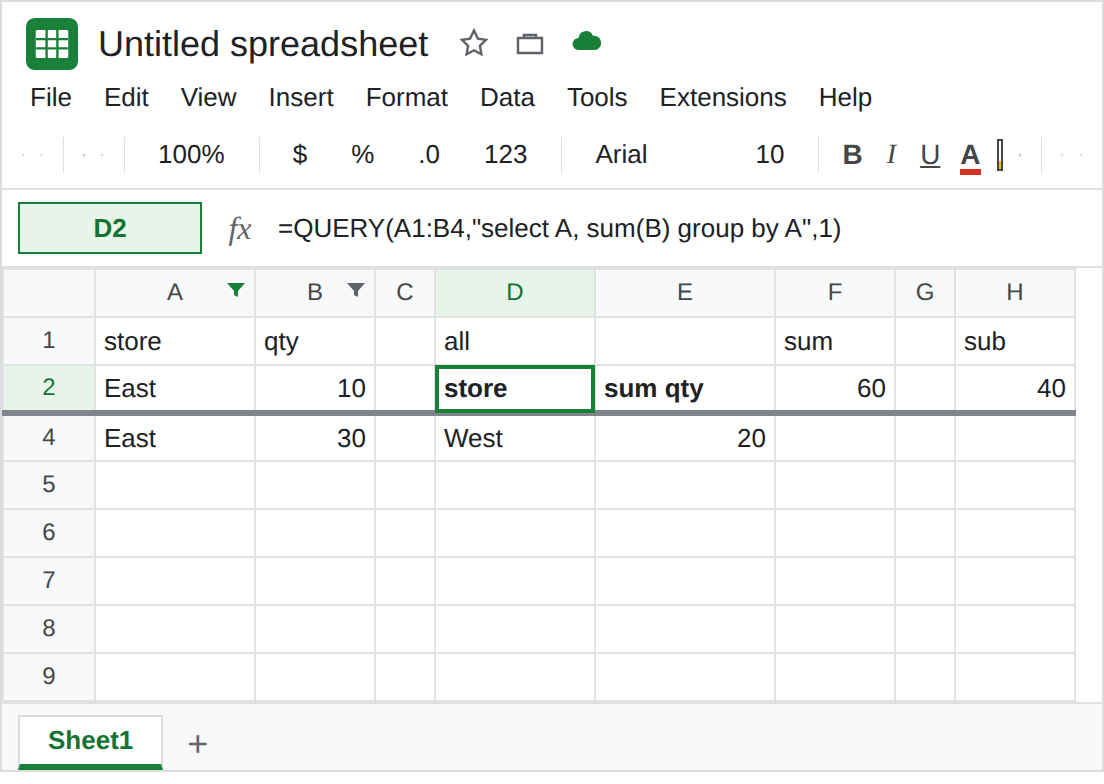
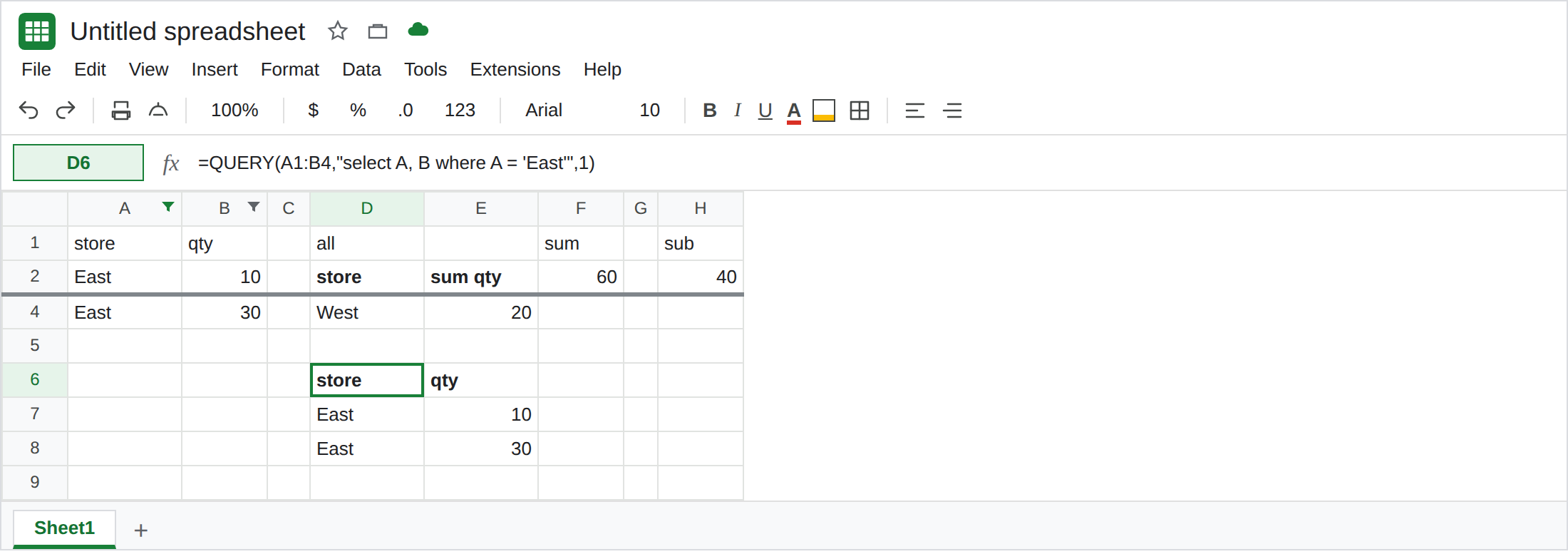
A where clause is not a filter. In D6 enter =QUERY(A1:B4,"select A, B where A = 'East'",1). The spill is the two East rows, 10 and 30, and West is gone because the statement says so. Turn the filter off (Data → Remove filter). D6 still shows only East. The where does not care whether row 3 is visible. Leave D6 as that contrast. D2, with the filter on, is the bug: West is in the result while the grid hides it.
A filter view is the same for QUERY. Data → Filter views → Create new filter view, hide West there, and D2 still includes West. The view changes the browser. It does not change the range. Close the view when you have seen it. See filter view vs filter for whose screen hides the row.
What is actually wrong
Section titled “What is actually wrong”QUERYhas no “visible cells” mode. Hidden, filtered, and grouped rows are still values. D2’s range isA1:B4. West is inside it.SUMmatchesQUERYhere. F2 stays60. If the report’s job is “what is on screen,” neither function is the one that follows the screen.SUBTOTAL(109, B2:B4)is the aggregate that skips the filtered row. Code9also skips filtered rows. The100you add matters for Hide row, not for this filter. See SUBTOTAL hidden rows. H2 is40while the filter is on. That is the control for “on screen.”- A
wherethat drops West keeps dropping West after you remove the filter. Do not use a filter click as a stand-in forwhere A = 'East'. The next person who opens the file may not have your filter. IFERRORaround D2 does nothing useful. D2 is not failing. It is complete. See IFERROR vs IFNA.
You can leave the filter on while you compare D2 and H2. Remove it when you are done so the next edit sees row 3.
Ask for the rows in the query. D6 is the East-only spill: =QUERY(A1:B4,"select A, B where A = 'East'",1). For the East total, =QUERY(A1:B4,"select sum(B) where A = 'East' label sum(B) 'east'",1) is 40, with or without the filter.
Follow the filter only when you mean the subtotal. Keep H2 as =SUBTOTAL(109,B2:B4) for “qty still showing.” Do not point a chart at D2 and describe it as the filtered view. The chart will include West.
Copy visible rows to values if a snapshot must ignore the hidden ones. Filter, select the visible block, copy, and Edit → Paste special → Values only onto another tab. QUERY that tab. The snapshot will not follow later filter clicks. That is the point of a snapshot.
If West is on the QUERY spill and missing on the grid, the filter worked and QUERY ignored it. Put the rule in where, or use SUBTOTAL for a total of visible rows. If West is missing from QUERY and the filter is off, the where removed it. The filter is not the cause.