

A custom function shows You do not have permission to call UrlFetchApp
Updated
A custom function is JavaScript you call from a cell, like =ECHO("hi"). It may return a string, a number, a boolean, or a table of those. It may not call services that need authorization. UrlFetchApp.fetch needs authorization. The cell does not sit on Loading… and then return a status code. It fails. The message is: You do not have permission to call UrlFetchApp.fetch. Required permissions include the external-request scope. Authorizing the script for a menu does not grant that call to the custom function. The cell is the wrong place for the fetch.
#NAME?, Loading…, and the time limit are Apps Script custom function. A custom function that returns a stale value is custom function cache. A simple onEdit that fails in the execution log instead of in a cell is simple vs installable. Keep the Google Sheets UI in English. Sheet Error is an independent formula-error library, not a Google product.
Recreate it on a blank sheet
Section titled “Recreate it on a blank sheet”- Open a blank spreadsheet. Extensions → Apps Script. Replace the sample with this. Save.
function ECHO(v) {  return v;}
function GETCODE(url) {  return UrlFetchApp.fetch(url).getResponseCode();}
A custom function that is allowed. In A1 type echo. In A2 enter =ECHO("hi"). After a brief Loading…, A2 shows hi. That cell is the control. The script is saved and the name resolves. If A2 is #NAME?, the project was not saved. See Apps Script custom function.
The fetch is not allowed. In A4 type code. In A5 enter =GETCODE("https://example.com/"). The cell errors. The message names UrlFetchApp.fetch and says you do not have permission. It is not #NAME?. The function exists. It started, called the service, and was refused. Leave A5 on that error. There is no Allow button on the cell that will add the scope to custom functions.
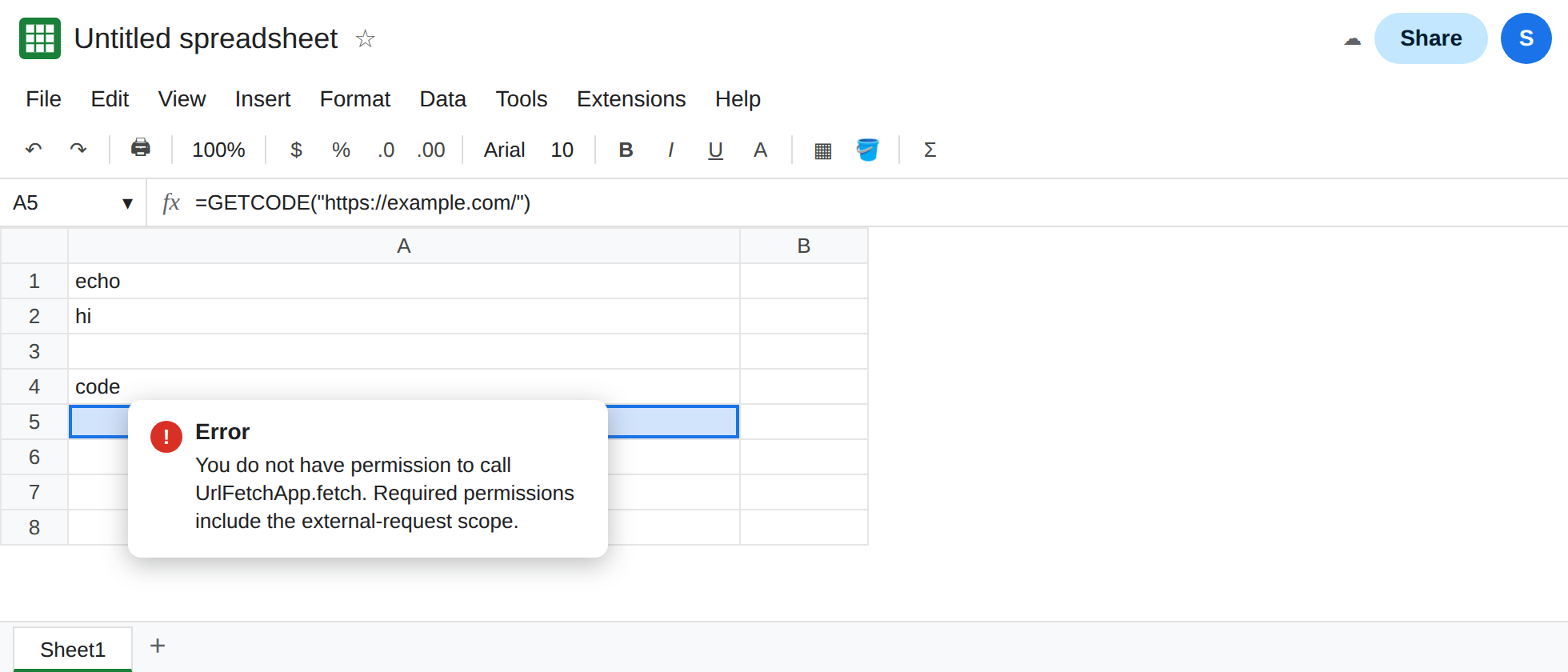
Running GETCODE from the editor is a different identity. In the script editor, run a small wrapper only if you want to see the authorization dialog. That dialog authorizes the account for a manual run. Return to A5 and let it calculate again. A5 still reports that the custom function does not have permission to call UrlFetchApp.fetch. The menu authorization did not change the cell. Leave A5 broken.
Do not point GETCODE at an address you do not mean to request. https://example.com/ is enough to see the refusal. The refusal happens before a useful response is returned to the cell.
What is actually wrong
Section titled “What is actually wrong”- Custom functions run in a restricted context. Google’s documentation lists services they cannot use.
UrlFetchAppis one.GmailAppand anything else that needs an authorization dialog are in the same class. The error text names the method you called. - The cache page is a different symptom. A stale number means the function returned a value and Sheets kept it. See custom function cache. A5 does not return a value. It throws. Editing an unrelated cell will not turn A5 into
200. - Passing the URL in as an argument does not grant the scope.
GETCODEalready receives the URL from the sheet. The illegal part isUrlFetchApp, not the way the address arrived. - A simple trigger fails this call quietly in Executions. A custom function fails it in the cell. Same permission, different surface. See simple vs installable.
- Data → Named functions are spreadsheet formulas, not Apps Script. They cannot host
UrlFetchAppeither. See named functions.
IMPORTDATA is the spreadsheet’s own fetch for a CSV. It is not this script. See IMPORTDATA fetch.
Leave A5 as the custom function that calls UrlFetchApp. Keep A2 as ECHO.
Fetch from a function you run yourself, and write a cell. Add this, save, and run writeCode from the editor. Authorize if asked. This run is allowed to fetch. It writes C2. It is not a custom function.
function writeCode() { var code = UrlFetchApp.fetch('https://example.com/').getResponseCode(); SpreadsheetApp.getActiveSheet().getRange('C2').setValue(code);}C2 shows 200 when example.com answers 200. The formula bar on C2 is a number, not =GETCODE(...). In C4 enter =ECHO(C2). C4 shows the same number, and ECHO is allowed to do that. The fetch stays in writeCode.
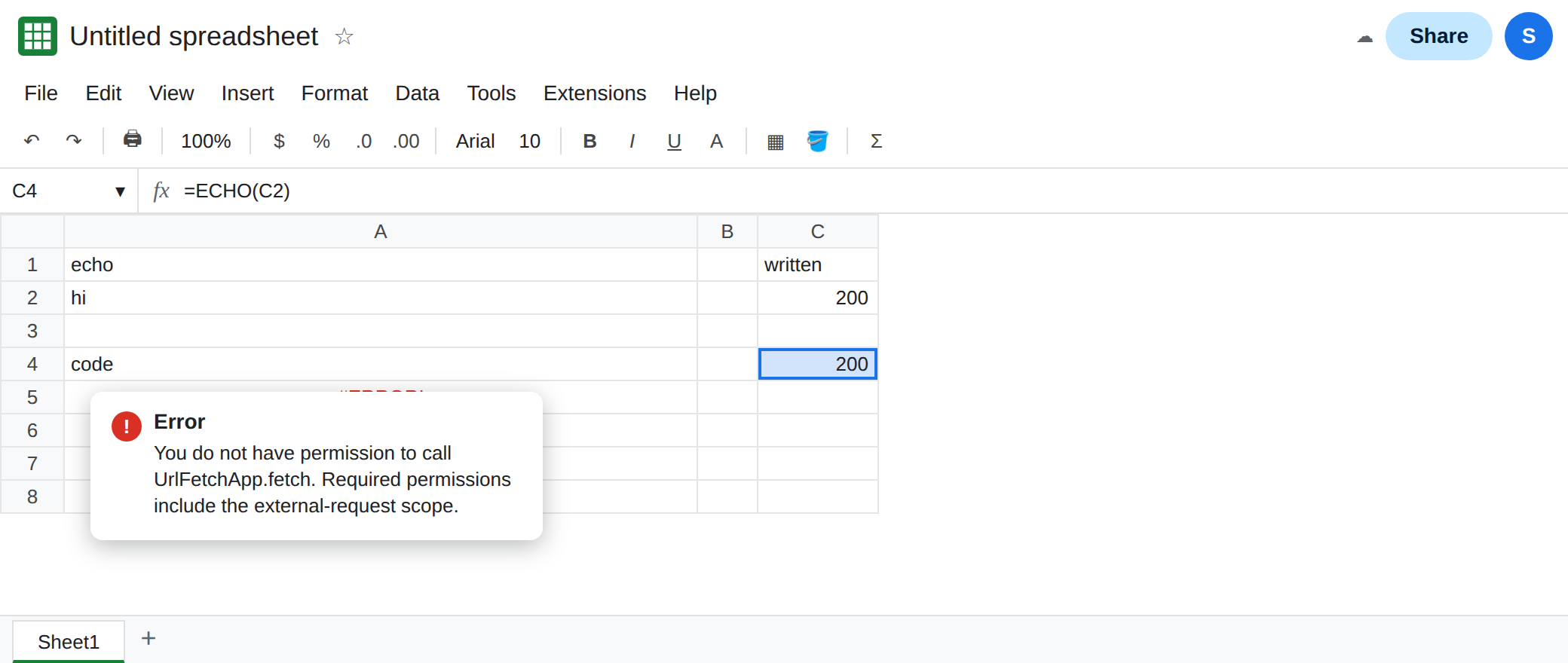
An installable trigger is the same split. The trigger function fetches and writes. The cell reads the written value. Do not name that function onEdit. See simple vs installable.
Do not wrap A5 in IFERROR. You would hide a call that cannot succeed and show a blank status. See IFERROR vs IFNA.
If the cell names UrlFetchApp and says you do not have permission, move the fetch out of the custom function. If the cell is #NAME?, the function is not saved under that name. If the cell shows an old number and never calls the script again, you are on the cache page.