

Fix VSTACK #N/A in Google Sheets when the arrays have different widths
Updated
VSTACK places arrays top to bottom and uses the widest width. A narrower array is padded with #N/A on the right for every row of that array. The formula returns the stack. It does not refuse the way FILTER refuses mismatched sizes. The #N/A values are padding, not failed lookups. Matching widths with a real blank column is a blank, not #N/A. HSTACK pads rows when heights differ. That is the other axis.
This page is VSTACK column counts. The row-pad page is HSTACK rows. The combined primer is HSTACK / VSTACK pad. Keep the Google Sheets UI in English.
Recreate it on a blank sheet
Section titled “Recreate it on a blank sheet”- Open a blank spreadsheet. In A1 type
role, B1hours. A2lead, B28. A3dock, B36. Two columns, two data rows. In D1 typetag. D2west. D3east. One column. The tag list is as tall as the role list and narrower.
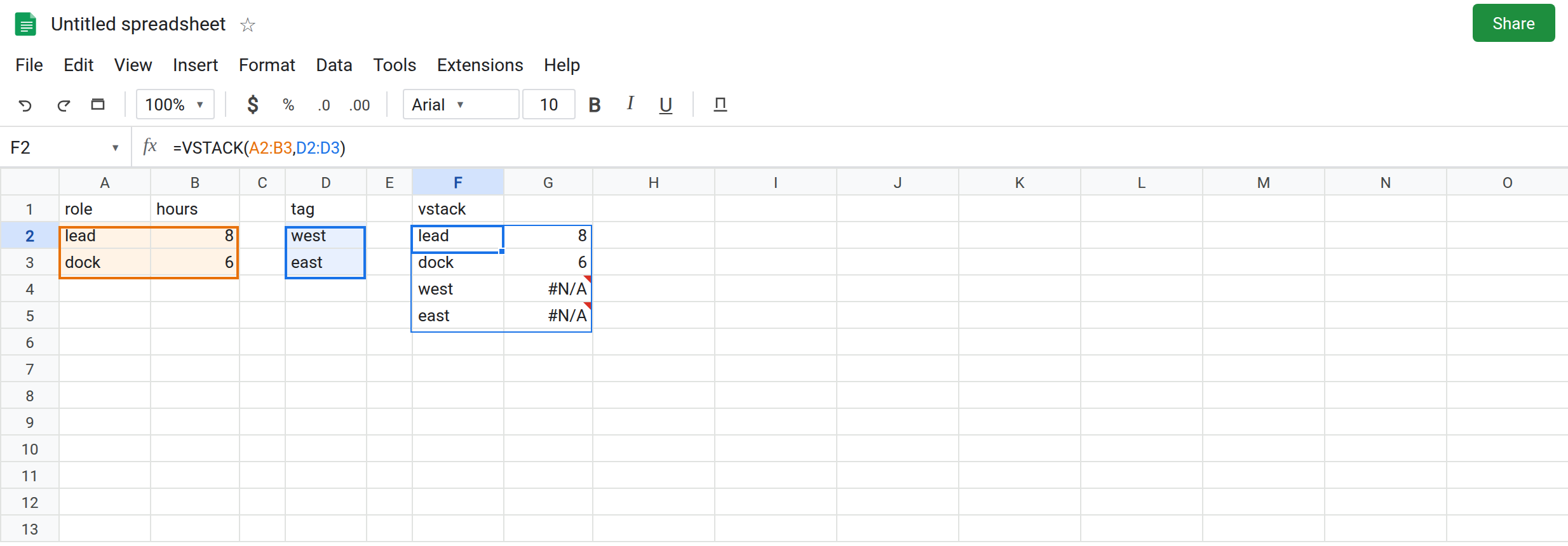
Narrow block under a wide block. In F1 type vstack. Leave F2:G5 empty. In F2 enter =VSTACK(A2:B3,D2:D3). The spill is four rows and two columns. F2:G3 is lead/8 and dock/6. F4 is west. G4 is #N/A. F5 is east. G5 is #N/A. The tags had no second column, so VSTACK invented one. Leave F2 as that spill.
A blank second column is not a pad. In D5 type note. Leave E5 empty. D6 west. Leave E6 empty. In I1 type wide. In I2 enter =VSTACK(A2:B3,D5:E6). Both blocks are two columns wide. The lower rows are note / blank and west / blank. Those blanks are empty cells, not #N/A. That block is the control.
Headers of different width. In F8 enter =VSTACK(A1:B1,D1) if F8:G9 is empty. The header row role / hours is two wide. tag is one wide. G9 is #N/A beside tag. Stacking a title that does not cover every column is this bug at the top of the report. Leave F8 as that pair.
QUERY blocks with different selects. A QUERY that selects two columns stacked on a QUERY that selects one column pads the same way. You do not need a live QUERY to see it: F2 is already a two-column array over a one-column array. If your sheet’s lower block is QUERY(...,"select A") and the upper is select A, B, the #N/A is the missing select, not “no rows.” Empty QUERY output is QUERY no rows.
HSTACK contrast. In F12 enter =HSTACK(A2:A3,D2) on empty cells. A2:A3 is two rows. D2 is one. The pad is a row #N/A under west. That is HSTACK rows. Leave F12 as that spill. Do not use it to explain G4.
Leave F2 with #N/A in G4 and G5.
What is actually wrong
Section titled “What is actually wrong”- Width is the maximum of the arguments. Every narrower piece grows to that width with
#N/A. Height is the sum of the heights. F2 is 2+2 rows, not a merge of columns by header name. VSTACKdoes not match headers.tagdoes not slide underroleby label. It occupies the first column of the next rows. The second column of those rows is padding.- A same-width range with blank cells stays blank.
#N/Ameans the array was narrower, or a source cell was already#N/A. {A2:B3;D2:D3}is an array literal with the same width rule in Sheets, and the separator depends on locale. If the formula is#ERROR!before it stacks, see array literal locale.VSTACKuses commas between arrays in a US locale and avoids that separator. F2 isVSTACK.- Overwrite
#REF!happens when G2 or another landing cell is full. The tooltip names that cell. After you clear it, the pad#N/Acan appear. Both can happen in sequence. They are not the same tooltip.
This is not FILTER range size. FILTER does not pad. See FILTER range size.
Leave F2 as the padded stack.
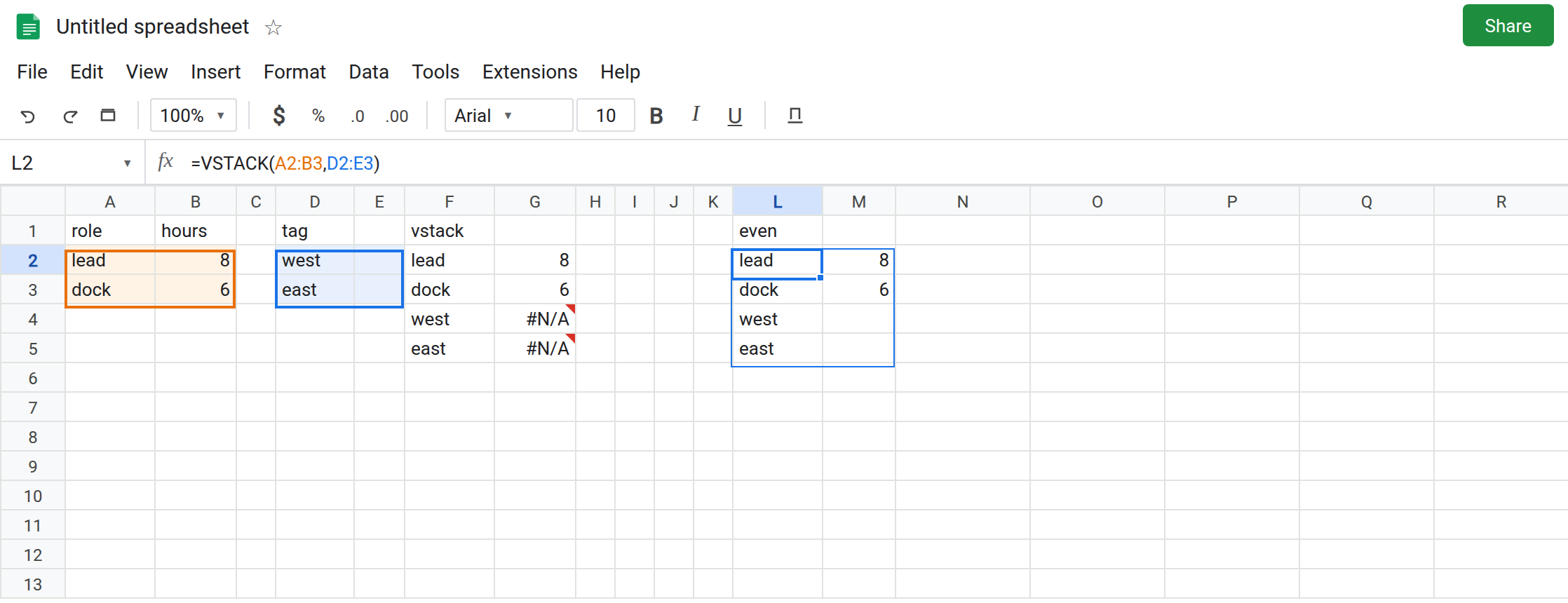
Give the lower block two columns. In L1 type even. In L2 enter =VSTACK(A2:B3,HSTACK(D2:D3,{"",""})) only if the literal is legal in your locale. The readable version: in E2 enter ="" and E3 enter ="", then in L2 enter =VSTACK(A2:B3,D2:E3). The lower block is two columns. West’s neighbor is blank, not #N/A. East’s neighbor is blank. Hours were never in the tag list. The blank says so without an error token.
Or stack one column only. =VSTACK(A2:A3,D2:D3) is role over tag, one column, no pad. Use that when hours should not sit in this stack.
IFNA when the pad should display as blank. =IFNA(VSTACK(A2:B3,D2:D3),"") clears G4 and G5’s tokens. It also clears a real #N/A that was stored in the source. Prefer a matching width if you still need to see source errors. See IFERROR vs IFNA. IFERROR would also hide a #REF! spill.
If #N/A appears to the right of the narrower block, add columns or drop the extra columns from the wider block. If #N/A appears under a short list beside a tall one, that formula is HSTACK, not VSTACK.