

Fix FILTER + SEARCH / REGEXMATCH contains in Google Sheets (#N/A vs wrong function)
Updated
FILTER keeps rows where the condition is TRUE. SEARCH and FIND return a position or #VALUE! when the needle is missing. Putting SEARCH straight into FILTER feeds #VALUE! into the condition: the whole FILTER errors (#N/A / #VALUE!), even when some rows would have matched. REGEXMATCH returns FALSE on a miss, which FILTER understands. ISNUMBER(SEARCH(...)) is the SEARCH-shaped fix.
This page is contains-as-a-FILTER condition. It is not FILTER no match (FILTER(A2:B4,A2:A4=999)). It is not FIND / SEARCH miss as a single-cell primer. It is not QUERY contains / matches. Keep the Google Sheets UI in English.
Recreate it on a blank sheet
Section titled “Recreate it on a blank sheet”- Open a blank spreadsheet. In A1 type
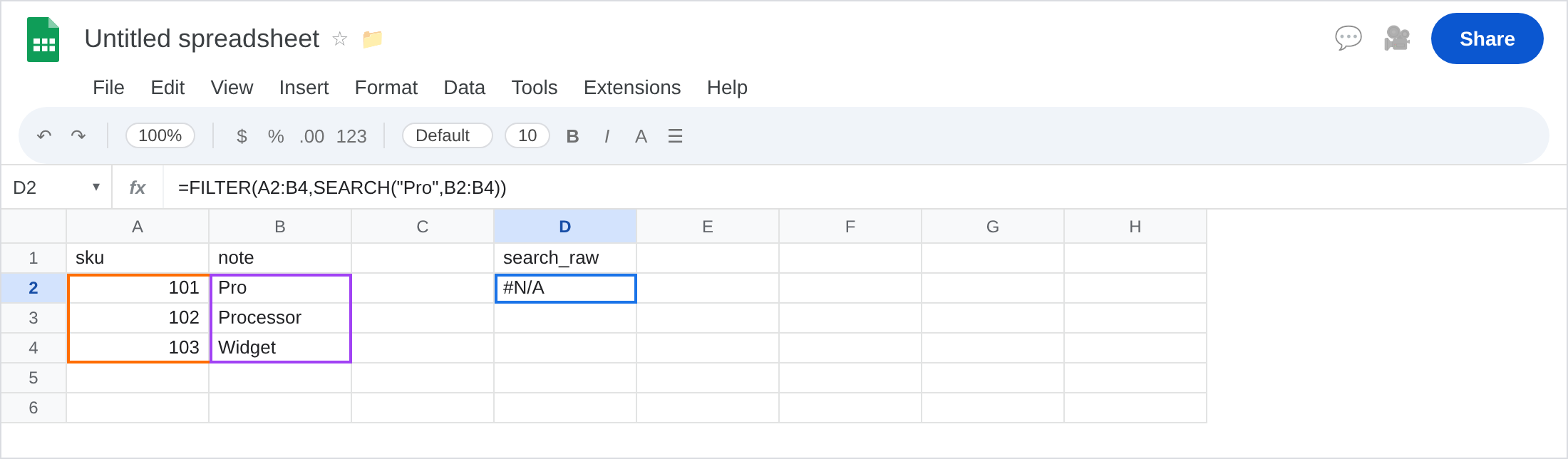
sku, B1note. A2101. B2Pro. A3102. B3Processor. A4103. B4Widget. Three notes. Two contain the lettersPro. One does not.
SEARCH inside FILTER (broken). In D1 type search_raw. In D2 enter =FILTER(A2:B4,SEARCH("Pro",B2:B4)). The cell errors (#N/A or #VALUE!). SEARCH("Pro","Widget") is #VALUE!. FILTER will not treat that as FALSE. Leave D2 broken.
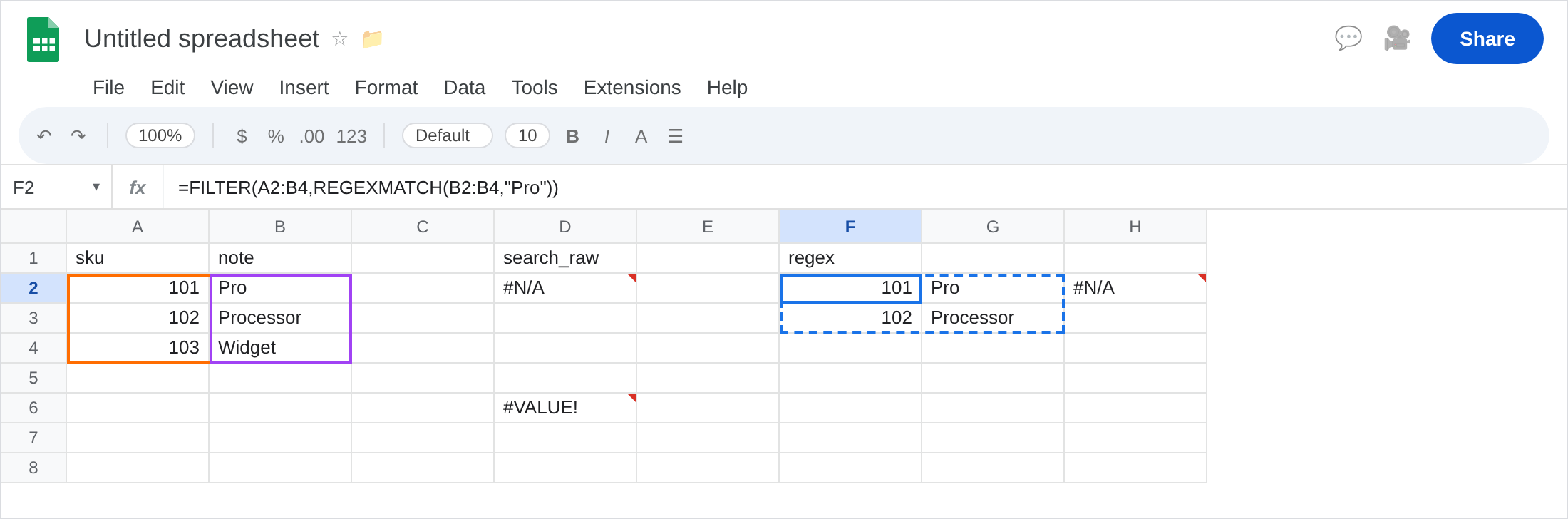
The same SEARCH on Widget alone. In D6 enter =SEARCH("Pro",B4). #VALUE!. That one cell is FIND / SEARCH miss. It is also the value FILTER received for row 3.
REGEXMATCH in FILTER (works). In F1 type regex. Leave F2:G3 empty. In F2 enter =FILTER(A2:B4,REGEXMATCH(B2:B4,"Pro")). The spill is 101 / Pro and 102 / Processor. REGEXMATCH on Widget is FALSE. FILTER drops that row. That block is the control.
ISNUMBER(SEARCH). In F6 enter =FILTER(A2:B4,ISNUMBER(SEARCH("Pro",B2:B4))). Same two rows as F2. ISNUMBER(#VALUE!) is FALSE. That is the SEARCH-shaped contains.
FILTER no-match contrast. In H2 enter =FILTER(A2:B4,A2:A4=999). #N/A, tooltip No matches are found in FILTER evaluation. Equal heights, zero rows. That page is FILTER no match. Leave H2 as contrast. Do not “fix contains” by changing 999.
Case: FIND vs SEARCH. In H6 enter =FILTER(A2:B4,ISNUMBER(FIND("pro",B2:B4))). FIND is case-sensitive. pro vs Pro → often empty #N/A. Leave H6 if it is empty. SEARCH / REGEXMATCH with (?i) are the case-insensitive options.
Leave D2 broken. Leave F2 as the working contains. Leave H2 as zero-sku contrast.
What is actually wrong
Section titled “What is actually wrong”FILTERwants booleans (or numbers coerced as 0/1). A position like1is TRUE-ish.#VALUE!is an error, not FALSE. One Widget in the column poisonsSEARCH-as-condition.REGEXMATCHis already a boolean. Miss = FALSE. Hit = TRUE. That is why F2 works withoutISNUMBER.SEARCHis case-insensitive.FINDis not.REGEXMATCHis case-sensitive unless you write(?i).SEARCHtreats*and?as wildcards.REGEXMATCHuses RE2. A literal star in the note is a different needle per function. See FIND / SEARCH miss for wildcards.- Zero matching rows after a boolean condition is the no-match tooltip (H2, and H6 if FIND missed everyone). That is not D2’s “SEARCH returned
#VALUE!.”
This is not FILTER mismatched heights. See FILTER range size. B2:B4 matches A2:B4 height.
This is not QUERY contains 'Pro' picking Processor. See QUERY contains / matches. Same extra-row idea, different function.
This is not REGEXEXTRACT #N/A. See REGEX no match.
Leave D2, H2, and D6 broken.
Use a boolean contains. Keep F2: =FILTER(A2:B4,REGEXMATCH(B2:B4,"Pro")). Or keep F6: =FILTER(A2:B4,ISNUMBER(SEARCH("Pro",B2:B4))).
Case-insensitive regex: =FILTER(A2:B4,REGEXMATCH(B2:B4,"(?i)pro")).
When zero rows is allowed after a real boolean: =IFNA(FILTER(...),"none"). Do not IFNA D2 hoping Widget becomes FALSE. See IFERROR vs IFNA. IFERROR around D2 can hide a range-size bug too.
If FILTER errors and the condition contains SEARCH/FIND without ISNUMBER, this is the page. If the tooltip is No matches are found, the condition already ran as booleans. If the tooltip is mismatched range sizes, leave for FILTER range size.
SEARCH in FILTER vs no-match vs QUERY contains
Section titled “SEARCH in FILTER vs no-match vs QUERY contains”Raw SEARCH in FILTER → error (D2). Convert to boolean.
Boolean contains, no row hits → No matches #N/A (FILTER no match).
QUERY where B contains 'Pro' → extra Processor row, or empty #N/A on case. Different language, no #VALUE! from SEARCH. See QUERY contains / matches.