

Fix CHOOSE #VALUE! in Google Sheets (index is 0, negative, or past the list)
Updated
CHOOSE returns one value from a list by position. The first argument is that position. #VALUE! here means the position is not a usable index: 0, a negative number, or a number past the last value you listed. The formula parsed. There is no fourth status to pick.
This page is CHOOSE with a bad index. It is not INDEX past range (INDEX #REF! when the row or column sits past a range). It is not wrong type as a generic primer (10 + pcs). It is not SWITCH no match (SWITCH matches values, not positions). Keep the Google Sheets UI in English.
Recreate it on a blank sheet
Section titled “Recreate it on a blank sheet”- Open a blank spreadsheet. In A1 type
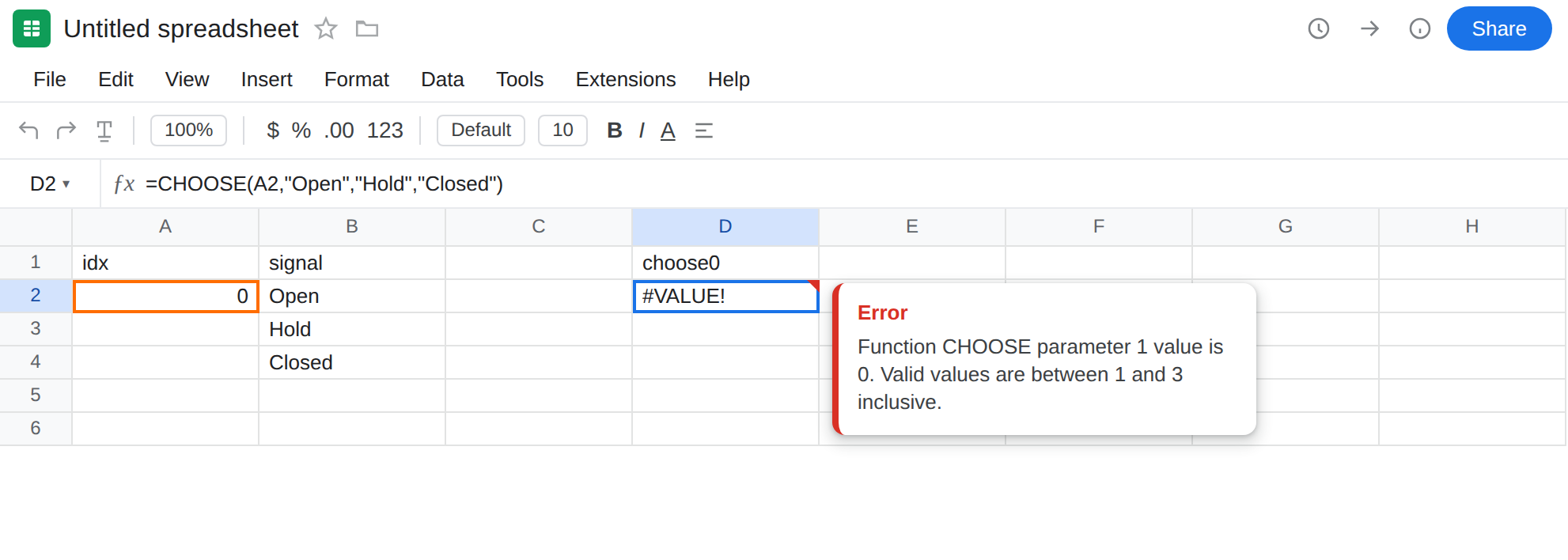
idx. In B1 typesignal. B2Open. B3Hold. B4Closed. Those three words are the listCHOOSEwill pick from. They live on the sheet only so you can compare withINDEXlater.
Index 0 (nothing selected). In A2 type 0 as a number. In D1 type choose0. In D2 enter =CHOOSE(A2,"Open","Hold","Closed"). The cell shows #VALUE!. CHOOSE counts from 1. 0 is not a position in the list. A form that uses 0 for “not chosen yet” feeds this error. Leave D2 broken.
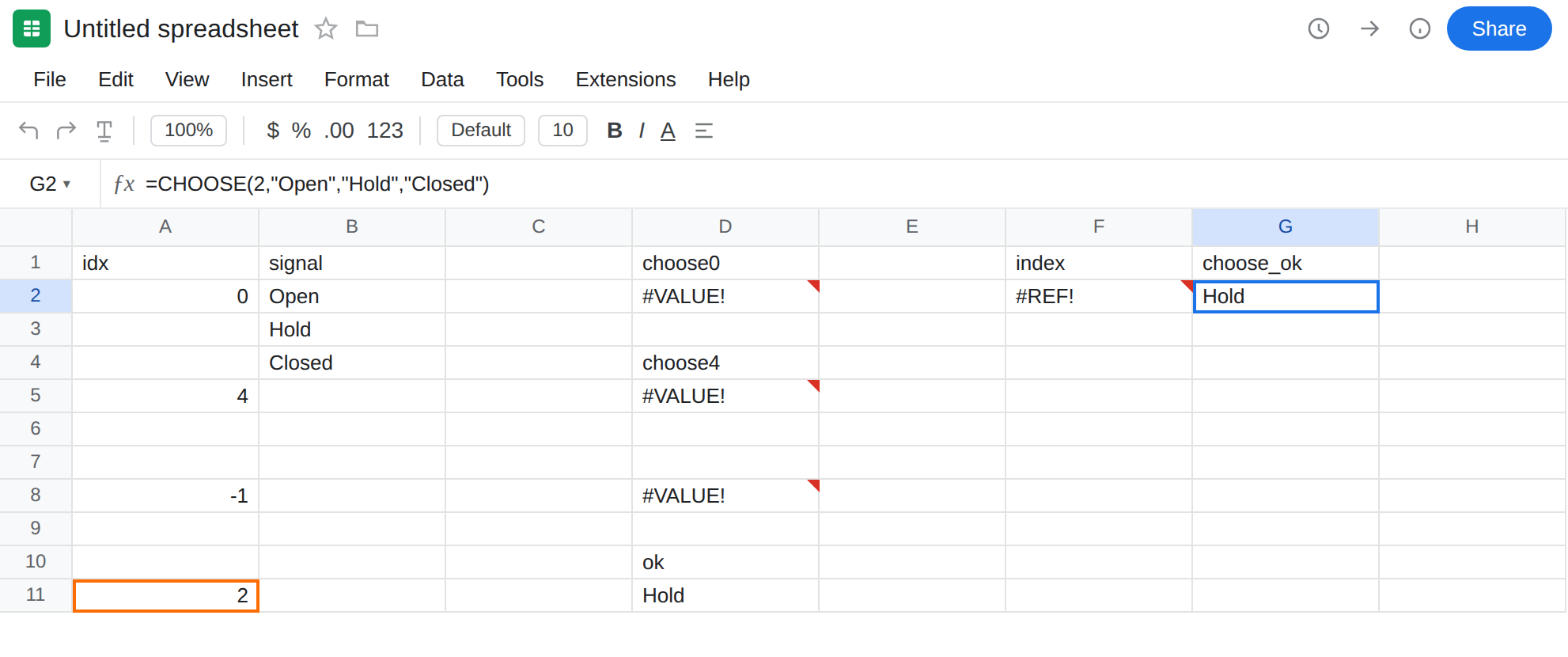
Index past the list. In A5 type 4. In D4 type choose4. In D5 enter =CHOOSE(A5,"Open","Hold","Closed"). The cell shows #VALUE!. Three values were listed. Index 4 asks for a fourth. Leave D5 broken.
Negative index. In A8 type -1. In D8 enter =CHOOSE(A8,"Open","Hold","Closed"). #VALUE! again. Leave D8 broken.
A control that fits. In A11 type 2. In D10 type ok. In D11 enter =CHOOSE(A11,"Open","Hold","Closed"). The cell shows Hold. Same function, legal index.
INDEX contrast — different error. In F1 type index. In F2 enter =INDEX(B2:B4,4). The cell shows #REF!. B2:B4 has three rows. Relative row 4 is past that range. The formula is INDEX, not CHOOSE. The error value is #REF!, not #VALUE!. That walkthrough is INDEX past range. Leave F2 as the contrast. Do not copy an INDEX fix onto D2.
Truncation is not this error. In A14 type 1.9. In D14 enter =CHOOSE(A14,"Open","Hold","Closed"). The cell shows Open. Sheets truncates the index toward zero before it chooses. 1.9 becomes 1. That is a legal pick, not #VALUE!. Leave D2 as the broken 0.
What is actually wrong
Section titled “What is actually wrong”CHOOSE(index, value1, value2, …)wantsindexin1…N, whereNis how many values you listed.0is not “blank pick.”-1is not “from the end.”4is not “use the last one.” Those three are#VALUE!.- The tooltip names
CHOOSEand the illegal index. It is not Circular dependency detected, not Array result was not expanded, not Unknown function. - The list is the arguments, not a range.
CHOOSE(4,B2,B3,B4)is still three values. Putting Open / Hold / Closed in B2:B4 does not add a fourthCHOOSEslot. To pick from a range by position, you wantINDEX, and a past-the-end index there is#REF!. - A blank index cell coerces to
0.CHOOSEof a blank is the same#VALUE!as A2. That is why a dropdown that starts empty breaks the formula until someone picks 1, 2, or 3.
This is not INDEX past the range. F2 is that recreate. See INDEX past range. INDEX(B2:B4,4) still names a real range in the formula bar. CHOOSE never had a range to overflow. Do not widen B2:B4 expecting D2 to clear.
This is not SWITCH #N/A. SWITCH compares A2 to case values ("Open", "Hold"). A missing case is #N/A. See SWITCH no match. D2 is a position, not a label match.
This is not 10 + pcs. See wrong type. A2 is the number 0. ISNUMBER(A2) is TRUE. The type is fine. The domain of the index is not.
This is not #N/A from a lookup. Nothing is being searched. See what #N/A means.
Leave D2, D5, and D8 broken so #VALUE! stays on the sheet. Leave D11 as Hold.
Use an index that exists. In G1 type choose_ok. In G2 enter =CHOOSE(2,"Open","Hold","Closed"). The cell shows Hold. For the sheet index, =CHOOSE(A11,"Open","Hold","Closed") already works. If A2 is a dropdown, give it items 1, 2, 3 — not 0 for empty.
Guard a blank or zero without hiding other errors. In G5 enter =IF(OR(A2<1,A2>3),"",CHOOSE(A2,"Open","Hold","Closed")). The cell is empty while A2 is 0. Do not wrap D2 in IFERROR. That prints a blank for #NAME? and #REF! too. See IFERROR vs IFNA. IFNA will not catch #VALUE!.
Need a range, not a list in the formula? Use INDEX(B2:B4,A11) — legal row 2 returns Hold. If the index can run past the range, that error is #REF! on the INDEX page, not this one.
Do not add a dummy fourth value to “absorb” index 4 unless you truly have a fourth status. Do not switch File → Settings locale. The index is wrong, not the argument separator.
If CHOOSE is #VALUE!, the first argument is not in 1 … N. An INDEX #REF! next to it is a different function.
CHOOSE vs INDEX (and SWITCH)
Section titled “CHOOSE vs INDEX (and SWITCH)”CHOOSE inlines the options. The formula is the list. Adding a row on the sheet does not extend it. A bad pick is #VALUE!.
INDEX reads a range. Extending B2:B5 and asking for row 4 is legal. Asking for row 4 of B2:B4 is #REF!. See INDEX past range. Same English word “index,” two error values, two fixes.
SWITCH does not use a position. It uses equality. held with no case is #N/A, not #VALUE!. See SWITCH no match. If you stored words, SWITCH (with a default) is the matching tool, not a CHOOSE of 0.