

Fix IF blank vs 0 vs empty-string traps in Google Sheets
Updated
IF(test, yes, no) coerces test to TRUE/FALSE. A blank cell is 0 in arithmetic and is FALSE in IF(A2, …). A typed 0 is also FALSE there. A formula that returns "" is an empty string: IF(A2, …) still sees FALSE (non-zero numbers are TRUE; "" is not), but A2=0 is TRUE for both blank and "" in Sheets, while A2="" is TRUE for blank and "" and FALSE for 0. Those three tests disagree on the same dock hours.
This page is IF plus blank / 0 / "". It is not ISBLANK vs empty (ISBLANK, missing IFBLANK). It is not ARRAYFORMULA empty 0 (blank × 2 prints 0 in an array). Keep the Google Sheets UI in English.
Recreate it on a blank sheet
Section titled “Recreate it on a blank sheet”- Open a blank spreadsheet. In A1 type
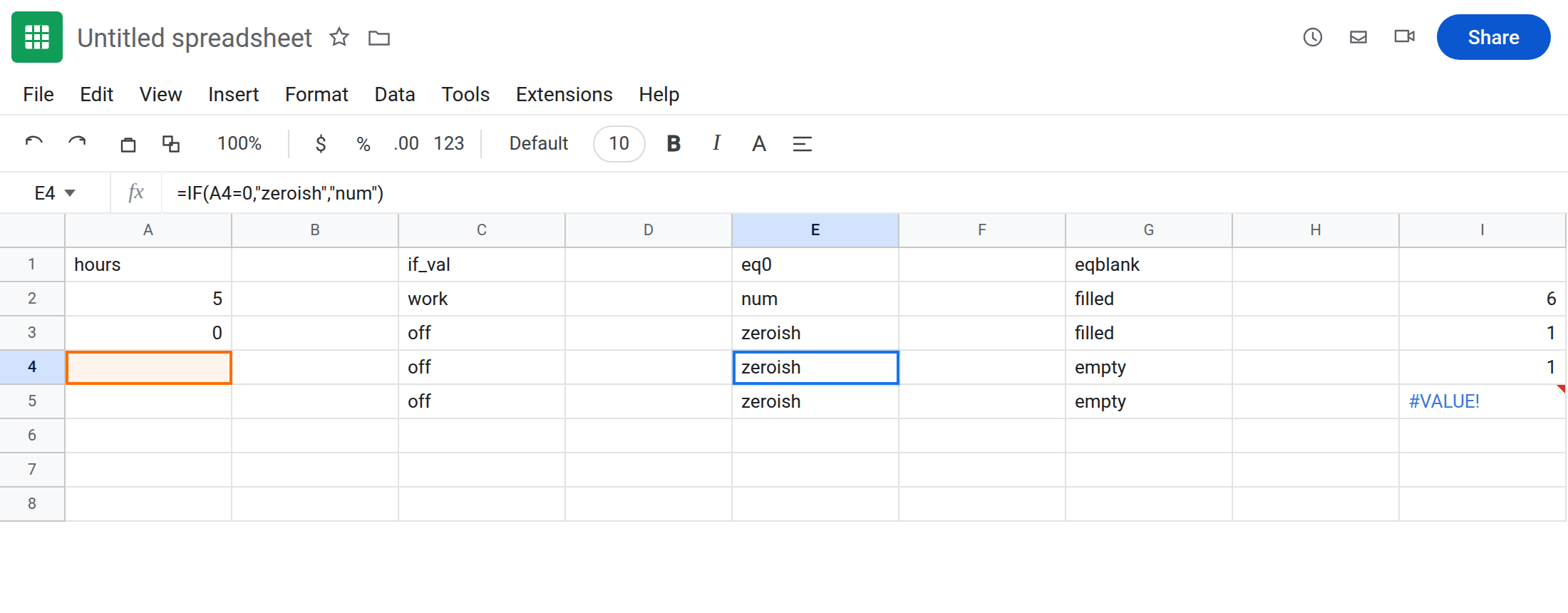
hours. A25. A30. Leave A4 truly empty (no formula, no space). In A5 enter="". Four rows: number, zero, blank, empty string.
IF(A2) truthiness. In C1 type if_val. In C2 enter =IF(A2,"work","off"). Copy C2 down to C5. C2 is work. C3 off (zero). C4 off (blank). C5 off (""). IF(range) cannot tell 0 from “not filled.”
IF(A2=0). In E1 type eq0. In E2 enter =IF(A2=0,"zeroish","num"). Copy to E5. E2 num. E3 zeroish. E4 zeroish (blank = 0). E5 zeroish ("" = 0 is TRUE in Sheets). Typed 0, blank, and "" all take the zero branch.
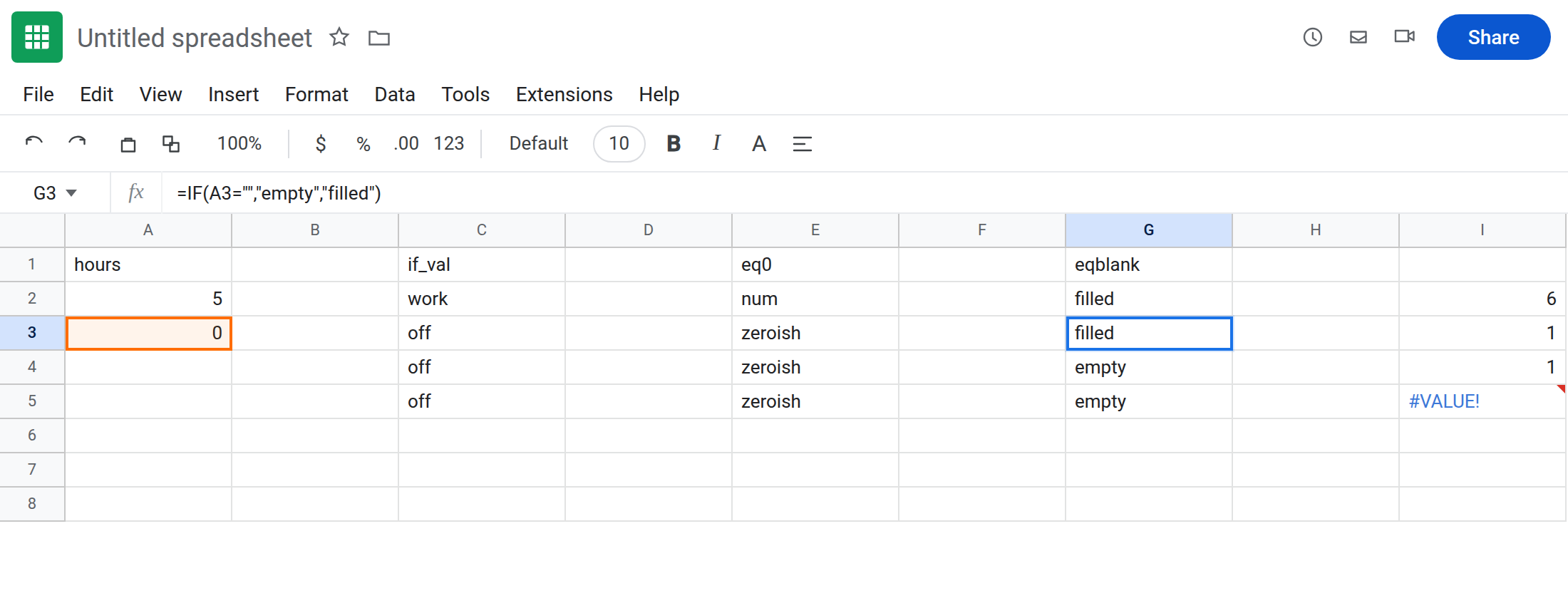
IF(A2=""). In G1 type eqblank. In G2 enter =IF(A2="","empty","filled"). Copy to G5. G2 filled. G3 filled (0 is not ""). G4 empty. G5 empty. This test is the one that treats 0 as real hours.
Control math. In I2 enter =A2+1 → 6. I3 → 1. I4 → 1 (blank + 1). I5 → #VALUE! (""+1). The empty string is the one that breaks arithmetic. Blank does not.
Leave A3:A5 as the three “empty-looking” hours. Leave the C/E/G copies in place.
What is actually wrong
Section titled “What is actually wrong”- Display can look blank for
0(if you formatted zeros to hide), for a truly empty cell, and for"".IFdoes not use display. IF(A2,"work","off")is a truthiness test.0, blank, and""are all off. Use it only when any non-zero number means “go.”A2=0is TRUE for blank and for"". Guarding a divisor withIF(B2=0,"",A2/B2)also catches those. That is why divide by zero can use one test for0and blank. It also treats""as zero before""would have#VALUE!on divide — order of tests matters.A2=""is TRUE for blank and"", FALSE for0. That is the usual “skip empty rows, keep zero hours” test.""+1is#VALUE!. Blank+1 is1. See wrong type for the token; the cause here is which empty you stored.
This is not ISBLANK. ISBLANK(A5) is FALSE because A5 holds a formula. See ISBLANK vs empty.
This is not ARRAYFORMULA painting 0 into empty rows. See ARRAYFORMULA empty 0. You can return "" from IF to avoid that.
Leave C, E, and G filled in so the three tests stay visible.
Zero hours are data, empty rows are not. Use =IF(A2="","",A2*9) so A3 (0) still computes 0 and A4/A5 stay blank-looking.
Any missing input should skip, including 0: =IF(A2,"work","off") or =IF(OR(A2="",A2=0),"off","work") depending on whether "" is in play.
Do not store hours as ="" if you need to add them. Leave the cell empty, or store 0. I5 is the #VALUE! tax on "".
Do not wrap I5 in IFERROR until you decide whether hours should be numbers. See IFERROR vs IFNA.
If 0 disappeared into the “empty” branch, you used IF(A2) or A2=0 when you needed A2="". If +1 is #VALUE! on a cell that looks empty, it is "", not blank.
IF(A2) vs =0 vs ="" vs ARRAYFORMULA 0
Section titled “IF(A2) vs =0 vs ="" vs ARRAYFORMULA 0”Truthiness IF(A2) → 0/blank/"" all FALSE (column C).
A2=0 → 0/blank/"" all TRUE (column E). Good for divisors; bad for “zero hours are real.”
A2="" → only blank and "" (column G). Keeps 0.
ARRAYFORMULA A2:A*2 writes 0 on blank rows — ARRAYFORMULA empty 0. Fix that with IF(A2:A="","",…), the same ="" test as G.