

Fix QUERY group by / aggregation errors in Google Sheets (AVG_SUM_COLUMN, mixed types, missing LABEL)
Updated
QUERY group by collapses rows and runs sum / avg / count. That statement fails when a summed column is not numeric (mixed types — tooltip often AVG_SUM_ONLY_NUMERIC, searched as AVG_SUM_COLUMN), when you select a column that is neither grouped nor aggregated (ADD_COL_TO_GROUP_BY_OR_AGG), or when the spill “works” but the header is sum tickets because you omitted label. The formula is a QUERY. The aggregation contract is what broke.
This page is GROUP BY / aggregation. It is not QUERY parse string (unquoted Widget, bare 2024-01-01, Col vs A). It is not QUERY mixed dates (year(A) on TBD). It is not QUERY no rows (empty #N/A, Query completed with an empty output).
Recreate it on a blank sheet
Section titled “Recreate it on a blank sheet”- Open a blank spreadsheet. In A1 type
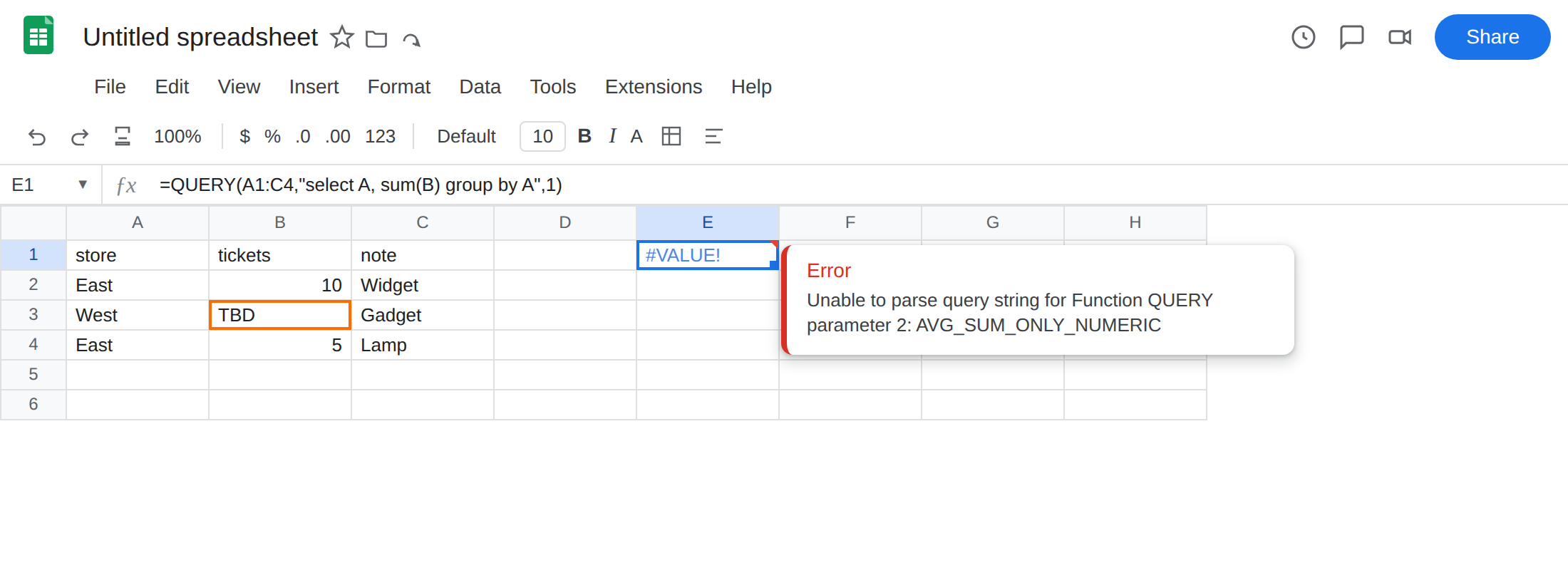
store, B1tickets, C1note. A2East. B210. C2Widget. A3West. B3TBDas text. C3Gadget. A4East. B45. C4Lamp. Tickets are mixed: two numbers and oneTBD.
SUM on a mixed column. In E1 enter =QUERY(A1:C4,"select A, sum(B) group by A",1). The cell shows #VALUE!. The tooltip starts Unable to parse query string for Function QUERY parameter 2 and names AVG_SUM_ONLY_NUMERIC (AVG_SUM_COLUMN). sum(B) needs a numeric column. TBD in B3 is enough. Leave E1 broken.
Selected column not grouped and not aggregated. In E4 enter =QUERY(A1:C4,"select A, C group by A",1). The cell shows #VALUE!. The tooltip is ADD_COL_TO_GROUP_BY_OR_AGG: C (or the same idea: C must be in group by or inside sum/count/avg). You asked for note without saying how to collapse Widget vs Lamp for East. Leave E4 broken.
A GROUP BY that works, ugly header. In A6 type store, B6 qty. A7 East, B7 10. A8 West, B8 8. A9 East, B9 5. In G2 enter =QUERY(A6:B9,"select A, sum(B) group by A",1). The spill shows stores and totals. The header on the total is sum qty. There is no #VALUE!. Missing label is that cosmetic.
Confirm mixed types on the first table: =ISNUMBER(B2) TRUE, =ISNUMBER(B3) FALSE. Leave E1 and E4 broken. Leave G2 as the working spill.
What is actually wrong
Section titled “What is actually wrong”QUERYtypes a column, thensum/avgrequire that type to be numeric. B mixes10,TBD,5. Mixed / text-majority columns are not numeric.sum(B)is AVG_SUM_ONLY_NUMERIC. The numbers you can see in B2 and B4 do not save the column.group by Ameans every otherselectfield must be an aggregate (sum(B),count(C),avg(B)) or also listed ingroup by.select A, C group by Aleaves C hanging. ADD_COL_TO_GROUP_BY_OR_AGG.labelis optional for parsing. Without it, Sheets names the aggregatesum B/sum qty. That is not#VALUE!. It still breaks dashboards that expecttickets. Missinglabelis the third failure mode on this page. This is not unquoted text ordate 'yyyy-mm-dd'. See QUERY parse string. E1 would parse if B were numbers. The tooltip names AVG_SUM, not NO_COLUMN.
This is not year(A) on dates mixed with TBD. See QUERY mixed dates. Here TBD sits in tickets, and the function is sum, not year.
This is not zero rows. See QUERY no rows. E1 did not finish. There is no empty output #N/A.
Leave E1 and E4 broken so #VALUE! stays on the sheet.
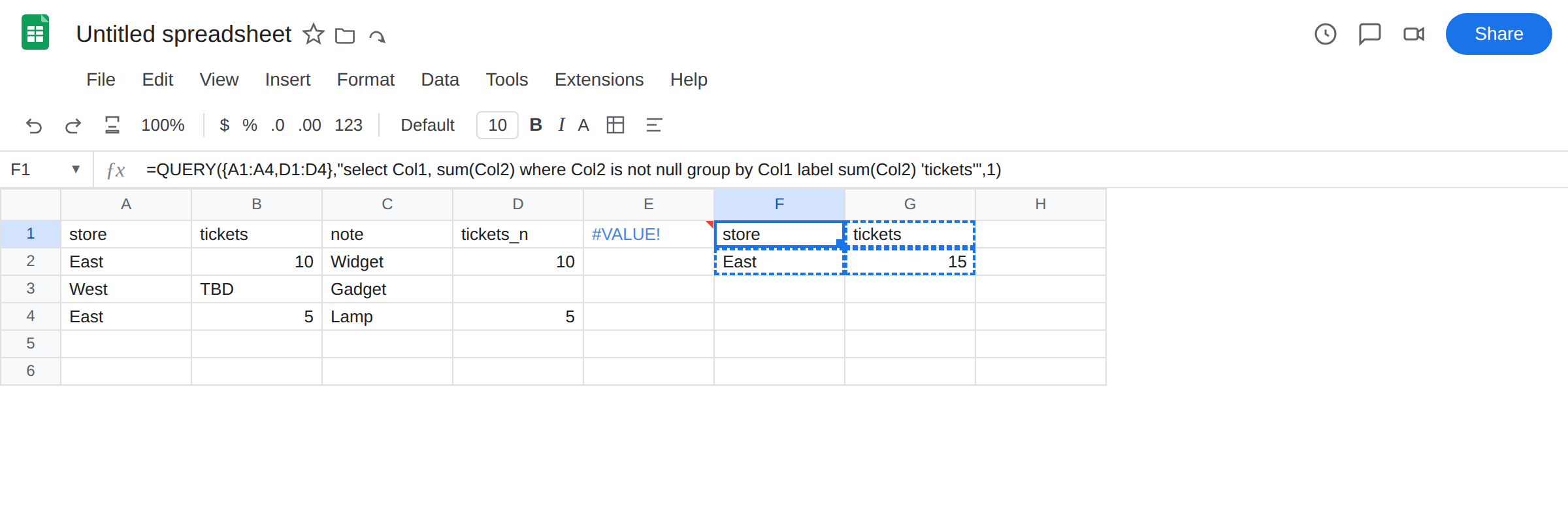
Numeric helper, then GROUP BY. In D1 type tickets_n. In D2 enter =IF(ISNUMBER(B2),B2,"") and fill down through D4. B3 becomes blank in D. In F1 enter =QUERY({A1:A4,D1:D4},"select Col1, sum(Col2) where Col2 is not null group by Col1 label sum(Col2) 'tickets'",1). The formula spills East / 15 and West with no row if West’s tickets were only TBD. Array wrappers use Col1, not A. That switch is expected. See QUERY parse string if you write select A on { }.
Hang a note column: aggregate it or drop it. select A, sum(B), count(C) group by A, or drop C. Do not select A, C group by A.
Label the aggregate. G2 works without label. Add it: =QUERY(A6:B9,"select A, sum(B) group by A label sum(B) 'tickets'",1). The header becomes tickets.
Do not wrap E1 in IFERROR until B is numeric. That only hides AVG_SUM. See IFERROR vs IFNA. Do not change File → Settings locale.
If group by is #VALUE!, read the tooltip. AVG_SUM_ONLY_NUMERIC is mixed tickets. ADD_COL_TO_GROUP_BY_OR_AGG is a field you selected and never aggregated. Then add label.
LABEL after GROUP BY
Section titled “LABEL after GROUP BY”label does not fix mixed types. Put it on a statement that already runs. The name must match: label sum(B) 'tickets' on a sheet range, label sum(Col2) 'tickets' on an array. A typo there is another Unable to parse — closer to QUERY parse string than to this page.
where Col2 is not null drops stores whose helper is blank (TBD only). If the whole spill is then #N/A, you filtered everything — that empty output is QUERY no rows. Put a number in tickets, or keep TBD rows out on purpose.
N(B1:B4) turns TBD into 0 so West still appears. Use that only when zero is the right stand-in. Do not use N on a date column.