

Fix TEXTJOIN spill overwrite or empty delimiter in Google Sheets
Updated
TEXTJOIN(delimiter, ignore_empty, text1, …) glues pieces into one string. An empty delimiter ("") is legal: it concatenates with nothing in between, so N12, E7, W4 become N12E7W4. That is the explosion. ARRAYFORMULA(TEXTJOIN(..., A2:C4)) joins the entire block into a single cell, not one join per row. BYROW plus TEXTJOIN does spill per row — and that spill #REF!s if a cell below is occupied.
This page is TEXTJOIN delimiter, whole-block join, and a blocked BYROW spill. It is not SPLIT spill / delimiter (SPLIT with "" splits every character). It is not TOCOL / TOROW. Keep the Google Sheets UI in English.
Recreate it on a blank sheet
Section titled “Recreate it on a blank sheet”- Open a blank spreadsheet. In A1 type
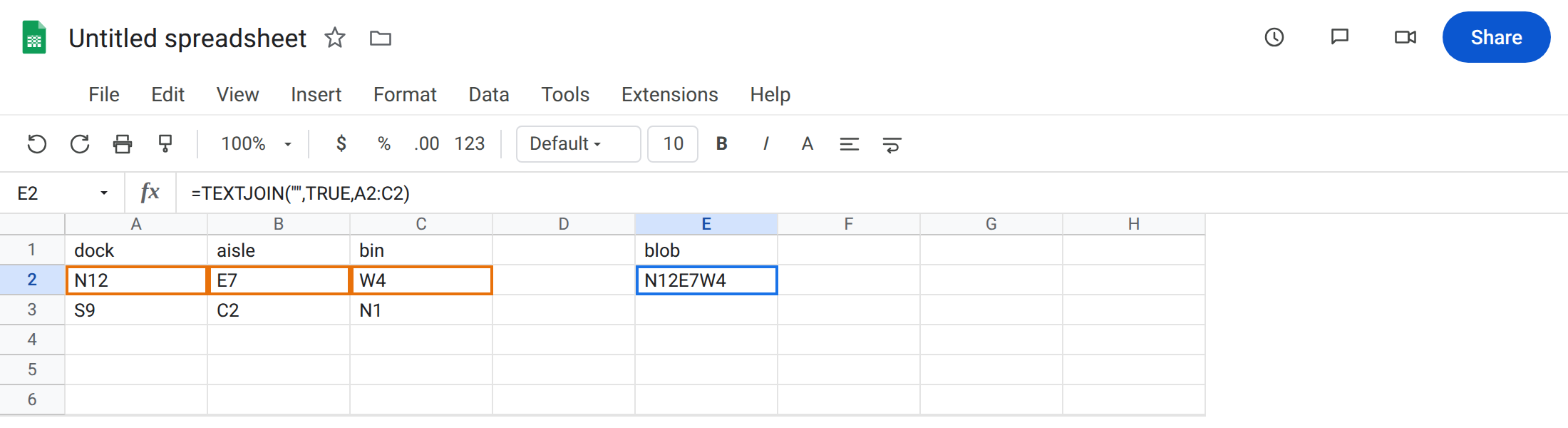
dock, B1aisle, C1bin. A2N12. B2E7. C2W4. A3S9. B3C2. C3N1. Two rows of codes.
Empty delimiter concatenates. In E1 type blob. In E2 enter =TEXTJOIN("",TRUE,A2:C2). The cell shows N12E7W4. No pipes, no commas. People type "" thinking “default comma” or “do not join.” Sheets joins harder. Leave E2 as that blob.
A working join. In E4 enter =TEXTJOIN("|",TRUE,A2:C2). The cell shows N12|E7|W4. Same three codes, readable. That row is the control.
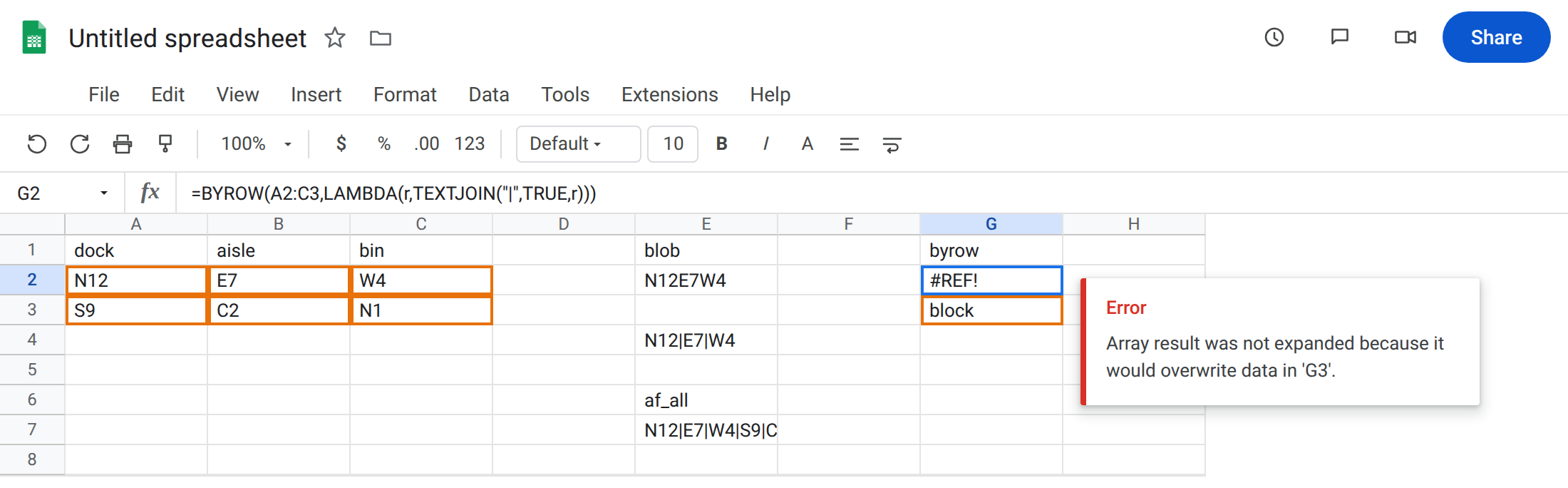
ARRAYFORMULA joins the whole rectangle. In E6 type af_all. In E7 enter =ARRAYFORMULA(TEXTJOIN("|",TRUE,A2:C3)). The cell is one string: N12|E7|W4|S9|C2|N1. There is no spill of two row-joins. TEXTJOIN already reduced the range to a scalar, so ARRAYFORMULA has nothing left to map. Leave E7 as that one-cell explosion.
BYROW spill overwrite. In G1 type byrow. In G3 type block. Leave G2 empty. In G2 enter =BYROW(A2:C3,LAMBDA(r,TEXTJOIN("|",TRUE,r))). The cell shows #REF!. The tooltip is Array result was not expanded because it would overwrite data in ‘G3’. Two rows need G2 and G3. Leave G2 broken.
The same BYROW on a clear column. In I1 type rows_ok. Leave I2:I3 empty. In I2 enter =BYROW(A2:C3,LAMBDA(r,TEXTJOIN("|",TRUE,r))). The spill is N12|E7|W4 then S9|C2|N1. Per-row join. That is the shape E7 was not.
Leave E2 as the empty-delimiter blob. Leave E7 as the whole-block string. Leave G2 as #REF!.
What is actually wrong
Section titled “What is actually wrong”- Empty delimiter means concatenate. It is documented. It is not “skip joining.”
SPLITwith""is the opposite explosion (every character). See SPLIT spill / delimiter. TEXTJOINof a 2-D range is still one string. WrappingARRAYFORMULAdoes not make it per-row. You needBYROW/MAP, or a join onA2:C2copied down.ignore_emptyTRUEdrops blank cells inside a row.FALSEinserts extra delimiters for blanks. Neither flag inserts a comma when the delimiter is"".BYROW+TEXTJOINreturns one scalar per row, so it spills down. Occupied G3 is#REF!for the whole formula. Same overwrite family as SORT / UNIQUE spill, function here isBYROW.
This is not BYROW returning an array (nested array / Single value expected). See BYROW / MAP LAMBDA. TEXTJOIN already returns one value. G2 failed because of occupancy, not because the lambda spilled a row.
This is not HSTACK pad #N/A. See HSTACK / VSTACK pad.
Leave E2, E7, and G2 as the three failures.
Pass the delimiter you want to read. Keep E4: =TEXTJOIN("|",TRUE,A2:C2). Copy down for row 3, or use the I2 BYROW.
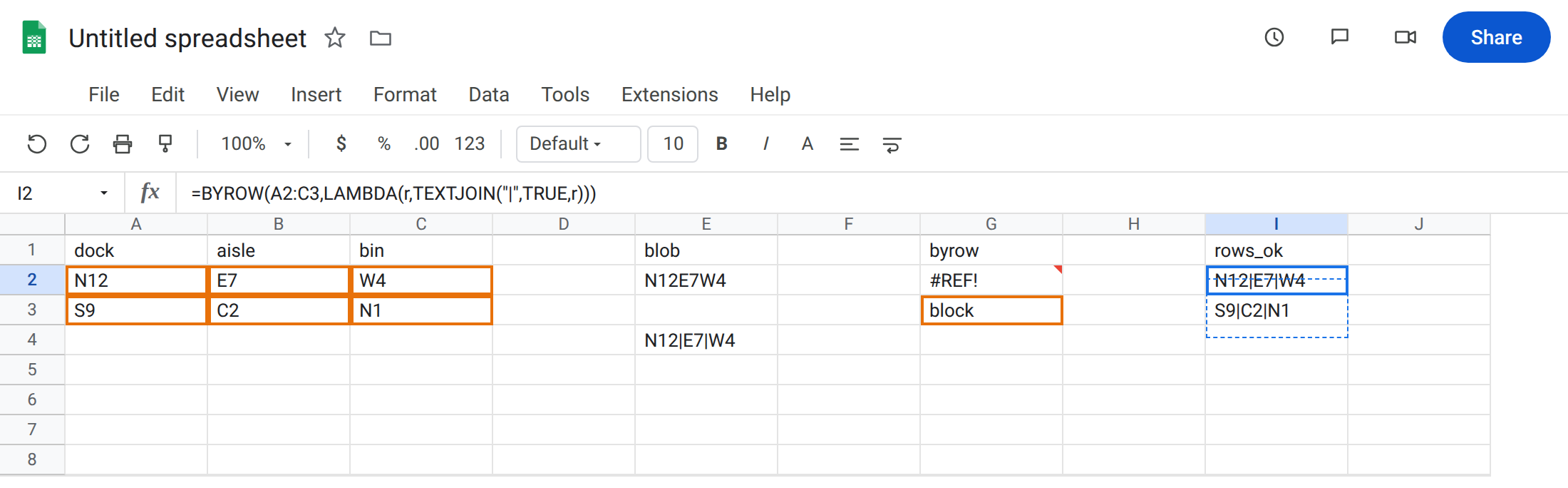
Per-row joins: =BYROW(A2:C3,LAMBDA(r,TEXTJOIN("|",TRUE,r))) on empty cells (I2). Do not ARRAYFORMULA(TEXTJOIN(...,A2:C3)) for that job.
Clear G3 or move G2 if you need the formula in column G. Do not wrap G2 in IFERROR. See IFERROR vs IFNA.
If the cell is one mashed code string, the delimiter is "" or you joined a whole block. If the cell is #REF! and the formula shows BYROW + TEXTJOIN, look at the cell below.
Empty delimiter vs SPLIT empty delimiter vs ARRAYFORMULA
Section titled “Empty delimiter vs SPLIT empty delimiter vs ARRAYFORMULA”TEXTJOIN("",…) glues. SPLIT(text,"") explodes into characters. Same "", opposite products.
ARRAYFORMULA(TEXTJOIN) glues a rectangle into one cell. BYROW(TEXTJOIN) glues each row. Pick the reducer that matches the grain you want: cell, row, or whole board. Occupied cells only matter once you actually spill.