

GOOGLEFINANCE changepct is #N/A on a currency pair
Updated
changepct is the percentage change Google documents for a security since the previous close, and for a mutual fund’s net asset value. A currency pair has no session close in this function. =GOOGLEFINANCE("CURRENCY:USDJPY","changepct") is #N/A. The quote without that attribute, or with "price", is a delayed rate. It is one number, not a percent. Google’s help says currencies do not have trading windows, so open, high, low, and volume do not return either. Percent change sits in that unsupported set.
The pair syntax itself is currency pair. A stock changepct that fails for a bad window is GOOGLEFINANCE attribute. Sheet Error is not a broker and not Google. Do not trade from this page. There is no rate and no percent stored in this article.
Recreate it on a blank sheet
Section titled “Recreate it on a blank sheet”- Open a blank spreadsheet. You need a network. Keep the Google Sheets UI in English.
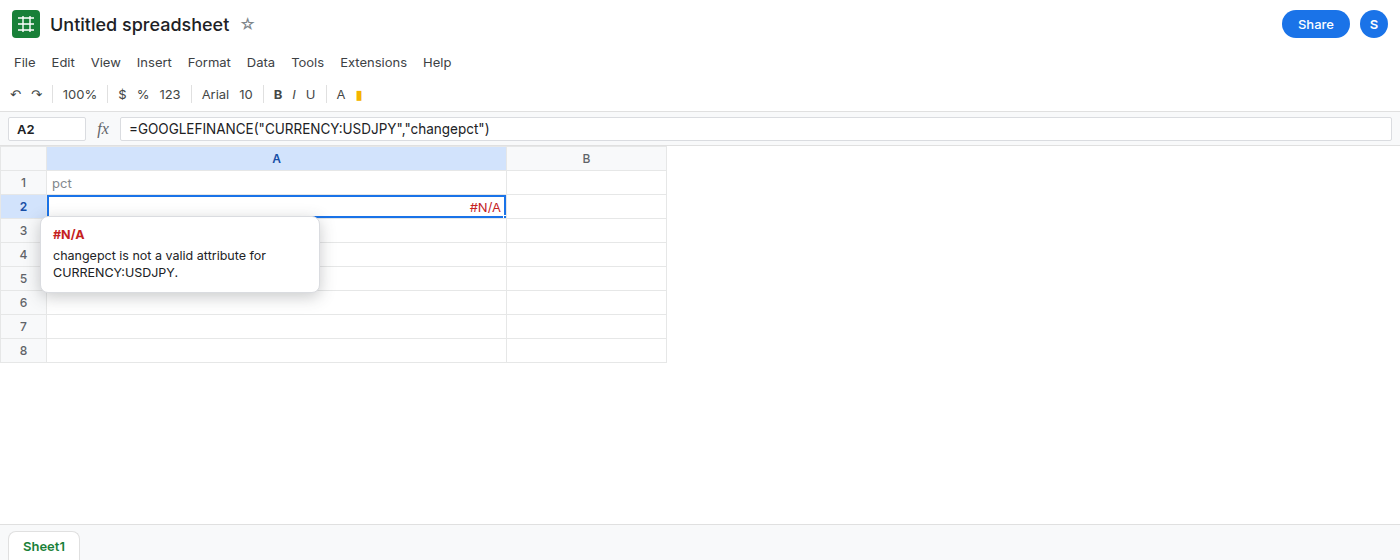
The attribute the pair does not support. In A1 type pct. In A2 enter =GOOGLEFINANCE("CURRENCY:USDJPY","changepct"). A2 is #N/A. The tooltip says the query returned no data, or that the attribute is not valid for the symbol. Leave A2 broken. Do not format A2 as percent and refresh. A format does not create the field.
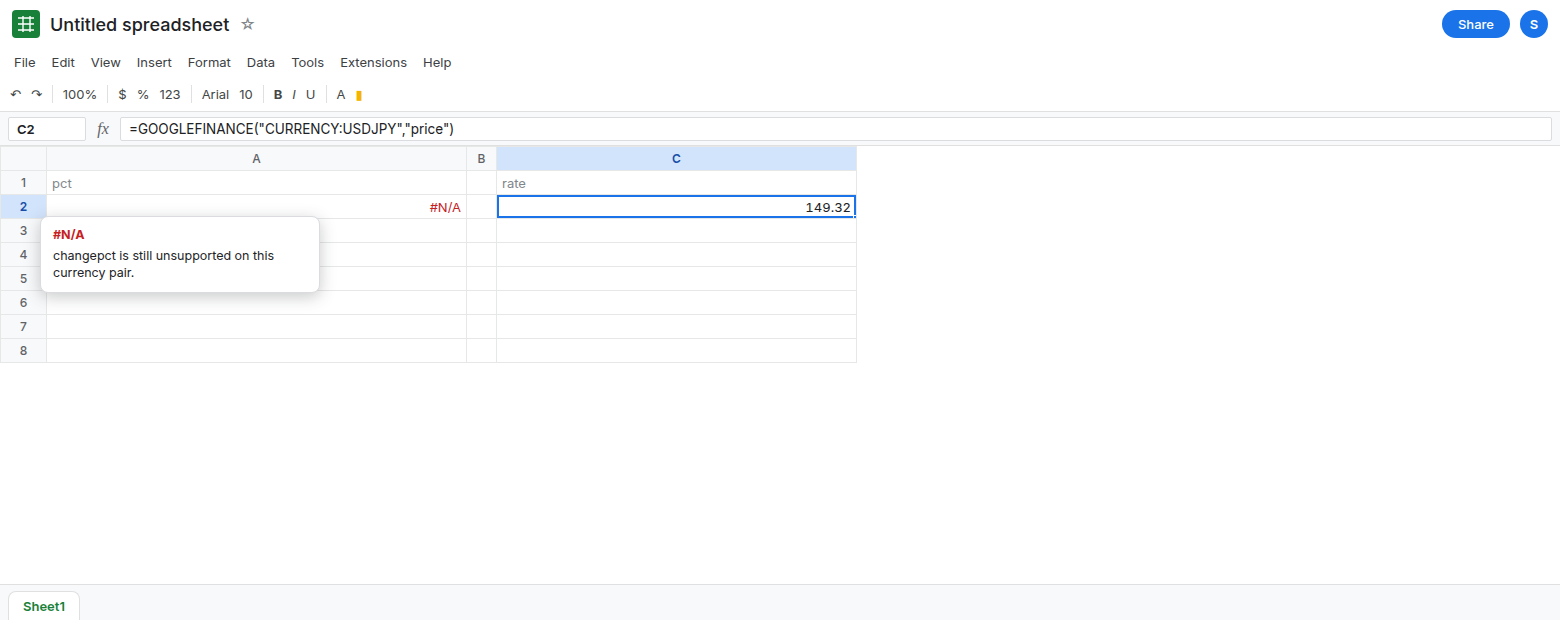
The quote is a rate, when the fetch works. In C1 type rate. In C2 enter =GOOGLEFINANCE("CURRENCY:USDJPY","price"). When the fetch works, C2 is one number. It is not a percent. Format it as percent and the display is nonsense, because a rate near 150 painted as percent is not a day’s move. Put the format back to Number if you changed it. If C2 is #N/A, the pair or the network failed. That is GOOGLEFINANCE #N/A and currency pair. Fix that before you judge changepct. A2 stays #N/A even when C2 is a number.
Session attributes fail the same way. In C4 enter =GOOGLEFINANCE("CURRENCY:USDJPY","volume"). C4 is #N/A. volume is not how you repair changepct. Leave C4 broken.
A stock percent is a different symbol. In E1 type stock. In E2 enter =GOOGLEFINANCE("GOOG","changepct"). When the feed returns it, E2 is a number you can format as percent. When it returns #N/A, this account’s fetch did not get that attribute today. Either way, E2 does not fill A2. A currency pair does not inherit a stock attribute because a stock cell succeeded. Leave E2 as whatever the feed did. Do not copy E2’s number onto the yen pair.
History is not changepct. In E4 enter =GOOGLEFINANCE("CURRENCY:USDJPY","price","2024-01-02","2024-01-05"). When the fetch works, E4 spills a small table of delayed historical rates. Those rows are not a percent-change field. If E4 is #N/A, the window failed and you still do not have changepct. See currency pair for price versus close on FX. Do not divide two spilled rates in this article and call the quotient Google’s percent.
What is actually wrong
Section titled “What is actually wrong”- Attributes are per security type.
changepctis documented for stocks and for mutual funds. It is not documented forCURRENCY:. A2 is the unsupported call. Waiting twenty minutes changes nothing, because the delay page is about a number that already exists. See GOOGLEFINANCE delay. priceon a pair is the rate. Formatting that rate as percent does not compute a move. C2 and A2 answer different questions, and only one of them is a legal attribute.- A percent you calculate from two historical rows is your arithmetic. It runs only when those rows exist. It is not the
changepctattribute, it is delayed, and it will not match every bank screen. This page does not give you that formula as a substitute field. If you need a published percent, you do not have one from this function for the pair. MUTF:funds and theirchangepctare mutual fund symbols. PuttingCURRENCY:on a fund ticker does not combine the two.
This is not a locale format. The cell is #N/A before any percent format applies.
Leave A2 and C4 as #N/A.
Read the rate, or stop. Keep C2 when it is a number: =GOOGLEFINANCE("CURRENCY:USDJPY","price"). Label it as a delayed rate. Keep A2 as #N/A so the sheet shows that percent change is unsupported. If C2 is #N/A too, you have no quote. See currency pair.
Do not invent the percent with IFERROR. =IFERROR(GOOGLEFINANCE("CURRENCY:USDJPY","changepct"),0) stores 0, which looks like a flat day. That zero is the mask. See IFERROR vs IFNA.
If A2 is #N/A and the ticker starts with CURRENCY:, changepct is the wrong attribute. If you need a fund’s percent, the symbol is MUTF:, and that call can still be #N/A. Reloading will not add changepct to a currency pair.