

Fix TO_DATE surprises in Google Sheets (serial vs text, not DATEVALUE locale)
Updated
TO_DATE(value) interprets a number as a Sheets date (days since 30 December 1899) and returns that date. If value is not a number, TO_DATE returns it unchanged — no #VALUE!. DATEVALUE is the function that parses date text and errors when the locale will not read it. TO_DATE(10/10/2000) is not 10 October: the slashes divide first.
This page is TO_DATE serial vs passthrough vs slash arithmetic. It is not DATEVALUE locale (DATEVALUE("13/1/2024") #VALUE! on a US locale). It is not wrong type. Keep the Google Sheets UI in English. Locale is File → Settings → Locale; display language stays English.
Recreate it on a blank sheet
Section titled “Recreate it on a blank sheet”- Open a blank spreadsheet. File → Settings → Locale → United States. Save. In A1 type
kind, B1raw, C1to_date.
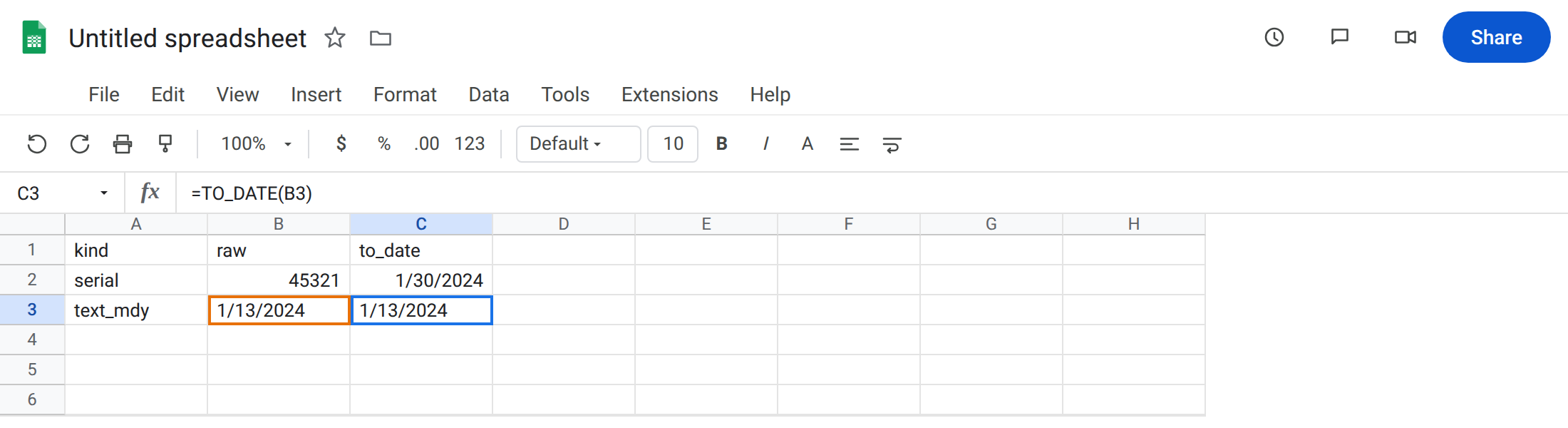
A serial that becomes a date. In A2 type serial. In B2 type 45321 as a number (a 2024-era serial). In C2 enter =TO_DATE(B2). Format C2 as Date. The cell shows a date (around 2024-01-30 depending on the serial). That row is the control: number in, date out.
Text that DATEVALUE would parse — TO_DATE leaves it. In A3 type text_mdy. In B3 type an apostrophe then 1/13/2024 so it stays text. In C3 enter =TO_DATE(B3). C3 still looks like 1/13/2024 and ISTEXT(C3) is TRUE. No #VALUE!. TO_DATE did not parse the string.
DATEVALUE on the same text (contrast). In D3 enter =DATEVALUE(B3). On United States, 1/13/2024 becomes a date. In A4 type text_dmy. In B4 type '13/1/2024. In D4 enter =DATEVALUE(B4). D4 is #VALUE! (month 13). In C4 enter =TO_DATE(B4). C4 is still the text 13/1/2024, not #VALUE!. Leave D4 as the DATEVALUE failure. Leave C4 as the passthrough. The locale primer is DATEVALUE locale.
Slash arithmetic. In A6 type slashes. In C6 enter =TO_DATE(10/10/2000). The cell is a near-zero serial (10÷10÷2000), displayed as a 1899/1900 date if you format it as Date. It is not 10 October 2000. Leave C6 as that trap. The working date constructor is DATE(2000,10,10).
Leave C3 and C4 as unchanged text. Leave D4 as DATEVALUE #VALUE!. Leave C6 as the division date.
What is actually wrong
Section titled “What is actually wrong”TO_DATEis Format → Number → Date as a function, for numbers. It is not a parser for13/1/2024.- Non-numeric input is returned as-is. That is why C3 is not
#VALUE!and why a laterC3+1can then be#VALUE!(text plus 1). The failure is delayed. 10/10/2000inside a formula is division. Typed into a cell, the same characters may become a date. Functions do not auto-convert that typing convention. Google’s help calls this out forTO_DATEandWEEKDAY.DATEVALUEis the parser. Its#VALUE!on13/1/2024(US) is the other page.TO_DATEwill not throw that error for you, and will not fix it either.
This is not QUERY mixed dates. See QUERY mixed dates. No year(A) here.
This is not TO_PURE_NUMBER stripping currency format. See TO_PURE_NUMBER. Inverse direction.
This is not a Formula parse error from commas vs semicolons. See locale parse error.
Leave C4, D4, and C6 as the contrasts.
Need a date from a serial. Keep C2: =TO_DATE(B2) and format as Date. Or Format the serial cell itself.
Need a date from locale text. Use DATEVALUE or DATE(year,month,day), not TO_DATE. In F4 enter =DATE(2024,1,13) for 13 January without locale strings. On US locale, =DATEVALUE("1/13/2024") matches D3.
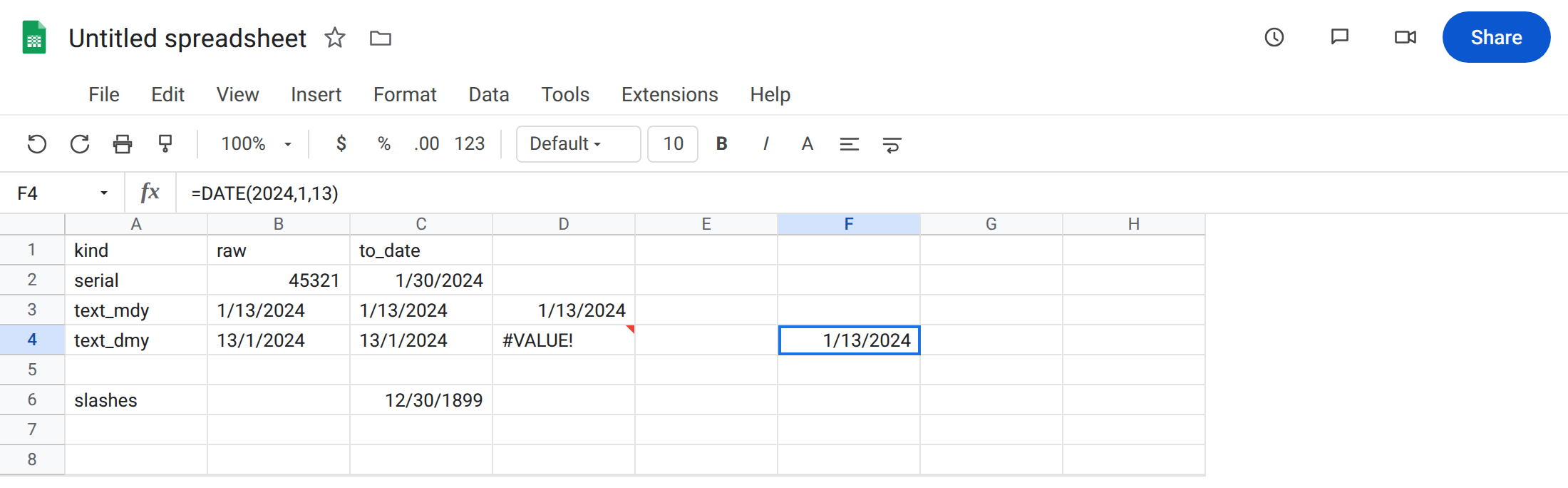
Need 10 October 2000. In F6 enter =DATE(2000,10,10). Do not TO_DATE(10/10/2000).
Do not wrap C3 in IFERROR looking for a parse error TO_DATE never raises. See IFERROR vs IFNA.
If TO_DATE “does nothing,” the input is text (ISTEXT). If you see #VALUE!, you are probably on DATEVALUE or on C3+1. If the date is in 1899, you divided.
TO_DATE vs DATEVALUE vs DATE
Section titled “TO_DATE vs DATEVALUE vs DATE”TO_DATE = number → date format. Passthrough for text.
DATEVALUE = date-shaped text → serial, locale-sensitive #VALUE!.
DATE(y,m,d) = three numbers → date. Use it when you already have parts, or when you must not depend on 13/1/2024 vs 1/13/2024. This page is the first function, and the slash-division trap that looks like a date literal.