

IMPORTHTML index 1 is the first table, and 0 or a list index is a different request
Updated
IMPORTHTML(url, query, index) pulls one HTML table or one HTML list. query is the word "table" or the word "list". index starts at 1. Index 1 is the first table on the page, not “the main table” in a visual sense. Index 2 is the second table. Index 0 is not a table. An index past the last table is #N/A, tooltip Imported content is empty. "list" with index 1 is the first list, which can succeed and still be the wrong object.
The download-size tooltip is IMPORTHTML resource size. Changing the index does not shrink that download. Allow access, Result too large, and Loading… are Allow access, size, loading. An XPath is IMPORTXML XPath. Keep the Google Sheets UI in English. Sheet Error is an independent formula-error library, not a Google product.
Recreate it on a blank sheet
Section titled “Recreate it on a blank sheet”- Open a blank spreadsheet. Use one small public page so the failure is the index, not the file size. In A1 type
t1. In A2 enter:
=IMPORTHTML("https://en.wikipedia.org/wiki/Moon","table",1)
Click Allow access if the banner appears. That banner is not an index error. After it, A2 spills a table from the article. Wikipedia edits change which table is first. You do not need a specific caption. You need a spill that is a table. That spill is the control.
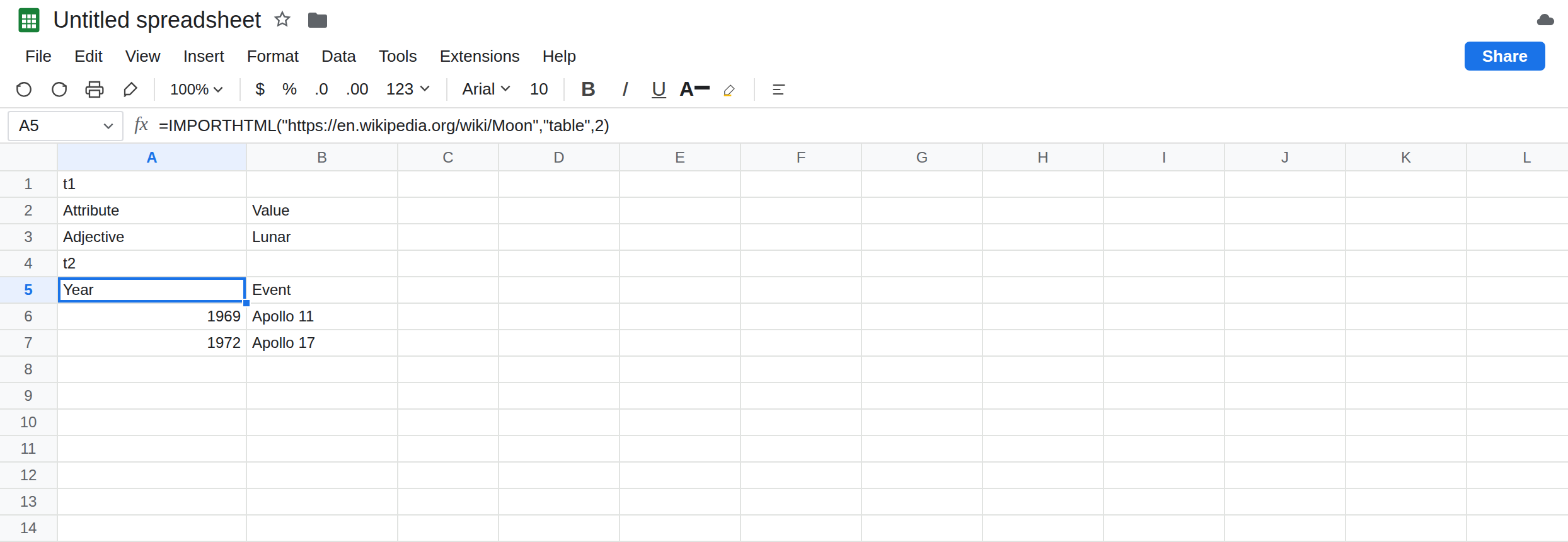
The next table is a different spill. In A4 type t2. In A5 enter:
=IMPORTHTML("https://en.wikipedia.org/wiki/Moon","table",2)
A5 is not a copy of A2. It is another table, or #N/A if the article currently has only one. Either outcome is the point: index 2 is not a retry of index 1. Leave A5 beside A2 and compare the first cells. If they match, you are not looking at the top-left of each spill; scroll the spill. Two imports can share a header word and still be different grids.
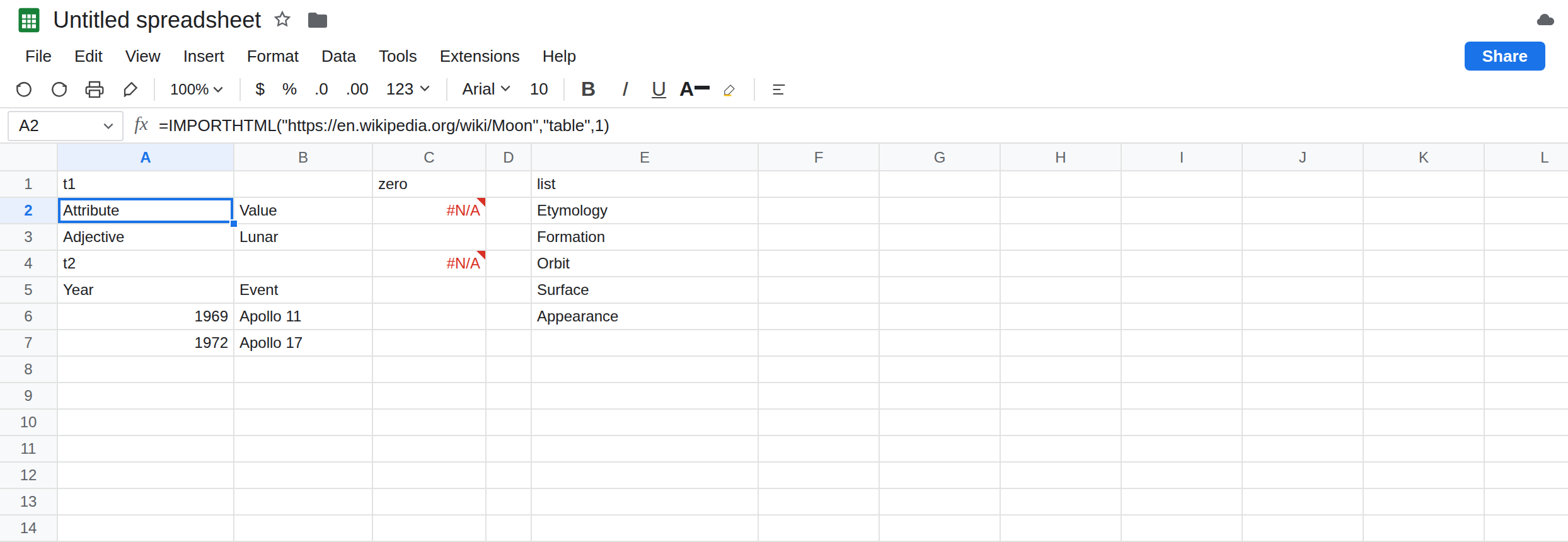
Zero and a missing index. In C1 type zero. In C2 enter:
=IMPORTHTML("https://en.wikipedia.org/wiki/Moon","table",0)
Index 0 is not the first table. C2 is #N/A. In C4 enter:
=IMPORTHTML("https://en.wikipedia.org/wiki/Moon","table",50)
There is no fiftieth table. C4 is #N/A. The tooltip is Imported content is empty. The URL is the same one A2 already imported. Leave C2 and C4 broken.
list versus table. In E1 type list. In E2 enter:
=IMPORTHTML("https://en.wikipedia.org/wiki/Moon","list",1)
E2 spills the first list, or #N/A if the page has no list. It is not required to match A2. "list" does not mean “tables, listed.” It means HTML lists (ul / ol). A page whose data is in a table will look empty or irrelevant under "list", 1 while "table", 1 is full. Leave E2 as that contrast.
The index does not shrink a huge page. If you already have Resource at url contents exceeded maximum size on another URL, changing 1 to 2 on that same URL still downloads the same body. That tooltip is IMPORTHTML resource size. Do not add that URL here to “test the index.” A2 already proved the index on a page that fits.
Leave C2 as #N/A. Leave A2 as the first table. Leave E2 as the list import.
What is actually wrong
Section titled “What is actually wrong”- The index is 1-based and positional. The first
<table>in the HTML is index 1, even when it is a navigation strip or an infobox and the grid you wanted is index 3. The browser’s “main table” is not an argument. "table"and"list"are different queries. A successful list import next to a successful table import is two answers. Picking the one that happens to be non-empty is how the wrong object gets into a report.- Imported content is empty on C4 means “no node at that index,” after a fetch that worked. If A2 is empty too, you are not on this page. Check Allow access, the quota cool-down in IMPORT quota, and Result too large.
IMPORTHTMLwill not take an XPath.//table[2]belongs inIMPORTXML. Index2onIMPORTHTMLis the supported way to say “second table,” and it still counts tables in document order.- The third argument has to be a number. A quoted
"1"can still coerce. A word does not. Keep the index numeric so a#VALUE!is not mistaken for a missing table.
This is not IMPORTDATA delimiter. IMPORTDATA splits a file. It does not take "table".
This is not a CSV upload. File → Import is CSV text vs number after the file is in the grid. IMPORTHTML never goes through that dialog.
Leave C2, C4, and the A5 contrast on the sheet.
Count tables in document order. Keep A2 for the first table. If the grid is wrong, try index 2, then 3, and stop when the spill matches the columns you can name. Write the index in a cell you can see: =IMPORTHTML(url,"table",G1) with 2 in G1, so the next edit does not bury the number in a long formula.
Ask for a list only when the page stores the data as a list. Keep E2 when that spill is actually the list you wanted. If E2 is a set of navigation links, switch the query back to "table".
Do not use 0 as “default.” The default you want is 1, written out. C2 stays #N/A so that mistake remains visible.
Do not wrap C4 in IFERROR. The empty index is information. See IFERROR vs IFNA. A wrapped miss looks like a page with no rows and you will not try index 3.
If index 1 spills the wrong grid, increment the index. If the tooltip is Imported content is empty and index 1 on the same URL works, the number is too high or you asked for "list". If index 1 fails with the resource-size sentence, the index will not help. If the banner is Allow access, click it before you change the number.
Index 1 vs 2 vs list
Section titled “Index 1 vs 2 vs list”"table", 1 is the first table. "table", 2 is the next one, or empty if there is no next one. "table", 0 and "table", 50 are #N/A. "list", 1 is a list. The resource-size tooltip ignores the index. XPath is IMPORTXML, not a substitute for the index on this function.