

INDEX with one number returns the whole row; the column form leaves the row argument empty
Updated
INDEX(range, row, column) counts from the top-left of the range you named, starting at 1. Leave the column out, INDEX(range, n), and Sheets returns every column of row n. That is a horizontal spill, not the nth column. Leave the row out, INDEX(range,, n), and Sheets returns every row of column n. A name you expected as one cell arrives as a whole row, and the cells to the right fill in.
Writing 0 for “all” is INDEX row 0. An index past the last row is INDEX past range. Keep the Google Sheets UI in English. Sheet Error is an independent formula-error library, not a Google product.
Recreate it on a blank sheet
Section titled “Recreate it on a blank sheet”- Open a blank spreadsheet. In A1 type
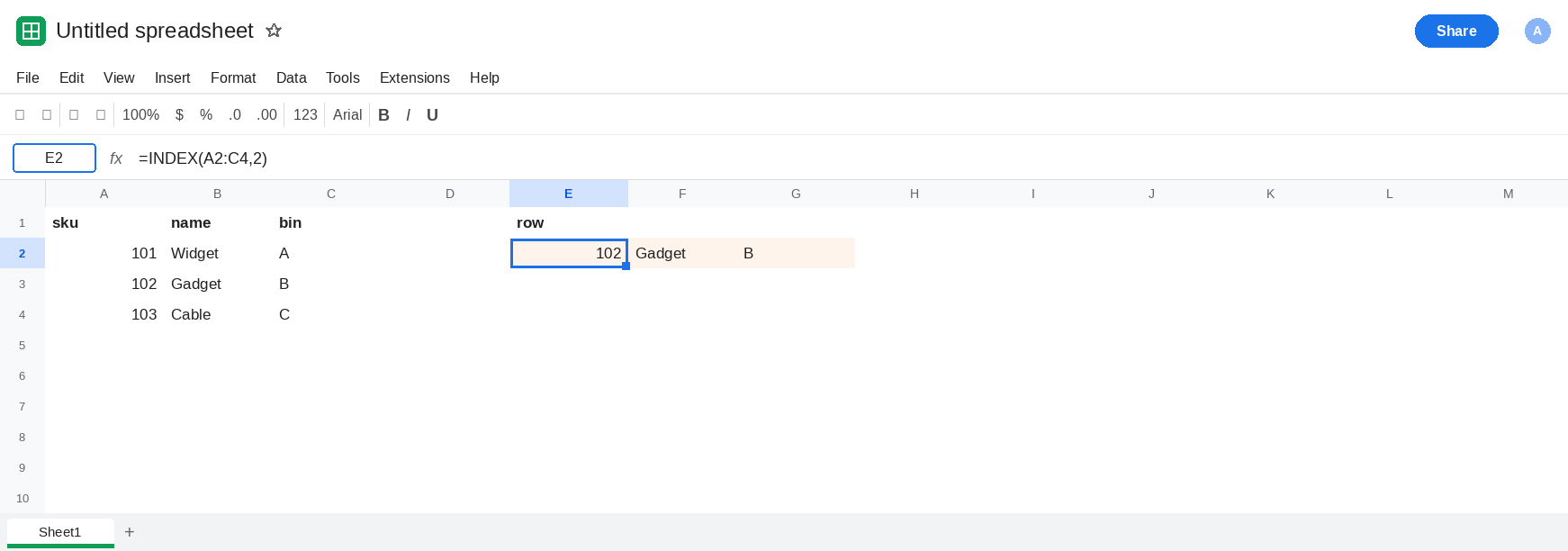
sku, B1name, C1bin. A2101, B2Widget, C2A. A3102, B3Gadget, C3B. A4103, B4Cable, C4C. The bodyA2:C4is three rows and three columns. Row 2 of that body is102, Gadget,B. Column 2 is Widget, Gadget, Cable.
One number, whole row. Leave E2:G2 empty. In E1 type row. In E2 enter =INDEX(A2:C4,2). The spill is 102, Gadget, B across E2:G2. You passed a single 2. The column argument was omitted, so the column is “all.” E3 stays empty. People who wanted the name column, because 2 felt like column B, got sku 102’s entire row instead. Leave E2 as that row.
Empty row argument, whole column. Leave E5:E7 empty. In E4 type col. In E5 enter =INDEX(A2:C4,,2). The two commas are the point: row omitted, column 2. The spill is Widget, Gadget, Cable down E5:E7. One column. That is the names. Leave E5 as that column.
Both numbers, one cell. In E9 enter =INDEX(A2:C4,2,2). The cell shows Gadget. Row 2, column 2. No spill. This is the call when the report wants a single name. Leave E9 as Gadget.
The same row written with an explicit 0. In E11 enter =INDEX(A2:C4,2,0). E11:G11 matches E2:G2. Column 0 means all columns. Omitting the column is that 0. The longer 0 recreate is INDEX row 0. Leave E2 as the form people actually type when they forget the column.
Leave E2 as the whole row. Leave E5 as the whole column. Leave E9 as Gadget.
What is actually wrong
Section titled “What is actually wrong”INDEX(range, n)is not “column n” and it is not “cell n.” With a rectangular range, the missing column argument means the entire row. E2 is three cells becauseA2:C4has three columns.INDEX(range,, n)is the column form. The blank between the commas is a real argument: row omitted. Delete one comma and the formula either parses as the row form or breaks. E5 has two commas.- A single cell needs both indexes. E9. If you know the row from
MATCHand you still want only the name, pass the column:INDEX(A2:C4,MATCH(...),2). Dropping the,2turns a price lookup into a spilled row. - The spill is an array. A value sitting in F2 makes E2
#REF!with the overwrite tooltip. Clear the path or return one cell. The token matches other spills; the cause here is the omitted column. - Row
0and an omitted row are the same idea on the other axis. Use the row-0 page when the formula already says0and you need the spill rules. Use this page when the formula has one number, or a double comma.
Two-way INDEX/MATCH that #N/As on a header is two-way lookup. E2’s inputs are constants. The headers are fine.
Leave E2 as the whole-row spill so the omitted column stays visible.
Name only. In I1 type name. In I2 enter =INDEX(A2:C4,2,2). I2 is Gadget. One cell. Pass the column you mean.
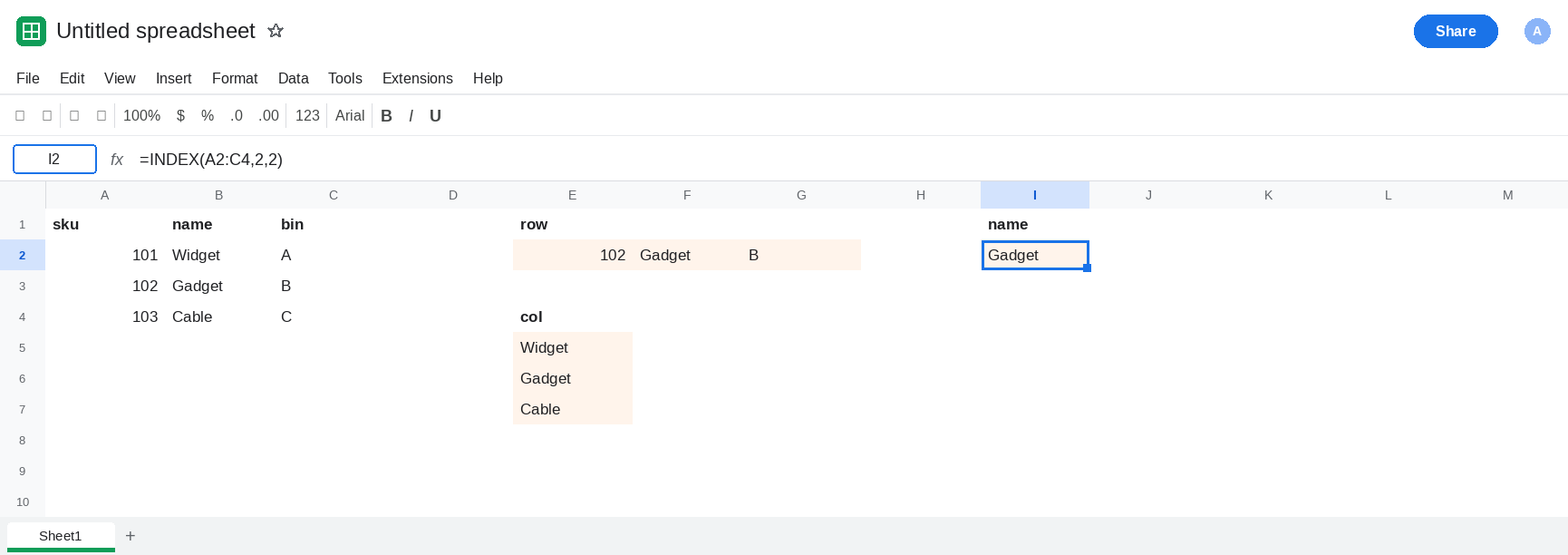
The whole name column, on purpose. Keep E5 when you wanted every name. In I5 enter =INDEX(A2:C4,,2) if you want that column next to the one-cell fix. I5:I7 is Widget, Gadget, Cable.
A row on purpose. Keep E2 when the report is supposed to be sku, name, and bin for record 2. Label it as a row so the next edit does not “fix” it back to one cell.
Do not wrap E2 in IFERROR. The row is the defined result of a missing column argument.
If INDEX spills sideways and the formula has one number after the range, that number is a row. Add the column index for a single cell, or write the double comma when you meant the whole column. If the formula already contains 0, you are on the row-0 page.