

Fix BYROW / MAP LAMBDA errors in Google Sheets (#N/A or #VALUE! from a lambda that returns the wrong shape)
Updated
BYROW runs a LAMBDA once per row and must get one value back each time. MAP runs a LAMBDA once per position and must get one value back, from arrays that are the same size. If the lambda returns a row, a SPLIT, or another array, Sheets errors — often #N/A or #VALUE!, tooltip Single value expected. Nested array results are not supported. If MAP’s inputs are different heights, the tooltip is Array arguments to MAP are of different size.
This page is BYROW / MAP shape. It is not ARRAYFORMULA empty 0 (blank × 2 prints 0 with no red triangle). It is not COUNTIFS range size (same “different size” sentence on a different function). English Google Sheets UI. Formula helper names stay English: LAMBDA, BYROW, MAP.
Recreate it on a blank sheet
Section titled “Recreate it on a blank sheet”- Open a blank spreadsheet. In A1 type
mon, B1tue, C1wed. A22, B22, C21. A30, B34, C33. A45, B41, C41. Hours per weekday, two more days omitted on purpose.
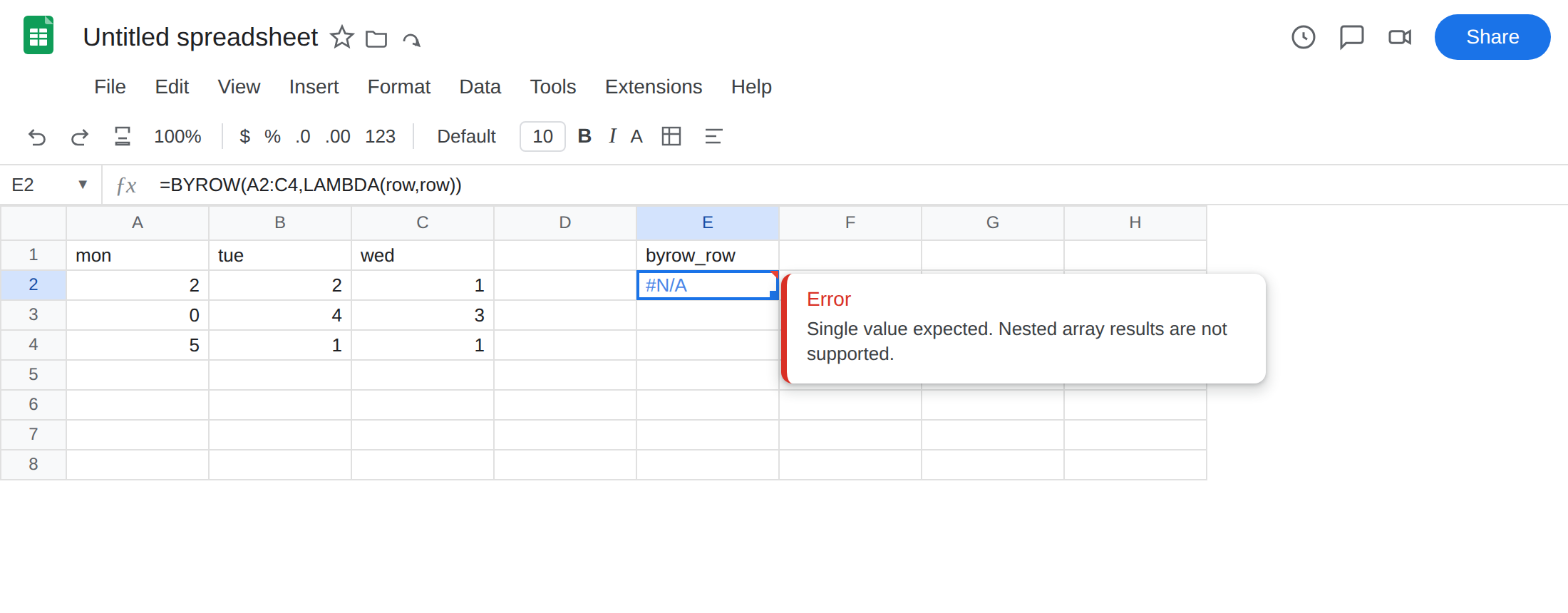
BYROW lambda returning the whole row. In E1 type byrow_row. In E2 enter =BYROW(A2:C4,LAMBDA(row,row)). The cell errors (#N/A / #VALUE!). Tooltip: Single value expected. Nested array results are not supported. row is already three cells. Returning row is an array per row. Leave E2 broken.
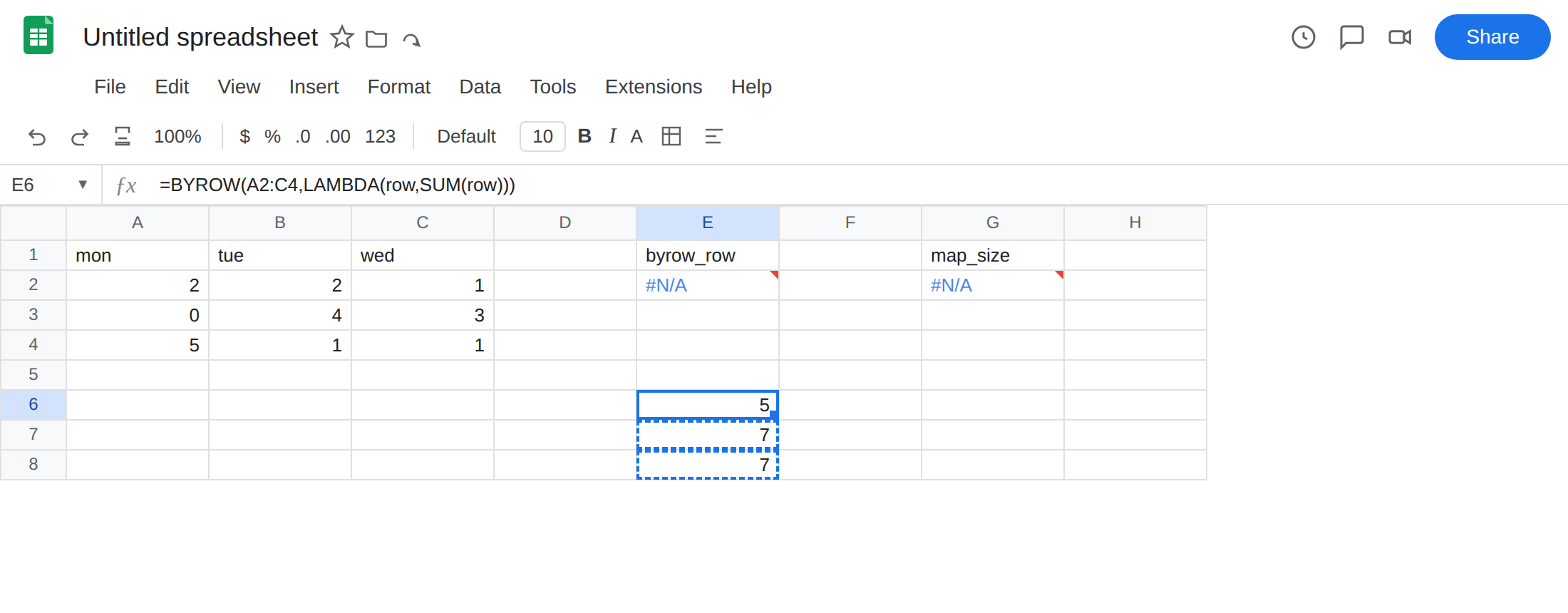
The same BYROW returning one number. In E6 enter =BYROW(A2:C4,LAMBDA(row,SUM(row))). The formula spills 5, 7, 7 (row totals). That block is the control: one scalar per row.
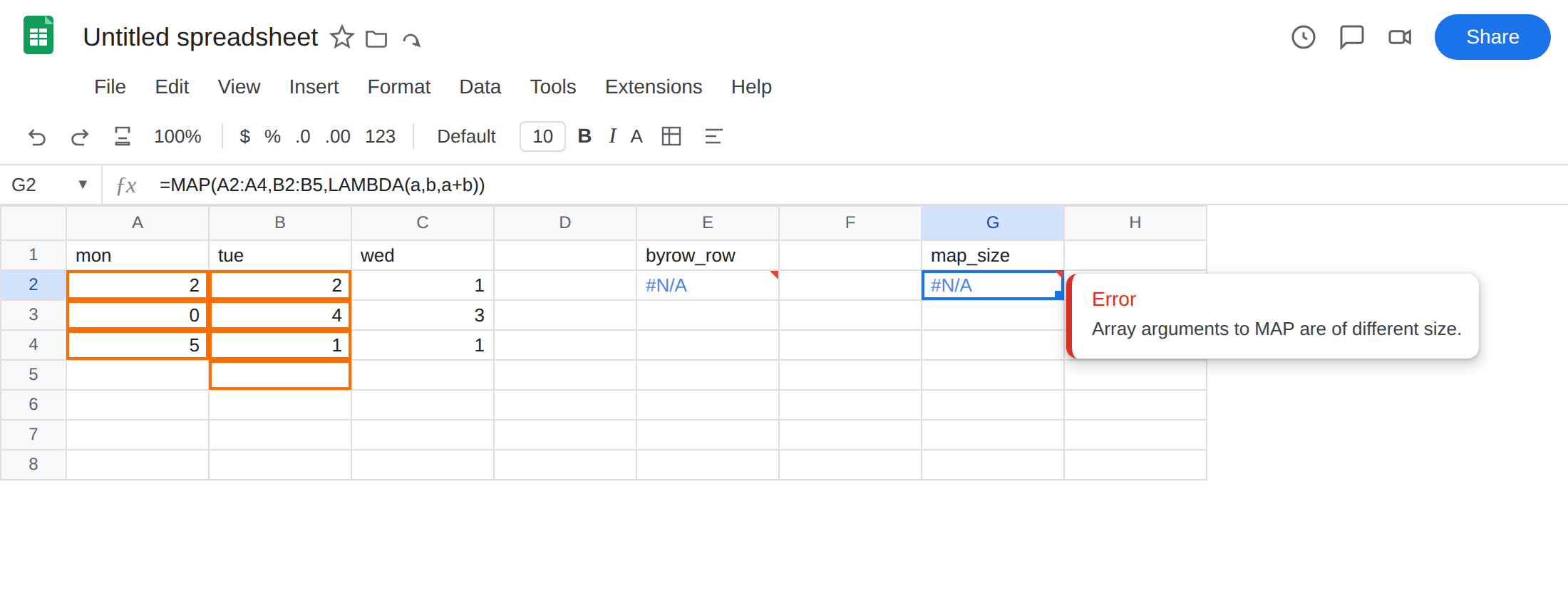
MAP over mismatched arrays. In G1 type map_size. In G2 enter =MAP(A2:A4,B2:B5,LAMBDA(a,b,a+b)). A2:A4 is three rows. B2:B5 is four. The cell errors. Tooltip: Array arguments to MAP are of different size. Leave G2 broken.
MAP lambda returning an array. In G8 enter =MAP(A2:A4,LAMBDA(h,{h,h*2})). {h,h*2} is two columns. Nested array, same Single value expected tooltip. Leave G8 broken.
Wrong number of LAMBDA names. In I1 type names. In I2 enter =MAP(A2:A4,B2:B4,LAMBDA(a,a+1)). Two arrays, one name. Tooltip: Wrong number of arguments to LAMBDA. Leave I2 broken.
Confirm the working shape. E6 already spills three totals. If E2 errors and E6 spills, BYROW is fine and the lambda’s return is the bug.
What is actually wrong
Section titled “What is actually wrong”BYROWgroups each row to a scalar.LAMBDA(row,row)hands the row back. Nested arrays are not supported.SUM(row),AVERAGE(row),INDEX(row,1),TEXTJOIN(",",TRUE,row)each return one value. Those are legal.MAPmaps each position to a scalar.{h,h*2}is two values.SPLITis N values. Same nested-array refusal.MAP’s input arrays must match in height and width. Three cells next to four is Array arguments to MAP are of different size. That sentence also appears onCOUNTIFS. The function here isMAP.LAMBDAneeds onenameper input.BYROWalways has one name (the row).MAPof two arrays needs two names. A missing name is#N/Awith Wrong number of arguments to LAMBDA — not a hours bug.
This is not ARRAYFORMULA(A2:A4*2) writing 0 on blank hours. There is no error value on that page. See ARRAYFORMULA empty 0. E2 is a red error from shape, not a fake zero.
This is not FILTER mismatched heights. See FILTER range size. FILTER’s tooltip names FILTER and row counts.
This is not UNIQUE spill #REF!. See UNIQUE overwrite. The path can be empty and you still error if the lambda returns an array.
Leave E2, G2, G8, and I2 broken so the shape errors stay on the sheet. Leave E6 as the working totals.
Return one value from BYROW. Keep E6: =BYROW(A2:C4,LAMBDA(row,SUM(row))). For a blank-looking total when the row is all empty, =BYROW(A2:C4,LAMBDA(row,IF(COUNT(row)=0,"",SUM(row)))) — that is a scalar "", not an array. Do not return IF(...,row) (that would pass the row through and nest again).
Same-size MAP. In H2 enter =MAP(A2:A4,B2:B4,LAMBDA(a,b,a+b)). The formula spills 4, 4, 6. Open columns: A2:A with B2:B, not A2:A4 next to B2:B.
One name per array. In I4 enter =MAP(A2:A4,B2:B4,LAMBDA(a,b,a+b)). Two names, two arrays.
Need several outputs per row? Do not return {sum, average} from BYROW — that is E2. Use one BYROW per metric, or MAKEARRAY.
Do not wrap E2 in IFERROR. You still have no total. See IFERROR vs IFNA. IFNA will not teach the lambda to return a scalar.
If BYROW / MAP errors and the hours are numbers, read the tooltip. Single value expected means the lambda spilled. Different size means the ranges. Wrong number of arguments means the LAMBDA names.
Not ARRAYFORMULA 0-on-empty
Section titled “Not ARRAYFORMULA 0-on-empty”ARRAYFORMULA on a column is a different contract. Empty cells coerce to 0 in arithmetic, so A2:A4*2 writes a number into the blank row. That looks “filled.” It is not an error. The fix on that page is IF(A2:A4="","",…). See ARRAYFORMULA empty 0.
BYROW does not invent those zeros unless your lambda does math on blanks (SUM of a blank row is 0). If you want a blank total, return "" after a COUNT test. Nested row results are this page, not the 0-on-empty primer. Collapse first (SUM, INDEX, TEXTJOIN).