

COUNTBLANK and COUNTIF of an empty string count the same blanks
Updated
COUNTBLANK(range) counts cells that are empty, and in Google Sheets it also counts formulas that return "". COUNTIF(range,"") counts those same cells. The two functions are not a split between “never typed” and “formula blank.” A space is in neither count. A zero is in neither count. ISBLANK is stricter than both: it is FALSE on the formula.
That ISBLANK split is ISBLANK vs empty. This page is only the two counters, plus COUNTIF’s “not empty” criterion, which treats "" as empty too.
Recreate it on a blank sheet
Section titled “Recreate it on a blank sheet”- Open a blank spreadsheet. Keep the Google Sheets UI in English. In A1 type
value. Leave A2 empty. In A3 enter="". In A4 type a single space. In A5 type0. In A6 type5.
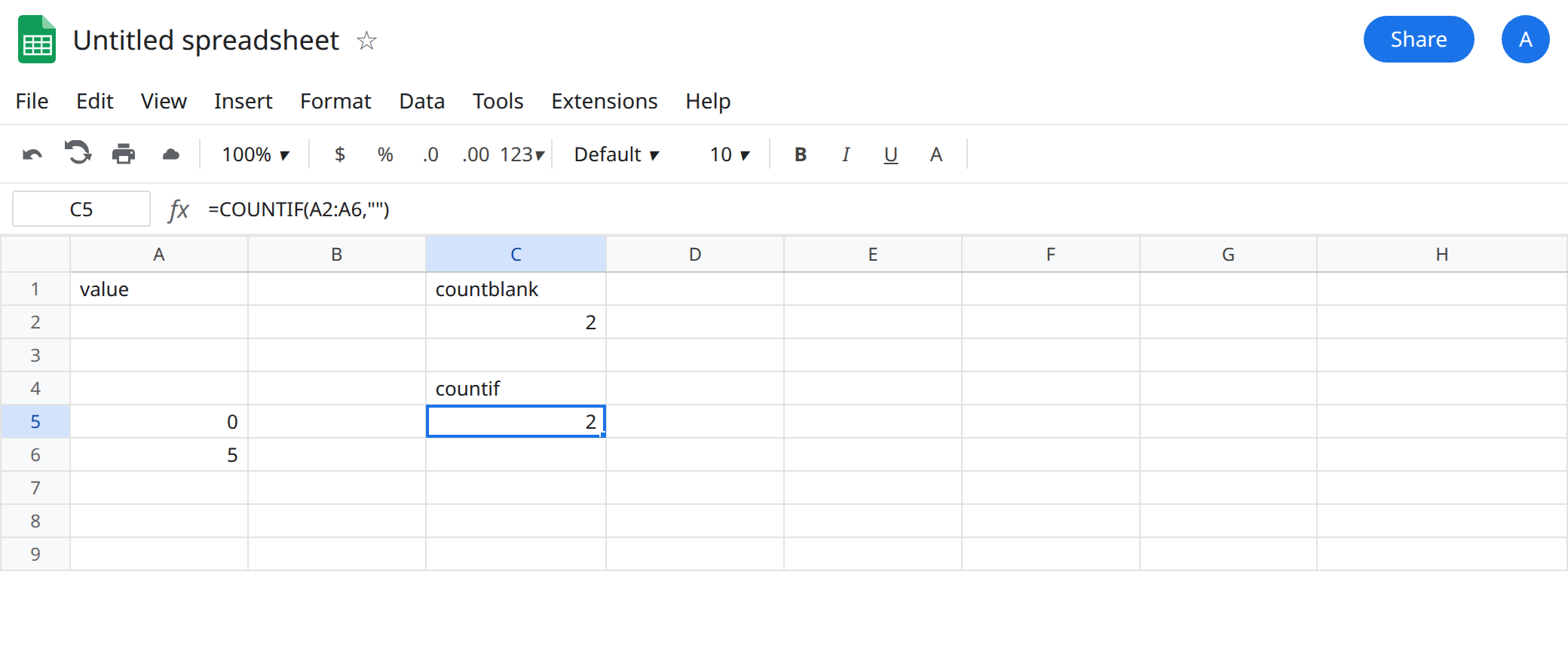
The two counters. In C1 type countblank. In C2 enter =COUNTBLANK(A2:A6). The cell shows 2. In C4 type countif. In C5 enter =COUNTIF(A2:A6,""). The cell shows 2. Same rows: A2 and A3. A4’s space is not blank. A5’s zero is not blank. A6 is the number 5.
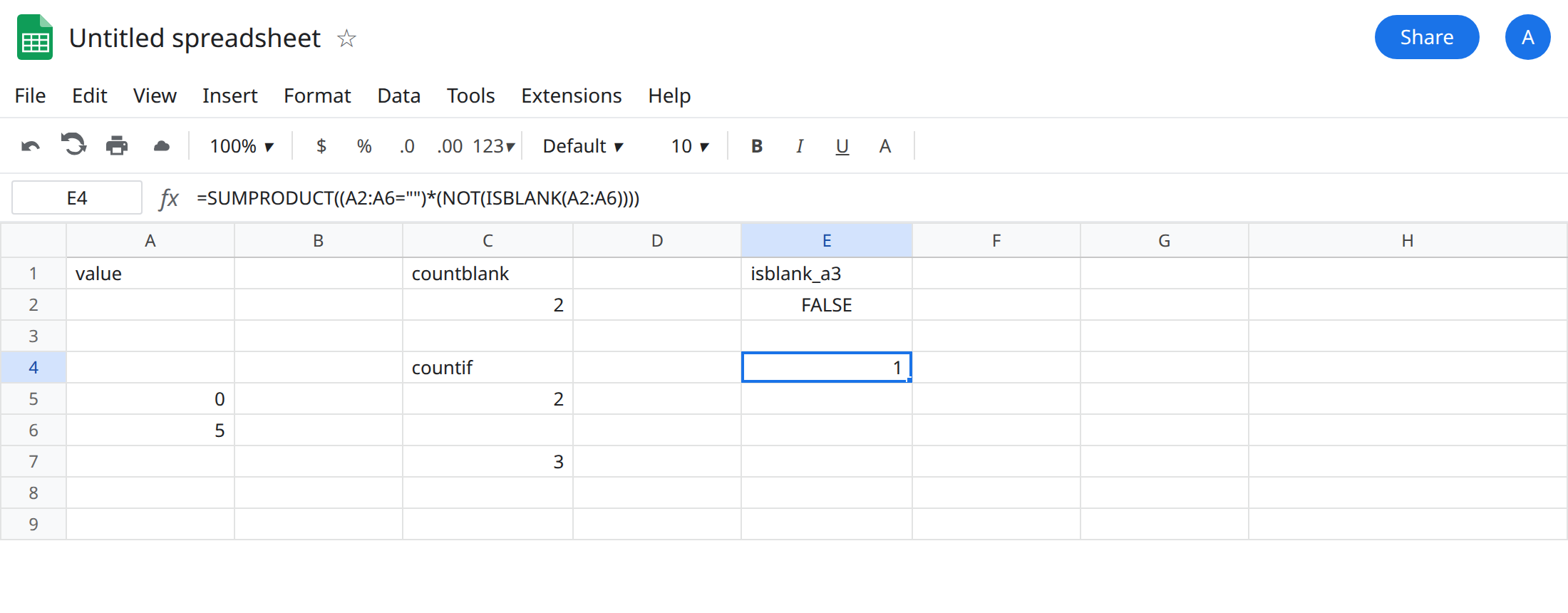
Not the formula-only count. In E1 type isblank_a3. In E2 enter =ISBLANK(A3). The cell shows FALSE. COUNTBLANK included A3 anyway. =ISBLANK(A2) is TRUE. If you needed “formula blanks only,” neither C2 nor C5 is that number. Sheets has no function that means “empty string and not ISBLANK.” Build it: in E4 enter =SUMPRODUCT((A2:A6="")*(NOT(ISBLANK(A2:A6)))). E4 shows 1 (A3 only). That is a third definition. Do not rename C5 to “formula blanks.” Subtracting SUMPRODUCT(--ISBLANK(A2:A6)) from C5 is the same 1, because C5 counted both empty kinds and ISBLANK counted only A2.
Not-equal criterion. In C7 enter =COUNTIF(A2:A6,"<>"). The cell shows 3: the space, the zero, and the 5. A2 and A3 are excluded. COUNTIF of "<>" does not mean “every cell that fails ISBLANK.” A3 fails ISBLANK and still fails "<>", because the criterion treats "" as empty.
Space and zero on their own. In C9 enter =COUNTIF(A2:A6," "). The cell shows 1. In C10 enter =COUNTIF(A2:A6,0). The cell shows 1. Those rows are why C2 and C5 are not “looks empty” and not “no useful number.”
Leave C2 and C5 as 2. They agree. The bug is a label that says they measure different things.
What is actually wrong
Section titled “What is actually wrong”- Google Sheets defines
COUNTBLANKto include empty text strings, not only untouched cells.COUNTIFwith a blank criterion uses the same idea of empty. C2 equals C5 on this range. A dashboard that adds them together double-counts A2 and A3. ISBLANKis the strict test. E2 is FALSE while C2 counted that cell. ISBLANK vs empty walks the single-cell case, including whyIFBLANKis#NAME?. This page does not replace that one. It stops the habit of usingCOUNTIF("","")as “theISBLANKcounter for a column.”- A space has length 1. It is not in C2 or C5. It is in C7 and C9. Visual emptiness is FILTER blank vs empty when you need the rows, not the count. CHAR(160) is CHAR(160) blanks and also escapes both counters.
- Zero is a value. Inventory formulas that turn blanks into
0move rows from C2 into C10. The blank count drops and the stock count rises, with no error. See IF blank vs 0 before you coerce a column to zero and thenCOUNTBLANKit. "<>"is not the complement ofISBLANK. It is the complement of the empty test C5 already uses.=COUNTA(A2:A6)counts A3, because a formula is not an empty cell forCOUNTA, and also counts the space, the zero, and the5.COUNTAplusCOUNTBLANKis greater than the five rows, because A3 is in both. That overlap is expected. It is not a reason to pickCOUNTIFas the “other half.”
There is no #N/A to wrap. If C5 shows 2 and the header says “formulas that returned blank,” the header is wrong. The formula is doing what it says. A whole-column call, =COUNTBLANK(A:A), also counts the empty rows under the table, so it will not stay at 2. Use A2:A6 when the lesson is the five cells you typed. The open-ended column is a different total, and it still will not split formula blanks from untouched cells.
Leave C2 and C5 as the pair that matches. Change the label, or change the formula, not both at once.
Untouched cells plus formula blanks. Either C2 or C5. Pick one so the sheet does not add them.
Untouched cells only. =SUMPRODUCT(--ISBLANK(A2:A6)) shows 1 on this range (A2). ISBLANK does not count A3.
Formula blanks only. Keep E4: =SUMPRODUCT((A2:A6="")*(NOT(ISBLANK(A2:A6)))).
Visually empty, including a normal space. =SUMPRODUCT(--(LEN(TRIM(A2:A6))=0)) counts A2, A3, and A4 (3). It does not count zero.
Do not wrap either counter in IFERROR. Do not replace C5 with COUNTIF(A2:A6,"<>") and subtract from 5 unless you intend to treat spaces and zeros as filled, which C7 does.
If COUNTBLANK and COUNTIF of "" match, they are the same empty test. Use ISBLANK when the formula cell must not count. Use LEN(TRIM()) when the space must count.