

ARRAYFORMULA around QUERY does not run the query once per row
Updated
QUERY already returns an array. The spill under the formula is that array. ARRAYFORMULA around the same call does not add a second expansion, and it does not run the statement once for every key in a list. When the query string is one literal, the wrapped formula and the plain formula paint the same rows. When the query string is built by joining a range ('"&D2:D3&"'), parameter 2 is no longer one string. The cell is #VALUE!. ARRAYFORMULA is what people add to “make it fill down.” It built the array of strings. It did not turn that array into one result per row.
A blocked spill, with or without the wrapper, is SORT / UNIQUE spill. ARRAYFORMULA that only evaluates the first row of IFS is ARRAYFORMULA IFS. Keep the Google Sheets UI in English. Sheet Error is an independent formula-error library, not a Google product.
Recreate it on a blank sheet
Section titled “Recreate it on a blank sheet”- Open a blank spreadsheet. File → Settings → Locale → United States so the formulas use commas. In A1 type
store, B1qty. A2East, B210. A3West, B34. A4East, B46. East’s total is16. West’s is4.
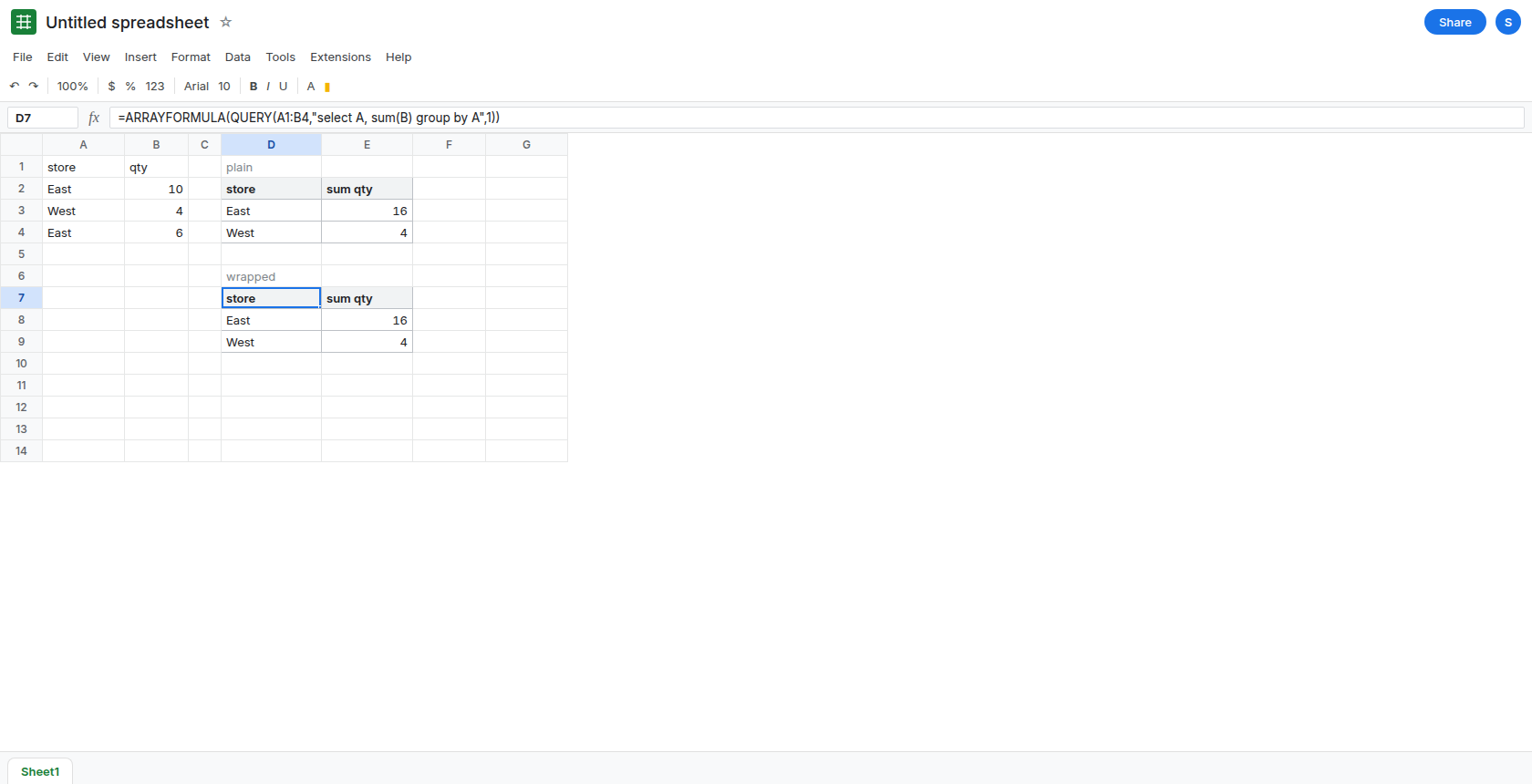
QUERY alone. In D1 type plain. In D2 enter =QUERY(A1:B4,"select A, sum(B) group by A",1). The spill is a header and two stores, East 16 and West 4. That block is the control. The header on the total may read sum qty. Labeling it is QUERY GROUP BY. Leave D2 as this spill.
The same call inside ARRAYFORMULA. In D6 type wrapped. In D7 enter =ARRAYFORMULA(QUERY(A1:B4,"select A, sum(B) group by A",1)). The spill matches D2: East 16, West 4. No extra rows, no per-row repeat of the query. The wrapper did not change the array QUERY was already going to return. Leave D7 as that copy.
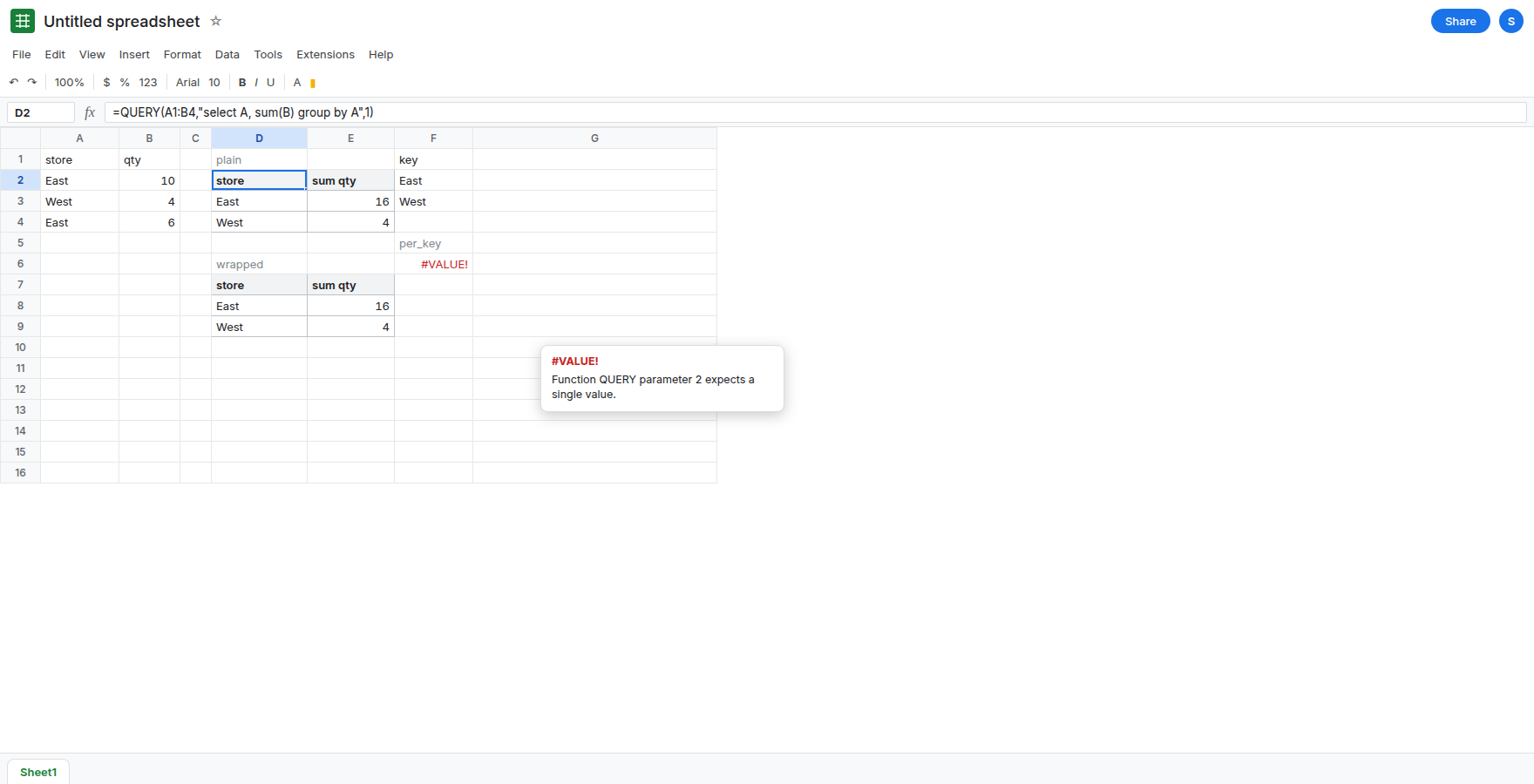
One query string per key, which QUERY will not map. In F1 type key. F2 East. F3 West. In F5 type per_key. In F6 enter =ARRAYFORMULA(QUERY(A1:B4,"select sum(B) where A = '"&F2:F3&"' label sum(B) ''",1)). F6 is #VALUE!. The second argument of QUERY has to be one text value. F2:F3 inside the quotes is two texts, so the argument is an array of query strings. ARRAYFORMULA does not run those strings as two queries. Leave F6 broken. You do not get East 16 in F6 and West 4 in F7 from this formula.
The wrapper was not the only way to build a bad argument. In F8 enter =QUERY(A1:B4,"select sum(B) where A = '"&F2:F3&"' label sum(B) ''",1). F8 is #VALUE! as well, or it uses only F2 and returns 16 while West never appears. Either result is one call, not a fill-down. Leave F8 next to F6. Adding ARRAYFORMULA did not repair it.
If F6 is #REF! and the tooltip says the array result was not expanded, a value is sitting in the spill. Clear it. See SORT / UNIQUE spill. That is not the parameter-2 failure.
What is actually wrong
Section titled “What is actually wrong”QUERYis one function call. Its return value is already an array, so the sheet spills it.ARRAYFORMULAtells scalar functions to spill. It has nothing extra to do with a function that spills on its own. D7 matching D2 is that fact.- The query language is a string, not a Sheets expression that iterates.
where A = '"&F2:F3&"'tries to build many strings. Parameter 2 rejects that array. The tooltip is a#VALUE!onQUERY, not “array result was not expanded.” - A list of keys in F2:F3 is not a
group by.group by Aalready returns one row per store from the data. You do not need the key list, and you do not needARRAYFORMULA, to get East and West. - Dragging the formula down the way people drag
VLOOKUPoverwrites the spill. That#REF!is ARRAYFORMULA drag. F6 failed before any drag.
This is not QUERY no rows. D2 returned rows. F6 did not finish a query.
Leave F6 and F8 broken. Leave D7 in place so you can see it matches D2, then use D2 in the report and delete the wrapper when you want one formula.
One statement for every store in the data. Keep D2: =QUERY(A1:B4,"select A, sum(B) group by A",1). East 16 and West 4. A key list is unnecessary.
One statement for a list you typed. =QUERY(A1:B4,"select A, sum(B) where A = 'East' or A = 'West' group by A",1) is the same two rows. Parentheses around a longer or are QUERY AND / OR. The string is still one string.
A row-by-row call is MAP, and it is the heavy shape. =MAP(F2:F3,LAMBDA(k,QUERY(A1:B4,"select sum(B) where A = '"&k&"' label sum(B) ''",1))) can return 16 and 4, because MAP calls QUERY once per key. A long key list is a long list of queries. Prefer group by when the keys already live in column A. See calculation limit if the sheet stalls.
Do not wrap F6 in IFERROR. You would hide a broken query string and show a blank where the totals should be. See IFERROR vs IFNA.
If the wrapped QUERY matches the unwrapped one, delete ARRAYFORMULA. If parameter 2 is #VALUE! and the formula joins a range into the quotes, write one where or one group by. The wrapper will not iterate QUERY.