

Fix MAP in Google Sheets when the arrays are different sizes
Updated
MAP(array1, [array2, …], LAMBDA) walks the arrays in lockstep and must get one value back from the lambda at each position. The arrays have to be the same height and the same width. Three rows next to four rows is #N/A. The tooltip is Array arguments to MAP are of different size. A horizontal pair next to a vertical pair is the same tooltip: shape, not just the count of cells. A scalar does not stretch to match a column. Put the constant in the lambda body instead of passing it as an extra array.
This page is MAP size. A lambda that returns two cells is BYROW / MAP LAMBDA. BYCOL arity is BYCOL LAMBDA. Keep the Google Sheets UI in English. Helper names stay English: LAMBDA, MAP.
Recreate it on a blank sheet
Section titled “Recreate it on a blank sheet”- Open a blank spreadsheet. In A1 type
qty, B1price. A22, B23. A34, B35. A41, B42. Three data rows. In B5 type9. A fourth price with no qty.
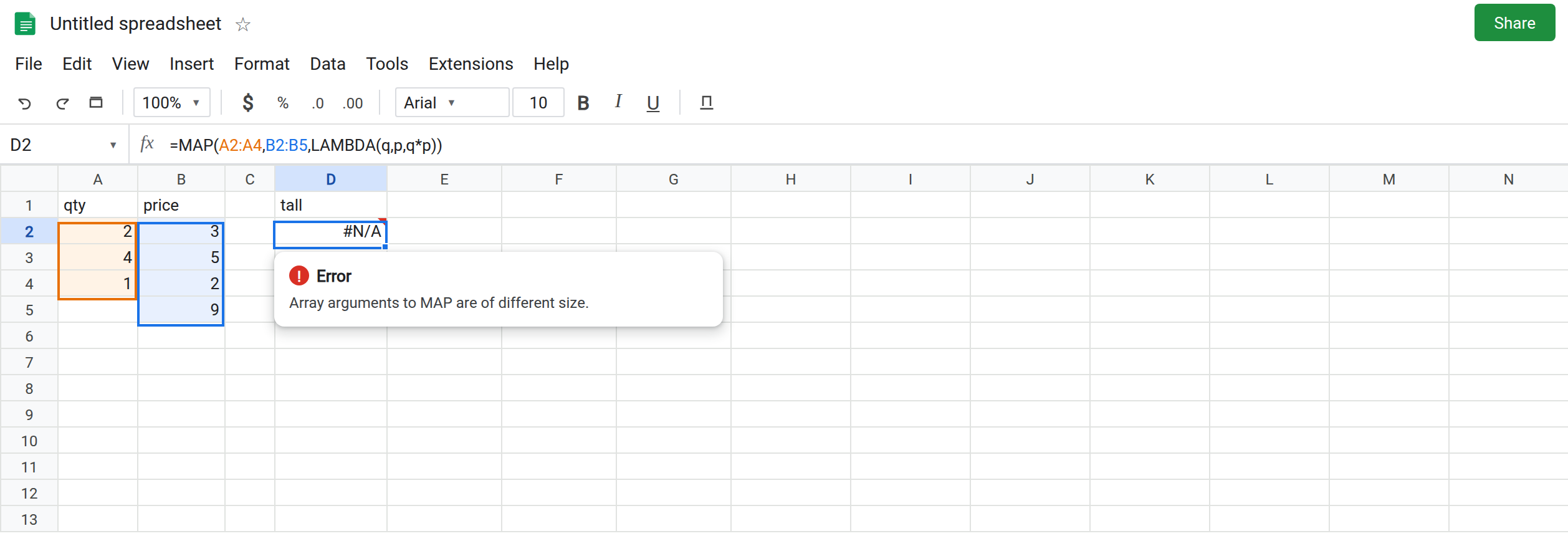
Different height. In D1 type tall. In D2 enter =MAP(A2:A4,B2:B5,LAMBDA(q,p,q*p)). A2:A4 is three rows. B2:B5 is four. The cell shows #N/A. The tooltip is Array arguments to MAP are of different size. Leave D2 broken. The lambda never multiplies.
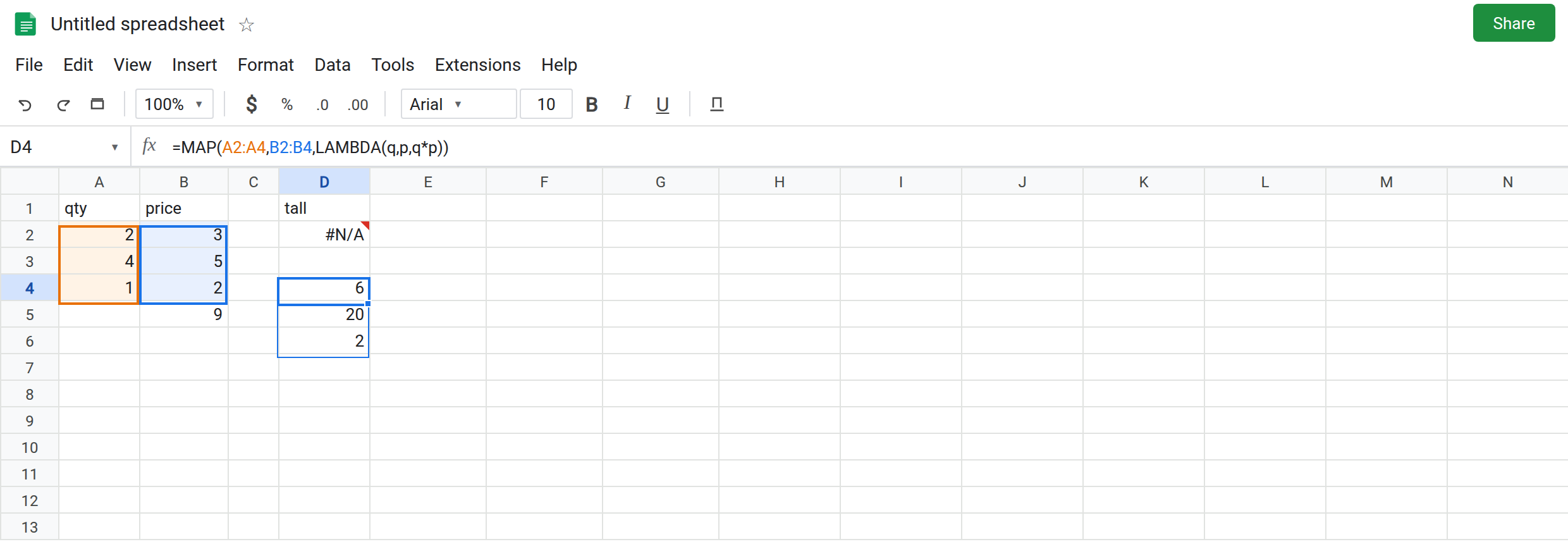
A matching pair. In D4 enter =MAP(A2:A4,B2:B4,LAMBDA(q,p,q*p)). The spill is 6, 20, 2. That column is the control.
A row against a column. In H1 type 2, I1 4, J1 1. In F1 type axis. In F2 enter =MAP(H1:J1,A2:A4,LAMBDA(a,b,a+b)). H1:J1 is 1×3. A2:A4 is 3×1. Same three numbers, different orientation. F2 is #N/A, different size. Leave F2 broken. TRANSPOSE one side if you meant them to line up. Do not expect MAP to zip a row with a column.
Open-ended versus a short block. In F5 enter =MAP(A2:A,B2:B4,LAMBDA(q,p,q*p)). A2:A runs to the bottom of the sheet. B2:B4 does not. Different size. Leave F5 broken. Two open columns of the same height (A2:A and B2:B) match each other. They also map a very long tail of blank pairs, and blanks become 0 in the multiplication. That tail is a reason to cap the ranges, not a reason to mix an open column with a closed one.
A constant passed as an array. In F8 enter =MAP(A2:A4,10,LAMBDA(q,k,q*k)). 10 is one cell. A2:A4 is three. Different size. Leave F8 broken. The constant belongs inside the expression.
One name for two arrays, as contrast. In F11 enter =MAP(A2:A4,B2:B4,LAMBDA(q,q*2)). The sizes match. The lambda has one name and two arrays. #N/A, Wrong number of arguments to LAMBDA. That is BYROW / MAP LAMBDA. Leave F11 broken so it is not confused with D2. D2’s tooltip says different size. F11’s tooltip says arguments to LAMBDA.
Leave D2, F2, F5, and F8 broken. Leave D4 as 6, 20, 2.
What is actually wrong
Section titled “What is actually wrong”MAPpairs position (1,1) with position (1,1), then (2,1), and so on. It will not drop the extra price in B5, and it will not pad it the wayHSTACKpads. The call fails. See HSTACK rows if you wanted a pad instead of a product.- Orientation counts. 1×3 and 3×1 are different sizes even when both contain three numbers. F2.
- A single value is a 1×1 array for this check. It does not broadcast. F8. Write
LAMBDA(q,q*10). - Headers included on one side only (
A1:A4next toB2:B4) are a height mismatch with a text cell in the mix. The tooltip is still different size, not#VALUE!from multiplyingqtyby3. - Wrong arity is a second gate. Arrays can match and the lambda can still be short. Read the tooltip. Do not add a blank row to “fix” F11.
This is not COUNTIFS mismatched ranges, which uses a similar “different size” sentence on another function. See COUNTIFS range size. The formula bar here says MAP.
Leave D2 and F2 broken.
Use the same rectangle. Keep D4: =MAP(A2:A4,B2:B4,LAMBDA(q,p,q*p)). Include B5 only if you also have a qty in A5.
Constant in the body. In H4 enter =MAP(A2:A4,LAMBDA(q,q*10)). One array, one name, the 10 is not an argument array. The spill is 20, 40, 10.
Line up a row. =MAP(H1:J1,TRANSPOSE(A2:A4),LAMBDA(a,b,a+b)) if both should be horizontal and the numbers are parallel. If they are not parallel data, do not transpose just to silence the tooltip.
Do not wrap D2 in IFERROR. The products in D4 are the values you wanted. See IFERROR vs IFNA.
If the tooltip says different size, count rows and columns of every array, including orientation. If it says Wrong number of arguments to LAMBDA, the ranges already match and the name list does not.