

IMPORTXML returns #N/A when the XPath matches nothing, and a broad path spills the wrong nodes
Updated
IMPORTXML(url, xpath) downloads a page and returns the nodes the XPath selects. A path that matches nothing is #N/A, and the tooltip is Imported content is empty. A path that matches the wrong nodes does not error. //a on an article spills a long list of links. The title is not in that list, and the cell looks like a successful import. XPath names are case-sensitive. //H1 is not //h1 when the tag in the page is lowercase. The first-use Allow access banner, Result too large, and a stuck Loading… are a different page.
Those transport failures are Allow access, size, loading. A quota cool-down across many import formulas is IMPORT quota. This recreate uses three formulas, not dozens. Keep the Google Sheets UI in English. Sheet Error is an independent formula-error library, not a Google product.
Recreate it on a blank sheet
Section titled “Recreate it on a blank sheet”- Open a blank spreadsheet. Imports ask once per file.
A heading that exists. In A1 type h1. In A2 enter:
=IMPORTXML("https://en.wikipedia.org/wiki/Moon","//h1")
If the banner says some formulas are trying to send and receive data, click Allow access. That banner is not a bad XPath. See Allow access, size, loading if A2 stays on the banner. After the click, A2 spills Moon (the article heading). That cell is the control: the URL is reachable and an XPath can hit.
A node that is not in the page. In A4 type missing. In A5 enter:
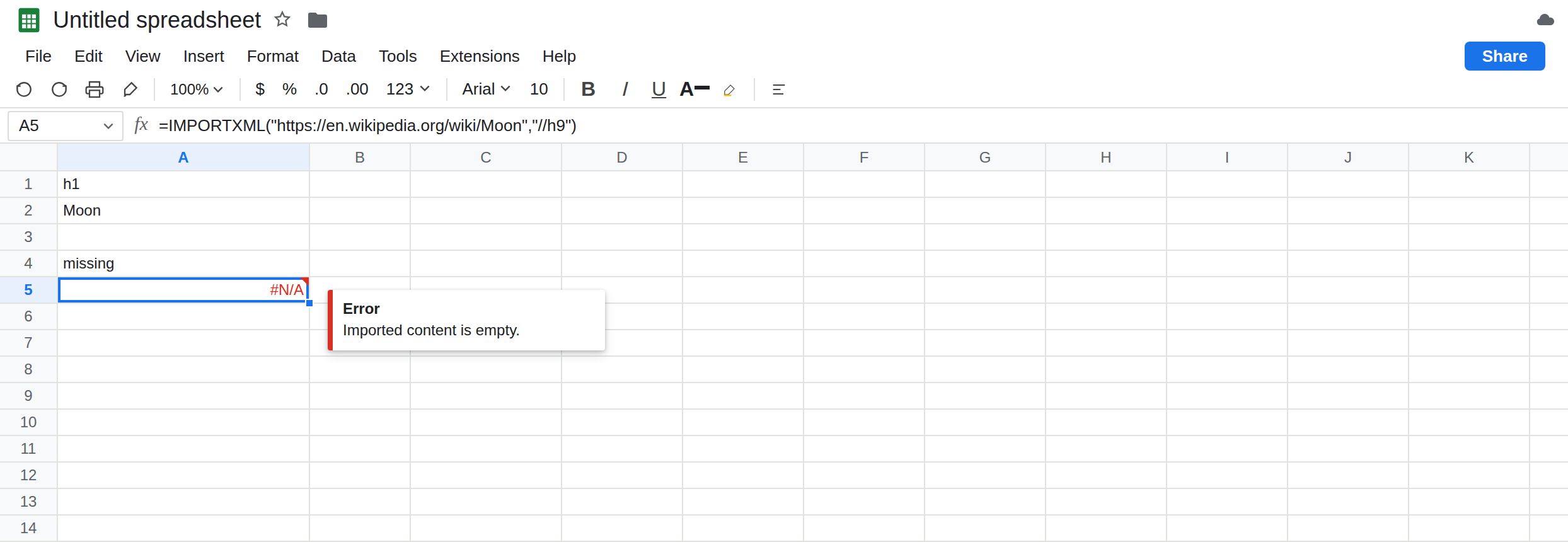
=IMPORTXML("https://en.wikipedia.org/wiki/Moon","//h9")
There is no h9 element. A5 is #N/A. The tooltip is Imported content is empty. The URL is the same one that just returned Moon. Leave A5 broken. Do not change the host to “fix” an empty XPath.
A path that hits the wrong nodes. In C1 type links. In C2 enter:
=IMPORTXML("https://en.wikipedia.org/wiki/Moon","//a")
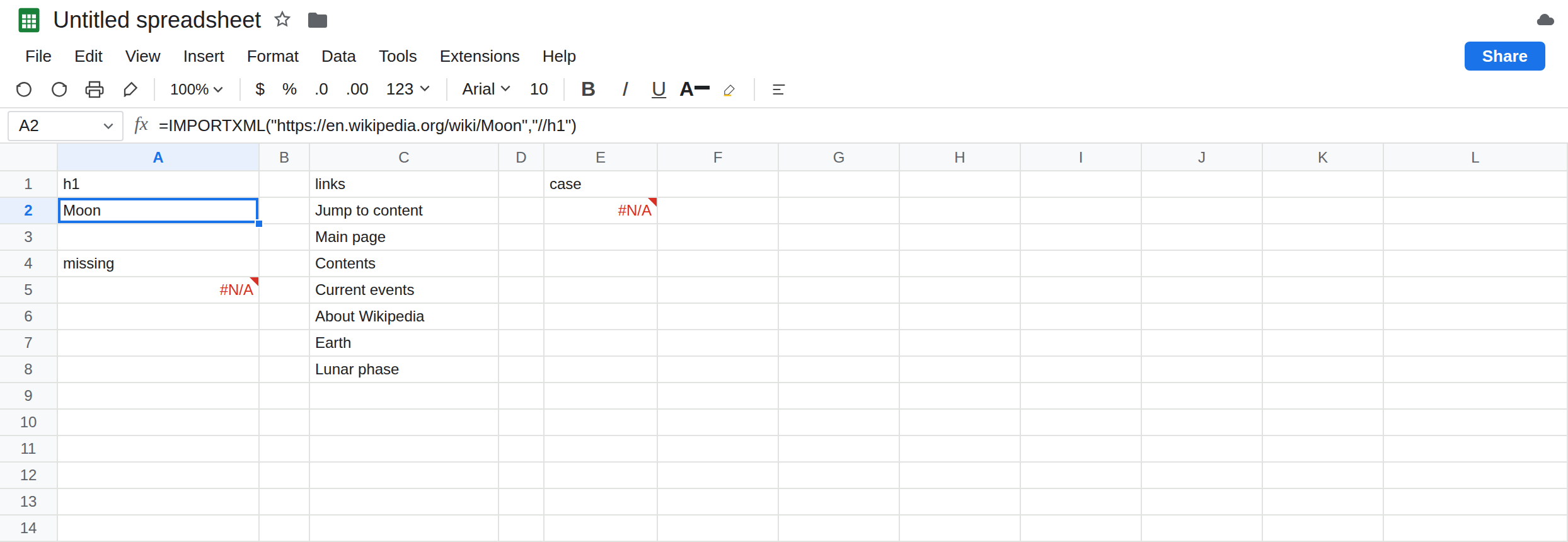
C2 spills a column of link text. It is not #N/A. It is also not the single heading in A2. //a means every anchor. The import did what you wrote. Leave C2 as that long spill so “it returned something” is not treated as “it returned the title.”
Case. In E1 type case. In E2 enter:
=IMPORTXML("https://en.wikipedia.org/wiki/Moon","//H1")
HTML tag names in XPath are case-sensitive, and this article’s heading element is h1. E2 is #N/A, Imported content is empty, while A2 with //h1 still shows Moon. Leave E2 broken. If a future copy of the page really contains H1, E2 will spill and this contrast collapses; the rule you are checking is that H1 and h1 are different names, which A2 versus E2 shows on the current article.
A path with no axis. In E4 enter:
=IMPORTXML("https://en.wikipedia.org/wiki/Moon","h1")
h1 without // asks for an h1 child of the root, not an h1 anywhere in the document. That is not the same call as A2. Leave E4 as whatever it returns beside A2: if it is #N/A, the missing slashes are why; if it spills, the document root actually has that child. Do not “standardize” A2 by deleting the slashes.
Leave A5 and E2 as empty imports. Leave A2 as Moon. Leave C2 as the link list.
What is actually wrong
Section titled “What is actually wrong”- Empty content means the XPath matched zero nodes after a fetch that succeeded. It does not mean the URL was typed wrong, unless A2 fails too. A2 is the control that separates “cannot read this host” from “this path is not in the document.”
- A broad path fails by succeeding.
//a,//div, and//spanreturn large spills. The first cell is whichever node came first, not the one you saw in the browser’s reader view. Narrow the path (//h1, an id, a single table cell) until the spill is the field you meant. - Case and namespaces both produce Imported content is empty on a page you can read in the browser.
//H1is the case version. Some feeds wrap nodes in a namespace, and//h1misses them even though View Source shows the lettersh1.//*[local-name()='h1']ignores the namespace. Use that when the lowercase path is already correct and the cell is still empty. Do not start there on Wikipedia’sh1; A2 already works. IMPORTHTMLdoes not take an XPath. A table index is IMPORTHTML index. Pasting//tableintoIMPORTHTMLis the wrong function.- Three formulas on one article are enough. A sheet of hundreds of
IMPORTXMLcalls hits IMPORT quota and the tooltip changes to the cool-down sentence. That sentence is not “your XPath is empty.”
This is not IMPORTDATA fetch. IMPORTDATA wants a CSV or TSV. The Moon article is HTML. A2 is IMPORTXML on purpose.
This is not ENCODEURL query unless the URL itself has a space or an unescaped parameter. The Moon URL does not.
Leave A5, E2, and the broad C2 spill in place.
Use the path that matches the node you can name. Keep A2 for the heading. If you needed a single link, do not import //a and then INDEX row 40. Find a stabler path, or accept that Wikipedia’s markup changes and A2’s heading is the stable demo on this page.
Match case to the tag. Keep //h1. Do not uppercase it to match a heading style in a screenshot. E2 is the uppercase miss.
Namespace only after the simple path fails on a page that has the text. =IMPORTXML(url,"//*[local-name()='h1']") on the Moon URL should agree with A2. On a feed where A2’s pattern is empty and View Source shows a prefixed tag, the local-name() form is the one to keep.
Do not wrap A5 in IFERROR. Empty content is the path. See IFERROR vs IFNA. IFNA would turn a real miss into a blank and also hide a later quota #N/A if you add dozens of calls.
If A2 and A5 fail together, you are on access, size, loading, or quota. If A2 works and A5 is Imported content is empty, edit the XPath. If the spill is huge and the first cell is not the field you wanted, the path is too wide. If the tooltip is Could not fetch url, this is the wrong function or the wrong host.
Empty path vs the heading vs every link
Section titled “Empty path vs the heading vs every link”//h1 returns Moon. //h9 and //H1 are #N/A, Imported content is empty. //a returns many links and no error. h1 without // is not the same expression as //h1. Allow access and the quota sentence are other tooltips. This page is the path.