

A pivot’s own filter does not follow the slicer, and the slicer is not private to one pivot
Updated
A pivot has two different filters that look like the same idea. Filters in the pivot editor is stored on that pivot. A second pivot built on the same source does not inherit it. A slicer is a separate control. It filters every pivot whose data range is the slicer’s range, which is why two pivots on A1:B4 both move, and a pivot on a copied block does not. Clearing the slicer puts those shared pivots back to whatever each editor filter still says. It does not wipe Filters in the editor. If the editor says East and the slicer says West, the pivot can go empty, because the two restrictions stack.
One slicer driving every pivot on its range is slicer many pivots. A slicer pointed at the wrong copy of the data is slicer not on pivot. A pivot that ignores new source rows is pivot not refreshing. Keep the Google Sheets UI in English. Sheet Error is an independent formula-error library, not a Google product.
Recreate it on a blank sheet
Section titled “Recreate it on a blank sheet”- Open a blank spreadsheet. In A1 type
store, B1qty. A2East, B210. A3West, B34. A4East, B46. East’s total is16. West’s is4.
Two pivots, one range. Select A1:B4. Insert → Pivot table, starting at D1. Rows: store. Values: qty summarized by SUM. Editor data range A1:B4. East 16, West 4. Select A1:B4 again. Insert → Pivot table, starting at D8, with the same rows and values. Both pivots show East 16 and West 4.
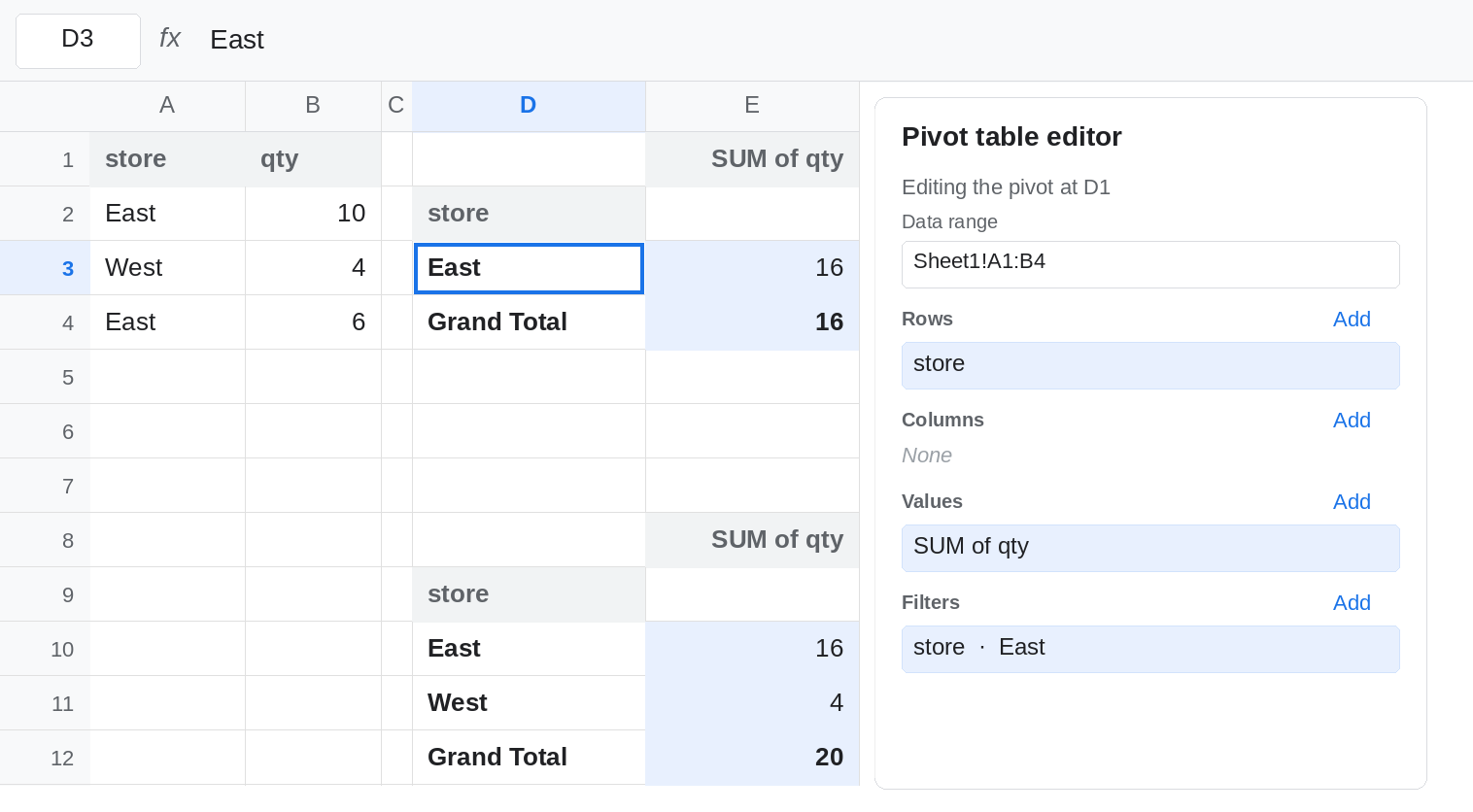
The editor filter is private. Click the pivot at D1. In its editor, add Filters: store, and keep East only. The D1 pivot shows East 16 and drops West. The D8 pivot still shows East 16 and West 4. You did not forget to refresh D8. A filter in the editor is part of that pivot’s definition. Leave D1 filtered to East. That contrast is the control.
A slicer is shared, and it stacks. Click a blank cell. Insert → Slicer. Data range A1:B4. Column store. Filter the slicer to West only. The D8 pivot drops East and shows West 4. The D1 pivot was already restricted to East by its editor, and the slicer now also requires West. D1 shows no store rows, or a grand total of nothing. The slicer did not replace the editor filter. It added a second condition the same rows cannot pass. The D8 pivot never had an editor filter, so West alone is enough for it to show 4.
Clearing the slicer restores the editor, not “everything.” Clear the slicer filter so all stores are selected again. D8 shows East 16 and West 4. D1 shows East 16 only. The editor filter is still on D1. People who “reset the dashboard” from the slicer and still miss West are looking at Filters in that pivot’s editor.
A sheet filter is a third scope. Select A1:B4 and use Data → Create a filter. Hide West on the sheet. Both pivots stay as they were. A pivot reads its data range. It does not read the sheet filter. Remove the sheet filter when you have seen that. QUERY has the same habit. See QUERY and filters.
Leave the D1 editor filter on East, and leave the slicer cleared, so D1 is East-only and D8 is both stores.
What is actually wrong
Section titled “What is actually wrong”- Editor Filters travel with one pivot. Copying the source range does not copy them. Inserting a second pivot does not copy them. D8 ignored D1’s East filter on purpose.
- A slicer travels with a data range. Every pivot on
A1:B4hears it. A pivot on a pasted copy does not. That shared behavior is slicer many pivots. This page is the editor filter beside it. - The two mechanisms AND together. East in the editor plus West on the slicer matches nothing. An empty pivot in that state is not a broken slicer connection.
- Clearing a slicer does not open the pivot editor. The editor filter remains. Clearing Filters in the editor does not move the slicer.
- Data → Create a filter on the source hides rows for people looking at the sheet. The pivot total does not change. Hiding a row with Hide row does not change it either.
This is not a stale pivot cache after you edited a source cell. See pivot not refreshing. Here the source never changed. The two pivots disagree because their filters differ.
Leave D1’s editor filter in place until the contrast is obvious. Then set each control to the scope you actually wanted.
One pivot, a definition you can reopen. Use Filters in that pivot’s editor when the restriction should survive after the slicer is cleared, and when the pivot beside it must keep showing every store. Remove the filter in the editor when West goes missing and the slicer is already on All.
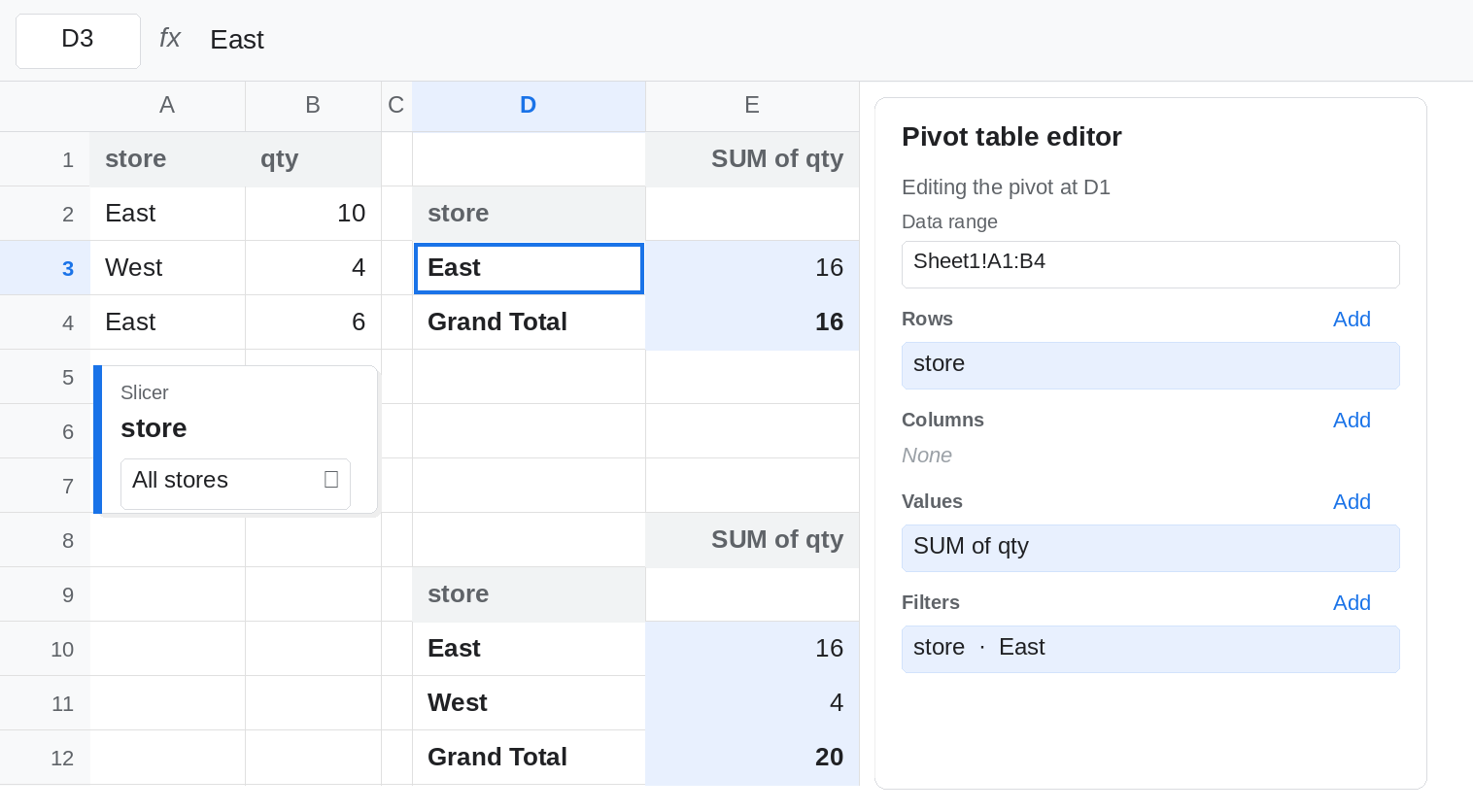
Every pivot on this block. Use one slicer whose data range is exactly the pivot range, A1:B4. Do not also leave an editor filter on one of those pivots unless you want the stack. If a chart or pivot must ignore the slicer, point that pivot at a different range. See slicer not on pivot.
The source total. =SUMIF(A2:A4,"East",B2:B4) is 16 whether or not either pivot is filtered. Use it when the contract is the sheet, not the pivot’s current view.
If only one pivot changed, you edited Filters in its editor, or the other pivot does not use the slicer’s range. If every pivot on that range changed, you used the slicer. If a pivot is blank while both controls are set, read them as a pair: one East and one West will not intersect.