

SUBSTITUTE replaces every match unless you pass the occurrence number
Updated
SUBSTITUTE(text, search_for, replace_with, [occurrence]) replaces literal text. Omit occurrence and every match is replaced. Pass a number and only that match is replaced, counting from the left, starting at 1. On N-12-E-7, replacing - with | with no fourth argument yields N|12|E|7. The same call with 2 yields N-12|E-7. The first and third hyphens stay. People read the 2 as “replace two of them” or “start at the second.” Sheets reads it as “the second one only.”
Instance 0, a negative, or text in that slot is #VALUE!. A number past the last match returns the original string. Those are SUBSTITUTE instance. This page is a legal occurrence that is easy to misread. REGEXREPLACE has no occurrence argument; a miss there returns the original text. See REGEXREPLACE miss. Keep the Google Sheets UI in English. Sheet Error is an independent formula-error library, not a Google product.
Recreate it on a blank sheet
Section titled “Recreate it on a blank sheet”- Open a blank spreadsheet. In A1 type
lot. In A2 typeN-12-E-7. Three hyphens. The pieces areN,12,E,7.
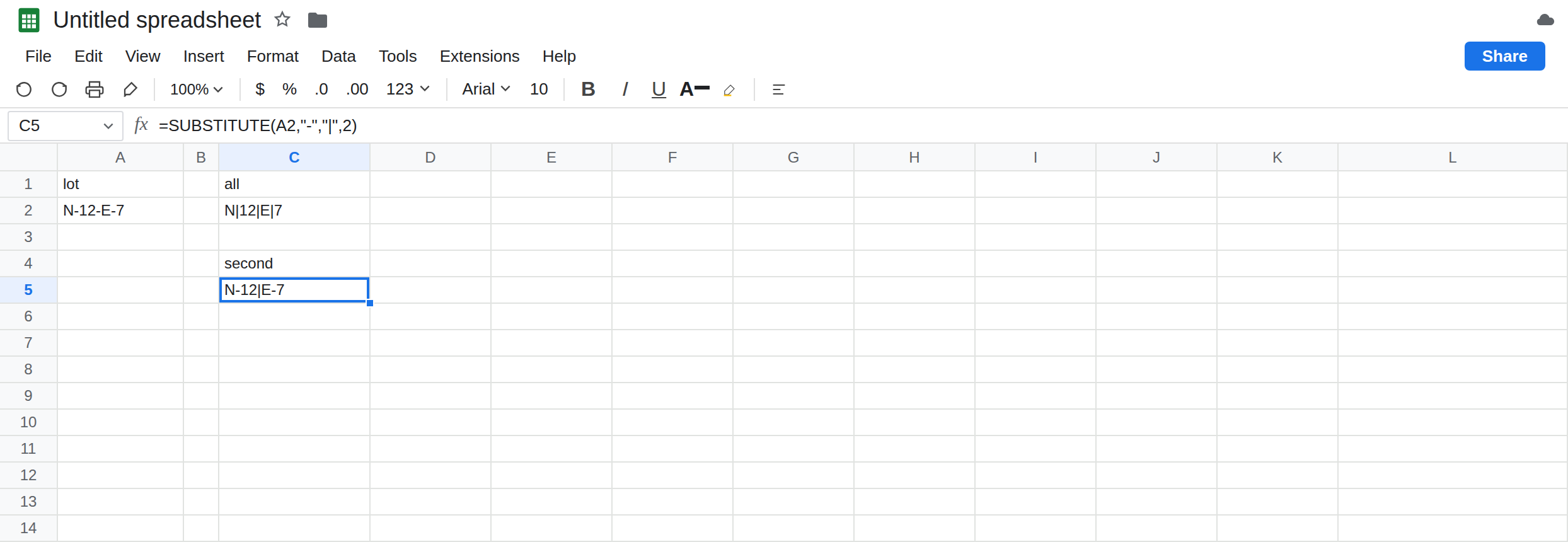
Every hyphen. In C1 type all. In C2 enter =SUBSTITUTE(A2,"-","|"). C2 is N|12|E|7. No fourth argument. That row is what most callers want, and it is the control when “all” is the spec.
Only the second. In C4 type second. In C5 enter =SUBSTITUTE(A2,"-","|",2). C5 is N-12|E-7. The hyphen after N is still a hyphen. The hyphen after E is still a hyphen. Only the hyphen between 12 and E became a pipe. There is no error triangle. If a downstream SPLIT expected three pipes, it now sees one. Leave C5 as that single pipe.
First and third, for the count. In C7 enter =SUBSTITUTE(A2,"-","|",1). C7 is N|12-E-7. In C8 enter =SUBSTITUTE(A2,"-","|",3). C8 is N-12-E|7. Occurrence 1 is the leftmost hyphen, not “the first of several you will replace.” Occurrence 3 is the last hyphen in this string only because there are three. It is not a keyword for “last.”
How many hyphens. In E1 type count. In E2 enter =LEN(A2)-LEN(SUBSTITUTE(A2,"-","")). E2 is 3. That is the occurrence number of the last hyphen. In E4 enter =SUBSTITUTE(A2,"-","|",E2). E4 matches C8: N-12-E|7. If someone inserts another hyphen into A2, E2 changes and E4 follows the new last hyphen. A hard-coded 3 does not.
Case is literal. In A10 type N-12-e-7. In C10 enter =SUBSTITUTE(A10,"E","X"). C10 is N-12-e-7, unchanged. E and e are different. SUBSTITUTE does not take (?i) and it does not take SEARCH. Leave C10 unchanged so a case miss is not confused with “occurrence 2 skipped it.”
Not “the first two.” In C12 enter =SUBSTITUTE(A2,"-","|",2). It is the same formula as C5. It does not produce N|12|E-7. There is no fifth argument for “how many.” Replacing the first two means two calls, or a different function. Leave C12 next to a note not first two if you want the misreading written on the sheet.
Leave C5 as N-12|E-7. Leave C2 as all pipes. Do not pass 0 here. That #VALUE! is the other page.
What is actually wrong
Section titled “What is actually wrong”- The fourth argument is a position in the list of matches, 1-based, from the left. It is not a count of replacements, not an offset, and not “from here to the end.” One call changes one match or, if you omit it, every match.
- Nothing in the function means “last.” Last is “whatever
LENminusLENof the string with the needle removed says, then that number as the occurrence.” If the needle is more than one character, that length trick still counts non-overlapping replacements the same waySUBSTITUTEcounts them. Check it on a two-character needle before you trust it on codes. - The search is case-sensitive and literal.
*is not a wildcard. A regex belongs inREGEXREPLACE, which replaces every match and has no occurrence slot. See REGEXREPLACE backslash if the replacement string is the problem, and REGEXREPLACE miss if a miss came back unchanged. - Occurrence
4on a string with three hyphens is not#VALUE!. The originalN-12-E-7comes back, which looks like the formula did nothing. That quiet return is SUBSTITUTE instance. Occurrence2on this page did something. It did less than the caller expected. REPLACEis a different function: it uses a start position and a length, not a search string.REPLACE(A2,2,1,"|")changes whatever character is in position 2. Do not switch to it to mean “the second hyphen” unless you have already found that hyphen’s position withFIND.
This is not FIND / SEARCH miss. Those return #VALUE! when the needle is absent. SUBSTITUTE of a missing needle returns the original text.
This is not a split. After C5, SPLIT(C5,"|") returns two pieces, N-12 and E-7, because only one pipe exists. See SPLIT column limit if that spill is #REF!. The occurrence choice already happened.
Leave C5 as the single-pipe result so the narrow replace stays visible.
Replace every hyphen. Keep C2, or enter =SUBSTITUTE(A2,"-","|") with the fourth argument deleted. Do not pass 1 hoping it means “all.” 1 is C7.
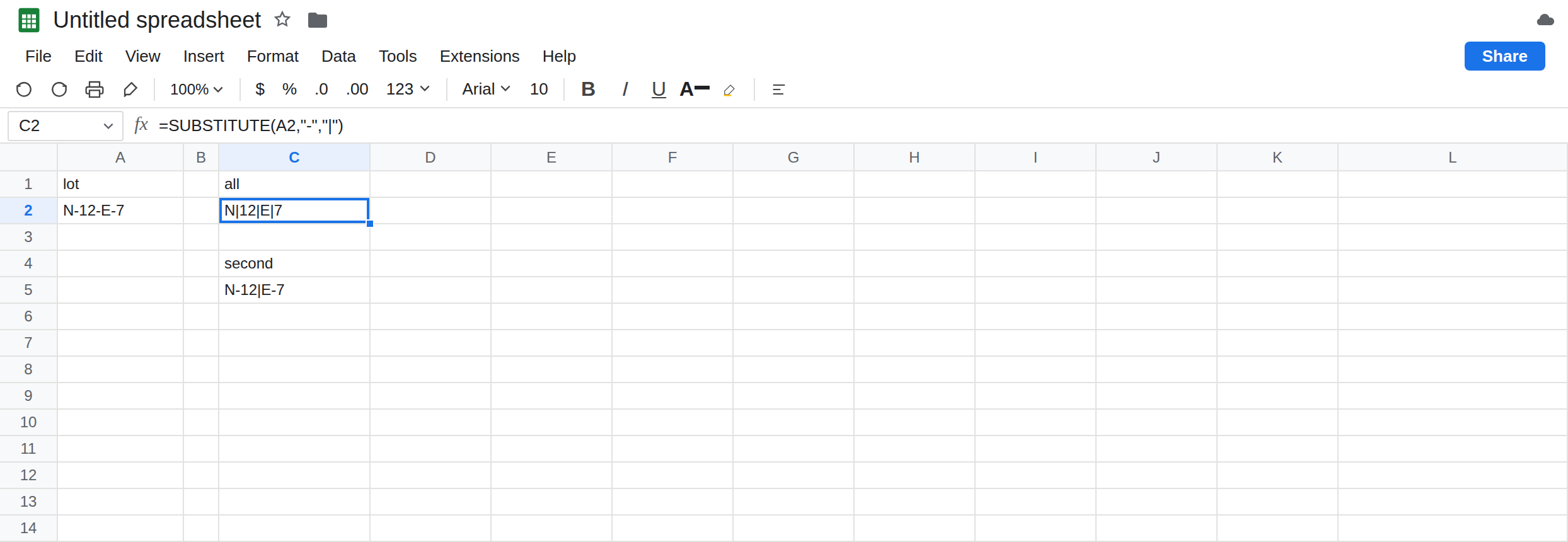
Replace only the second, on purpose. Keep C5 and label the column second hyphen only. Anyone reading N-12|E-7 can see the other hyphens survived.
Replace only the last. Keep E4: =SUBSTITUTE(A2,"-","|",LEN(A2)-LEN(SUBSTITUTE(A2,"-",""))). When A2 has no hyphen, the count is 0, and occurrence 0 is #VALUE!. Guard it: =IF(E2<1,A2,SUBSTITUTE(A2,"-","|",E2)). The guard belongs on a missing needle, not on a deliberate second hyphen.
Replace the first two and not the third. SUBSTITUTE will not take a list. One approach that stays literal: replace all, then put the last hyphen back, which is easy to get wrong. Clearer: REGEXREPLACE with a pattern that matches only the first two hyphens, and test it. If you only needed them all, you do not need that pattern. Use C2.
Do not wrap C5 in IFERROR. It is not an error. See IFERROR vs IFNA.
If every match changed, the fourth argument is missing. If only one match changed, the fourth argument is that occurrence, counted from the left. If nothing changed and the needle is visible, check case, or the occurrence is past the end. If the cell is #VALUE!, the occurrence is 0 or not a number; use the instance page.
All vs the second vs the last
Section titled “All vs the second vs the last”No fourth argument: N|12|E|7. Occurrence 2: N-12|E-7. Occurrence 1: N|12-E-7. Occurrence 3, or the LEN count of hyphens: N-12-E|7. The number is which match, not how many matches. REGEXREPLACE still changes every match. Instance 0 is #VALUE! on the other page.