

QUERY PIVOT and GROUP BY parse only in that clause order
Updated
QUERY accepts group by and pivot in the same statement. The clauses have an order: select, where, group by, pivot, then order by, limit, offset, label, format. pivot then group by never reaches the aggregation. The cell is #VALUE!, and the tooltip starts Unable to parse query string for Function QUERY parameter 2. A second parse failure is listing the pivot key in group by as well. The key that becomes column headers is not also a group column.
A selected column that is neither grouped, aggregated, nor the pivot key is QUERY PIVOT (ADD_COL_TO_GROUP_BY_OR_AGG). Too many distinct pivot values is QUERY PIVOT keys. Keep the Google Sheets UI in English. Sheet Error is an independent formula-error library, not a Google product.
Recreate it on a blank sheet
Section titled “Recreate it on a blank sheet”- Open a blank spreadsheet. Locale United States. In A1 type
store, B1sku, C1qty. A2East, B2101, C210. A3West, B3101, C34. A4East, B4102, C46. East-101 is10, West-101 is4, East-102 is6.
The clause order that parses. In E1 type legal. In E2 enter =QUERY(A1:C4,"select A, sum(C) group by A pivot B",1). The spill header is store, then 101, then 102. East shows 10 under 101 and 6 under 102. West shows 4 under 101. The empty West-102 intersection is blank. That block is the control. group by A names the row. pivot B names the new columns. sum(C) is the aggregate both of them require.
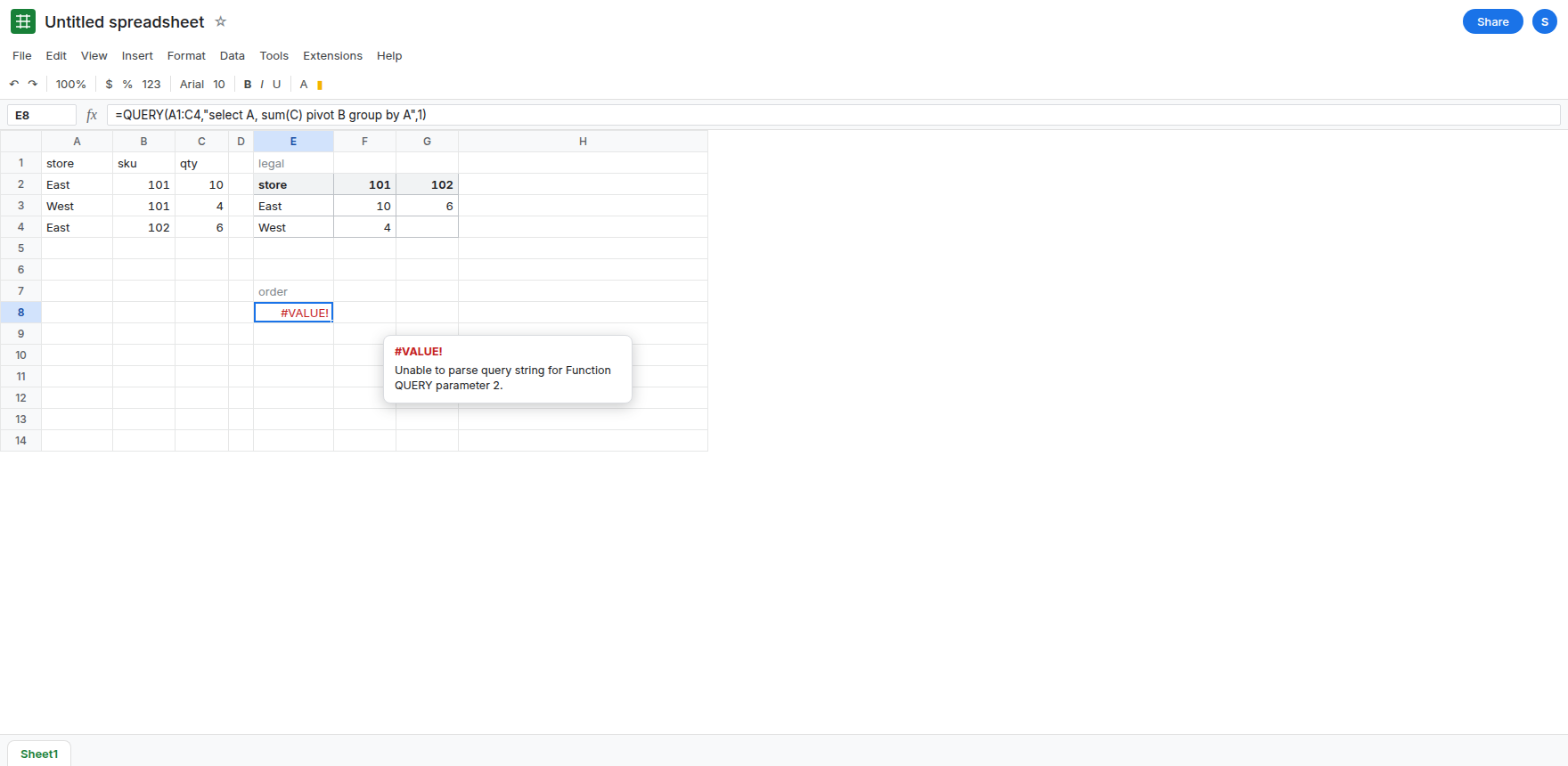
Pivot written before group by. In E7 type order. In E8 enter =QUERY(A1:C4,"select A, sum(C) pivot B group by A",1). E8 is #VALUE!. The tooltip starts Unable to parse query string for Function QUERY parameter 2. The words are the same words as E2. The order is not. After pivot the language expects order by, limit, label, or format, or the end of the string. group is none of those. Leave E8 broken.
The pivot key also grouped. In E11 type both. In E12 enter =QUERY(A1:C4,"select A, sum(C) group by A, B pivot B",1). E12 is #VALUE!. The tooltip is Unable to parse query string. B is the pivot key and a group column in the same statement. The language does not allow the pivot column in group by. Leave E12 broken. E2 groups A only.
A hanging column is the other page. In G1 enter =QUERY(A1:C4,"select A, B, sum(C) group by A pivot B",1). G1 is #VALUE!. This tooltip names ADD_COL_TO_GROUP_BY_OR_AGG, or says B must be aggregated or grouped. B is selected raw and also pivoted. That failure is QUERY PIVOT. Leave G1 broken so you can tell it from E8. E8 never got as far as the aggregation rule. The parser stopped on clause order.
Leave E8, E12, and G1 broken. Leave E2 as the store-by-sku spill.
What is actually wrong
Section titled “What is actually wrong”- Clause order is part of the syntax.
group byis earlier thanpivotin the statement. Swapping them is the same class of parse error asorder bybeforewhere. The totals in the grid do not matter until the string parses. E8 is that swap. pivot Balready collapsesBinto headers. PuttingBingroup byasks forBto be a row key and a column key. E12 is rejected. The row key is the column you did not pivot:A.select A, sum(C) pivot Bwithoutgroup bycan still be legal.pivotgroups the remaining selected columns. E2 writesgroup byanyway, which is allowed when it comes first and lists onlyA. The parse error is not “you used both words.”- G1 selects
Bas its own output column. That is ADD_COL_TO_GROUP_BY_OR_AGG on the pivot page, even with a legal clause order. Read the tooltip. Parse-position versus “add a column to group by” are different repairs.
This is not QUERY parse string from a missing quote. E8’s tokens are real clauses. They are in the wrong sequence.
Leave E8, E12, and G1 broken.
Group the row, then pivot the key. Keep E2: =QUERY(A1:C4,"select A, sum(C) group by A pivot B",1). East 10 and 6, West 4. On an array literal the same statement uses Col1, Col3, and Col2. See Col1 vs A.
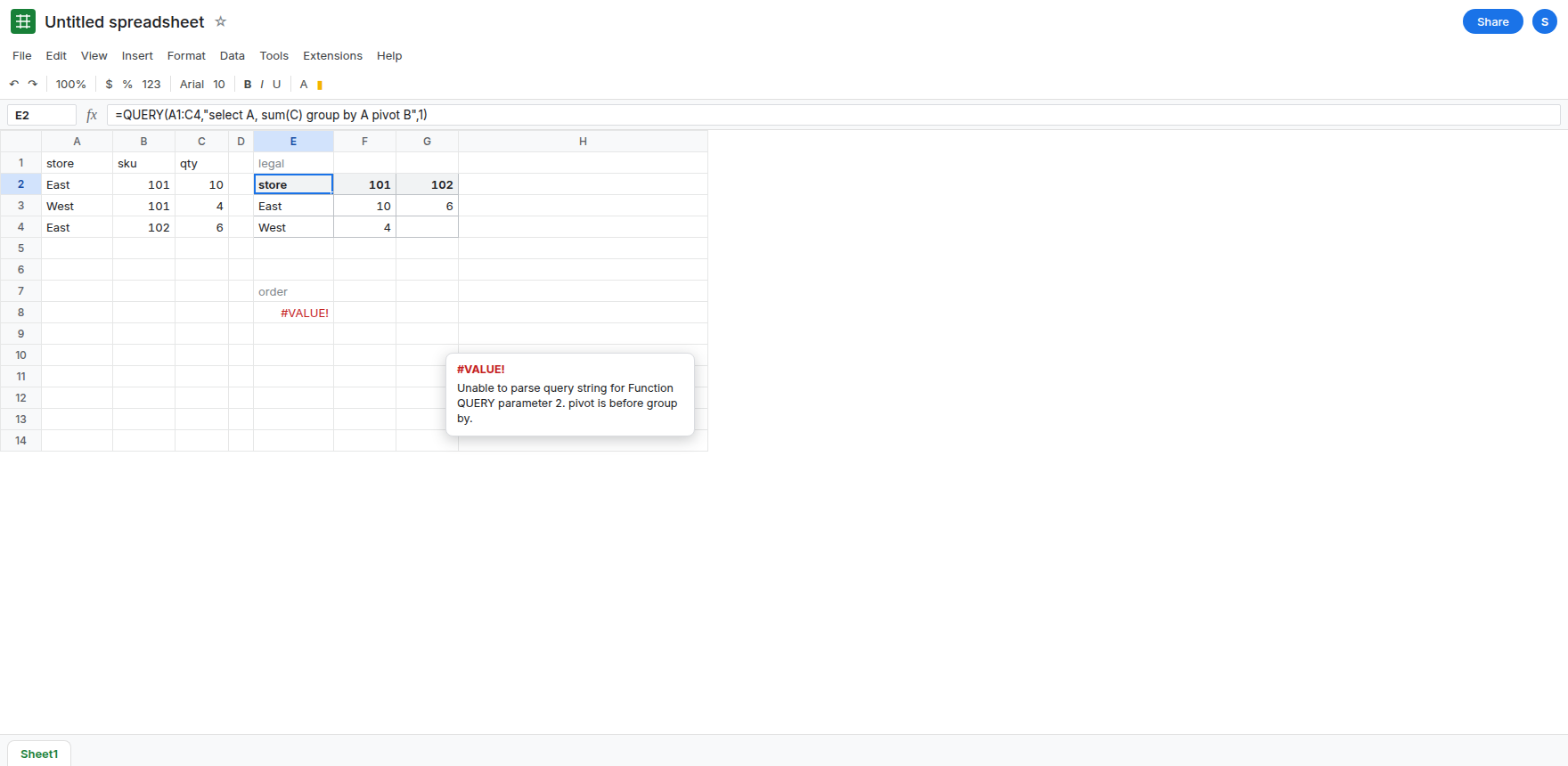
Order by stays after pivot. select A, sum(C) group by A pivot B order by A still parses. order by before group by does not. Alias rules for order by are QUERY ORDER BY alias.
Do not wrap E8 in IFERROR. The clause order would stay wrong and the report would go blank. See IFERROR vs IFNA.
If the tooltip is Unable to parse and group by sits after pivot, move group by forward. If the pivot key is also in group by, delete it from group by. If the tooltip names ADD_COL_TO_GROUP_BY_OR_AGG, you selected a raw column. That is the pivot page.