

WRAPROWS pads the last row with #N/A, and SUM of that spill is #N/A
Updated
WRAPROWS writes a column across rows of width wrap_count. Five numbers and a width of 3 fill one full row and two cells of the next row. The sixth cell of that rectangle has no source value. The default fill is #N/A. SUM of a range that contains #N/A is #N/A. The five numbers are fine. The pad is what the total cannot survive.
wrap_count of 0, and a spill blocked by a neighbor, are WRAPROWS / WRAPCOLS. This page is the pad, and what SUM does with it. Keep the Google Sheets UI in English. Sheet Error is an independent formula-error library, not a Google product.
Recreate it on a blank sheet
Section titled “Recreate it on a blank sheet”- Open a blank spreadsheet. In A1 type
n. A210. A320. A430. A540. A650. Five numbers. Their total is150.
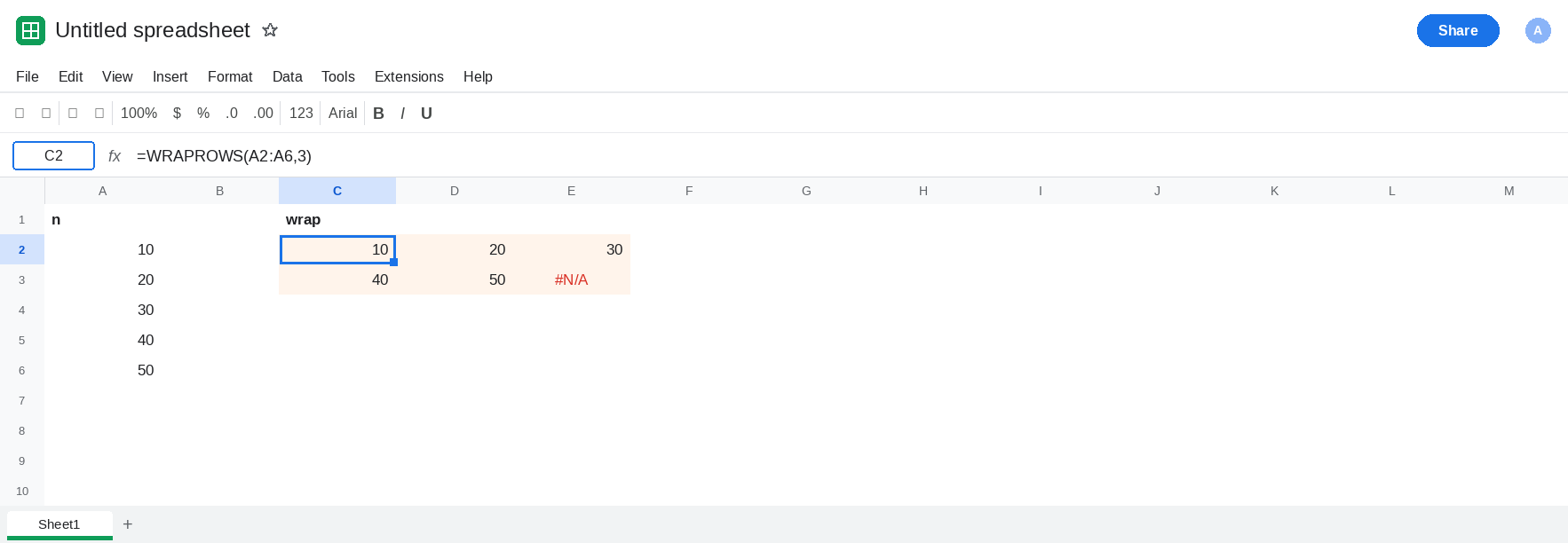
Width 3, default pad. Leave C2:E3 empty. In C1 type wrap. In C2 enter =WRAPROWS(A2:A6,3). The spill is two rows. C2:E2 is 10, 20, 30. C3 is 40. D3 is 50. E3 is #N/A. No error triangle on C2. The function finished. The empty seat is #N/A because you did not pass pad_with. Leave C2 as that spill, with E3 showing #N/A.
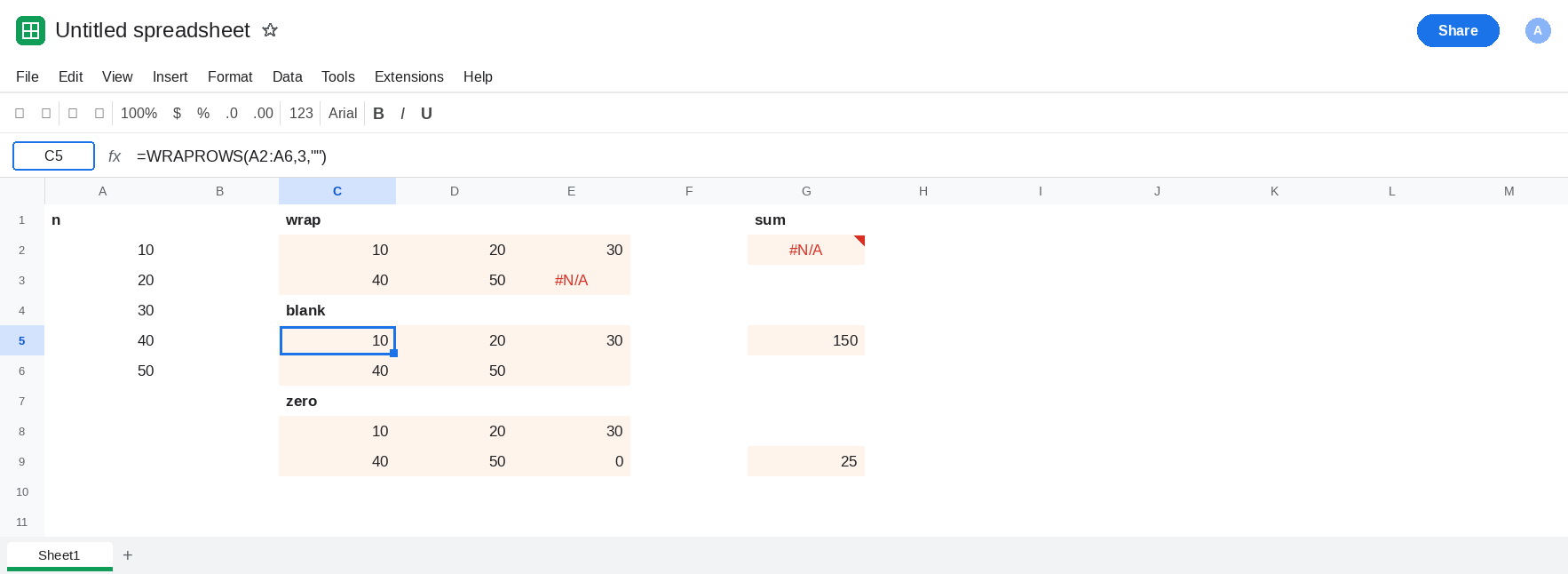
SUM and AVERAGE see the pad. In G1 type sum. In G2 enter =SUM(C2:E3). G2 is #N/A. In G3 enter =AVERAGE(C2:E3). G3 is #N/A. Five ordinary numbers, and both aggregates fail. Leave G2 and G3 broken.
A blank pad. In C5 enter =WRAPROWS(A2:A6,3,""). The shape matches C2. The corner is empty, not #N/A. In G5 enter =SUM(C5:E6). G5 is 150. SUM ignores text, and an empty string is text. In G6 enter =AVERAGE(C5:E6). G6 is 30. The blank is not one of the values being averaged. 150 / 5 is 30. Leave G5 as 150.
A zero pad changes the average. In C8 enter =WRAPROWS(A2:A6,3,0). The corner is 0. In G8 enter =SUM(C8:E9). G8 is 150. Adding zero does not move the total. In G9 enter =AVERAGE(C8:E9). G9 is 25. The zero is a sixth number. 150 / 6 is 25. That average is wrong for these five inputs. Leave G9 as 25 so the pad is visible in the result.
Leave E3 as #N/A. Leave G2 as #N/A. Leave G5 as 150. Leave G9 as 25.
What is actually wrong
Section titled “What is actually wrong”- The result of
WRAPROWSis a rectangle. Width times the number of rows has to cover every input. Five inputs and width 3 need six seats. The extra seat ispad_with. Omit it and the seat is#N/A. E3. SUMandAVERAGEdo not skip#N/A. One pad fails the whole aggregate. G2 and G3. The source column A2:A6 still sums to150if you total A instead of the wrap.pad_withof""prints a blank and stays out ofSUMandAVERAGE. G5 and G6. Use that when the corner is not a measurement.pad_withof0is a real number.SUMhappens to match.AVERAGE,MIN, and a chart treat the zero as data. G9 is the damaged average. A line chart of E3 gaps or breaks on#N/A; a chart of the zero pad plots a zero. See chart error gaps.WRAPCOLSpads the unused cell at the bottom of the last column the same way. The count-zero error is WRAPROWS / WRAPCOLS. C2’s width is 3, which is legal.
This is not a short HSTACK inventing #N/A because two lists differ in height. See HSTACK #N/A fill. E3 is a pad inside one wrap.
Leave C2 and G2 as the default #N/A path.
Pad with a blank when the corner should not count. Keep C5 and G5. In C11 enter =SUM(WRAPROWS(A2:A6,3,"")). The cell shows 150 without a helper block. Pass "" in the formula you actually total.
Pad with 0 only when a zero belongs in the rectangle. Keep C8 if a later matrix step needs a numeric grid. Do not average C8:E9 and call it the mean of A2:A6. Average A2:A6, which is 30, or average the blank-padded spill.
Make the width divide the list when you want no pad at all. =WRAPROWS(A2:A6,5) is one row, 10 through 50, and there is no extra seat. Use that when the width is “how many numbers do I have,” not “how wide is the report.”
Do not wrap G2 in IFERROR. You will hide the pad and a real #N/A in A2:A6 the same way. See IFERROR vs IFNA. IFNA on the spill turns the corner blank after the fact. pad_with never creates the #N/A.
If SUM of a wrap is #N/A and the last cell of the rectangle is #N/A, the width did not divide the list and pad_with was omitted. Pass "" when that seat should be empty. If the average dropped after you padded with 0, the zero is inside the average. If the tooltip says the wrap count must be greater than 0, you are on the wrap-count page.